Check out the conversation on Apple, Spotify and YouTube.
Will AI Replace Developers? (0:00)
Aakash: Nadav Abrami is one of the co-founders of Wix, the $5.5 billion online website building giant whose stock has 5xed since its IPO in 2013. Everyone thinks AI will replace developers, but you have a different perspective. What’s your take?
Nadav: I think AI is a tool, and it’s a tool that lets you do a lot of things, but you can create in it only so much more than you can understand. It’s not an “anybody can build anything” tool. It is an amazing tool for PMs that build prototypes all the time. It’s an amazing tool if you want to build a small app that you can use for something that’s not your main business or just an enabling tool as part of your business.
Aakash: So you can’t really build a production app with AI today?
Nadav: It really depends on who you are. If you can build a production app without AI, then definitely you can build a production app with AI. If you can’t build a production app without AI, it’s going to be really hard to use AI correctly to build the production app — it’s a gap of knowledge, a lot of it. It’s not a gap that’s going to stay there.
When Should PMs Use AI Prototyping Tools? (3:03)
Aakash: When should people be using AI prototyping tools?
Nadav: All the time. They’re amazing. They’re magical. I’ve heard of so many use cases that you would not imagine — from closet companies building an editor to design their closets so they don’t do it on paper anymore, to kids building a small platform where they need to escape the farts of sheep. It’s really endless. And those are just the cases where you say I want something small and I can do it myself. They couldn’t before and nobody would build it before.
But I think the people who are going to use it daily are PMs, because they keep getting to the point where they want to create something and experiment with it more than anybody else. And they really know how to talk to developers and explain what they want. What they got now is a virtual developer.
Aakash: Why should they be using an AI prototyping tool versus Figma or Cursor’s new visual editor?
Nadav: You get something else from Figma and from vibe coding tools. You get an experience that is more functional, that you can play around with, that you can put users in front of, and they can actually get the real experience. Functional prototypes aren’t something totally new — we built them a lot in weeks for big features that we really wanted to test with users. But it was a huge investment. Now with AI, it’s not a huge investment. It’s the cheapest option time-wise. It’s the fastest way to get to something you can play with.
If it used to be very rare, reserved for really complex features — now there’s no feature that goes through the ideation stage without at least a few functional prototypes.
The Problem Space vs. Solution Space (6:07)
Aakash: One criticism I’ve heard from people as famous as Itamar Gilad is that when we jump into prototyping for ideation, we’re going too fast into the solution space. We’re not spending enough time on the problem space. How should PMs think about that?
Nadav: That’s a really interesting question. I totally agree. Research is super important in a PM’s job — both research on the web and using AI tools for research, to understand how a feature looks, what user stories you have. There’s a lot to do before you even get to prototyping, and I would never give up that step. The visual aspect of the feature you’re building is usually not the big thing. By the time you got to it, you already know what the feature is that you want exactly — and that’s really the big decision.
So you really need to understand what problem you’re solving, what user story, and the rough shape of the feature. These three elements — if you truly want to master AI prototyping, you can’t just jump into the solution space. Air prototyping has its place. Don’t overuse a tool. Whenever a new tool comes out, we just want to use a hammer on everything.
Live Demo: Building From Scratch in Dazzle (8:02)
Aakash: Can you show us how to build something from scratch in Dazzle?
Nadav: Sure. Let’s go through the flow that PMs really go through. We chose to add a feature to LinkedIn and we’re going to simulate being a product manager working in LinkedIn. Even before we start, the first thing I want is to build on something — I want to start from something that looks like our product.
I’m going to drop in a screenshot of LinkedIn and tell it a small prompt to recreate the page. While it’s working, it’s important to understand what it does. Dazzle spins up a real server for you. As a PM, I always think it’s important to understand some of the technical decisions behind your product. In this case, it means it’s very open — you have a server it can talk to, you can bring data from wherever you want, and do pretty much anything you can imagine on the web.
I always start with this — start by copying the product I want to add a feature to, at least the visual aspects of it. So I’m not starting from a blank page and I can see where I want to fit the new feature inside. Also, I can save that. I can reuse it. I can build a lot of features from that — it’s going to save me a lot of time in the flow later.
Aakash: So as a product leader, if you’re introducing Dazzle or an AI prototyping tool to your team, you might want to do this first step — bring in the design system, make it look like their existing product — so the team can just pick it up and start using it.
Nadav: Totally. You want to save it as a template and reuse it across your organisation. You want to then start building all features on this, and probably keep maintaining that project as your product evolves. Keep it tight and very close visually — not just visually, even almost functionally to your product, so you can open the same screen, see the same experiences, and everybody can copy that and mutate from that.
Adding a Feature: Sentiment Analysis (17:49)
Nadav: Let’s build a feature. I was thinking about adding sentiment analysis — basically something that says about the comments of each post whether the sentiments are positive, negative, and so on.
What happened for PMs is that they were just given a huge “get out of jail free” card. Before, they were blocked whenever they wanted to do something small. Now it’s just magic.
Aakash: I’m actually coaching somebody who got hired before they hired the engineering team. For the first couple of weeks it was like, what is she going to do? The first thing we did was get access to an AI prototyping tool so she could come up with good specs and validate them before the engineers came on board. When the first Google engineer started on day one, she had four or five AI prototypes, and he was able to ship something in the first week.
Nadav: And the fact that you have a server, you have an entire application — it is something you could start a production app with if you’re technical enough. But I do feel the main use case is playing around and prototyping, and this technology is super exciting for that.
Prompting Principles for PMs (22:37)
Aakash: What’s the takeaway for PMs around prompting? You don’t need system-prompt-level prompt engineering, right?
Nadav: That’s totally right. Developers would tell you when something you’re saying is not correct. AI will just take your choice, correct or not. So if you’re not super technical, it’s really better to explain very coherently what you want. It’s really important because anything that can be misinterpreted will statistically be misinterpreted.
It’s like talking to a genie — 95% of the time it will do what you want. But if 5% of the time the genie finds everything you said that is flawed and does the exact opposite of what you wanted, those cases can be so time-consuming. So before you do anything real, take the prompt to an LLM and ask it: what are the contradictions, what’s unclear? Clarity is the key, not going technical.
Aakash: Any common mistakes around prompting?
Nadav: Three main ones. First — write in a prompt, and then it’s going to run so fast and be so eager to do exactly what it understood wrong from what you said. That’s why it’s really important to go to plan mode, go to discuss mode. Tell the AI: “I’m going to do this, what do you think? How do you understand me?” Like you would with a developer sometimes. When the answer you get back makes real sense, only then proceed. Make your questions such that it’s not clear what it needs to answer to please you.
Second — people take the time to do research and then create huge prompts and pass them to the AI as one step. A lot of times what we do is not going to be as good as what you do when you build your prompt in stages beforehand. AI has context switches just like people — it’s more problematic with AI because when we have a context switch, we usually stop and think. AI doesn’t; it just works with the wrong data.
Third — any ambiguity will be exploited statistically. So before sending, ask an LLM to find the contradictions in your prompt and make it more clear.
Exploring Divergent Solutions (20:02)
Aakash: The most powerful thing about these AI prototyping tools is that you can create very quickly divergent solutions. We have one implementation here. Can we branch this or try out a second implementation that looks visually different?
Nadav: We can ask the AI to add a toggle at the top and have two behaviours. What do you want the second behaviour of the sentiment to be?
Aakash: Right now we have sentiment attached to the page posts. What if we had sentiment as its own separate bucket below the page posts — showing a quick summary of your last few posts, and you could click in to get more details?
Nadav: I totally agree. You want to first play around, make a few variations. Then the one you really like — that one you want to get perfect. But it’s never the first step.
Aakash: What I want to emphasise and triple click on for people is: don’t stop at two. We did two for you today, but you should think about doing a couple more. You can iterate within each one — add negative data, adjust layout. But then come up with a third or a fourth. The magic is how quickly this tool allows you to generate them, so you can understand after playing with them which one is truly the best.
Nadav: You want to first play around, make a few variations. Then the one you really like, that one you want to get perfect. But it’s never the first step.
Visual Editing and the Dev Tools (28:00)
Aakash: Now let’s talk about the next level. How are we going to go ahead and edit this further — with natural language, with code, with component level changes?
Nadav: Dazzle offers a number of ways. First, once an element is selected, you can see it represented in the chat and the agent is aware of the selected element. The connection is really strong — it knows the exact place in the code, it knows the properties.
One thing important to understand: an element in the HTML might be both the sentimental analysis component and also a card, and that card is a div. Editing this div means editing all the cards. Editing this card means editing this card instance. Editing the sentiment analysis means editing only this instance in your application. So this is one thing that’s very different.
Second, you can see the data that is bound to any component — the state of the application is exposed to the AI as well. This makes the AI so much smarter. There are so many things that are super hard to understand just by looking at the code; if you look at the application with debugging tools, it becomes super easy.
Third, you can go directly to the code whenever you want. If I want to look at a div, I can inspect it, but I can also view its code, and it will take me immediately to the code of that element. Any change I make there is immediately saved to the code.
Aakash: When should PMs be editing in code versus editing via prompting versus editing visually?
Nadav: I don’t think PMs should ever be editing in code. When PMs get to the point where they have to edit in code, something did not work as expected. I do a lot of visual edits — it’s a clearer way of editing the code, saves time, I can see it immediately on stage. The most important thing you get from all the visual tools is immediacy. I can make a change and know that it’s done, it’s not going to change — no other code writing is going to go on. That lets me play faster.
The AI gives us an amazing run for the initial generation, for the big things — it does it so much faster than I could in any other way. But for changing stuff later, it’s not the fastest option. Look at how designers work in Figma — they’re lightning fast with keyboard shortcuts, doing things so much faster than the 10-20 seconds it takes to prompt the AI and wait.
Building Multi-Page Applications (49:19)
Aakash: Let’s say we’re going to take this to the next level. Multi-page application — because most of your prototypes are not just going to exist on one page. One of the peak powers of prototyping is that we used to write a PRD, then designers and developers would go build it and learn all these edge cases. One edge case we can already see: what if you have less than three or four posts? And a flow that comes up: what happens if somebody clicks on post one or two?
Nadav: Let’s add it. When a score card is clicked, go to a new dynamic page showing that post and an explanation of all the sentiment that was collected for it, and a way of seeing the comments according to sentiment.
Aakash: When should PMs be building a high fidelity prototype?
Nadav: It’s really a matter of what you’re trying to achieve. A lot of cases, a feature doesn’t have the buy-in of the organisation yet. High fidelity is a tool for selling. It works so much better with high fidelity. If I added something ugly here, it’ll be really hard to look at the functionality and not think about the visual.
High fidelity is a tool for selling the idea — also for solo entrepreneurs getting investment — but also for PMs in larger organisations where it can be harder to convince people that a feature is necessary and important. The second reason is that after you finish ideation and want to put it in front of users, usability testing works a lot less with low fidelity. You have to have the entirety of the product in low fidelity — if something is low fidelity in the middle of something that’s high fidelity, that is even worse.
So in practice: a lot of low fidelity ideation prototypes first — usually just the team plays with them. Then when you choose one, it goes to high fidelity, in vibe coding tools, to get it in front of users as fast as possible. Getting it in front of someone who specifically asked for the feature is a godsend — they can play around with it and say, yeah, that’s what I meant. It both keeps the user super motivated and gives you the strongest validation of the feature that you can get.
Handing Off to Developers (58:21)
Aakash: How do you hand this off to engineers after prototyping?
Nadav: There are a number of things, but the main thing is that it’s just standard code. And most of the time what a developer really wants is clarity of how you want it to behave — just sending the prototype over does 90% of the work.
For something more specific or complex, a developer can save a lot of time by downloading the project, putting it next to the project they’re currently building, and telling Cursor to copy the experience from there. A lot of the end product is basically a code-to-agent workflow now.
One thing that’s really important in my workflow: store data, information, and specs of different parts of the system inside the project itself. In discuss mode, you discuss an entire spec or aspect of the system with the AI, and then just say: write that to file. That’s an asset that’s really important for the developer’s AI to get with the rest of the files. But it’s also really important for your own iteration work with AI — you have points of data you can refer to, and you can manage some of the context as things get bigger.
The Role of the PRD in the AI Prototyping Era (1:02:53)
Aakash: One of the hot topic questions everybody is asking me is: when do I use an AI prototype versus a PRD? What is the role of the PRD now?
Nadav: PRDs are really important, but also really notorious. They have a number of problems. First, it’s a lot of text that people sometimes skim and miss parts of. Second, everybody knows it takes a thousand words to describe one picture — and an application, if you put it down to pictures, is like a thousand pictures. So there’s so much text you’re not going to cover it all.
The prototype and the PRD aren’t coming to replace each other. For most people, they’re going to play around with the prototype and understand most of the things from the prototype. In a way, the PRD becomes something that is more useful for the AI — the AI is going to read it and not skim it. It creates a kind of mirroring between the PRD and the prototype.
PRDs come second now. They’re for the edge cases, for the things the prototype didn’t cover. The prototype will cover a lot of main things, but some edge cases won’t be represented. As a checklist for yourself: if you have anything you feel you need to say after somebody already read the PRD and played around with the prototype, then something is missing.
Aakash: I really like this distinction. Cover your 90% flows in your prototype, and then have all your edge cases in your PRD — so PRD plus prototype leads to no questions.
Nadav: Exactly. Text is cheaper to iterate on — you don’t need to debug text, you just need to read it. Cover the main 90% flows with the prototype, and make sure all edge cases are in the PRD.
How Should PMs Prepare for the Next 3-5 Years? (1:10:27)
Aakash: Is there a point where AI starts to replace developers or replace product managers? What’s your forecast for the next 3-5 years?
Nadav: In 3-5 years, I don’t know if AI is going to replace developers. It’s going to replace some very simple development tasks. What it does is blur the lines between developers and just tech-savvy people. Writing code is not a limiting factor anymore. I think what PMs really need to do is level up the skill of understanding what they’re building.
I know it sounds uncomfortable because PMs don’t want to be developers, and they’re right — it’s something different. But I think sometimes now, with these superpowers, you can just become unblocked. I see our product managers at Dazzle pushing code into the main project — not huge things, but things like changing a publish dialogue, changing the media gallery, adding a link to some back office we have. This is done by PMs and designers, not developers, many of the times.
When writing code is not a problem, the developers become the gatekeepers — they’re in charge of making sure the code still makes sense in the end. But they’re not going to be the only contributors of code.
One thing you can do to start getting ready: sit down with whatever AI tool has access to your actual project and start asking it questions. Ask it for an architecture diagram, ask it whatever you want to understand a bit more about the architecture. It’s a muscle you can practise. And if you do it on your own project, you’re going to have a common language with the developers on your team that you never had before.
Key Takeaways (1:06:38)
Aakash: All right, so to review everything we covered today.
We talked about when a PM should use AI prototyping versus other methods — ideation, to feel production-ready, to sell an idea, to reduce usability risk.
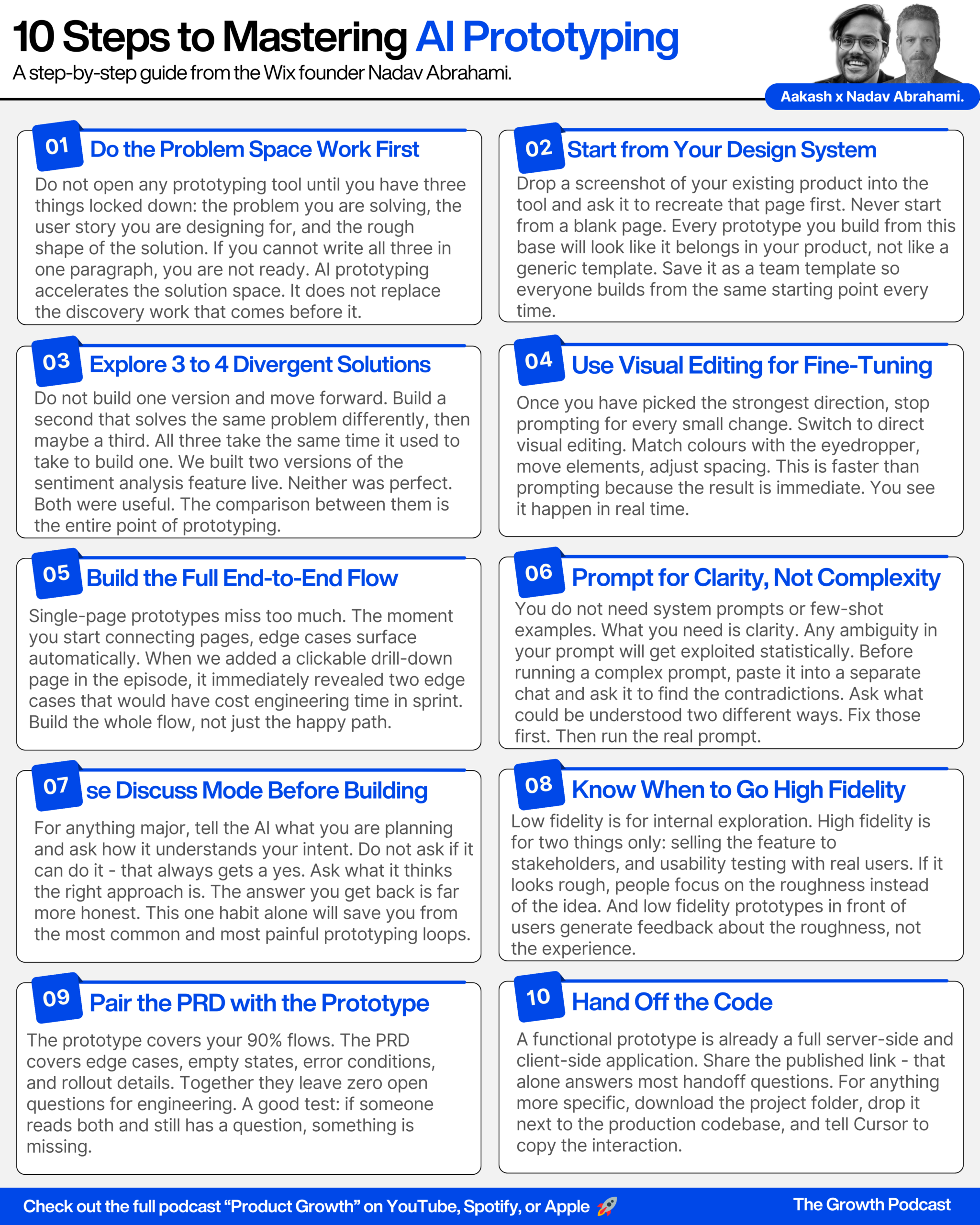
We walked through the ideal workflow: explore the problem space, define the feature, match it to your design system, explore 3-4 divergent solutions, visually edit the best solution, test it with real people (ideally your own users), then share the prototype with the developer team.
Step 1: Match your design system. Start by importing a screenshot of your existing product. Save this as a template your whole team can reuse. Use the eyedropper for colour matching and visual editing tools to get fidelity right. Optionally, bring in a designer to polish the template.
Step 2: Explore 3-4 divergent solutions. Don’t stop at one or two. Give the AI a simple, clear prompt — no technical specs needed. Use discuss/plan mode for major changes before letting the AI run. Make sure your prompt is unambiguous; ask an LLM to check it for contradictions first.
Step 3: Visually edit the best solution. Use the visual editor bar for quick tweaks. Use the elements tree to navigate complex component hierarchies. Understand the difference between editing a component vs. an instance. PMs should almost never edit code directly — use visual editing or prompting.
Step 4: Build it out with multi-page flows. Identify edge cases and end-to-end flows as you build. Use this step to discover questions developers would have hit during build. Move to high fidelity when you need to sell the feature or run usability testing.
Step 5: Test with real users. Your own engaged users give far better feedback than random testers. Jump on a video call and have them play with the published prototype. This both validates the feature and keeps users motivated.
Step 6: Hand off to developers. Share the published link — it covers 90% of what they need. Download and share the project folder for more complex handoffs. Store specs and context as files inside the project so the developer’s AI can read them. Cover the 90% flows in the prototype; put all edge cases in the PRD.
As Nadav said best: have fun with it. Don’t be afraid to do a lot of variations. And remember — this is a tool that’s given PMs a huge get-out-of-jail-free card. Use it.