Product management in 2025 looks nothing like it did two years ago. The best AI tools for product managers have transformed how we work, from writing PRDs to synthesizing customer feedback to shipping code ourselves.
I’ve tested dozens of AI tools for product managers over the past year. Some changed how I work. Most were hype. This guide covers the 9 that actually matter, how to use them effectively, and the workflow changes that unlock their full potential.
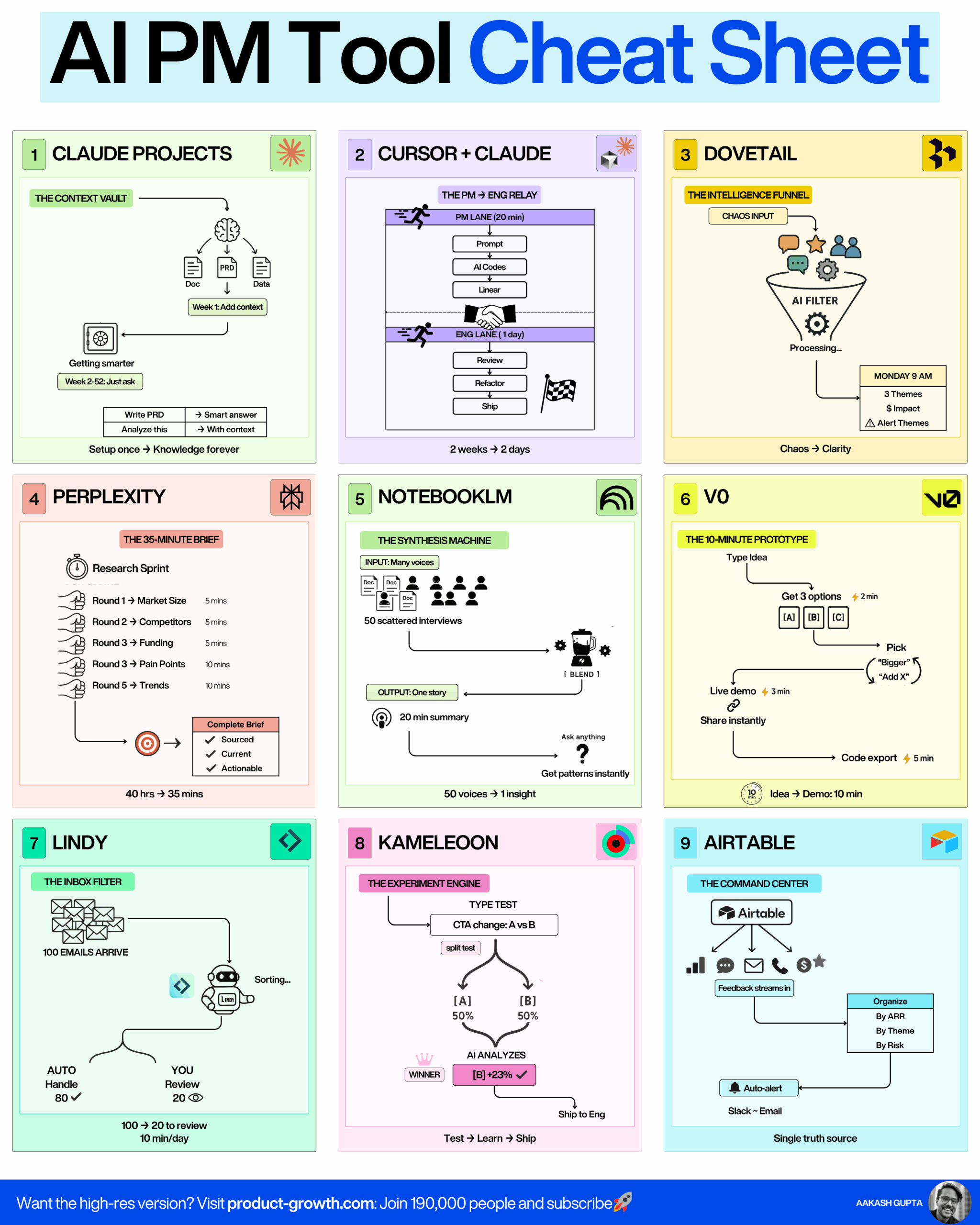
1. Claude Projects: Your High-Context LLM
The problem with most AI assistants is that they forget everything between conversations. You explain your product strategy in one chat, then have to re-explain it the next day. It’s exhausting.
Claude Projects solves this by creating what I call “The Context Vault,” a persistent knowledge base that Claude references across all conversations. You upload your strategy docs, PRDs, experiment results, and performance feedback once. Then every conversation happens with full context.
How to set it up:
- Create a new Claude Project and name it after your product
- Upload all strategy documents, PRDs, and spec docs in Week 1
- Add data files like CSVs, experiment results, and analytics reports
- Include performance feedback and past reviews
- Start asking questions with full context, the system gets smarter with every addition
I wrote a complete guide on how to use Claude for work that covers the setup process in detail. The more you add, the smarter it gets. Setup once, knowledge forever.
The alternatives here are ChatGPT Projects and Gemini Gems, but Claude’s context window and instruction-following make it my default for product work.
2. Cursor + Claude: AI Tools for Product Managers Who Code
This one changed how I think about the PM role entirely. Cursor is an AI-powered code editor that lets product managers make simple front-end changes directly in the codebase. Combined with Linear for task management, you can ship features without consuming engineering sprints.
The workflow is beautifully simple: PM writes the spec in 20 minutes, AI codes it instantly, engineering and design review in a day, then ship. What used to take two weeks (sprint planning, development, review, deployment) now takes two days.
The PM coding workflow:
- Write a clear spec describing the change you want (20 minutes)
- Open Cursor and describe the change to the AI assistant
- Review the AI-generated code and iterate with follow-up prompts
- Push your changes to a branch and create a pull request
- Have engineering and design review before merge
- Ship to production
I’m not suggesting PMs become engineers. But being able to change copy, adjust button colors, build new landing pages, or add form fields yourself? That’s a superpower. This video tutorial walks through the exact workflow.
The key is starting small, copy changes and button tweaks, then graduating to new pages and simple features. Other AI tools for product managers in this category include Claude Code, GitHub Copilot, and Devin.
3. Dovetail: AI Customer Intelligence That Actually Works
Customer feedback is everywhere and nowhere. You’ve got sales calls in Gong, user interviews scattered across Google Drive, support tickets in Intercom, app reviews on mobile stores, and social mentions across Twitter and Reddit. Good luck synthesizing that into actionable insights.
Dovetail uses AI to become what I call “The Intelligence Funnel.” You drop in all that chaos, 50 scattered interviews, sales calls, support tickets, app reviews, social mentions, and it processes everything through AI to give you clarity: 3 major themes, 8 high-impact opportunities, alert themes that need immediate attention. All weighted by ARR.
How to implement AI customer intelligence:
- Connect all your data sources (Zoom, Gong, Intercom, App Store, social media)
- Let the AI auto-transcribe and analyze all inputs
- Review the synthesized themes every Monday morning
- Identify the top 3 themes and 8 opportunities by revenue impact
- Prioritize your roadmap based on ARR-weighted customer feedback
- Set up alerts for urgent pain points that need immediate response
My AI customer intelligence guide breaks down the full implementation, but the magic is in the synthesis. Instead of manually reading through dozens of transcripts trying to find patterns, you get Monday morning summaries of what actually matters. Chaos becomes clarity.
Alternatives in this space include Enterpret and Unwrap, though Dovetail’s depth of analysis and integration ecosystem make it hard to beat. This is one of those AI tools for product managers that pays for itself in the first week.
4. Perplexity: The 35-Minute Research Sprint
Market sizing used to take days. Competitive analysis meant hours of clicking through websites and reading reports. Strategic research was a multi-week project. Perplexity turned all of that into a 35-minute sprint.
The tool is an AI research assistant that conducts comprehensive market research faster than you can schedule a meeting. I call it “The 35-Minute Brief” because that’s legitimately how long it takes to go from zero to a complete strategic brief with sourced, current, actionable insights.
The research sprint workflow:
- Round 1: Market Size, ask Perplexity to calculate TAM/SAM/SOM (5 minutes)
- Round 2: Competitors, request a feature and pricing comparison (5 minutes)
- Round 3: Funding, search for recent announcements and valuations (5 minutes)
- Round 4: Pain Points, analyze customer complaints and review themes (10 minutes)
- Round 5: Trends, identify emerging patterns and technology shifts (10 minutes)
- Compile the complete brief with all sources and citations
Traditional research takes 40 hours. With Perplexity, 35 minutes. The output includes sourced information, current data, and actionable insights. Check out my AI PM’s Playbook for more research techniques.
The key is starting broad (market overview) then narrowing into specifics. Always verify sources and cross-reference important decisions with multiple queries. Alternatives include Claude with web search, ChatGPT Research Mode, and Manus, but Perplexity’s speed and source quality are unmatched among AI tools for product managers.
5. NotebookLM: The Synthesis Machine
If you have a low tolerance for hallucination, NotebookLM is your solution. It’s Google’s AI tool that operates only on the documents you provide, no hallucinations, no outside knowledge, just pure synthesis of your inputs.
The magic is in what I call “The Solo-Context LLM.” You upload 50 scattered customer interviews, research notes, and meeting transcripts. NotebookLM synthesizes everything into key insights with source citations. It can even generate a 20-minute AI podcast summarizing all the findings. 50 voices become 1 insight.
The synthesis process:
- Upload all your source documents (up to 50 files)
- Ask NotebookLM questions that span across all sources
- Review AI-generated insights with direct citations
- Generate an audio overview (AI podcast) for executive summaries
- Export key findings with source links for your PRD or presentation
- Add new sources over time to expand the knowledge base
What makes NotebookLM different:
- Zero hallucinations because it only uses your uploaded sources
- Massive context window that handles 50+ documents simultaneously
- Every output cites specific source material for verification
- Audio overview feature turns dense research into digestible podcasts
This video guide shows the full workflow. It’s perfect for synthesizing customer research, comparing multiple PRDs, analyzing experiment results across quarters, or processing competitive intelligence. Obsidian with AI plugins is an alternative, but NotebookLM’s focus on source-grounded synthesis makes it uniquely valuable among AI tools for product managers.
6. v0: The 10-Minute Prototype
Prototypes speak 10,000 words. They’re the fastest way to communicate product ideas, catch UX issues early, and get stakeholder alignment. v0 by Vercel generates working React prototypes from text descriptions in minutes.
The workflow is stupidly fast: type your idea (2 minutes), get 3 options instantly, pick one and refine it, create a live demo (3 minutes), share the link, export the code (5 minutes). Idea to demo in 10 minutes total. These prototypes don’t replace PRDs, they accompany them.
How to prototype like a pro:
- Describe your feature or page idea in plain English to v0
- Review the 3 generated options and pick the closest one
- Refine with follow-up prompts (“make it darker,” “add a filter”)
- Generate a live demo link to share with stakeholders
- Collect feedback and iterate in real-time during meetings
- Export the production-ready code for engineers
What you can build with AI prototyping tools:
- Landing pages for new features or product launches
- Dashboard concepts with real data visualization
- Forms and multi-step workflows
- Mobile app screens and user flows
- Feature demonstrations that show actual interaction
- Design system explorations and component libraries
My AI prototyping tutorial covers advanced techniques, and the v0 CPO’s tutorial shows how they use it internally at Vercel. Other AI tools for product managers in this space include Lovable, Bolt, and Magic Patterns, but v0’s code quality and Vercel integration make it the default choice.
7. Lindy: AI Agent Builder for PMs
You’re drowning in email. Your calendar is a mess. You spend 10 minutes per day just scheduling. Lindy lets you build AI employees that handle all of it.
Think of Lindy as “The Inbox Filter” that actually works. You can create AI agents that auto-handle 80% of emails, manually review the important 20%, and learn from your decisions. 100 emails arrive, 20 need your attention, 10 minutes per day instead of an hour.
Building your first AI agent:
- Define the task your AI agent will handle (email triage, scheduling, research)
- Set up rules and filters for what the AI should auto-handle
- Connect your tools (Gmail, Calendar, Slack, project management)
- Train the agent by reviewing its decisions for the first week
- Gradually increase autonomy as accuracy improves (from 80% to 95%)
- Build additional agents for other repetitive tasks
AI agents PMs actually use:
- Executive assistant that manages your calendar and scheduling
- Email drafter that responds to common requests
- Research assistant that compiles competitive intelligence
- Meeting prep bot that summarizes relevant context before calls
- Feedback collector that organizes user requests from multiple channels
My AI agents for PMs guide goes deeper, and this podcast with Lindy’s CEO explains the vision. Alternatives include Relay, n8n, Make, and Zapier, but Lindy’s natural language setup and learning capability make it the most accessible among AI tools for product managers.
8. Kameleoon: Vibe Experimentation Platform
Traditional A/B testing is slow. You write a spec, wait for design, wait for engineering, wait for the sprint, then launch the test. Weeks gone. Kameleoon lets you just vibe code experiments and ship them.
I call it “The Experiment Engine” because you can run real product experiments in days instead of weeks. You design the test, vibe code it (or use AI), engineering and design do a quick review, then you launch. The iteration speed is what matters.
The fast experimentation workflow:
- Identify the hypothesis you want to test (CTA change, pricing test, flow variation)
- Use Kameleoon’s visual editor or code the variation directly
- Set up the experiment parameters (traffic split, success metrics, duration)
- Have engineering and design do a quick review (not a full sprint)
- Launch the experiment and monitor real-time results
- Ship the winner or iterate based on learnings
Types of experiments you can run quickly:
- Call-to-action testing (button copy, color, placement)
- Pricing and packaging variations
- Onboarding flow modifications
- Feature discovery experiments
- Landing page optimization
- Navigation and information architecture tests
Check out my vibe experimentation guide for the full methodology. Alternatives include Amplitude Experiment and Optimizely, but Kameleoon’s balance of power and speed makes it my favorite among AI tools for product managers who want to test fast and learn faster.
9. Airtable: Your AI Feedback Command Center
Feedback is everywhere. Slack messages, email requests, sales calls, support tickets, feature requests in your tool, social media, app reviews. You need a single source of truth.
Airtable becomes “The Command Center” when you use AI to collect, organize, and synthesize all feedback automatically. Set up automations that pull feedback from every channel, use AI to categorize and prioritize, then organize by ARR, theme, and risk. Single truth source achieved.
Building your feedback system:
- Create an Airtable base with feedback sources as different tables
- Set up automations to import from Slack, email, support tools, and social
- Use AI to auto-categorize feedback by theme, urgency, and customer segment
- Build views that organize by ARR, risk level, and feature area
- Create a dashboard that shows trending themes and alert-worthy issues
- Review weekly to stay expert on your customers
How AI transforms feedback management:
- Auto-categorization of thousands of feedback items
- Sentiment analysis to identify urgent issues
- Theme detection across disparate sources
- ARR weighting to prioritize high-value customer requests
- Duplicate detection to see true signal vs noise
The Airtable VP of PM’s guide shows their internal setup. Alternatives include Productboard and Canny, but Airtable’s flexibility and automation capabilities make it unbeatable among AI tools for product managers who want total control over their feedback system.
Putting It All Together: The AI-Powered PM Stack
These nine AI tools for product managers aren’t just individual productivity hacks. They form a complete system for modern product management:
Claude Projects holds your strategy and context. Cursor lets you ship code. Dovetail synthesizes customer intelligence. Perplexity handles research. NotebookLM processes your synthesis work. v0 builds prototypes. Lindy automates busywork. Kameleoon runs experiments. Airtable centralizes feedback.
The PMs winning in 2025 aren’t using one or two of these tools. They’re using all nine as an integrated stack. The compounding effect is what matters, each tool makes the others more powerful.
What’s your favorite AI tool for product managers? Drop a comment with what’s working for you.
