Claude Code hooks are commands that run automatically at set points in a session, and a hook that exits with code 2 stops the action no matter what the model decided. I run 7 hook scripts in my content repo. They are registered 12 times across 4 event types in settings.json.
This page covers how hooks work according to Anthropic’s docs, what each of my seven blocks, the numbers inside them, and how to write and test your own. It goes one level below my guide to what a Claude Code harness is. That guide counted six hook scripts and a 150-call limit on agent briefs as of October 16. x_human_pace joined on October 20, and spend_guard now enforces 300 calls.
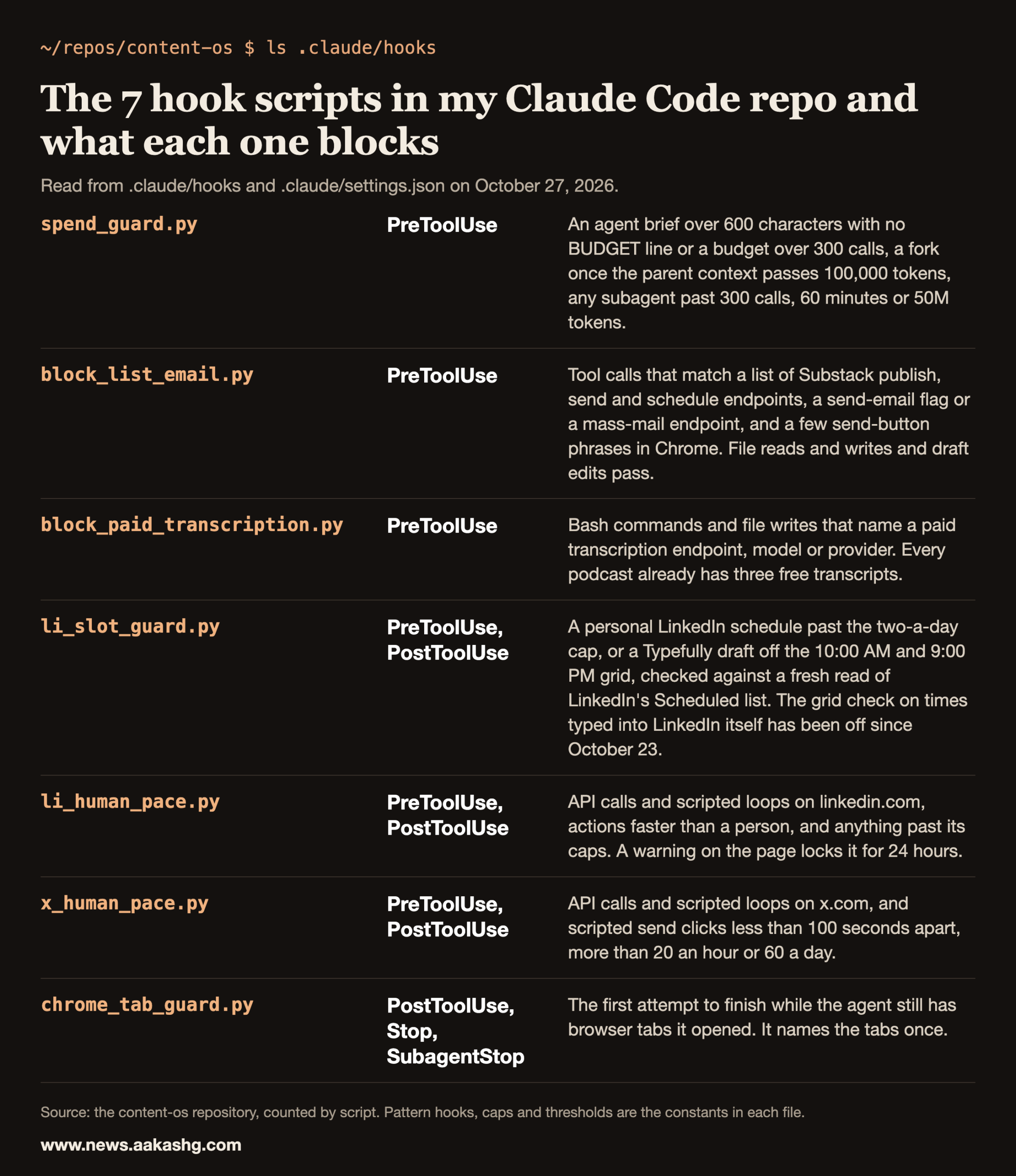
A hook runs even when the model forgets the rule
The docs define hooks as user-defined shell commands, HTTP endpoints, MCP tool calls, LLM prompts, or subagents that execute automatically at specific points in Claude Code’s lifecycle. The hooks guide says what that buys you: “deterministic control: certain actions always happen rather than relying on the LLM to choose to run them.”
A line in CLAUDE.md is a request. Claude reads it and usually follows it. A hook is code that runs whether or not the model remembers the rule. The memory docs draw the same line: “To block an action regardless of what Claude decides, use a PreToolUse hook instead.”
The mechanics are short:
- An event fires. For command hooks, input arrives on stdin as JSON that describes the event.
- Your script reads it and decides.
- Exit code 2 blocks. On PreToolUse that blocks the tool call, and the message that comes with the block is your script’s stderr, which goes back to the model.
Exit 2 also wins over JSON output. The docs say exit 2 blocks even when your hook prints JSON, and even a permissionDecision of “allow” doesn’t let the action through.
I use six events: PreToolUse (before a tool runs), PostToolUse (after one finishes), Stop (when the agent is about to finish), SubagentStop (when a subagent finishes), SessionStart and SessionEnd. Only the first four carry my hook scripts. The other two run housekeeping scripts.
The seven hooks in my repo
Most of the files say in their header comment why they exist. spend_guard came out of a September 30 to October 1 postmortem, block_paid_transcription out of one on September 28, and block_list_email out of a sentence I typed on October 2. li_slot_guard’s header says that memory notes about the two-slot rule “had already said so and were not enough”. li_human_pace followed my October 13 instruction after a LinkedIn search pause, and x_human_pace copied it on October 20.
| Hook | Event | What it blocks |
|---|---|---|
| spend_guard | PreToolUse, every tool | Long agent briefs with no budget line, forks on a big context, and subagents past their ceilings. |
| block_list_email | PreToolUse, every tool | Calls that match a list of Substack publish, send and schedule endpoints, a send-email flag, mass-mail provider endpoints, or a few send-button phrases in Chrome. |
| block_paid_transcription | PreToolUse on Bash, Write, Edit, MultiEdit | Calls to paid transcription services. |
| li_slot_guard | PreToolUse and PostToolUse | LinkedIn schedules past the two-a-day cap, and Typefully drafts off the 10:00 AM and 9:00 PM grid. |
| li_human_pace | PreToolUse and PostToolUse on Chrome tools | API calls, scripted loops and inhuman speed on LinkedIn. |
| x_human_pace | PreToolUse and PostToolUse on Chrome tools | API calls, scripted loops and fast scripted sends on X. |
| chrome_tab_guard | PostToolUse, Stop, SubagentStop | Finishing a task with browser tabs this session opened still open (it blocks the first stop only). |
The table is simplified, so here are the numbers inside the ones that have them.
spend_guard puts a number on every agent
Rule 31 in my CLAUDE.md reads: “Every agent brief carries BUDGET: max N tool calls, max 2 review rounds. Never unbounded. Hook-enforced.” The hook enforces the budget line for briefs over 600 characters. It does not check the review-round half.
When the main session launches an agent, spend_guard blocks the launch if:
- the brief is over 600 characters and either has no
BUDGET: max N tool callsline or has an N over 300 - the brief uses open-ended phrasing such as “do not give up”, “loop until” or “work until every …”
- no model is set on a non-fork launch
- it is a fork and the parent context is already over 100,000 tokens
- the session has launched more than 40 agents in an hour
When a subagent makes a tool call, the hook sees an agent_id in the input, so it can count that agent’s calls separately. The default ceilings are 300 tool calls, 60 minutes, and 50 million tokens of context summed across calls. I set the token ceiling from data. The script’s comment records the calibration: 242 normal subagents since September 23 had a median of 3M tokens, a p90 of 20M and a p99 of 115M.
spend_guard has two overrides, each for a number I approved in chat. Putting ALLOW_FANOUT=1 in the agent prompt lifts the launch cap, and ALLOW_UNBUDGETED_API=1 in a command skips the OpenAI budget check. There is no in-chat override for the loop phrasing or the per-agent tool-call ceiling; the ceilings are read from environment variables.
The pace hooks give Chrome a human speed
My agents drive a logged-in Chrome for LinkedIn and X. Two hooks sit in front of every Chrome tool, every Agent launch and every Workflow, and the state is shared across the main session and all subagents. They are registered with a 60-second timeout instead of 10, because they sleep between actions.
The LinkedIn hook, li_human_pace, enforces seven things:
- No API calls from the page. A javascript_tool call that contains fetch, XMLHttpRequest or voyager is blocked.
- No scripted loops that click, load pages or scroll. One page action per call.
- A wait before each action, until 3 to 7 seconds (page loads) or 2 to 4 seconds (other actions) have passed since the previous LinkedIn action, with jitter. No single call sleeps more than 12 seconds.
- Caps: 40 page loads per 10 minutes and 400 a day, 20 searches an hour and 100 a day, 40 profile views an hour and 250 a day, 3,000 actions a day.
- A 24-hour lock. The PostToolUse half scans the result of every LinkedIn Chrome call for warning text such as “unusual traffic” or “quick security check”. On a match, nothing touches linkedin.com for 24 hours, and LinkedIn agent launches are blocked too.
- A
LINKEDIN PACEline in any agent or workflow brief that mentions LinkedIn. A brief without it is blocked. - One LinkedIn agent at a time. A second LinkedIn agent can’t launch while one started in the last 30 minutes is still active on LinkedIn.
My instruction when I asked for it was: “never endanger my li acct always go slow … act like a human w li always.” The X hook, x_human_pace, copies the lock, the API ban and the loop ban and is lighter on the rest: no wait before in-page actions and no search or profile caps. It spaces and caps sends only when they are scripted tweet-button clicks inside a javascript_tool call: at least 100 seconds apart (jittered up to 140), 20 an hour and 60 a day. A real click through the browser tool is never counted as a send, so the gap and the send caps do not apply to real-click replies. The page-load cap (30 per 10 minutes and 300 a day), the API and loop bans and the 24-hour lock do apply to them. I keep the two-minute gap between replies myself; the hook does not enforce it for real clicks.
One thing I learned fast: caps that block real work get switched off. I loosened the LinkedIn search caps on October 13, and the code comment says so. Pacing, the API and loop ban, and the warning lock are the real protection in the pace hooks. The caps only stop runaways.
The publishing hooks protect decisions that are mine
block_list_email exists because of one sentence I typed on October 2: “mk sure u never autonomously email my list in this harness.” Sending or scheduling a Substack post emails my subscribers. The hook scans the input of every tool call except file reads and writes (Bash, Chrome, MCP tools) for a Substack publish, send or schedule endpoint, a send_email=true flag, or, in Chrome, the “Send to everyone” button text. Writing a file sends nothing, so file reads and writes pass, and so does creating or editing a draft.
li_slot_guard covers a gap that a normal queue check can’t. Typefully can’t see a post scheduled natively inside LinkedIn, so the hook requires a fresh read of LinkedIn’s Scheduled list before it counts a day. The PostToolUse half keeps a map from Chrome tab IDs to URLs so the check knows which tab is LinkedIn.
This is the hook I loosened most. On October 23 I asked why the off-slot rule kept hampering real work and told it to go. The Chrome check on typed times now sits behind if False and, with a comment that carries that date. The two-a-day cap still holds in both paths, and a Typefully draft still has to land on 10:00 AM or 9:00 PM.
The overrides are a convention
Six of the seven hooks have a way around them, and that is the weakest point of the design. Four are files that I create by typing ! touch ~/.config/content-os/allow-... at the prompt: one each for block_list_email and li_slot_guard, plus one for each of the two pace hooks that clears its 24-hour lock. The email override is valid for 10 minutes and is deleted on first use. The other three are strings: ALLOW_FANOUT=1 and ALLOW_UNBUDGETED_API=1, each for a number I approved in chat, and ALLOW_PAID_TRANSCRIBE=1, for a short clip I approved in chat.
The rule is that only I create the file or approve the string. Nothing in the hooks enforces that. None of them matches a touch command, so a model could create an override file in a Bash call, and it could type an ALLOW string into its own command. A bypass would show up in the transcript, but nothing proves I approved it.
block_paid_transcription shows how to test a hook
Every podcast I publish already has three live transcripts: YouTube, my site and the Substack post. The hook blocks calls to paid transcription services, matched by patterns such as the audio transcriptions endpoint path, whisper-1, assemblyai and api.deepgram.com.
Test a hook by piping the JSON your event would send into the script and reading the exit code. This is the test, run from a plain terminal:
echo '{"tool_name":"Bash","tool_input":{"command":"curl https://x.example/v1/audio/transcriptions -F file=@a.mp3"}}' | python3 .claude/hooks/block_paid_transcription.py
echo $?
The result was exit code 2 and a message on stderr that begins “BLOCKED: paid transcription.” and tells the model where the free transcripts live. Swapping the command for ls -la gave exit code 0 and no output.
Two lessons came out of building these tests. First, a pattern hook matches text, so a command that only mentions a blocked string is blocked too. Build test inputs in code, or your own test run trips the hook. Second, the stderr message is the instruction. A message that says only “blocked” makes the model guess. Mine say what to do next.
Four design choices I’d copy
- Fail open on bugs. A hook that crashes is a non-blocking error unless you configure it otherwise, so a bug in a hook that runs on every tool call cannot wedge a session. Several of mine also catch their own errors and exit 0, and the comments say why. The one exception is the 24-hour lock in the two pace hooks. It fails closed on the PreToolUse half: if the hook hits an error while a lock is active and the call mentions LinkedIn or x.com, the call is blocked anyway. The half that sets the lock fails open.
- Block once, then let go. chrome_tab_guard blocks the first stop and names the open tabs. On the second stop it lets the agent finish. That is the escape hatch for a tab I have to act in, such as a CAPTCHA. The docs warn about the loop version of this mistake: a Stop hook should parse stop_hook_active and exit early when it is true, and the guide notes that Claude Code stops the loop after eight iterations unless you raise the cap.
- Register where the rule lives. spend_guard is registered in my user settings through a symlink as well as in the repo, so it runs in every project. It is safe to register twice because a tool call it already handled is skipped.
- Test the number the script enforces. The header comment in spend_guard still says the 151st tool call is blocked. The code blocks after 300.
If you want a build like this to count in a PM interview, that is the work inside Land a PM Job, my 12-week cohort starting November 9, 2026. It includes live sessions, six 1:1 coaching sessions and reviews of your own materials.
When a rule belongs in a hook
I move a rule into a hook after the model skips it once. The skills docs say the same: when Claude skipped a rule that must hold every time, move the rule into a hook. My paid 10 laws of Claude skills guide measured that skip. A self-review step written into a skill ran about one time in five.
A rough sort that works:
- CLAUDE.md for preferences and context. Claude follows them most of the time.
- A skill for a procedure Claude loads when the task matches.
- A hook for a rule that costs real money, real reputation or a real account when it is broken once.
My memory system guide covers the first layer, and Harness Engineering walks through how all the layers fit together.
Claude Code hooks FAQ
What are Claude Code hooks?
Commands that Claude Code runs automatically at set points in a session, such as before a tool call or when the agent is about to finish. Per Anthropic’s docs they can be shell commands, HTTP endpoints, MCP tool calls, LLM prompts or subagents.
Which exit code blocks an action in a Claude Code hook?
Exit code 2. On a PreToolUse hook it blocks the tool call and sends your stderr to the model as the reason. The docs say exit 2 blocks even if the hook also prints JSON that says allow.
Where do I configure Claude Code hooks?
In a JSON settings file under a hooks key. Anthropic’s guide uses ~/.claude/settings.json for a personal hook, and I keep mine in the project’s .claude/settings.json so they travel with the repo.
Can a hook use a model to decide?
Yes. The hooks guide says that for decisions that need judgment you can use prompt-based hooks or agent-based hooks that call a Claude model. Mine are plain scripts, because every rule I enforce has a deterministic test.
Why does my Stop hook keep running?
A Stop hook that blocks makes Claude continue, which fires Stop again. Check the stop_hook_active field in the input and exit 0 when it is true. The guide also notes that Claude Code caps the number of consecutive blocks, and you can raise the cap with CLAUDE_CODE_STOP_HOOK_BLOCK_CAP.
