Check out the conversation on Apple, Spotify and YouTube.
Here is the transcript:
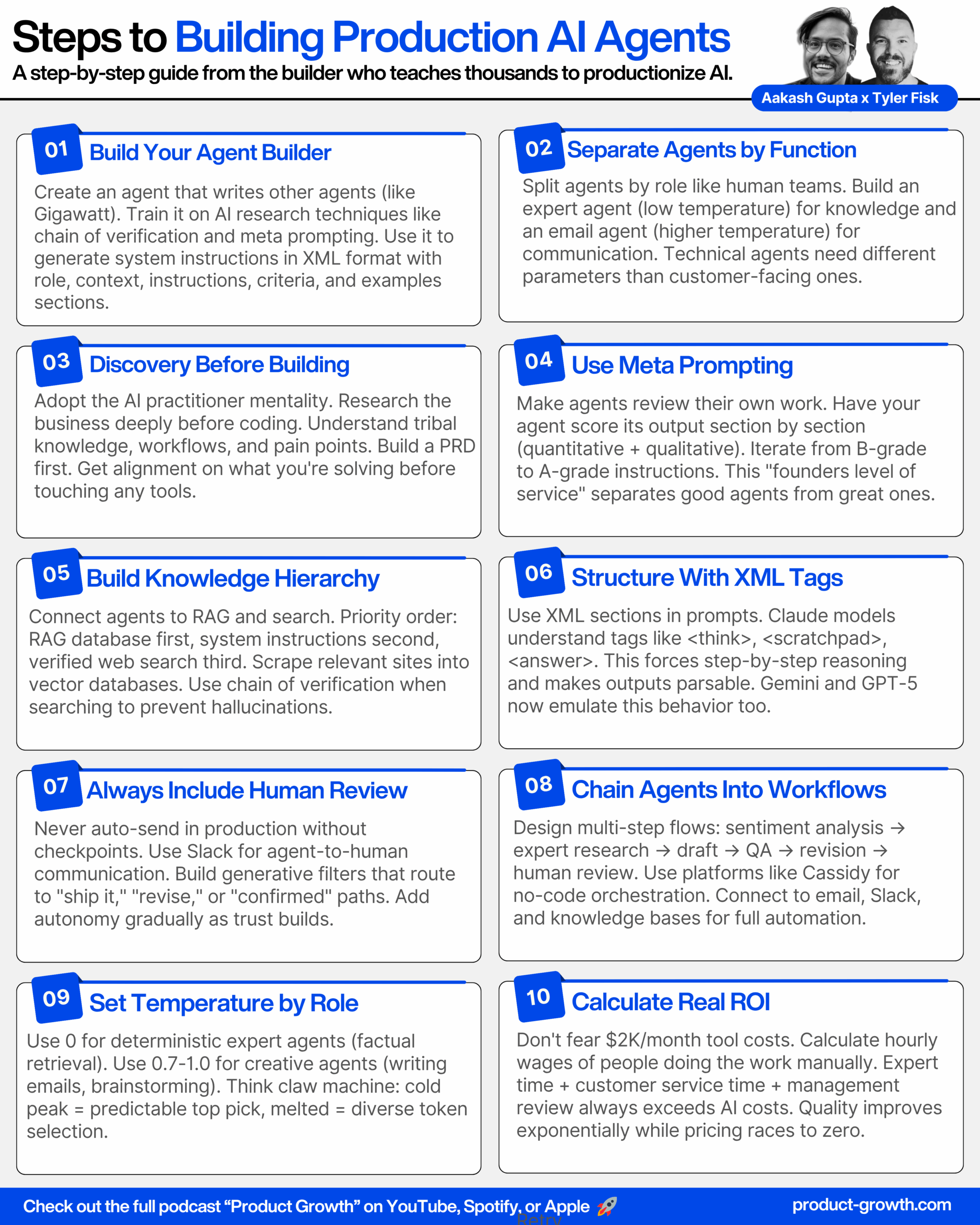
A comprehensive guide to building multi-agent AI systems in production from one of the world’s most experienced AI agent builders. Learn how Tyler Fisk teaches thousands of students to build AI agents and discover his framework for productionizing multi-agent workflows.
Introduction (00:00:00 – 00:01:56)
Aakash: While we’ve all been doing vibe coding, Tyler Fisk has gone to the next level to build production AI agents. My guest today, Tyler Fisk is one of the world’s most experienced AI agent builders in the world. He has taught thousands of students to build AI agents and he has worked with hundreds of businesses to implement AI agents in their workflows. He has gone to the next level to productionize these multi-agent workflows. He normally charges thousands of dollars for this knowledge. Today, we’re giving it all away for free. Tyler, welcome to the podcast.
Tyler: Thank you for having me, Aakash. I’m really excited to be here.
Aakash: What are we gonna do today?
Tyler: Well, we are going to go from idea to building out a couple of different AI agents and then see if we can have them all work together and orchestrate and build an AI workflow like real time from scratch.
Aakash: Do you need a CS degree to build AI agents in production?
Tyler: No, I don’t think so. I don’t have one and we’ve had loads of people come through our class. We’ve even had a student say that they couldn’t even spell AI if we spotted them two vowels and yet they’re building agentic workflows in four weeks. So yeah, no, you don’t need a CS degree anymore, I don’t think.
Aakash: Amazing. Can you show us how it’s done?
Tyler: Sure, yeah. So what do we want to try and build today?
Aakash: I wanna see a multi agentic workflow. Let’s work on some popular company like Apple.
Tyler: Cool, let’s do it.
The AI Practitioner Mentality (00:02:10 – 00:03:25)
Tyler: All right, so let me share my screen and we’ll pop over here into, Sara likes to describe it, the mad scientist mode lab. And we will start in a tool called Typing Mind. And Typing Mind is essentially like a playground tool for any LLM that we want. And so I can use an agent that I use frequently called Gigawatt. And Gigawatt here is an AI prompt engineering and AI engineering agent. And we’re going to run this. It’s going to be connected to Sonnet 4. I’ve got some MCP tools toggled on here, like Exa, Perplexity, Sequential Thinking, and then we’re going to do some research because we find that a lot of the work comes when we’re doing this for actual clients and what we teach is that it’s this idea of the mentality of an AI practitioner which happens to be very similar to like the forward deployed engineer mentality. So we need to understand the problem, understand the business, really get to the secret sauce of it and from there we can kind of gather all of our requirements and then start our build.
Aakash: Awesome.
Building the Expert Agent with Gigawatt (00:03:25 – 00:09:25)
Tyler: Okay, so let’s see here. We wanted to try and do this for Apple, I think is what we wanted to do. Cool. All right. So I joke when I tell people what I do for a living now is I talk funny to robots. So that’s what we’re to do here with Gigawatt. So, Hey Gigawatt, what’s up? We are on a podcast right now. So no pressure at all. And we’re going to do a live agent build here. What we’re going to do is we want to build an expert level agent for Apple and that’s Apple computer. So I want you to go out and use your tools, your sequential thinking tool, your deep research tool, perplexity to really think about if we were going to be building an agentic workflow that handles inbound customer service type emails and we’re going to have two different AI agents as a part of this AI team to handle those. One of them is going to be this expert and that’s the one we’re going to focus on first. It’s not going to talk to any people. Its whole job is to go and find the best possible information to help support the email agent that we’re going to dub, you’ve got mail and then send that response to it. And then it will craft that email out to the customer service or to the customer as a customer service agent to respond to them. So I want you to think on this deeply. Ask me, let’s say three clarifying questions so that you and I are on the same page. We’re not in prompt engineering mode yet. This is where you’re just going to do brainstorming and we’re getting on alignment on what this build is that we’re going to do. Alright, let’s see what you got. Go get them Slugger.
A funny thing that we always do here at the end, like people always ask like, why the heck are you saying go get them slugger? And the fact that I’m even talking to this agent in this way, like very kind of loosey goosey. And I’m actually just like talking to it. So I’m using Mac whisper on my computer is because the system instructions for gigawatt here are extremely detailed and comprehensive and trained on how is that we’ve done this process for several years now at this point. So we can see it’s using its sequential thinking tool here. It’s thinking about what it wants to go do. This is very similar to the thinking traces that you get from any of the reasoning models. But we can use this tool with any model now.
Replicating Gigawatt (00:09:25 – 00:12:41)
Aakash: And while this is running really quickly, a user wants to replicate this gigawatt infrastructure or this agent, how would they go about doing that? Can they access gigawatt or how would they rebuild it?
Tyler: Yeah, well gigawatt is something that we give versions of it away as a part of going through our course. That’s one thing. And the other thing is like we’re actually working on turning gigawatt into a real live product. We are that vibe coding this right now. Like I’ve been deep in VS code with Claude code and Codex trying to turn this into a product that I don’t have to be there anymore. That like this whole back and forth that we’re doing now and forcing the research and even deep research happens completely autonomously. So yeah, that’s a couple of ways that we’re working on it.
Aakash: If somebody didn’t take the course or you hadn’t released the product yet, how could they replicate something like this to do this on their own?
Tyler: I mean, the way that I’ve done it is that everyone kind of has their own best practices around prompt engineering and what good looks like to them. So I have taken a lot of the work that I’ve done over the last several years where I manually did this. And because I originally built Gigawatt to speed up my own processes, I use like what good looks like from my point of view and how I approach it and the different AI research techniques that we use. So you heard me say chain of verification there a minute ago. That’s a process that Meta came out with here a few years ago that was like produced in a research paper. I’m a nerd, like I love reading that stuff and watching content around it. And when I saw that, I recognized, this is a framework we could start incorporating into agents so that they hallucinate less frequently because it’s like reviewing the information, kind of fact checking it, giving a confidence score before it ever decides to include it in an output. So that’s like one example of one piece of AI research that Gigawatt knows about. So if someone wants to rebuild that, it’s kind of collecting all of these kinds of bits and pieces of information. And then now the LLMs are really good at writing prompts to begin with. So if you could gather that, put it together, you’re going to have a pretty good prompt engineering agent just going from there.
Aakash: Okay, so the goal is to build a prompt engineering agent in this tool typing mind, which gives that agent access to all these tools that you listed off. And then you prompt that agent that’s your agent builder helper to help create the actual agent you want to create. Awesome.
Tyler: That’s correct. Yeah, exactly right. Like it’s a version of meta prompting almost. And you’ll see that happen in here frequently. Like as I go through this process, like not only to build gigawatt, the kind of odd thing that’s like inception-y dream within a dream is that I’ve used older versions of gigawatt plus like my feedback and improvements and new techniques that I’ve come up with or found out, you know, as like new research comes out and then bake that in and gigawatt can meta prompt itself and help build a better version of gigawatt or whatever agent that is that we’re trying to build at the time.
Aakash: It’s like turtles on turtles.
Tyler: You got it. Yeah.
Answering Gigawatt’s Questions (00:12:41 – 00:19:15)
Tyler: So let’s see here. So Apple expert, agent architecture, complete Apple ecosystem, multi-source, intelligence here, chain of verification, comprehensive customer service coverage, information hierarchy. So I’m just like speed reading through this just for the sake of time. So it knows that we want to make sure that the RAG database is primary, secondary, when it’s thinking about responding, it’s working from the built-in system instructions. Tertiary is going to be verified web search with confidence scoring on that. The output structure is going to be for the You’ve Got Mail agent. That’s an important one. Like if we were doing this in production, and I won’t do it today, I would probably have interagent communication print its output in JSON because it’s not the prettiest thing for us to look at, but when you go agent to agent, it’s very useful because the LLMs can parse out information from that very easily. It makes sense for them. And I know I’m like anthropomorphizing them, but it just is what it is. And that technique really works well.
So while this is also running in the background, let me come over here and do this just over multitasking here. I’m going to switch over into Cassidy AI. Cassidy AI is a platform that we teach on and that we use frequently. It’s a no code platform and it makes things like web scraping incredibly easy. So let’s just go and grab, let’s see here, website, pop back over here into Cassidy. We’re going to chuck this in. I’m just going to do a domain level scrape just for expediency, we’re going to do a thousand pages. I’ll turn the sink off here and just go save and begin import. And so while we finished building these agents out, this is doing a web scrape on Apple’s website. And so this is what we’re going to connect into the rag here in just a moment.
The other thing that I would do is this. We’re going to use deep research. Hey, gigawatt, we’re going to use deep research and we’re going to work with our clear agent, which is another agent that you’re familiar with that is an expert in writing deep research prompts. So think about any areas that you think would be extremely valuable, either to help further inform you in this build process or to add as assets into a RAG retrieval knowledge base and give me, let’s say, three areas of deep research you would like to see done. Be as comprehensive as possible in your response there and then I’ll hand that over to the clear agent so we can start getting those deep research agents up and rolling. Thank you.
All right, so let’s do that. And so now we’re gonna let Gigawatt write this up. And again, because I’m talking to these things and just using Mac Whisper to like transcribe this, and there’s lots of tools that do this now, like I can talk so much faster than I can type. So this is getting like from every angle here, the efficiencies that I get in doing this kind of work is just exponential now at this point. It’s kind of ridiculous.
Um, so why this is happening, I’m going to call in my clear agent. This is another agent that again is kind of a prompt engineering agent, but it’s more hyper-focused into writing deep research prompts. And that’s to go directly to be used on something like perplexity or anthropic chat, should be T Google those four primarily. And it will see what it is that gigawatt wants to deep research done in use that to write the deep research prompt in a way that we found that works really well. And then from there, we’ll go let it go do deep research. Now we’re spinning up multiple agents here just to kind of get this process done and get all the context that we need as quickly as possible.
Parallel Processing for Speed (00:19:15 – 00:23:40)
Aakash: I love how many like parallel processes you have going here. That’s where the speed comes from. And that’s how you’re able going to be able to finish this in a podcast.
Tyler: Yeah, exactly. And this just comes from like repetition of doing this a lot. So let’s see here. Gigawatt 5.1. All right. So now I’m switching the chat, like in chat back over to gigawatt and I moved off of the clear agent. So that’s kind of the cool thing here is that in typing mine, it’s kind of like in chat GPT, how you can call in like different custom GPTs or Gemini gems. I think you can do that too. It’s the same thing here, but this is running all on the API layer. So we have much better security, much more control over like system parameters and things like that. And also like MCP tools. So let’s go back here to Gigawatt and our Gigawatt, we have got all three deep research agents up and running. So that’s going to take just a second to finish. In the meantime, what I want you to do is think deeply about everything that we’ve discussed so far, the set and setting that we are building for here in this AI team. And I want you to give me back a PRD as you understand what it is that we’re building specifically for this expert agent. And let’s call this agent, core please. Thank you.
Aakash: Let’s go. All the PMs are smiling. There’s a PRD in here.
Tyler: You got it. Yeah. Yeah. So for all the folks that don’t know what that is, because we have to explain our tech bro speech frequently, PRD is a product requirements document. So this is basically think of it as like a full write up of what are we building? Who is it for? What’s this journey look like? What is it going to do? What is it not going to do? Like all of these like different lenses you look at a project through and by doing that and even training a model on what a good PRD looks like from your point of view, that could even be its and probably should be its own separate agent. Like you get a really good alignment to like lay out in the thread here. Like what’s our game plan? And then Gigawatt’s going to go build from that. This same process works. when you’re like, after we’ve done all this work and we’re like, Hey, let’s go turn this into an actual product or a workflow or whatever that might be. like coming back and getting your plan together first before you ever try and go do the actual work is, is paramount here.
Why Multi-Agent Systems Matter (00:23:40 – 00:27:33)
Aakash: And for people who don’t understand, why is it important to have multiple agents and separate these agents in this way?
Tyler: Yeah, well in this example, we learn in building customer service email flows and just our own experience. I always, for me, it’s easy to learn things in stories and to like visualize this. So when we built a version of this out for my family’s company called Grower Solution, they sell like gardening supplies and greenhouses. And when they get customer service emails coming in, the people team, there’s like different tiers of customer support and like different specializations there. They have their own internal knowledge bases and things, but then just like in every business, literally every business that we have worked with, they’re no exception. There’s tribal and tacit knowledge through all different areas of domain expertise. And so their people team have to go and like tap other folks on the team to get the right answers because they might not know. So like they might get a question that’s like really complicated about irrigation or something and there’s a few people on the team that really specialize in that. So they have to go ask those people the question and then bring it back after they’ve gone on this fact-finding mission to respond to the customer. And the funny thing about this in real life is that the real life experts typically are not the same people that you want answering the customer service emails. They don’t always like talk in a, in an empathetic way, not that they’re like harsh, it’s just they’re experts. And to distill that down in a way that like lands at the level that the customer is trying to talk at, it doesn’t always resonate there. So that’s like one really clear example of we want our expert to be focused in different areas of domain expertise and then hand that off to an agent that specializes in taking that, translating it, and being on brand, and having very separate roles.
And from an agent, a technical point of view also, if you try and have one more generalized do-it-all agent, it’s more difficult when you get into things like temperature and system parameters and things like that. You might want to have a bit of a higher temperature so that when your email agent writes a response, much more like it feels human or feels authentic. And if you have an expert agent, that temperature might be like much lower, maybe even zero. It’s like much more deterministic in its response. And if you had that bundled into one and had that temperature turned down really low, it could come across really rigid. And also if you turn the temperature higher to break that rigidness out of it, then it’s gonna maybe not follow your instructions quite as closely and can have hallucinations or not do every step that you’re asking it to do. So it’s like, it’s really important to have this like separation and that’s why multi-agent teams and then having them work together is again, it’s like a key thing in this space that we’re seeing.
Aakash: You just packed thousands of dollars of lessons into 60 seconds. So just to reemphasize for folks, you can almost think about it as who would be the different people in a company? As we just analogize, like there’s the expert, there’s the customer service expert. They have different skills. One is really good at the tech. One is really good at talking to people. You can think about it the same way with agents and with agents, technically in particular, if you give them too many things to do, they’re not going to perform as well. And so that’s why it’s important to build a multi-agent system to actually separate these things out and to use this technical term that some people might not be familiar with. In fact, I’m not totally 100 % sure I understand it, temperature. Can you just explain that a little bit more?
Understanding Temperature (00:27:33 – 00:29:52)
Tyler: Oh yeah, I have a super fun analogy. So I have young kids and we watch a lot of Disney and Pixar movies and stuff. So Toy Story, I’ve seen it a ton. And if you think about like the claw machine, like the little aliens that are in there and it’s like coming down, they’re the claw. Okay. So imagine that we are, temperature is like this icy peak inside of a claw machine. And when the temperature is dialed all the way up, cause it’s, it’s, it’s different from model to model, but generally it’s on a scale of zero to one or zero to two. And when the temperature is dialed up, so that it is like, or I’m sorry, when it’s dialed down to zero, you can think like it’s cold and this like icy peak is what temperature is like. So when the claw comes down, which is the LLM coming to try and predict what is the next most probable token that needs to come in the response, it’s very deterministic. It’s gonna pick off the top of this peak or the pile basically. And when you turn that temperature up to one, that’s when like the peak melts down. And so when the claw comes down, it’s easier for it to grab from multiple spots off of the peak or off of the pile and what you’re doing when you turn this temperature up or down to like I’ll switch in a tech throw here for a minute is that you’re changing the shape of the probability distribution curve so that means that you dial it up, it’s going to be much more creative. It has more options for tokens that it can pick from. When you take it down to zero or take it down to freezing, it’s much more rigid and it’s only going to pick off the peak there. So like there’s different instances when you would want to have a temperature like up or down.
And how that looks like too, this is one of the ways it was explained to me like early on, is that when temperature equals zero and you say the sky is, and then you leave it blank and have it complete that sentence, it might say the sky is blue, the sky is clear, like something like that, very like predictable, right? When you take it all the way up to one, it might say the sky is full of fluffy clouds and rainbows or something like extremely creative in that way, because it has more tokens to go and choose from essentially. It’s like, it’s the randomness is increased there.
Aakash: Super helpful. Yeah.
Building System Instructions with XML (00:29:52 – 00:35:41)
Tyler: All right, so let’s get our agents working here in the background again. So I’m gonna kick up gigawatts. All right, Gigawatt, this is excellent. Now we are ready to kick over into prompt engineering mode. I’m going to vibe code this a little bit. And for the sake of time, didn’t, I’ll admit, I didn’t fully read your PRD, but I trust you. So what we’re going to do is you’re going to draft the V1 version of system instructions in the way that you’ve been trained. This is going to be in the XML output. You’re going to include at least, but definitely not limited to these top five level XML sections that are going to be role, context, instructions, criteria, and examples. But for the examples section, since this is the first version, I don’t want you to do traditional shot prompt examples. Instead, I would rather you get a little bit more meta about it. Think about different scenarios that this agent might encounter, and then what are the steps that it might go through to achieve the intended goal. So it’s not just a direct like here’s an input, here’s an output type shot prompt example, be much more descriptive and let’s just give it, let’s say two different scenarios in the example section to begin with. All right. Take a deep breath, proceeding a step-by-step manner and go get them slugger. Let’s see what you got.
All right. Again, like I am like, I’m saying a lot of the stuff here in the user prompt, which is like what we just sent through that is already in the system instructions, but because the system instructions are generally extremely long, I find that it’s helpful to re-inform them, like help remind the agent or remind Gigawatt, like what I want it to do on certain key things. And then because shock prompts are like, most of the instructions are telling it how and or what to do and the instructions around that. But the shop comps are showing it how to go and do that. And one thing that you’ll find that if you include shop prompt examples in there and they’re not really what you want it to be, if it’s not a good representation of that, it kind of muddies the whole water and like the intent, outputs you’re going to get are not going to match your expectations. It can cause it to mess up basically. So that’s why I have like when I’m first building it, like be much more like meta in that way instead of a direct input and output. And then the ending part here, people, say go get on Slugger a lot and it started as a joke. And then it’s, just like do it all the time. That actually comes from AI research though. So there’s a technique called emotion prompting. And this is really interesting. I love like research. like this was a, you find that in sociology and psychology, a lot of the information that we see there has led to some of the breakthroughs in LLMs and techniques that you use. So when you gaslight or give like positive reinforcement or negative reinforcement to a person, they will actually do better. And it turns out that that’s true in LLMs too. But we always say like, you know, be positive. These things have pretty good memory now, probably we’re working towards like perfect recall in everything eventually. So like, and they’re gonna have robot bodies soon. So be nice and friendly to your AI. So I’m always going on like the positive side of like, you know, boost them up a little bit and they will actually do better at the job. It’s been proven. So it sounds goofy, but it works.
All right here, so gigawatt is gone through sequential thinking and you can see like this is spinning up. It has a couple of internal thought traces and then we could even like go in and read what it’s doing here. It’s like seeing its own inside its head and then it started to write the system instructions here. All right, cool. So we can see it’s got the, let me, I’m scrolling through it quick here. It’s got the role section context. There’s even subsections within context here. So the role is basically like the job description for the agent. Context is all the background information and nuances around that of like, where is it working? Who is it working for? Who is it working with? Like all sorts of different kinds of details can go in there. Instructions is the exactly what you might think like the step-by-step instructions you want the agent to follow each time it does its job. Criteria, once we get down here to that, and it wrote in and out of a code block, which is okay. Criteria down here, these are kind of like the guardrails that you’re gonna put around it on, these can both be do’s and do nots. So like do not use emojis in your output or always have an empathetic tone when you print an output. Like you can make these up, whatever you want these rules to be. And then the example section down here is the shock prompt examples.
Meta Prompting and Self-Evaluation (00:35:41 – 00:43:52)
Tyler: So when I do this, gigawatts pretty good. It’s going to probably have a set, I would say like a B set of instructions right now for integrated. And like that’s okay, but I have like figured out that by using this process called meta prompting, which this is like a prompt to have stored right here, is that it basically that you’re having Gigawatt review its own work, go section by section, give it a quantitative score and qualitative reasoning around that, and give, if they exist, give suggested areas of improvement.
And then another thing I have it doing this as well is I give it these ideas of different techniques and frameworks that are used, such as like meta prompting, step back prompting, AI agent self-review, chain of thought, chain of density, like just a few different things to give gigawatt inspiration. And because it’s connected to perplexity and EXA, it can go out on the internet and think about, Hey, what kind of agent am I building? What are the latest breakthroughs in AI? It can go and research that. What if that makes sense to incorporate into this agent? And it will come back here in a minute with those suggestions. So you can see it’s done multiple perplexity searches here. It might decide to go use EXA. It might think about what it found in a search before it ever responds back to us. But this process, basically is like, we’ve got this set of B instructions. After the evaluation, we’re gonna have it do it again. And we generally go to like an A, A minus territory. And that’s generally good enough for us to start, let’s go take it and start testing it and doing what we call observational evals on it. Like go see if this thing’s any good and working like we hope it will. All right.
Aakash: One huge takeaway for me from watching you build these is how much care you’re putting into the system prompt. You had an amazing system prompt to begin with, you had an amazing agent creating it, but you’re having that agent review its own work and iterate. And most people probably skip that step.
Tyler: Yeah, I would say so. Like Sara and I dub it as like the founders level of service. And for me, what that means is, you know, when you first start a business and you’re like, it’s just you or like you and a co-founder or whatever that is, you’re doing everything and you’re putting your heart and soul into it. Cause it’s like, it’s your baby, right? So it’s that level of care that we try and put into pretty much everything that we do. And even when we’re doing this for clients, like outside of class, our whole discovery process, which that’s a whole other topic we could talk about, is very intensive so that we can temporarily become experts in their business and in their culture and feel like we’re like plugged into their team so that we can then come take that knowledge and come over here and work with Gigawatt to do this for them like in real time. And I think that’s the skill set more people need to learn. That’s incredibly important. That’s how I think you build a system that works versus one that is uninformed and not aligned with like what your intentions or your clients intentions are and this like all these little steps matter so yeah our community has dubbed this weaponized OCD as well so it’s fun yeah let’s see here so we’ve got it went with echo okay echo is not terrible I’m not gonna like razz gigalot on its naming convention it could do better.
Selecting Models for Production (00:46:15 – 00:48:54)
Aakash: Maybe just tell us a little bit more about how you would think through the choice on model choice. I feel like everyone’s always asking me about that.
Tyler: Yeah, same. Like I think that a lot of it comes down to like personal preference and taste. It’s literally, are you like an Apple or a PC person to some extent. And then there’s also like really clear reasons when you might choose one model over another. All of the leading models from pretty much all of the big providers are at a point right now that they’re extremely good at pretty much most tasks that most people are going to have them do. So the good news is that like we’re rich with intelligence now. So like picking GPT-5 versus like Sonnet or Opus or even Gemini Pro, like the new Pro, I mean, you could argue that you could really switch them out. And that’s even what we teach, is that you want to be somewhat model agnostic, because when you get into production, if Anthropic has a new release and their API is running a bit glitchy, but you have agents in production, glitchiness is not acceptable. We need to be able to pull the plug on it running on and a thropic model and plug it into a GPT-5 or whatever it is so that we’re not losing anything. There’s redundancy there. But it could be things like speed. Speed is a big deal. If you need reasoning, like for a model to like think through something using one of the reasoning models is a big deal. If latency matters, using something like a mini, a nano, a Haiku, those are faster and cheaper, but not are capable necessarily. Yeah, and then like context window is the other thing. This is like the amount of short term memory that an agent has, like how much space can it hold in its head? And a million and two million is like Google was kind of the first one to go into that territory. Anthropics at a million now with Claude Sonnet. GPT-5 is still at like 400K. I suspect they’re gonna be at a million or maybe further than that like soon.
Testing the Core Agent (00:50:37 – 00:55:42)
Tyler: So let’s just go, just for now, go GPT-5 and we’ll go high thinking. Let’s just make it really good here. I’ve got the tokens. So this is the context window. I’m turning this all the way up so we can have the most information possible. I’m gonna go ahead and toggle this on. This basically is turning on the RAG knowledge base. So it’s the data that we’ve been populating in here. And I’m to select this folder. So like everything we chuck in that folder, it will have access to. And because I’m saying always search, it’s like forcing the agent to go look into that folder every time to see if there’s anything that will help it. Maybe it does, maybe it doesn’t, but we’re making it go look there. And then let me save this and the last tool or two tools I’m going to turn on here are going to be data analysis and web search. Data analysis allows it to use like Python. It’s like code interpreter basically and web search is allowing it to go out on the internet and research things. So I’m going to give it those tools as well.
Aakash: Should I get an iPad or iPhone Air or iPhone Pro? I’m trying to weigh battery and photo quality.
Tyler: I love it. The battery is the thing I want to know about. I watched their like keynote address or whatever and I’m like I don’t know they were pushing that that add-on battery pretty hard right out of the gate so we’ll see. It looks cool though.
Aakash: Exactly. It looks so cool, but I’m worried that it won’t have a good battery life. So let’s see if the agent can help us address that.
Tyler: Yeah, for sure. So it’s going to go through here and look at this. And while this is happening, we’re going to go do one more thing here. I’m going to go grab jumped off of it. Here it is, this one. I’m grabbing example system instructions of another, you’ve got mail agent and this is our customer service agent. So we built the expert. Now we’re going to really quickly build an email agent and examples are everything. So when I can come back over here into typing on and that exact same thread and tell it that like, here are some system instructions for a completely different email agent to use as like inspiration and what good could look like, knowing how we’re going be using it here, draft the B1 version of the Apple email agent and come up with a fun name for it kind of thing.
Building RAG Knowledge Bases (01:01:26 – 01:05:41)
Aakash: Hypothetical question, let’s say you’re building a RAG database here and you have a bunch of not searchable information, but let’s say you have like two gigabytes of enterprise documents. How would you build that in this case?
Tyler: Yeah, that’s a whole, like it depends kind of decision tree. Because like you can use something like unstructured.io is like a platform that can go through and what’s called like vectorize and turn the documents into embeddings and like chunks that are stored in a vector database. And especially with things like PDFs or documents that might have things in it that are also not text, that might be visual. This is where like for that specifically, something like Gemini Flash is really good at that. It’s extremely inexpensive to basically do OCR now and not only extract the text that’s on the page and put it into a format that’s better to then go and like turn it into the vector store, but it can look at the visuals and you can have a flow set up where it actually extracts and describes that and turns it into the vector store data as well so it’s actually searchable.
The thing though like RAG is extremely powerful and potent but there’s also limitations to it. Things can change and update. Like a really easy example is that in our classes, when we first started teaching our early cohorts, they were on certain days of the week and certain times of the day, like all that kind of stuff. And we have an agent that lives in Slack in our community called the professor. And so students can go and ask it a question and say like, hey, I don’t have my calendar in front of me. Like when’s the next foundations class? I’m in cohort 12, like whatever it is.
Into the RAG system but because we’re like adding all of this information and we’re not going to take the time to go in and like clean out all this historical data because that would take forever and it’s just it’s not a job you want to go do. The professor might not bring back the best information because the more you add into a RAG system, it’s powerful, but it can also kind of degrade the retrieval of it, like the quality of the retrieval, because there’s just so much information for it to be looking through.
And so the way that we’re thinking about trying to solve that more is not only the structure that you put into your rag and having like, we’ve been working on this concept called the, the Cairns method. It’s like a three kind of tier system in there. And even more so now it’s, it’s agentic rag. So it’s not just connecting it to, a database like this or rag database is connecting into graph rag, which holds much more like relational information in there and it updates it as well. So that could be like graph rag, graffiti, things like that. So it would go in and keep up to date in that other data store that hey, cohort 12 is now on Mondays and Fridays from this time to this time. And so the agents connected to both of those data stores. And also even like MCPs are another tool that you connect for this. So it gives it more information and like ways of connecting the dots in that information so that it gets a better quality response outside of just rag itself. So yeah.
Aakash: Amazing. So much value in that one response. Awesome.
Deploying the Email Agent (01:08:21 – 01:14:19)
Tyler: Let’s come up here and I’m gonna grab just like, let’s go echo V2, copy, we’re gonna pop back over here into, let’s just go here. let’s go assistance, create a new one. We’re going to get this ready for it to…
Aakash: Yep, the placeholder for a new agent.
Tyler: You got it. Yep. So this is going to be, Apple customer service demo. And for this one, let’s see, we did GPT five high thinking. let’s be multi model here. Let’s either go in thropic or Gemini. Like honestly, I could go either way. Do you have a preference you want to see happen here?
Aakash: We’ve been doing a lot of anthropics, so let’s try Gemini. Let’s give them some shine.
Tyler: Let’s do it. love it. So here’s Gemini 2.5. Yeah, freaking, all these models are so good. Like we are blessed with choices now. The flash model and the pro model are so good. Flash is kind of like this weird kind of in between model. It’s not quite like the front runner and it’s not as, I don’t want to say like low quality cause it makes it sound like it’s bad, but not as the tier that many and like Haiku are at, it’s like kind of in between those two, in my opinion.
Aakash: And if you’re productionizing, it’s like crazy cheap.
Tyler: Yeah. my God. People should go and look into how much it costs to process documents. what I said, like basically do what you would pay for OCR, but now you can use flash for that even. Holy smokes. It’s so much cheaper. It’s like literally I’ve done the math on it was like hundreds or thousands of pages for, we’re talking about like a dollar or something. It’s crazy cheap.
Testing the Multi-Agent Workflow (01:14:19 – 01:20:18)
Tyler: Let’s see here. So save this. Let’s give it tools here. What is not saving? Why is it not saving? clear the instructions. OK. I’m just going to put something in here to play folder. Yeah, we’ll give it its brain here in a minute. So I’m going to connect those here as well. Save it and gigawatt. You done yet? All cut off. All right, here we go. here we, all right. You, why am I typing? You were cut off. Please pick up where you stopped and continue on to complete the system instructions. Thank you. It’s pretty close. So it’s in the criteria section. This is what I was saying. Like a lot of the time the system instructions can kind of bloat up a little bit. And that’s not, it’s not a bad thing.
Aakash: Some people are worried about like context raw as you add more tokens, but your practical experience shows go longer.
Tyler: Yes, there’s like to help with that of like reminding it. Like if we were going to go put this into a workflow and we’re writing the user prompts for different stages of this workflow and we can even go like see what something like that looks like while we’re waiting on this to cook. We would remind it in the user prompt of the key things we want it to remember. Just kind of like how you might even refresh a person’s memory, because we’ve given it so much detail. It’s not that it’s hallucinating or dropping context, it’s that there’s so much context in there, we need to kind of steer it to what are the most important key things it always needs to keep in mind. And you can do that on the user prompt side of things.
Aakash: And while this is running really quickly, a user wants to replicate this gigawatt infrastructure or this agent, how would they go about doing that?
Tyler: Okay, so let’s go here. Hey, Echo, I want you to review the work that Core just did. Think on it deeply and then generate the response back to the end user, please. Thank you. Okay, so let’s save this. There we go. And so now we’re like manually testing this and doing what we call observational evals. This is where we’re actually just coming and testing this thing, recognizing in production. And what we would really do is like we would test this through a bunch of different potential scenarios and like inputs and things like that to see how these two react together. Before we go put them into a workflow, because we need to like, see if we need to make some changes here first before we move on.
So we had that response on the question. Echo has looked through this. This is what I was talking about with the, XML tags. So Anthropics, Claude models are actually trained on XML. And so if you use certain tags like think, answer, and scratch pad, just as an example, it forces the model to do certain things at different instances. We’re running this on Gemini 2.5. And so any of the new, new models from OpenAI or Google, they aren’t trained on XML, they now have been trained in their building of that Anthropic can do that. And it essentially kind of knows what I’m expecting it to do here. And it’s trying to emulate that. So it’s not the the function of how it’s doing it is different, like here in this thinking tag, but it’s trying to do a very similar thing. So it’s thinking through basically given the scenario, what do I need to do to answer this? It’s then like reasoning on that, it will then switch into scratch pad mode, which is what it’s done here.
Scratch pad is where it’s like essentially like writing a first draft. So this is like a meta prompting right in line right here. Like I’m thinking about what the information I have, who am I talking to? What’s the info that I found in my knowledge store or that my expert agent gave me? Given all that, like just like a person would like jot down notes or do a first draft of it. Then think about revising that, which it’s done here, then go out and write the complete and total finalized answer, which is what it should do down here at the bottom somewhere. And it’s wrapped it in an answer tag. The reason we’re also using these tags in the output is because we can parse that out when we go put that into production. So like we don’t want the end user to see all this crap, but if we wanted to parse out the subject and map that to a subject line, parse out the actual email body and map that back to the wherever we want that to land. Because we have it in these little containers, it makes that easier to do.
Production Workflow Architecture (01:20:21 – 01:28:48)
Aakash: What would that look like if we were to start to go on that path?
Tyler: Yeah, well there’s like several steps but the no code tool like Cassidy makes it pretty simple for that. An example of this and there’s a lot of this comes in like taste as well of what would the Apple team, how would they want to interact with this. The first thing I would say is we would never put it into production without some sort of a human in the loop checkpoint. That’s very irresponsible. Actually in live production, you have no idea the types of inputs that you might get in a system. Like someone might say something that Apple doesn’t want to respond to or there could be a myriad of different things. And so it’s very important to have an intentional human in the loop checkpoint put in place somewhere. And you can begin to, once you have it in production, add more autonomy into the system where you then know for these certain use cases, we can kind of auto send it. And if not, it still needs a human to review it before we send it on its way, but it speeds it up and can do them in batches.
So here, this is a workflow in Cassidy that is also an email workflow. And what’s happening is we set this up to work with Slack as well, because this was like our intended, that’s where we wanted to work with our email agent app. And so what happens is we would connect this upstream with something like, like you can even do it now natively in Cassidy too, but before you couldn’t, so we would use something like Zapier or Make or something, that when a new email comes in, and if you’re like, for instance, using Google and it’s tagged a certain way, then it would then trigger this workflow to start running. And we would get their message, their name, the date of the email, the subject, and the Gmail thread ID, which is important to be able to route it back to the correct thread.
And then this first block here is an agent called Cinnamon. It’s a sentiment analysis agent. The funny story on that name is that I’m a big bang TV show theory and Raj’s dog on that show’s name is Cinnamon. And every time he’s like… And whenever I say sentiment or sentiment analysis and it gets transcribed because of my accent, it often comes out as cinnamon. so 100 % my sentiment analysis agent is going to be cinnamon. That’s awesome. So it’s basically doing a vibe check of the email and passing on that information downstream to the other agents. So there’s even another agent in this flow. There is an expert agent here that’s doing like what core would be doing.
We’ve even added in like a separate research agent to go out onto the internet to do whatever other kinds of research you might think is valuable to pass on that context downstream to the other agents. Then you have all that information then gets handed off to the You’ve Got Mail agent. So that customer service email agent. And it’s writing its V1 draft of the email. Even in the workflow, we will do this process of, we call it the toast method. like, tests, it does a thing, it grades itself. It does it again. It’s like the, it’s the meta prompting, but at a workflow level. So you’ve got mail wrote its email, it’s QAing its email, and then it does it again here in this next step.
And then this is a version of gigawatt that’s called gigawatt unhinged. And it writes things that will make your grandma clutch your pearls. Like it’s pretty terrible. And we just do that as like an internal agent to send us a Slack message. It’s funny. It saves this into a short-term memory bank and the knowledge base in Cassidy. So it will know it like moving forward as a history. And then it sends us a Slack message. And so like if we’re the grower solution team, what this feels like for us, or for the Apple team, let’s say, is that our agents are constantly listening for new email. And when a new email comes in and they’ve answered them, it runs through this process of all these different agents doing the work and then pinging us in Slack and saying, hey, Tyler, guess what? Here’s the new email we got. Here was the situation. Here’s what we thought about it. Here’s the version of the email that we wrote. Do you like it? If so, we’ll auto send it. If you don’t let us know what we need to do better and we’ll go back and fix it again. And depending on how we answered that question in Slack, it will then force this other trigger right here, which is like the second part of this flow. So this is constantly watching that Slack channel that the agents are talking to us in.
And we just talked to that agent, like no hot words, no fancy language. It’s literally like we’re talking to like an executive assistant that comes in and does this. And this is what we call a generative filter. It’s just a very simple like GPT-4-0 or it could be like GPT-5-Mini, like anything like a cheap fast model that looks at what we said or what the Apple team said and determines did we say, yeah, it looks great, go ahead and send the email. No, it needs this revision or it needs to add this or whatever it might be. Or is it like a message coming back in Slack that’s some sort of a confirmation message from an agent? And this is a generative filter. Based off of that, it understands and it will only print one of three outputs here. It’s either like ship it, revise, or confirmed. And based on this output, there’s different paths here. So if it says ship it, the agent will go look up the history, go pull the Gmail thread ID, find the email that was written, know that it’s approved, and actually go send the email for us. So we don’t have to do anything. Like Apple just needed to talk to the agent and then the agent go does its thing.
If we had something that we wanted it to improve on or revise, it goes through this different path where it goes and looks at more information, it sees what was done originally, it goes back to the expert agent, the research agent, the email agent, they kind of do their process again to take into consideration what you said it needs to do differently and then it brings it back to you in Slack at this like checkpoint for you again of like, Hey, we went back and fixed it. Do you like it this time or not? Like we can send it or if we need to fix it again, we can do it. So it’s like all of these agents are working under the hood autonomously without us. And we just have to talk to it in Slack and that’s it. And then once we finally say send it, it sends it sends it on its way. Records all that here back into a folder system that we have set up in the rag knowledge space.
So that if, let’s say you send through that email about the iPhone Air versus the iPhone Pro, and then we send you a response in email, and then maybe tomorrow you send a follow-up email, we now have memory of that, like both at a system level and like in the email also. We could go and like research it in the tool if we wanted to as well. So this is part of the piece of getting into production is like building out the workflows and the user prompts and all the system parameters around this. That’s like a whole like whole thing to go into that. And at the same time, we have to put into place an eval system and eval evals are paramount in production. they’re so key because that’s what gives you observability and a detailed audit trail to know what it is, what’s happening in production. What do you need to go fix? What improvements need to be made? What’s actually working well? We put that into a golden’s database to reinforce what’s going well. Yeah, so it’s a complicated system to get to this type of quality, but we haven’t found another way to do it, to get to that level of outcome without that level of complexity as well.
Cost and ROI of AI Agents (01:28:31 – 01:32:20)
Aakash: Amazing. And all these tools we walked through today, what plans are you on? How much are they costing?
Tyler: You don’t want to see my tech stack bill. This is like a mind shift change. In Cassidy specifically, because we actually teach out of that platform as well as use it ourselves for internal work. We’re on an enterprise plan with them. So we’re spending like a couple thousand dollars a month on it. But that’s like heavy, heavy usage. I would say though, and this is what, like when we were doing more client work, now we’re much more like focused in education. When we were doing client work, it’s this kind of a paradigm shift of don’t look at it as like tool expenses. Instead, this is where I have an accounting degree and it comes in handy quite a bit here is that look at what this costs you to do without AI, like your people team to go to each of these functions. If you had to have your experts go get pinged and their time is valuable to go ask them a question about something that only they can ask. And then you have to give that to a customer service rep and they have to take the time to read the email and respond to the email. If it’s like a high email they might have to go get that approved or checked off by someone else in management above them before they hit send calculate their hourly wage back that into here and it’s always a winning scenario. Like even if this costs a lot of money in credits, when you look at that on a cost to cost of like not necessarily like tech stack spend, but real world value translated into what are we spending to gentify that process? There’s always a huge Delta there in a positive way. And that will only increase as we keep moving forward because this is the most appreciating asset. AI is the most appreciating asset in the sense that the quality of the outputs that we get is improving on a logarithmic scale. And we know it will continue on that trajectory because of things like Moore’s law. And it’s also racing to zero on how much it costs to actually use these things because there are open source models can run for the price of electricity on your local machine now that are essentially free, that are just as good, if not better than the leading models from open AI or Anthropic from like six months to a year ago. So it’s going to be the most expensive it’s going to be right now is the main takeaway, I would tell you, for that.
Building a Seven-Figure Course Business (01:32:20 – 01:34:36)
Aakash: All right, this completes our demo of how to build multi-agent workflows into production. There’s obviously much more that we could have gone into, but that’s the high level. Before we go, since I have you here, there are a couple of questions I have to ask. You guys, you and your partner, Sara, you guys crossed seven figures in a year. What’s your advice to people looking to create seven figure courses?
Tyler: Whew, be ready to work your tail off for sure. We launched AI Build Lab as what we thought was gonna be a side hustle actually. I would say a couple different things. would say constantly be listening to your customers and iterating and improving, because we hear them, we understand if they’re like grasping these concepts and the way that we’re teaching it, is it connecting with them or not? And we’re going back and revising it so that the next round we’re getting better for each cohort. So that’s one thing. Once you start to get any sort of kind of massive students coming through, you need to start thinking about your own personal infrastructure, whether that’s like AI-ifying processes yourself or like bringing people team on, adding the head count, which we’ve done, both of those.
Yeah, just like really, honestly, just like working your butt off as well, like and bringing value. We spend a lot of time in live sessions answering questions for folks. And we find that that has like we’ve poured into them. Like we have very much so an abundance mindset. And because of that, we don’t have to advertise it very much. Almost all of our business is word of mouth. And even talking to like the Maven executive team, even Gagan himself, they’re like, y’all are a bit of enigma to us because we don’t have PhDs after our names and we didn’t work for any of the big Silicon Valley tech companies. yet somehow we’ve managed to come out of nowhere and make a seven figure course on Maiden. So I think it’s just like pouring yourself into the quality of the product that you’re giving to your customers and really caring about that.
Aakash: Are you able to share any facts and figures for folks, like how the business is doing now or how big the latest cohort was?
Tyler: Yeah, we have had, I don’t even know what the new, so we have another cohort starting up here in October. The one that’s in there right now is between 100 and 200 people in foundations. And I believe we’re over 200 people in our doc gen course, which is like the advanced, the next course. We are now at a run rate where we’re running it like about $1.6 million in gross revenue, which is still kind of baffles me because I’m an entrepreneur I’ve been a part of multiple businesses and launched multiple businesses and Sara and I take that for granted sometimes like how quickly we’ve been able to hit that and we’re grateful for that for sure.
What’s Next for AI Build Lab (01:36:01 – 01:37:10)
Aakash: Definitely a really interesting case study. Anybody who’s watched this far knows why you’ve hit that success. It’s the depth of the knowledge of these new tools that nobody else has. I’ve had plenty of people build AI agents on this show and you have a next level depth of that knowledge. What’s next for the AI build lab empire?
Tyler: That’s something we’ve been talking about quite a bit actually internally. I think a few different things. We really want to scale our foundations course which is our entry level course. It’s definitely not entry level but it’s our first course, because for us, it’s incredibly important to not just say it, but actually do it, to bring more people from all over the world, diverse areas of work and demographics so that we are actually democratizing AI, because we still live in a bubble. Most people still don’t know what’s even possible with this tech, and we want to enlighten folks and bring more voices and more more people to this table because it’s huge. So there’s that. And then the other thing I would say is that we’ve been thinking a lot about trying to get into the product space. So like this, Hey, gigawatt thing, we’ve been trying to figure it out because that also helps people go from needing to know all of this head knowledge. The idea is that Hey, gigawatt works for any kind of a non-technical user guides them through this process and builds everything for them in the backend. it’s kind of like coding and I don’t even love that term but kind of like that for agent building in an essence so yeah.
Aakash: Well, I’ll be cheering you on from the sidelines. I’m sure everybody who’s watched and listened to this point will as well. Tyler, thank you so much for sharing your expertise with us.
Tyler: Thank you so much. It’s been a lot of fun. I appreciate it. All right, bye y’all.
Aakash: Bye everyone.