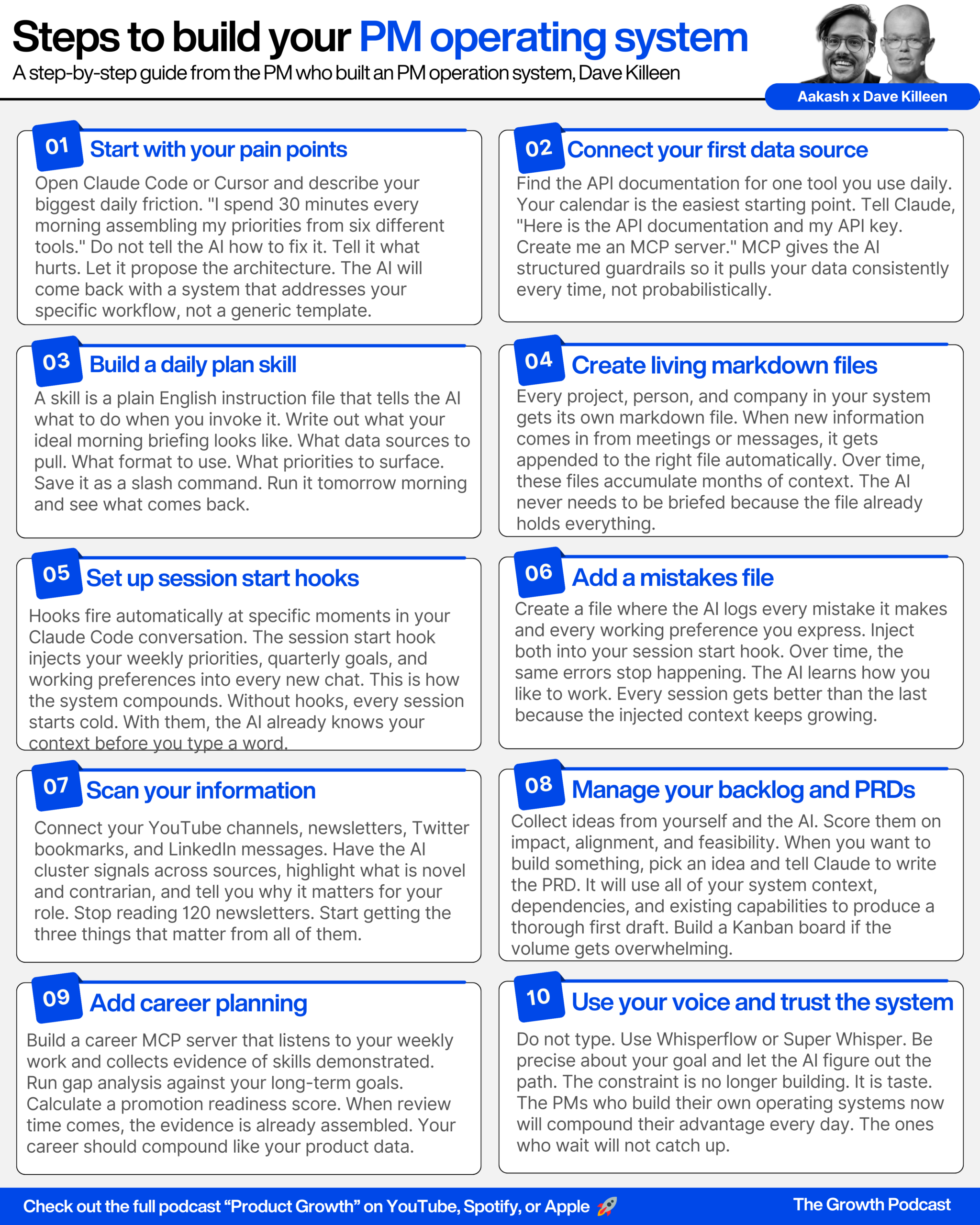
Check out the conversation on Apple, Spotify and YouTube.
Intro (0:00)
Aakash: Cloud Code just hit a $2.5 billion run rate and people are using it to build personal operating systems that run their life. So I run one command in the morning and five minutes later I know what deals need attention, who I’m meeting, what I owe them, and what they owe me. And I didn’t gather any of it, the system does it all for me.
You’ve had human executive assistants. You say this is better?
Dave: Yeah. It never forgets anything. It never needs to be brought up to speed, and it operates at the speed of our conversation. Everything compounds. All the files get smarter and smarter. They’re living files. The more you dance with them, the more useful they become for you and your AI.
Aakash: Dave Killeen. He has worked at BBC, Mail Online, and now he is the Field Chief Product Officer at the PM giant Pendo.io. Over the last four weeks, everything’s shifted so much with Anthropic and OpenAI now as of this week, that your mind is always now racing with lots of other things you can be doing and building upon, and it’s just crazy times. The mobile app that I have was built in 37 minutes. I spent more time in Xcode trying to get it published onto the phone, but the whole guts of it was there. It is crazy, Aakash.
Aakash: So we’re hyping it up. I have to ask you, what’s overhyped versus underhyped in AI tooling?
The daily plan command (1:47)
Aakash: Dave, welcome to the podcast.
Dave: Hi Aakash, delighted to be here. I’m looking forward to showing everyone how I’m using Claude Code. Let’s not waste any time.
Aakash: Dave, can you share your screen and show us what happens when you wake up in the morning and open Claude Code?
Dave: Hey there, can we do a daily plan for the day today, please? Thank you. Love you. I always say love you because I do think it changes how we feel about our AIs, particularly when we’re using voice to text.
So what it’s going to do is go through and pull everything together. We have a daily plan command here that’s baked in with a whole bunch of goodness, which I’ll talk about in a second after it pulls everything together.
It’s looking at a whole bunch of material. It’s looking at my calendar, which is connected. It’s looking at my weekly goals, it’s looking at my quarterly goals. Literally in sync and pulling everything together. It pulls in all sorts of data coming from Clary, our sales forecasting tool, coming in from Granola. All meetings from Granola come in 30 minutes after the meeting’s happened, and everything gets pumped in here.
You can see down here at the bottom, YouTube intel, LinkedIn intel, email newsletters, a whole bunch of stuff now is coming through, and we’ll have a daily plan page in a sec.
What app is this? (2:55)
Aakash: What are we looking at here? What app is this? I’m not familiar with it.
Dave: This app here is Cursor. And it’s where I’m doing my work at the moment. To be honest with you, Cursor is a great place to start for people, because what you have here is a development environment for engineers, typically, but we’re seeing an awful lot more people coming into Cursor now to do non-engineering work. Particularly around creating their own personal operating systems, because essentially it’s just a bunch of text files.
If you look over here on the left-hand side, there’s a whole bunch of noise. Quite frankly, I don’t even need to know where anything is. You’ll see the whole power system here, inbox, projects. I never look at any of it. I just trust that the AI knows where to find things.
Everything’s a text file, and that’s what’s so good about it. Everything’s a markdown file actually, which is even better for the AI to dance with. Everything comes in as markdown files, appended to existing files, or new files are created, and then the AI is able to do its dance and its shenanigans with you.
How MCP servers connect everything (3:51)
Aakash: And you mentioned that it’s connected to all these systems. How are they connected? Have you used MCP connections, API connections?
Dave: Typically what I do, MCP is better for AI than the APIs. So sometimes if I’m trying to get an integration, as we were doing recently with Clary, our sales forecasting tool here at Pendo, I’ll just go to the API documentation. I’ll tell Claude through voice, “Hey, can you have a look at the API documentation for this? I’ve got an API key for you. Create me an MCP server.”
The reason an MCP server is great for this is because it actually acts as better guardrails for the AI to do a more effective dance with the content and bring it in in any way you want. You could literally go in and point it at API documentation and say, “Hey, look, we’ve got this system, knowing what you know of having read the API documentation, how can we make it even better? What could we do? How can we go to town with this?”
And literally it comes back to you and just delights you with lots of other use cases that you might not necessarily have thought of, because it’s literally just ingested all the API documentation into your system for you, so it can then get some sense of how to build more value for you on top of what you already have.
Voice-to-text tools (4:46)
Aakash: And we obviously see that you’re not typing, you’re talking. What app are you using for voice to text?
Dave: I’ve been a fan of Super Whisper for about three years now, but actually recently now Whisperflow.AI have come on the market. They’ve got a whole tonne of funding, about $80 million. So it’s increasingly going that way because they’ve got a whole team, a massive team behind it, rather than Super Whisper, which is just a one-person company right now. And I’m finding I’m getting a lot more out of Whisperflow.
Whisperflow is kind of just press a button, talk to it, and then it just gives you back what you need. And Super Whisper is really interesting because it has these different modes. You can have a mode for giving feedback on a Google Doc, a mode for writing an email, a mode for Slack message. Essentially it knows what software it’s in, and it’s able to invoke that mode. Each mode has its own prompt, saying, “Hey, take whatever I’ve said and turn it into a short Slack message and put a suitable emoji into it.”
So you can craft those modes with Super Whisper, which is quite cool. But Whisperflow seems to be now the one that has the most adoption.
Aakash: I made the same switch just recently back over to Whisperflow.
Daily plan output walkthrough (5:43)
Aakash: So let’s take a look. How did this daily plan command do?
Dave: So here’s our daily plan, or the one I have, and you can tailor this however you want to. It comes up with my three things that matter today. I’ve just redacted some of the information here, which is what’s so nice about working with something like this. It’s malleable software.
I’ve gone in here and said, “Look, how the hell do I show a PKM system to Aakash and other people without revealing anything sensitive for Pendo?” And I said, “Look, if there’s any company names, any people, any projects that are sensitive, any dollar data, just redact it for me.” And it’s done it. This is how easy it is now to work with this software. Just tell it what you want, tell it what you want improved, and it just does it.
So back to the daily plan. We have three things for the day. Just looking at my core quarterly goals that I have in here, pushing forward on all of that. Gives me my week’s priorities, which I’ve set at the start of the week, and then what my day should be. And then it even offers up to book that time out in my diary if I want to. So that’s pretty cool.
And then it’s looking now at some of the accounts that we have here at Pendo, and where my help as Field CPO might be needed, because it’s listening to all of our conversations with customers, and it’s pointing out for me, at least, where I need to be leaning in. I can’t be across 45 enterprise deals every single week and what’s happening at the nuance of all those deals, but it can for me, and then say, “Hey look, you might want to reach out to one of the team here.” It even writes me the Slack message to send to the team. So it really is quite powerful.
YouTube and newsletter intelligence (7:00)
Dave: YouTube intelligence looks at all of that, gives me a summary. I don’t want to be listening to 100 YouTube channels. I can’t, quite frankly, no one can. All I do is I have it say, “Hey look, what’s new, novel, and contrarian, and then tell me what I should be looking at,” and cluster all that across not just YouTube but newsletters as well. So that’s pretty cool.
LinkedIn intelligence (7:12)
Dave: LinkedIn, I’m doing a lot of outreach obviously on LinkedIn. Are there any people that I should be connecting to that have reached out to me, that are maybe even connected to existing accounts here at Pendo?
Aakash: So just to clarify, this is actually accessing your LinkedIn messages, cross-referencing that against your CRM to understand who you should be responding to?
Dave: Absolutely. I use a tool called Phantom Buster for that, and it’s helpful for me to pull that through. It’s working really nicely now. So it helps me keep on the front foot and make sure that I’m mindful of key people that I might otherwise miss.
And then down here, market intel signal from just other newsletters. I’ve got like 120 newsletters and everything will come in here and tells me, here’s why this matters. Here’s what you should be thinking about, and here’s why it’s different. Here’s a contrarian novel angle. It’s just such a breath of fresh air.
As Karpathi said recently, it’s just so hard, more than ever before, to keep on top of what’s going on out there. Having some system like this that you can just have a chat and craft, and then have these cron jobs, essentially automations that run for you, is just bonkersly helpful.
The X-ray skill (9:07)
Aakash: All right, so we were looking at this daily plan, and it was going to tell us about how it actually works. What did it result in?
Dave: What I’m going to do instead is just issue the X-ray command itself.
Aakash: The promise of skills is that they’ll get invoked, but actually you generally need to use a slash command or say “use X skill.”
Dave: Exactly that. So here is the X-ray command in action. We’ve asked it to tell us how the daily plan is being pulled together, and the X-ray skill itself has been told to do its storytelling through mermaid diagrams.
If I just pull this up here, you can get some sense of how that is working. It will check yesterday’s review, read all of the intel digests, generate what’s missing, pull structured data together from the MCP, and then from there give you what you need.
So essentially what it’s going to do is see, before it does its daily plan, what files have already been populated. Has it actually done its intel on LinkedIn, on Twitter, and brought all that stuff in? If it hasn’t, it will then execute it. That in itself is really helpful to get everything pulled in every day.
And then the next stage, it will pull in all of my commitments, all my tasks, all my weekly priorities. And again, all that then gets injected into every fresh chat, which is fantastic.
Ads (10:13)
Account health score skill (14:17)
Aakash: So what is the next command you might be running with Claude Code in your day?
Dave: So now we’ve pulled the daily plan together and we have a plan for the day. What I’ll then do is have a quick look to see if any of my accounts have moved over the last 24 hours with the AE team here at Pendo. So I’ll go in and do the following. “Can you give me a health score, please, for the accounts? Thank you.” And that will then invoke the next skill, which is the health score skill.
Aakash: So this is another skill that you’ve created, health score. Part of the key to an operating system is having these compounding skills that Dave is talking about. You create a first draft with AI, you prompt it, you keep improving those skills, and now he has like an account health score skill.
Dave: My second skill for the day then is just having a quick check across all the deals that need my attention, where the health of those accounts are at, what I need to be doing, what I need to be leaning into, and how I need to be helping the team. Really helpful having this, and it means I can just focus on where I’m most needed, but I don’t have to wait for people to come to me. I can proactively lean in and do that myself.
GitHub repo scanning (15:25)
Aakash: So we’ve just looked at the account health scores. Now how do we bring in more external information to help us understand what to do?
Dave: What I’ve done is I’ve created another skill which basically runs a command, runs a search against the GitHub API every morning, and then pulls in any repos that it finds which connects to the DEX PKM system.
What I’ve got here now in front of you is it ranks everything based on its level of enthusiasm. It’s telling us how it would actually be useful for something like DEX. What it’s calling out here is ScreenPipe, a GitHub repo which basically looks at your screen and is able to pick up other sentiment, other actions you might not have put into your system for you. Bit controversial if people want ScreenPipe running in something like DEX, so haven’t done anything with it just yet.
But the idea here is you’ve got a whole bunch of repos that it’s pulling in and telling you this is why we might want to be using this for DEX and how we could use it, which is fantastic.
And then what I’ve got separately is a DEX backlog. There’s another command in here, and what that will then do is collect my ideas that I’m coming up with, and then rank it based on impact, alignment, token efficiency, all that kind of governance. And then it will also take ideas from the AI as well, and then have a scoring competition, essentially, between myself and the AI.
From backlog idea to PRD (16:46)
Aakash: Can we see that? How do we go from here to what we have raw to a PRD?
Dave: Let’s just pick up this idea here. It’s idea number three, and then I’m going to ask DEX to work on it. I have no idea what it’s going to come up with, but let’s give it a go. “OK, from the DEX backlog, can you work on idea number three please and come up with a PRD for me? I want you to think about how you can make this absolutely brilliant. 10x it. Don’t settle for anything mediocre. Think about something that’ll make this brilliantly serendipitous, massively delightful.”
And I always, by the way, feel like just keep pushing and pushing it and pushing it on your prompt and make it really emotional, and it really responds, I find, particularly Opus 4.6. It gets quite excited with you when you really push.
Aakash: And I’m curious, as a Field CPO, are you writing PRDs? Are you getting that close to the IC PM work?
Dave: No. I think with AI it’s all about the taste. You could go to town and go, “OK, implement the entire backlog here.” That’s just Frankenstein territory. You have to have some sense that this is something that will be worthwhile, but also taste when it comes to the AI coming back to you and saying, “Here’s what we think we could be doing,” and really spotting that element of brilliance from it.
So really for me, you’re just judging at a very, very high level. And then of course it comes into the UI side of things, and you really need to lean in there. But there’s a whole bunch of fantastic applications like Magic Patterns AI that lets you then take that PRD, throw that in there, and it will come up with a fantastic UI for you.
Very much far less than I used to be doing over the last 25 years, for sure, being in the weeds. But it’s fantastic. You’re just orchestrating everything and orchestrating this sense of taste and delight, which is brilliant.
One of the analogies I’ve been giving before is, it’s a bit like we’re all head chefs of Michelin-starred restaurants, and we’re not in the kitchen doing all the gubbins. We literally just design the menu and we have the AI chefs in the kitchen doing it for us. And I think that’s where we’re all at right now.
Taste and when to ship (20:04)
Aakash: And you guys can get a free year of Magic Patterns Pro if you sign up for Aakash’s bundle. All right, so let’s wait for this to come through. It’s fun to see actually what the AI is building because it’s very thorough. People are used to, “Hey, the first time I prompted ChatGPT for a PRD in 2023, it was a garbage output.” But when you’re prompting it for a PRD inside your operating system that has all your context, that has all your MCP servers, you can see it’s doing a very careful job of using all of that information.
Dave: It’s fantastic. I think the challenge you end up having is that you end up having so many PRDs that are kind of being cooked up. And where we get to, and you see this being talked about quite a lot, is a sense of nearly overwhelm in a way, because you go back into it and you’re juggling many parallel agents at the same time. Many PRDs are kind of in flight, and it becomes just difficult to stay on top of everything. The cognitive overhead becomes difficult.
But I can show you in a second, one thing I’ve been building is essentially a Kanban board. So I now have all of my PRDs. I can see what I’ve shipped, and when I go into each of the cards, it has a PRD in there, and I just press play. The AI even ranks everything for me and says, “This is what we should be doing next to move this forward.”
And so again, this comes back to this whole concept of malleable software that you can just say, “I’ve got a pain point here, how do I solve this?” And straight away now it’s built me a Kanban board system that I can then manage everything with a calmer state of mind and a more focused state of mind as well.
Aakash: And people might be listening to this and saying, “OK, it’s automating our job away, we’re one step away.” But I think the key point here is, even if you have awesome cooks in the kitchen, you still need the head Michelin chef exercising taste. So while we’re giving you a lot of tools to create infinite slop, it’s your goal to then figure out how do I refine that slop, find the good stuff, finesse the good stuff, and present that out to your teammates.
The Claude MD file (21:42)
Aakash: So while the PRD is generating, can we take a look at that Claude MD file?
Dave: Let me pull it up for you now. And that trick, guys, that he’s doing there to open preview, make sure you do that because it’s a pain to look at markdown files with all of those symbols.
So here is the Claude MD file. It’s got the DEX product identity. It’s got this really important bit of how to spar with me. Stress test against the ICP. DEX is for people who are not engineers. Check the bloat radar. Is this replacing something, or is it one more thing? It’s just really, really good here.
And then there’s what they call with Claude progressive disclosures. So you don’t want your Claude MD file to be too big. You want it to be nice and short, to act as a map to go off and springboard for the AI into other files where it might need it. And that keeps the performance quite tight and quite effective.
We’ve got a whole bunch of behaviours, a whole bunch of work in progress, how I just basically want to be dancing with the AI every time I have a new session with it.
The Claude MD file is good. It’s not always adhered to. And that’s why I think the Claude MD file is good guidance, but that’s why having session start hooks with Claude Code is super effective, because it means you start that session and it always adheres to whatever is in that session start hook, every single time.
Always lean into your Claude MD file. Go back into Claude, into the AI and just say, “Look, let’s do an audit. You’ve got my whole system here, do an audit on my Claude MD file, tidy it up, figure out how we can do progressive disclosure to make it more efficient. Tell me what we can move into maybe a session start hook if we’re in terminal for Claude Code.” Just have the AI guide you on how to make everything optimal, and then you’re off to the races.
And one thing I will warn you, because I’ve done hundreds of iterations on my Claude MD file, push to GitHub so that you have a version controlled version of your Claude MD file, because there have been many times that I’ve seen a regression in my Claude MD file performance, and I wanted to revert back, and you’re only going to have that if you’re pushing to GitHub.
PRD output review (23:50)
Aakash: So it’s completed the PRD. Can we take a look at that and honestly judge it?
Dave: Let’s have a look at it. It’s got some dependencies. It’s recognised that there’s some other stuff by Toby, the founder of Shopify, came out with something quite good called QMD which is a repo on GitHub that allows you to have really token-efficient search within your laptop, essentially. So I’ve been playing around with that at the moment, so it recognises that there might be some overlap with this particular capability that we’ve already worked with.
Aakash: As a CPO, if some PM on your team gave you this PRD, what would you rate it?
Dave: Right now there’s nothing commercial on it, which is missing, but DEX is open source, so arguably that’s why not. But I want to know strategically, commercially, what are we doing here, rather than kind of fixing a pain point for a user. What exists today? This is good, because it’s telling you the last thing you want to be doing as a CPO is kind of having your team increase more bloat into the system. So saying there are other things that we can actually leverage, which is great. Other components, QMD I just mentioned, it’s good. Starting point, but you might want to kind of use this as a way to get a bit tighter on what those metrics actually are, how you’re measuring it, what the baseline is. Non-goals, that’s good.
Aakash: So overall, I feel like it’s a strong first draft, but it needs editing. Let’s pretend we’ve edited it.
Dave: On that point about it being a strong first draft, to be honest, what I’ve been doing over the last few weeks is not even going into PRDs. I’m just accepting it. Literally, I’m vibe CPOing or whatever. Because typically, it just is on the money, and the AI is able to work out the edge cases and build things for you. So I wouldn’t even waste time going into the PRD, to be honest with you. I mean, I’m in a luxurious position, I’m building software which doesn’t connect to anything else commercially. But typically it is good. So I would just try and play, build things yourself away from work, and see how those PRDs that are given to you are actually good enough to start building with.
Kanban board for managing PRDs (25:02)
Dave: Let me show you now what I’ve been doing, because a lot of people are saying to me, “Look, I don’t want to be in Cursor, I don’t want to be in terminal, but I really like the idea of having files on my computer that the AI can dance with.”
So I went in, I spent three hours last week, literally three hours, and I said, “Look, can you create me this experience where I can actually access these files in a web UI?” And it’s built it. That’s what this is. I’m currently working on it, and it’s good. It’s kind of quite concierge-like. It’s telling me what I need to be doing next.
And then the piece that was getting crazy for me was all of these ideas, all the backlog that you just saw. Is it too much? So now I’ve got all of these ideas here. Everything’s in here. It’s all ready to go. The PRD that you saw will be in here. It’s even scored it in terms of points. It’s crazy. I mean, I’m just adding features in, and it’s being really helpful for me to get some sense of what should I be working on next.
I’ll just go down here, have a chat with it, say, “Right, go build.” And then when it starts building, I then pick up something else. Go build, go build. And so you have these things then working together in parallel, where they’re building separately.
Aakash: And what are we looking at here? What software is this?
Dave: This is just sitting on localhost. It’s all React. I might build like maybe an Electron app, I might distribute it that way. I’m thinking I might have maybe a mobile app. But the thing is, all I need to do is go in and have a chat, and the whole thing’s built.
The mobile app that I have was built in 37 minutes. I spent more time in Xcode trying to get it published onto the phone, but the whole guts of it was there. So it is crazy what you can do now. You just have the chat, have your taste, and then guide it along.
Article editing and annotations (27:34)
Dave: The other day I was doing an article, and I was trying to work with AI to kind of edit it for me, and it just turned the article into a complete mess. And so I said, “Hold on a second, let’s build it up.”
So now I can go in here, imagine this is the article. I go into edit mode here, I go in, highlight this, and I basically annotate it and say, “Look, I don’t want this piece in here, change it.” For my annotations generally, imagine this was like a YouTube summary of something, or my Intel Digest coming through from market movement. I can go in here and say, “Oh, this is really interesting here,” let me just go in and annotate this. And when I annotate this and give it a tag, I can then chat with my tags. “Show me the key metrics I’ve seen externally.” That might not be for everybody, but it’s how I like to work.
And then I can just chat with that subset of content. Create content based off of it, create a report based off it, whatever I might want to do. But you have this way now of dancing with your thoughts as they come through, as you form them. And that for me is the idea of me being able to build this software for however I want to work, and play with it and say, “Actually, it’s too much, kill it please.” You’ve got that freedom.
Career planning with the career MCP (28:38)
Aakash: So we’ve walked you guys through the daily plan, PRD creation, the Claude MD, the Kanban board. This is the lifecycle of a lot of the PM work we’re going to do. But we promised you an operating system. An operating system is also going to help you with your career, with your goals. Can you show us how the operating system can help with that?
Dave: So what I’m going to pull together now is just to show you how the career planning piece works. A lot of what we do is we’re very good at shipping features, all of that, but we don’t really look after our own personal roadmap so much.
What I wanted to pull in here was this ability to actually look holistically at your longer-term career goals, your annual reviews, any of the feedback you get. It gets collected through DEX into a feedback system and gets matched up with where you want to be in the conversations you want to be having at the end of the year coming to review time.
But at the same time, you want those longer-term goals to connect into your quarterly goals and your weekly planning. So there’s an MCP server in here, which is called a career MCP server, which I just went in, had a chat, said, “Build me this server. I want to make sure there’s a nice tight logic.” And as an MCP server, it’s making sure it happens.
Let me quickly show you through X-ray. I’ve just done an X-ray on the career MCP and what it’s now doing is showing me how the whole thing works. Essentially what it will do is scan for evidence. So as I dance with the AI every week, it’s listening in for evidence to hoover in, whether it might be Granola transcripts or whatever, to bring that in so that evidence compounds over time.
And it’s now looking at skills gap analysis. Based on what evidence I have, the gaps I need to close, it’s coming up with guidance on all of that, and then looking at a promotion readiness score at the end of all of that.
Ads (31:00)
Career goals laddering (33:09)
Aakash: And so that resonated with you? You felt like that was on-point feedback?
Dave: Yeah, it was absolutely. I mean, I’m mindful of it, but what’s great there is when you go into your weekly plan, you just do your /weekly-plan, it’s able to say to you, “This is what I think you should be doing. Based on what I’ve heard over the last few calls, over the last week, based on what you’ve been doing within Cursor with DEX, these are the gaps, and you’re leaning far too much in over here, you need to course-correct, invest more in over here, because these are goals you have up in the next eight to nine weeks. You need to pull your socks up on these areas. Here’s how I suggest you do it.”
It’s just brilliant. It’s bonkers.
Skills vs MCP vs hooks explained (33:42)
Aakash: Can we show people what’s the difference between a skill and MCP and how you’re going to use those?
Dave: Skills, as we saw earlier, sometimes they get invoked or not, and it’s a bit like the Claude MD file. It just misbehaves sometimes. But a skill at its core is essentially a job description that you give to your AI. It knows what those steps are to do once you can issue a skill. They actually call them commands now at Anthropic. Skills and commands have come together.
What you have is on the left, that job description, plain English instructions on what to be doing. And then MCP is very different. MCP is those guardrails I’ve talked about before, where it tells you how to be interacting with other services, what steps to be following. It’s just far tighter and making sure that things are a lot more deterministic and far less probabilistic in your system.
So what I’ve done is I’ve created a task MCP server, because I want my tasks to be created in a consistent way all the time. I always want to make sure the AI is knowing to look for certain pillars to attach my tasks to, to look for certain projects that are connected to those tasks and infer what projects they are. If you did it with a skill, it might not necessarily always follow those steps. MCP on the other hand makes sure that it always, always happens.
Creating a skill from scratch (35:13)
Aakash: If somebody wants to create a skill for themselves, how do they do that?
Dave: Good question. Let’s go and do one. “Hey, I’d like you to create a skill for me that would look at pulling in all the GitHub trending repositories that you’re collecting in that repository MD file, and would then take them and recommend the top 10 to me every week from the last week, and then I will then invoke the skill, and then you’ll give me everything and tell me exactly why you think these repositories are useful and worth our time looking at in the context of the DEX operating system.”
And it’s literally that simple, just have a chat with it, and then it’s now going to create the skill file itself.
It’s just crazy. I normally sleep very well. Over the last four weeks, everything’s shifted so much with Anthropic and OpenAI now as of this week, that your mind is always now racing with lots of other things you can be doing and building upon. It’s just crazy times.
OK, here’s a skill file. It’s now pulled everything together, it’s worked out all the steps. It’s telling me what information to be pulling in, and it’s now applying the filter. It’s literally, you can see, it’s gone to town on this. I would never know how to create this. I just go in, have a chat with my voice, and it gives everything. It’s come up with a format for me. I mean, I can edit this if I want to, but quite frankly, I can’t be bothered. Everything’s here and my skill is now ready to go, just like it’s been taken out of the oven.
And then to invoke this, just /repo-radar.
Intelligence scanning (36:36)
Aakash: So one of the coolest things I see you doing that other people aren’t is intelligence scanning. Can you walk us through it?
Dave: What I’ve got doing is pulling in, I just went on to the AI and said, “Look, I want you to download YouTube transcripts for these 60 channels, including yourself Aakash. Bring the transcripts into my system, create MD files for each of the transcripts, do the same for all the 50 or so newsletters I follow, and bring all that in, and all the bookmarks I have on Twitter.”
And it brings everything in, and then it clusters everything. It’s bringing signals together from different sources. So you can see Nate’s newsletter here, Chamath, Lenny, and it talks about the same thing but really pulling it together about what’s novel, what’s contrarian about what you’re seeing here, which is really good.
I’m not having to go in to look at too much content, but I’m really getting a good sense of what’s interesting, what’s contrarian, why it matters to me as Field CPO. And I’ve got that coming to me now every single day, which is giving me a lot more comfort that I’m keeping on top of things.
If I want to drill in, I can drill into stuff. There’s other files in my system that let me do that. But right now, this for me is absolute gold.
The compounding system (37:49)
Aakash: One of the biggest differences from using an operating system like this compared to ChatGPT is your ChatGPT conversation just lives in the cloud. Maybe ChatGPT encodes it into its memory, but it’s not a compounding system. What is the thing about this compounding that people need to know?
Dave: Very simply, having all this information come into your files, if you have a project and then that project hears through the system that there’s a new Granola meeting with actions from it, or there’s a new angle from a stakeholder on that call, that gets appended to the stakeholder’s person page, to the project’s page, to the company page if there’s a company connected to it.
So every time the AI then later pulls on that information, that particular entity, it’s going to have all that fresh context. So you have these living files which then just get better and better and more useful for you. The more you dance with the AI, the more the AI dances with your MCP servers.
And that’s the fundamental difference. You’re just chatting to ChatGPT and it’s not got that context. It’s not got that memory, really, that you understand quite what it knows of you. Here, you can just ask it, “What do you know of this particular project? Where are we at with it?” It will know where to look. The AI is fantastic, as of Opus 4.6 in particular, to really be that dependable partner, to lean in and find the right information for you and show you your otherwise blind spots.
DEX improve command (39:03)
Aakash: And you have this DEX improve command in there. Can you walk us through how that works?
Dave: The DEX improve command basically will look at all of the changelog with Claude Code. It will do that once a week for you. But if you trigger it like I triggered it here, you will then do a search and see what’s been released from Anthropic over the last ten days. And then it will also look at anything going on on Hacker News, in Reddit communities. It’s quite frankly bonkers.
With that then, it scans all of that and says, “OK, I’ve done all my homework, now what do you want to do? Have you got an idea, Dave? Or do you want to just find out what’s new? Or do you want me to have a full audit of the entire system? How should we dance together here?”
And I’ll just say, “Look, tell me how we should go about adding extra capability in here. Anything released from Anthropic over the last month that we should be aware of.” It then does all its work and comes up with all of this. New capabilities have come out. I now don’t have to check anything. It’s all coming to me, and it’s telling me why it matters for DEX and how we can be leveraging it. And now it’s saying, “Right, this is what we should do in this order. These are the items we should work on first. Would you like me to build it, Dave?”
Honest to God, it is madness.
Hooks deep dive (40:11)
Aakash: So what we’re doing at this point is we’re deep diving on the critical topics people need to understand. We just walked them through the compounding system. The next one is hooks. I see a lot of people getting this wrong. What do people need to know about hooks?
Dave: First of all, make sure that you’re using Claude Code in terminal or on Claude Code desktop, because hooks that we’re about to go through now are only available there. They’re not available in Cursor.
Hooks are magical and really change how you use Claude Code. Hooks basically get invoked at different parts of your chat with Claude. I use the session start hook, because I want basically every time I go into a new chat, I want that chat to be primed with the right context.
As you mentioned earlier, there is a Claude MD file, but it’s not that dependable. Session start hooks are like the guarantor. Make sure that every single moment you’re having that new chat, the right context comes in.
So it will then have my strategic pillars, it’ll have my quarterly goals, it’ll have my weekly priorities. Straight away it knows what I’m doing and how I’m connecting up, has all my tasks, has working preferences.
So every time now I go back into Claude and I’m having a back and forth with it, if ever I say, “Hey Claude, you bloody idiot, why did you do that?” it can pick that up, it can listen for that and inject that into a working preferences file, which compounds over time.
Likewise, anytime it makes a mistake and it sees it makes a mistake itself, I’ve got a mistakes file which it writes to, and it’s unbelievable. All of the mistakes we’ve had together, that also then gets injected so those mistakes don’t happen again.
So everything then just compounds and gets better and better. A bit like compound engineering for engineers, that’s kind of using an awful lot of Claude Code hooks. I just felt from a first principles point of view, how can we use hooks for knowledge management to make sure that our personal knowledge management system gets smarter the more you dance with it, and that’s what hooks are.
Getting started with DEX (41:47)
Aakash: So we’ve walked people through the system. At this point, they want to know, how do I make this mine? How do I get started and onboard into it?
Dave: Everything’s up here in GitHub, has been out there for a few weeks now, and it’s getting a tonne of traction. Essentially it is for non-engineers, and it’s fairly straightforward to set up. You go into this section here, it will take you through step by step, written for non-engineers on what you need to do. This might look a little bit messy, downloading Node.js and all that gubbins, but ultimately just follow the steps. It’s very straightforward, and then you’re up and running.
Then when you’re in the system, whether it’s in terminal or whether it’s in Cursor, I’ll quickly now move over back into Cursor and show you then how to get that set up there.
So all I’ll just do, I’ll quickly do onboarding. You take that repo URL from GitHub, throw that in here once you’ve set up your Cursor to be able to do this kind of thing. Instructions are on the repo. You download the whole thing. It creates a folder, pulls essentially all the source code down.
Then open all that up, and now you’re in your version of DEX. It’s now all your own. You can see all the files over here, all pulled down. And simply then, you just go through and type in /setup, and then you’re off to the races.
Once you do that, it will guide you through, ask you for your name, ask you for your role. I think there’s about 30 roles or something in here. And depending on which role you have, from CMO to CEO down to whatever you might be doing, then it will unfurl the scaffolding around that, and then get you all set up.
It will listen in for your calendar. It will listen in to see if you’ve got Granola in here. And then you can also integrate then your Gmail and other sources of data as well. So within about five minutes, you’re set up. It’s going to know where your Granola meetings are, if you have Granola, and it will then know what your calendar is and so on. All that gets pulled in, and then just guides you through setting up your goals, setting up your weekly plan, and all of that, then you’re off to the races.
Claude Code vs Cursor vs Cowork (44:00)
Aakash: So we’ve walked people through Claude Code. When should people be using Claude Code versus Cursor versus Claude Cowork?
Dave: Depending on where you’re at. I think starting, definitely start in Cursor if you can, and don’t be intimidated by it. Don’t worry about that messy left-hand rail of the files. Just trust the AI to file things the way it should be, and you’re pretty much good to go.
Then if you want to take advantage of making sure that those hooks can be used, and the system improves and gets better and better over time, move yourself into terminal. On Mac, Ghostty, I think it’s called, is really good. It’s a cleaner terminal, it feels nicer. There are other terminals out there outside the Mac terminal.
But get into terminal and start talking there. What I hope to have out soon with DEX is that Notion-like kind of UI that you saw earlier, where it gives you that file system on the left, the chat in the middle, and your files on the right to look at. And I hope that’ll come out in a few weeks’ time for those less technical that don’t want to go in there.
But just try to get comfortable with it, because it’s a space I think we should all be playing in. And quite frankly, I think we should be spending probably more time in here than we do in the likes of Slack.
Pi and Open Claw (44:58)
Aakash: You have been experimenting with the system that Toby Lutke, the CEO of Shopify, made called Pi. Should people be using this?
Dave: Pi’s fascinating. I don’t think people should be using it themselves, but I definitely think people building should be looking at things like Pi.
What’s interesting about Pi, so Open Claw is built using Pi, and essentially it’s a very lightweight agent harness. Manus got recently purchased by Meta for quite a whack. And what Manus was letting people do was talk to AI in a far more effective way, but leveraging OpenAI, leveraging Claude, leveraging Gemini. So it had other LLMs behind it, but because of the way it orchestrated its agent harness, it was giving people a far better experience in Manus than if they talked directly to the LLM in Gemini.
Pi lets you build essentially a Manus. For example, when you go into Pi, if you want to change how it all gets booted up, if you want to change the UI of how it looks, you can do that. So you can essentially build on top of Pi, which is open source, and create your own Manus.
That direction is where I want to go, because I want people to be able to build on DEX and through DEX without having to use Claude specifically. I could just go to Pi and say, “Hey, look, I love the idea of session hooks or Claude Code hooks. Can you just build that logic in for me please?” And straight away you’ve extended Pi, they call them extensions, to be able to give you the capability that Claude will be giving you in Claude, but actually through Pi, where you’re neutral, like Switzerland, in terms of LLMs. You can then let people plug into whatever LLM they want.
The biggest mistake people make (46:25)
Aakash: What is the biggest mistake people make when they first start using Claude Code?
Dave: Not knowing what they want from it. It depends what your use case is. I’d say going in and just jumping in if it’s your first time, and just saying, “Hey look, this is my job, this is my friction, these are my pain points. What do you think we should be doing together to make them easier?” Just flip it around, reverse prompt it. And ask it to come up with solutions for your pain. And start there.
And I think you’ll find it really interesting. The other day I was like, “I want you to build or create a source to pull in all these YouTube transcripts for me.” I didn’t know how to do it, but it did. It figured it out. It’s got access to search.
So just tell it what you want, have a chat, use your voice. Do not type. And I think you’ll be off to the races in no time. Be very clear what your goal is when you’re talking to the AI. Don’t be vague about what you want it to do. The kindest thing you can do to the AI is give it a very clear goal. If you give it that, it’ll work out how to get there. Don’t tell it how to get to a place. Let it figure it out itself, and it will do it in the most elegant way possible, as long as you’re clear and precise and sharp with your goal.
Anthropic, the developer console, by the way, have a really cool thing called prompt improver. Prompt improver, and baked into DEX, is a way where you give it a kind of a vague prompt, and then it turns it into a really good precise one. And then the AI has a far better dance with it. So in DEX, what you’ll do is go in here, do /prompt-improver, give it the crappy prompt, and then it will turn it into a good one, inject that into the chat, and then you’re off to the races.
How AI has changed product management (47:53)
Aakash: So you’ve been in product management for over 25 years. How have tools like Claude Code changed the role?
Dave: No disrespect to folk I’ve worked with over the last 25 years, but I kind of feel this way. As a product geek, when you’ve got lots of ideas, you’re nearly half the battle is trying to convince others of them and get the investment in particular to get them built.
Now that’s gone. Now you just go in and talk to Claude. And if you have the right Claude MD file where you’re saying, “Make my ideas 10x, do not accept mediocre,” everything we just showed you earlier, then you’re working with the best person you’ve ever worked with. No disrespect to others I’ve worked with in the past. It takes it up to a whole new level of brilliance.
And so that’s what’s changed. That’s why it comes back to your point that we have to have that taste. We have to have a good sense of where we want to steer our dances with Claude or with AI.
But there has never been a better time to be a product geek. The hardest thing for us is storytelling. And now we can build these prototypes quickly, whether it’s Lovable, whether it’s in here or whatever, and take these out to customers, get willingness-to-pay data back from them, validate our assumptions as fast as quickly as we can, and get the buy-in from our exec to go and build.
And that is just hair on the arms, quite frankly. There has never, ever been a better time to be a product geek.
What is overhyped vs underhyped (49:02)
Aakash: So we’re hyping it up. I have to ask you, what’s overhyped versus underhyped in AI tooling?
Dave: I’m going to answer in a bit of a weird way. What’s hyped, Open Claw. What’s underhyped, Open Claw.
Literally. Because everyone’s going, “Oh my God, this is amazing.” If you watch Alex Finn, amazing podcaster, he’s hilarious. And it’s just, he’s off the extreme of excitement and enthusiasm. He’s spending tens of thousands of dollars on Mac Studios and crazy stuff.
But at the same time, there’s something in it. And I don’t think, I think most people in product are so busy and don’t have the time to be leaning into AI. They really see it as just not that useful.
And I think what we’re seeing with Open Claw is a fundamentally different way of working with data. That level of persistence, that length of memory, and it being yours. Models are going to get smaller and smaller where they’ll sit on device, and we won’t have to be talking to the cloud anymore.
So I think we’re seeing something really interesting happening with Open Claw that I myself want to spend a lot more time working with, because I think it’s directionally fascinating in terms of what kind of business models it opens up, what ways of working that it opens up and changes. Security, there’s an issue around security right now, but I think if you do it in the right way, it’s fascinating.
Kimi, just recently, for $39 a month now you can go to Kimi.com and open up Open Claw hosted in a browser. And it’s just fascinating what’s happening in that space. Which is why, obviously, Sam Altman’s put down allegedly a billion dollars to Open Claw to get them on board.
Aakash: The man who predicted a one-man billion-dollar startup ended up buying one.
Closing and next steps (51:02)
Aakash: So we have walked you guys through end to end what it looks like from a daily plan to knowledge scanning across the web, to PRD, to Kanban board, through to skills, MCPs, and hooks.
You now have enough information. Stop watching, start doing. Clone the repo like we just showed you. If you prefer, you can take my Pi operating system. There are other resources out there. You can build your own from scratch after what you’ve learned.
The most important thing for you to do is take a little bit of time to try out these tools. Even if your product leaders haven’t given you access to these internally and you can’t connect to your internal MCP tools, go build a side project. Try this out.
This is not hype. This is coming from somebody with 25 years of experience. You can see how enthusiastic he is, how he has embraced the tooling. There’s a lot here, even if you’re not working on AI products, if you’re not working on AI features.
If you need a little more guidance, I have a couple more guides with Carl Vellotti, with Rachel Wolan, with Caitlin Sullivan on this podcast. I have a couple of guides in my newsletter. Go check out those extra resources if you need.
Dave just mentioned Alex Finn. He’s a great resource on YouTube and Twitter as well. Take advantage of all these content creators, build out a system, and I guarantee you, you will find some value out of it.
Until the next episode, we’ll see you later.