Check out the conversation on Apple, Spotify and YouTube.
Introduction (0:00)
Aakash: I run my whole day out of Claude Code and Cursor. These are my AI superpowers, and I’m encouraging my entire team to use them. This is Rachel Wolan, the Chief Product Officer at Webflow, the $4 billion web giant used by companies like TED Talks, SoundCloud, and even Reddit.
Rachel: So it’s almost like having a data scientist in my pocket. I think this is the art of building amazing AI native products. It gets rid of a lot of the junk in my inbox first and then it will actually create drafts for a few people that it thinks they need to actually send emails to. And I think that’s the one thing I would say about a lot of like building an agent is trying it out and then going and adjusting what you want the agent to do.
Aakash: This is the roadmap to becoming a great product leader. There are tons of tutorials about Claude Code and Cursor for IC PMs, but what about leaders? Today’s episode is a masterclass.
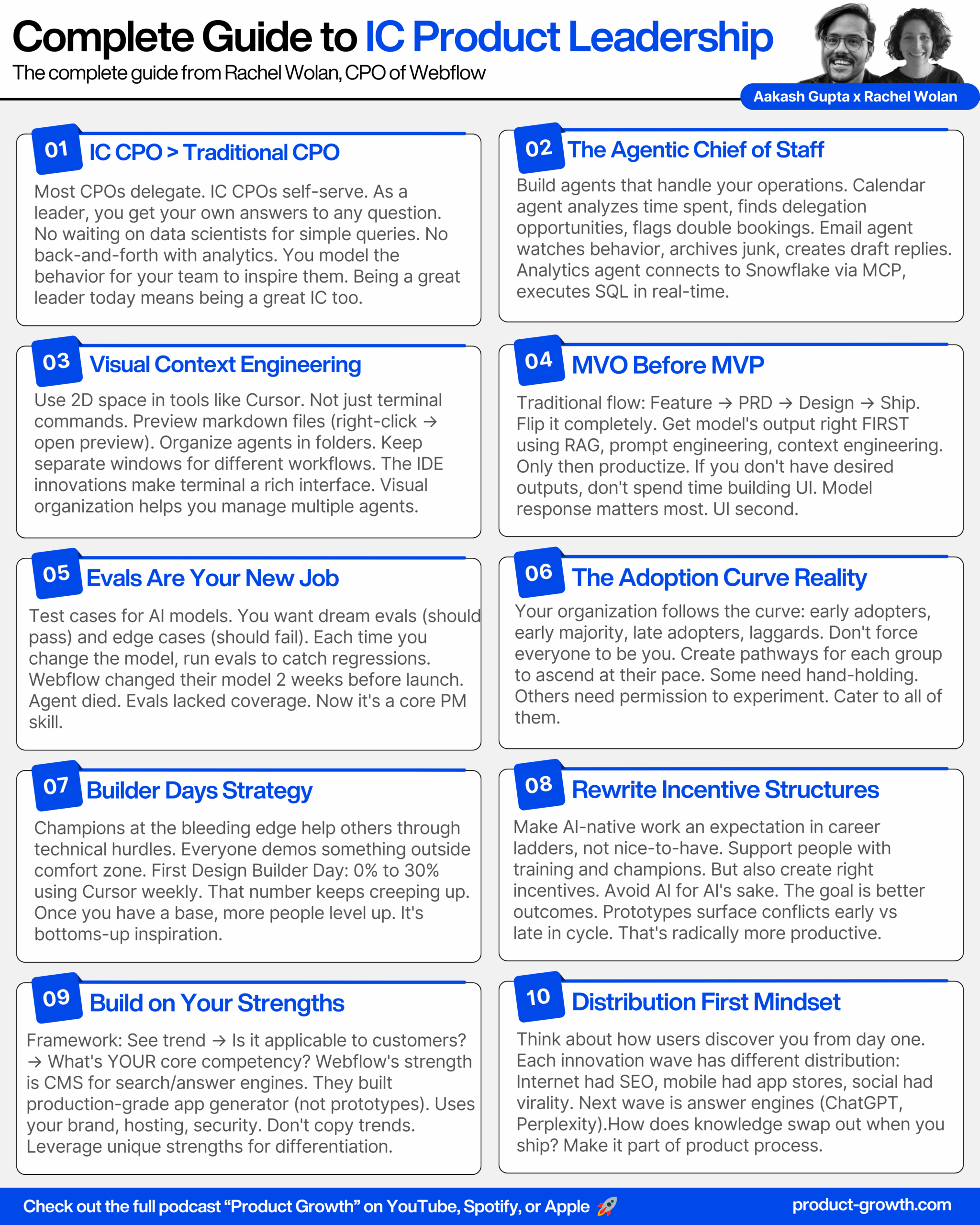
Rachel: What is this concept and how can CPOs effectively do IC work? To me, IC CPO means as a leader you are able to get your own answers to practically any question.
Aakash: We’ve just showed all these amazing workflows. How do you set up your organization to work this way?
Rachel: I think one of the things I would first assume is that…
Aakash: Really quickly, I think a crazy stat is that more than 50% of you listening are not subscribed. If you can subscribe on YouTube, follow on Apple or Spotify podcasts, my commitment to you is that we’ll continue to make this content better and better. And now on to today’s episode.
What We’re Covering Today (1:30)
Aakash: Welcome to the podcast.
Rachel: Thanks, Aakash. Great to be here.
Aakash: What are we going to do today?
Rachel: We are going to go through some of my workflows, my agentic chief of staff, and a bunch of different ways that I use Claude Code and Cursor, and then I’m going to walk you through what it’s like to actually build AI native products in the wild, and we’re in the middle of getting a new codegen product ready to go. And so I will walk you through the good, the bad and the ugly of trying to get a new AI native product out into the wild and into our customers’ hands.
Aakash: Awesome. So, as you alluded to there, there’s really two sides to AI product leadership. There’s being a productive AI product leader and there’s shipping AI native features. So in the productivity bucket, let’s start here at this concept of IC CPO.
The IC CPO Concept (2:16)
Aakash: What is this concept and how can CPOs effectively do IC work?
Rachel: Yeah, so, to me, IC CPO means that as a leader, you are able to get your own answers to practically any question. And if you stated that as a goal, then you kind of have to work backwards and look at how do I make sure my data is in shape, where I, as well as anybody else on my team could go and self-serve answers, and that is a large task to undertake. I can tell you that from experience, and we’re still in the middle of that.
I think the second is making sure your team has the right tools for what they’re trying to accomplish and then can even stair step their way up. And then I think the third is really, you know, figuring out how and when to model for your team, not because you expect them to copy your workflows, but you want them to be inspired. I think that part of, you know, being a great leader today is also being a great IC and getting your hands as dirty as you can, carving out time to experiment. And showing your team that it’s OK to experiment and for sometimes it works, sometimes it doesn’t, but that’s part of, you know, like building today.
Claude Code and Cursor Workflows (3:25)
Aakash: Amazing. So, let’s start with Claude and Cursor. Can you walk us through how you’re doing some of this IC CPO activity through them?
Rachel: Yeah, absolutely. So, what I’ve done is I’ve built out what I call my agentic chief of staff, and this is like a combination of a set of Claude Code agents rather, as well as an app that I’m building that I use on a day to day basis.
So, first, I’ll kind of walk you through how I use Claude Code, and this is, by the way, in Cursor, you could do this in any IDE. I also, depending on what my task is, sometimes I will use Cursor and the Cursor agent. A lot of times if I’m like trying to start something, a project from scratch, I will install from Cursor. I will also sometimes use Codex, especially if it’s like a complex type of task where I’m trying to understand content from our mono repo.
And so, you know, I, I basically am running out of terminal for a bunch of different tasks and so what I’ve done is I’ve created a set of agents, and I’m kind of like constantly adding to those agents. So I’ll just show you what like an agent looks like, and this was generated by Claude, and we’ll go through like how to actually generate an agent, but this one is like understanding the priority of a calendar event and trying to decide if it is truly important.
Calendar Analysis Agent Demo (4:49)
Rachel: And so what I’ll show you is like I actually was running this earlier today. And you know, you’re trying to decide is this part of my priorities and then trying to filter out noise and then looking for different types of meetings that are very important, and then also really like this is all generated by Claude, by the way.
And then what I’m doing, so I ran this earlier today, let’s see. Hopefully it doesn’t have anything too crazy in here. And what I, you know, I, I think I looked at this before I got in here. And so what I did was first like I asked it, earlier today, I ran it because it takes a little bit of time. I asked to look at the last two weeks and I said, can you analyze my calendar, like how I spent my time?
So analyze my calendar for the week. How did I spend my time? Where could I have been more effective at delegating, right? So this is something that I do usually like once a week, but I also will run this once a day as well. And then first it kind of gave me like, here are delegation opportunities. These are actually right. I ended up not attending this meeting because I needed to get ready for this podcast.
Funny enough, this is a meeting that usually I do send one of my directs to that is our growth lead. Like this is spot on, right? This is a demo lab that we run, called Alpha Arcade, and I usually don’t end up attending that one. Merge Council is something that I have somebody in my direct team. So this is all like completely correct.
And then it also identified like red flags like where I’m like double and triple booked, you know, it like said, hey, you’re not like your context switching too much. I mean, this is correct, right? And this is something that I give to my EA and I’m telling her, hey, like this is kind of what I’m seeing and we’ll start with this at the beginning of the week.
And then, you know, it also, I also like to look forward at the following week and be like, hey, what can we do to improve things? And, you know, it, a lot of it is like, what do you recommend I should cut for next week? I’m not sure I agree with everything in there, but a lot of this is like a first pass, and it’s organizing it in a way that, you know, makes a ton of sense to me. And so, and this is just from basically running the agent and giving it that one line.
Email Triage Agent (7:03)
Aakash: That’s cool. So you’ve got one of your chief of staff agents. What else are you building around the chief of staff space?
Rachel: Yeah, so, I do the same thing in email, so it has complete access to my email triage. And this is spot on. So basically I asked it to triage my email and I think I ran it a couple of times accidentally. What it does is it gets rid of a lot of the junk in my inbox first, but it will first go through and run it. It runs a triage first and then I tell it what to archive.
So I don’t want like calendar notifications or marketing or systems messages, then it like pins the messages that are kept. And then it will actually create drafts for a few people that it thinks I need to actually send emails to, right? I don’t want it sending emails on my behalf. That’s not the point, but I do think that there are like opportunities to where it’s like an email that’s been sitting in my inbox and sees me, it kind of is actually like watching the behavior in my inbox, and then, you know, ultimately I’ll get into a much, much healthier state.
The other thing that was like funny, I ran it this morning and I had a meeting with someone that it didn’t have a meeting link and I called it out. So it’s like kind of little things like that where maybe there are mistakes, and it’s not typically acting on my behalf, it’s just running the triage for me.
So it recommends it would archive 40 emails, right? It would keep it in the inbox and then I basically say yes or no to go and run those actions.
Setting Up Email and Calendar Access (8:25)
Aakash: This is epic. So how would somebody set this up? How do they connect to their email and calendar to Claude Code and give it access?
Rachel: Yeah, so, I basically set up a token in Google. I’m not going to show you my exact ENV setup, but I basically generated a token on Google Cloud and then I store that in my .ENV file, which is, I’m not going to show you the actual file because it has all of my tokens and I’d have to regenerate them, but basically I have like an ENV file and then that the reason why it has a, this is basically ignored by Cursor, right? This is also ignored by Git.
So, I have this as like a GitHub repo that I maintain, but it doesn’t, this particular file does not get synced, and so there are variables that are in that file and Claude Code like generates it for you. So it’s not, I basically tell it, hey, generate a variable for Gmail, right? And it’ll say, OK, it’s in this file and then it will go, then I go and I generate it on Google in the console.
Analytics Agent Demo (9:30)
Aakash: Awesome. So we got the high level overview. You’re getting your full chief of staff agents. You also have an analytics agent. Can you show us that?
Rachel: I do, and this one’s really fun. So I figured I would show one thing that is more fun. So my wife has a company called Shirts. It is an AI t-shirt design company called Shirts.com. This is my wife’s company. It’s called Shirts.com. It is an AI t-shirt generator, you know, I generated a t-shirt. We’re talking about answer engines. This is, you know, a fun t-shirt I generated for my team because we just launched an answer engine optimization product.
And what I’ll show you in, I assume you can see my Cursor here. The way that I run this is I can actually query Snowflake out of Claude. This is obviously a workspace where we have our website running out of Webflow, then we’ve got a number of different sites that you can see and I can ask you questions about those sites, and when was the last time that, you know, how many HTML blocks, like, what, when was the last time it was published, what features is it using?
And this is really useful for me. You can imagine if I like go into a customer meeting and I want to know what they’re using on Webflow. That is sometimes like not something I want to go and bother a data scientist with. They have lots more important problems than this to go and tackle, but it is useful and it’s something that I want to enable anybody in the team to do.
So, one of the things that I was talking about previously was that I think a big, like my vision for our insights team was to be able to self-serve any insight. That is kind of like an insight where maybe it has a yes or no answer or it has like a very specific piece of data that you’re trying to collect, right? Like in this case, I’m trying to collect information about the websites in this particular workspace for Shirts, right?
And so, like I said, Shirts is an AI design generator, but I’m like, oh, this is interesting that we’re not actually using very much, you know, like, it’s not a very complex site yet. It’s just a very simple vanilla JavaScript web implementation.
MCP Servers and Data Access (11:38)
Rachel: This has been informed by this directory. So, we’ve actually gone and we’ve done a bunch of analysis of all of our models and then we’ve started to document our models. You kind of have to do this in order to be able to get good outputs from your Snowflake when you’re sending natural language queries.
The other thing that I’ve done here is I’ve basically set up MCP servers for Snowflake, for Tableau. Snowflake and Tableau, I believe are not officially supported repos, and I basically, the way that I set it up was I just fed the repo to Claude Code and I’ll, we can put those in the show notes and then I said, hey, I want you to use this MCP server and then all it does is it authenticates with your credentials.
So, it uses my SSO credentials and so I’m not like sharing any data that I don’t already have access to and this is all being done locally and it’s being run through a work, you know, basically through our work Anthropic accounts.
So, you know, I think that’s like a big thing to really be thinking about, what do you have access to, are you trying to give too much information to the model and so a lot of this I think is also like a good exercise in understanding privacy and really trying to think about, you know, how, like when you’re building software even, what information do you want to give to the model and are you comfortable with?
Linear Sponsor Message (13:01)
Aakash: Yeah. You see that right there? That’s Linear. Today’s sponsor. If you haven’t heard of Linear yet, check it out. It is the task management platform that is dethroning Jira. Teams like OpenAI, Vercel, Perplexity, they all use Linear. Why? I had Nanny, the head of product on the podcast, and he explained that those teams value speed. Linear is built for speed. If you have engineers who want to be operating at that next level of speed, you need Linear.
And even if you’re a product manager, you need Linear because Linear has Linear agents where you can call Devin, call Claude Code, call Cursor to complete a task for you. Imagine you have a ticket, you ask an agent to do it, the on-call engineer reviews it and it’s live in production. PMs are getting closer to the bare metal of the product with Linear, today’s sponsor, so check it out at linear.com/Aakash.
Using the Analytics Agent (13:48)
Aakash: So how would you use the analytics agent?
Rachel: Yeah, so the analytics agent is really like a way for me, you know, let’s say I want to understand what, how many sites does Shirts have in its workspace. So I just ask it like a natural language question. And then it’s basically going to go and it’s going to write a query, so it’s using tokens to write that query and then I’ve already authenticated, so it shouldn’t go, it might, the way I’ve set it up is that my authentication, yeah, so it’s already authenticated and it just basically spits back, this is how many sites you have.
So it’s very much like it can act like an agent if I asked it a more complex question, like, help me understand the signup behavior over the last week and a half. Again, that’s like proprietary data, so I probably won’t ask that question on this podcast, but it will pass back to me and say, oh, well, this is how many visitors you have, and this is your week over week behavior.
So it’s almost like having a data scientist in my pocket. And the way that I set this up is I actually have an analyst that I’ve set up that is like a Snowflake, so I have like basically set up an agent that is a Snowflake agent that monitors different trends for me. And so then it, then it can basically go out and this agent can go and like report meaningful changes and discrepancies and so that is feeding into another agent that I’ve set up that allows me to go and analyze what is actually in my Snowflake repo.
Organizing and Invoking Agents (15:35)
Aakash: So how are you invoking these different agents and what is the right way to organize these?
Rachel: Yeah, so one of the reasons why I like to keep these in separate windows is a lot of times, like, for example, I’ll go into the podcast prep because this was kind of a fun one that I did for you, for this. So, what I did was, you can basically pull your agent in, so that’s like one way that you can invoke it. Usually, it picks it up, what I wanted to do, right? So, let’s say I want you to prep me for Aakash product growth podcast, which agent are you using?
And let’s see if it like actually picks it up correctly. It should pick up this podcast prep researcher agent. Nice. So basically just by having the context of the agent markdown file in your agent’s folder in the folder that you’ve opened up Cursor in, Claude can using this. It’s picking this up now, right? Love it. So it just invokes the agent just by having that markdown file there and you just keep them in an agent’s folder. It sounds like there’s not really much else to it.
There’s not much else, and that’s where Claude generates it. So like, for example, we’ll maybe go and generate a LinkedIn post generator, but what I wanted to show you that I thought was pretty cool. So what I’ve also done beyond just like this trick or treating, that’s fun, it’s Halloween. What I want to show you here is this is actually the output.
Podcast Prep Agent Output (16:54)
Rachel: So I run this as like an app. So I know that I am in the middle of a podcast with you and so I’ve kind of built this out as my calendar. I also have like different agents that have outputs. This is the markdown file, so it’s reading the markdown file, and then this is what it actually generated, and this was like the prep work that the agent did for me for this podcast, right?
Aakash: Pretty epic. I mean, it’s pretty industrious. It’s not just doing a little bit, it’s going the next level.
Linear Sponsor Message (17:27)
Aakash: This episode is brought to you by Linear. You know what’s broken about product development right now? It’s not the coding. We’ve got AI helping with that. It’s everything else, the planning, the feedback synthesis, the endless context switching between tools, you’re drowning in PM busy work while the actual product work suffers. Linear started as that issue tracker engineers actually wanted to use, which, let’s be honest, is pretty rare. But it’s evolved into something way more powerful, your entire product development hub.
Their new AI features are a game-changer for product managers. Product intelligence automatically surfaces insights from customer feedback and support tickets. No more manually combing through hundreds of reports. And their AI agents help draft PRDs, scope projects, and handle all those status updates nobody wants to write. Product teams from OpenAI to Vercel use Linear to build complex products at speed. There’s a reason they call it magical.
So visit Linear.app/partners/Aakash. That’s linear.app/partners/AAKASH.
Additional Agent Examples (18:27)
Rachel: So I have a, let’s see, I have a video transcriber. So this is an agent where I will like pass several of your previous YouTube videos, and it will transcribe those videos, and it will pull out context for the podcast session. So I, look, I find it like not easy necessarily to read the markdown file, which is why I created the app for myself. And the app, I’m like kind of constantly tweaking.
I’ll show you like one other version. I went to dinner last night and I prepped myself for dinner and literally all I did for that dinner was I gave it the, I gave it who I gave it like my calendar invite of who was going and then it like generated this amazing, like, this is who is going to be there and, you know, what they, what they have been talking about that went into their LinkedIn and, you know, so to me, this is like what an epic chief of staff would do.
And I literally, like, all I did was I went into my dinner guest research and I invoked the agent and it generated that.
Building an Agent from Scratch (19:26)
Aakash: All right, so you just walked us through the analytics agent. The next thing is, can you help show us from scratch how we would build an agent together?
Rachel: That sounds great. Now I’m going to create a LinkedIn post generator. OK. I have to create a lot of LinkedIn posts. I have a custom GPT, but I do think that this is like a new agent where it would be a lot easier if I just fed it a bunch of content, and so I’ll show you the way that I think about doing this.
So, all you do is go into agents, you manage your agent configurations, and then I’m going to create a new agent. So, this is literally just walking me through this and then I’m going to give it access to the whole project, you can give it less access, but I’m just going to give it access to the whole project and then I’m going to use Claude to generate that agent.
And I wanted to write a LinkedIn post and generate a meme image using OpenAI image gen model. Maybe we should throw in there not to use an M dash so it doesn’t give you away. There you go. Don’t use an M. Is that how you, yeah, probably. Is it M or is it N? I’m not sure. And then let’s also reference the materials I’m going to give you for what makes a great LinkedIn post. I’m also going to give you my best performing posts.
Aakash: Nice. OK, so that’s what I give it, and then what it’s going to do is generate the agent, and then I’m going to point it to, I kind of like grab some data to begin with, we’ll get there in a second. It takes its time.
Rachel: But at least it has fun verbs to let you watch along.
Aakash: I know. Doesn’t it make you feel so good? I like that it has personality. I feel more connected to it. And if you guys really hate it, just use Codex.
Rachel: Well, I think Codex has like a time and a place. OK, so I’m going to create that and give it. I’ve been using Sonnet for these types of tasks, and I think it does pretty well. And then we will make it, let’s make it blue because LinkedIn’s blue.
Reviewing the Generated Agent (21:43)
Rachel: And then, so this is basically what it generated. You are an expert in LinkedIn content strategy, social media, blah, blah, blah, and then I’ll show you like the full version of this. So it just created this file. So it created this file that is a markdown file. It’s telling you what to do. You want to analyze reference material, so you’re gonna see I’m gonna point it at those reference materials, craft a compelling post, and then it’s gonna generate a complimentary meme image. Let’s see if it works.
Aakash: Show everybody something cool, which I don’t know if you know about yet. So if you two finger click on the markdown file in the left, you can actually open preview. So like kind of like right click on the markdown file name in the left bar. Yeah, if you go all the way to the left like where it appears in the file, yeah, and then two finger click or right click on it, and then open preview.
Rachel: Oh, I didn’t know about this. This is exciting. It’s exciting, eh. I love that.
Aakash: Cool. This is a lot easier to read, isn’t it?
Rachel: Yeah, it’s a great way to work with in Cursor. Yeah, thank you for showing me that. That was like a life changing thing you just showed me.
Aakash: And we just got a life changing agent that you showed us. So cool. So let’s see if it works. Should we try this? Yeah.
Testing the Agent with Reference Materials (22:56)
Rachel: OK. So now I’m gonna close this. We’re gonna go back to our agent, and the other thing that I’m gonna do is basically like escape out of this. I am going to upload a directory of stuff, so I have like a few different posts that I’ve pulled down. And then I also pulled, I like Tom Orbach and his content about how to write viral LinkedIn posts, and then I had like a couple of other posts that like did really well, like, I like writing Southwest and I wrote a post about that, you know, and so that’s more or less what I’m gonna feed it.
I’m just gonna upload all of these and I’m gonna tell it, let’s see, add these to my reference materials and point this agent at these materials. So then I’m gonna like reference this agent. Update the agent. It probably will do that anyways, but…
Aakash: And for people who that went by too fast, you literally just drag files.
Rachel: I literally just dragged files. It’s so easy. It’s super easy, and I think that’s part people don’t understand with Terminal is that it is like a very rich interface, you know. Then I think what I’m also enjoying is like the improvements to the IDE as well, like what you just showed me with Cursor. I’m like, oh, I’m going to use that all the time. And you know, now I can like go and preview that. I’m like how cool is that.
So, I think that there’s so much innovation that’s happening in the terminal, and with the CLIs with the command line interface, and then there’s so much innovation that’s happening just in the, I may have gotten too ambitious there. That’s OK. Let’s see, I think it, I think I actually did update it. Here we go, LinkedIn referenced it. Cecily created it. Not updated here.
I’m gonna try reuploading this because I think it only, I see it. I see what happens. It did not. I’m going to do one more thing here. I’m going to pull them in one by one because I think that’s what happened because I didn’t like zip it up.
Aakash: Yeah, I think it prefers that sometimes.
Rachel: I was actually surprised that it took all of them. Yeah, I was surprised too, and then I, it didn’t. All right, let’s see, you know, that’s the thing. I feel like it’s very, you just have to sort of be paying attention and be like, did that work? Nope. So let’s pretend you just pulled those in and so you can just say, all right, so I’ve just pulled the files in and we’ll go from there, yeah.
OK, give me one second, we’ll let it. OK, there we go. So, I’ve just pulled in those files and you can see that they’re all accessible here and now what we’re gonna do is check and see, did you update the agent to reference the LinkedIn reference files. Just to double check. So, I think it’s updated right here. So, now I’m making the edit. Yeah, so now I can see that that post creator is critical. It’s actually analyzing, it’s analyzing and using all those reference materials that I created, right? So, it looks like that happened, so…
Testing the LinkedIn Post Generator (26:04)
Aakash: Gonna go. Should we, should we try creating a post now?
Rachel: Moment of truth. Moment of truth. What’s something snappy? Let’s see.
Aakash: I think that you should do something about being a working parent on Halloween.
Rachel: I like that. It is Halloween. Sure, let’s just give it something really simple, something fun. Halloween. Let’s see what it does.
Aakash: Is it going to be smart enough to re-engineer what made your Southwest post go viral is the test here?
Rachel: That’s the big question. All right, so it did pick up that it wants me, I wanted to create a LinkedIn post, right? I didn’t tell it actually. It had enough context from this previous thread, but it is using that agent, which is cool. OK, so let’s see, this is not a bad post. Lower your standards. It’s funny. I think this is a good post. This is a pretty good post.
Aakash: This clearly is learning something from the context we provided. Yeah, it’s not just if you had typed that into a regular Claude, you would get that answer.
Rachel: Yeah, so I think that that’s, and then let’s see, did it actually like, yes, let’s generate that meme image. And so now here we told it to go through the ChatGPT image model.
Aakash: So just to enable it for that, some at some point you’ve probably given Claude your OpenAI API.
Rachel: Exactly. I gave it my OpenAI key and let’s see if it’s actually good at generating images. So we spend a lot of time, my wife and I thinking about how to generate images for her company Shirts. I think it’s like ChatGPT is very good at generating images without a reference image. Let’s see, use ChatGPT with Dot.
Iterating on Agents (27:42)
Rachel: And I think that’s the one thing I would say about a lot of like building an agent is trying it out and then going and adjusting what you want the agent to do and usually after using it like 3 or 4 times, you can kind of have it dialed in. Like I’ve used the podcast prep 13 or 4 times and now I’ve got it dialed in and how I want to do prep for me.
Aakash: Yeah, the mistake is to assume that this first version is the final version, just assume that’s like step 1 of 4. You’re going to have to dial in most of these agents, especially if you’re going to have drafting your emails or something very critical like we showed earlier.
Rachel: Exactly, like with the email agent as well as the calendar agent and analytics, I have kind of gone through and continually updated those agents as I’ve seen it make mistakes. And now I have it working in a way that, you know, is to my liking, but I’m still constantly like kind of tweaking it and when a new model comes out, I can see that it is able to do different things.
So the analytics one is a perfect example. Previously, I, number one, did not have all the context from DBT so I wasn’t able to pass that in. I’ve been using the analytics agent for several months and then once we got DBT stood up and our models really well documented, I was able to go and actually start querying Snowflake much more effectively.
But then when Sonnet 4.5 came out, it was able to actually, it kind of managed tool call much better and then it also is able to run a much longer agentic task. So, you kind of, and I would say maybe that’s like a good segue into talking about like building products that are AI native as well.
Setting Up an AI Native Organization (29:16)
Aakash: And right before we get into that. Last thing I wanna ask you, we’ve just showed all these amazing workflows as you talked about as a leader, we have to motivate others and inspire others. How do you set up your organization to work this way? Obviously you need to get everybody a Claude Code license. You need to allow people to access the MCPs for Snowflake and whatever else that might be needed, but beyond that, how do you really build a product organization that is at the bleeding edge of AI?
Rachel: This is a great question. So, I think one of the things I would first assume is that your organization is going to be like every other adoption curve known to man. So, you will have people in your organization that are the early adopters, you’ll have the early majority, but you will also have the late adopters and the laggards and then kind of everyone in the middle. And you want to really figure out how to cater to all of those different people in your organization, so that they can start to ascend the ladder themselves.
So, whereas I might be, I’d probably put myself more in early majority, at least if it’s hardware, but maybe the software, I’m more in the, you know, the early adopter. I think that I have people in my team where I’m like, hey, I only want to see prototypes, for example, when you’re going to have meetings with me. And that’s kind of created a dynamic where we spend a lot of time looking at the prototype and they spend a lot of time investing in what that prototype, like what that experience is like.
It doesn’t mean we don’t have a PRD, but we’ve kind of like shifted away from a PRD in some in a lot of cases, and maybe it’s like a more evolving, you know, document, right? And so then, you know, when I kind of think about how do we train our team, we have, everybody has like access to Figma Make, for example, there’s a very like a much easier tool to sort of learn, and we’ve taken our design system and made that accessible in Figma Make.
We also have a repo that is our design system that is accessible through Cursor. We just did a Cursor training. We did a Figma Make training, and we’ve done a couple of these builder days where we have people that are like the champions on our team who are maybe at the bleeding edge, but they are really there to like help walk people through getting over the technical hurdles.
And so we’re gonna do a builder day where like everybody has to demo something. And it can be in any of those tools, but you do have to go a little bit outside of what you’re comfortable with right now. And ideally, you know, what we saw when we went through that exercise was the first time we did it, we just did it in design.
And we basically went from like nobody in design using Cursor to about 30% of the team using Cursor weekly. Now that’s like kind of crept up a little bit because once you have like a base of people using an organization, you start to see more and more people leveling up and then we’re about to go do a second builder day and it’s going to be for product design and insights, which is like user research and data science.
Data science is a different set of use cases for Cursor than product managers, than design and so a lot of this is like trying to both have people who are champions that are like kind of bottoms up showing things off and then also saying, here are some of the behavior changes that we expect.
We are actually rewriting our career ladder to incorporate this as like an expectation. We’re thinking about, you know, so it’s like you want people to be supported, but also you want to create the right incentives inside of your team. And then you also want to make sure that you’re thinking through like, well, are you just inserting AI for AI’s sake?
Are you going to get, at the end of the day, you want to get to a better outcome. So like, I’ll give an example that happened to me yesterday. I was in a meeting, this is hilarious, where this designer had put together an amazing prototype. It was awesome. It was like, really like very future forward. It incorporated like a lot of new things, new elements, around our answer engine optimization workflow.
This is kind of the new AEO is the new SEO and what we, but somebody, another like one of the directors of design in my team was like, hey, I was in this design review where somebody else had a prototype. It looked a lot, you know, like some of the workflows you are building. And I want you two to go and like harmonize your two prototypes.
It’s a lot easier to do now than like being like you’re, you know, so far down the product development life cycle and you’re building something and then you’re like, oh crap, these, you know, two workflows like don’t work with each other. So, I think it’s really productive, but it’s definitely like a different way of building.
Key Insights on Building AI Native Organizations (33:55)
Aakash: So many insights packed in there. If I were to synthesize for everybody at the base of the pyramid, start with access, so we talked about Cursor access, Claude Code access, Figma Make access, then giving the MCP access for those tools. The second layer supporting your team, whether that’s training, builder days, bringing the people who are at the bleeding edge and helping others, and then we talked about getting the incentive structures right. So even changing your career ladder, that’s how you actually create these AI native product organizations.
So once we conquer the productivity side, the other side is shipping AI native features, and I think you have a really interesting story about Eval, so can you tell us that?
Shipping AI Native Features: The Eval Story (34:35)
Rachel: Yeah, so, one of the things that I think is really fun about building AI native products is so much is changing. So, what you’re seeing here is Webflow. Webflow is a website experience platform that is AI native and, you know, we, this is a website that I’ve built out for a website, an event planning company called Party Parrots, and what you’ll see here is a set of components, and variables, that are for this particular site.
Now, we decided to build out an app gen product that uses those variables, uses those whole design system as well as our CMS. That’s really like how we thought about differentiating. Now, what’s funny is I was getting ready for this podcast. This product broke and I know exactly and so obviously the product works like I’ve generated full apps, but you know, we’re about 2 weeks away from launching this product into the world, which is exciting, and also, we decided to go and change out the model.
And so I was like patient zero going and like generating apps for this podcast and what I realized, I kind of kept telling the team like, hey, this is, the agent keeps dying, why is it dying and we’re trying to figure it out and there are some other variables that we had like changed in the experience and what we realized is we had changed the underlying model and our evals didn’t have enough coverage when we change the model.
And I think that is one of the, that is a new skill set for a lot of people is building evals, which are effectively test cases for a model and a lot of times you want a test case that is going to fail inherently and that’s really hard. But you also want test cases that you think will pass and you know, so each time you go and change out the model, you want to see how the model does, the new model does against your like what I call like dream evals.
And so in this case, like we didn’t, we actually lacked the coverage and so we’ve been really trying to think through how do we instrument product leaders, how do we help product leaders, again, this is one of those new tools that’s part of the AI product manager toolkit, so how do we teach PMs how to write evals? How do we teach them to have enough coverage?
And so we’ve been working with our vendor, we use BrainTrust and are trying to understand, well, what are the best practices across all the other teams that are out there. And, you know, where should we use, for example, synthetic evals where we’re like generating it using another model, right? And so I think that’s been like a really interesting process for, especially for the, we have a number of products that are AI native products that we’re building here.
And but then it’s also been very interesting to see, I mean, when you’re building a codegen product, you know, like for us, we wanted it to be so simple that like literally all you did was give components and CMS collections and like a very, very simple prompt, and we wanted you to get something simple, great, very powerful, very powerful. I mean this is a chat kit app that actually works. So to me that that was like the, you know, how do you build something that’s differentiated in an AI of space where it’s maybe even noisy. We still think that’s very possible and I think that’s like been a very interesting process for us to go through.
Choosing AI Features Based on Your Strengths (38:04)
Aakash: So, the next lesson is you need to choose features that are actually related to your strengths. How did you guys decide and how do teams decide what AI features to be putting on their roadmaps?
Rachel: I think that’s it, you know, part of it is like. Number one, if you see a trend in market, do you think that trend is applicable to your customers? So I’ll share like another app that and just kind of like walk through that. So, in our case, our strengths are really helping our customers bring visitors to their front door, right? And so we think of our CMS which is a, which is basically like a collection of database items that then get rendered for search engines and answer engines and answer engine is like ChatGPT to discover.
So this is our core competency. What we saw was like, hey, we think there’s a lot of people who, for example, don’t necessarily want to have an app off to the side generated by, you know, Lovable or Vercel. That’s more like a prototype. We want, people want to generate like production apps. And so what does it mean to have a production grade app?
And so I’m like, well, it looks like your brand. That I think that was like one of the first principles. It uses your, you know, it uses like your CMS so this actually uses your CMS to generate these and then it can integrate into your workflows and so we’ve really focused on how is this natively integrated with everything else and still simple enough for our customers.
We have kind of a wide variety of different types of users, everything from a designer who maybe might be technical but not a developer. We have developers on our platform and we have marketers that are, you know, like content marketers or even performance marketers that are not very technical and so we wanted a product that could actually cover that gamut.
And like, use our production grade hosting, benefit from all the security capabilities we’ve built into Webflow Cloud, etc. And so a lot of that is like, we built a lot of the scaffolding around this and we’re like, OK, we’re not just bringing a, you know, a coding agent to market, we’re bringing a way for you to prompt an app to production, and that we believe is like quite a differentiated experience than what you would get out of the box from another coding agent.
Aakash: Yeah, I think this is extremely powerful. As a product leader, you need to be leveraging the latest technology. You can’t see a trend like all this stuff we just demoed with Claude Code and not think about how could this be brought to my product, and I love the thinking framework you’ve given us here of, well, what are my strengths in Webflow’s case, you know, building production apps, having an incredibly large enterprise backing of users, being able to do it on your hosting, being integrated with the CMS for people who don’t understand CMS content management system, this is like where you’re actually publishing all your blogs and your pages and the content on them and then leveraging that to build a product. I think this is the art of building amazing AI native products.
Distribution First Mindset (41:01)
Aakash: The final lesson is you need to think about distribution. How do you build products with a distribution first mindset?
Rachel: Yeah, it’s a great question. So, I think that if you think about the different waves of innovation that have happened, you know, each of those waves has had a different distribution mechanism that product managers have had to learn. And so, if you think about the first wave, that was really the internet and then you needed a way to find websites. So, people learned how to optimize search engines. Search engine optimization, there’s a lot of dark art to optimizing your website for keywords and keyword stuffing back in the day, but it still works sometimes.
And so that was kind of like phase one. Phase two was you were like, OK, I also want to launch a mobile app and mobile apps also have app engine optimization, right? So, people did had very similar tactics to get to the top of the iOS store, right? And so, that again was a very specific set of tactics to get distribution for your product.
Wave 3 was social, so you’re building for virality, you’re trying to get people to discover your product, to come back to your product, to share your product and on and on and on that, you know, worked on, works on many different platforms and so these are all still viable distribution paths for some segment, but the next wave is really going to be around how do you get listed in answer engines, how do you get your brand recognized in answer engines, how do you get your, you know, if you make a product change, it’s like a major product moment.
How do you get that answer engine knowledge to swap out and so a big part of that is going to come through your website, understanding that you need to feed, you know, a FAQ to your website and get that updated and that is something that needs to be part of your product process in order to get that information updated or you can use a platform like Webflow that does it automatically.
You need to really think about how are you going to create apps that showcase or maybe highlight part of your experience as, you know, ChatGPT apps start getting adopted and inevitably, there’s going to be all kinds of agentic experiences around these agentic browsers, that will also want to interact with your app or with your website or with your e-commerce store, etc.
So, really thinking about I mean, and that’s going to be a huge opportunity for growth, right? That’s going to be an unseeding of how people discover things and so the more you can understand how people’s discovery is shifting. The more you can actually drive growth to your product.
Aakash: Yes, I think that this is the final thing that so many PMs, they maybe outsource to product marketing or outsource to their execs, but it’s actually worth thinking about from the very beginning so that you make it a part of all your plans.
Conclusion (43:57)
Aakash: So that concludes our masterclass in AI product leadership. We started with AI productivity. We walked you through how to be an IC CPO, how to use Claude Code and Cursor, how to build agents, what agents Rachel is building, including her amazing chief of staff team of agents and how to set up your organization. Then we talk you through the three most important lessons on shipping AI native features having great evals in place, continually iterating on them, playing off your strength, and thinking about distribution first. This is the roadmap to becoming a great product leader, a top 1% product manager. You have to embrace these tools. Rachel, thank you so much for dropping all the sauce.
Rachel: Thank you so much, Aakash. It was great to come on and just really appreciate it. Thanks for letting me share.
Aakash: And if you guys didn’t know, I write a paid newsletter of which Rachel has been a subscriber for a really long time, which is really, really special. I only found that out in our pre-call recording. Check that out as well if you want. Check out Webflow for their amazing new app builder, and we’ll see you in the next one. Bye.
So if you want to learn more about how to shift to this way of working, check out our full conversation on Apple or Spotify podcasts. And if you want the actual documents that we showed the tools and frameworks and public links, be sure to check out my newsletter post with all of the details.
Finally, thank you so much for watching. It would really mean a lot if you can make sure you are subscribed on YouTube, following on Apple or Spotify podcasts, and leave us a review on those platforms. That really helps grow the podcast and support our work so that we can do bigger and better productions. I’ll see you in the next one.