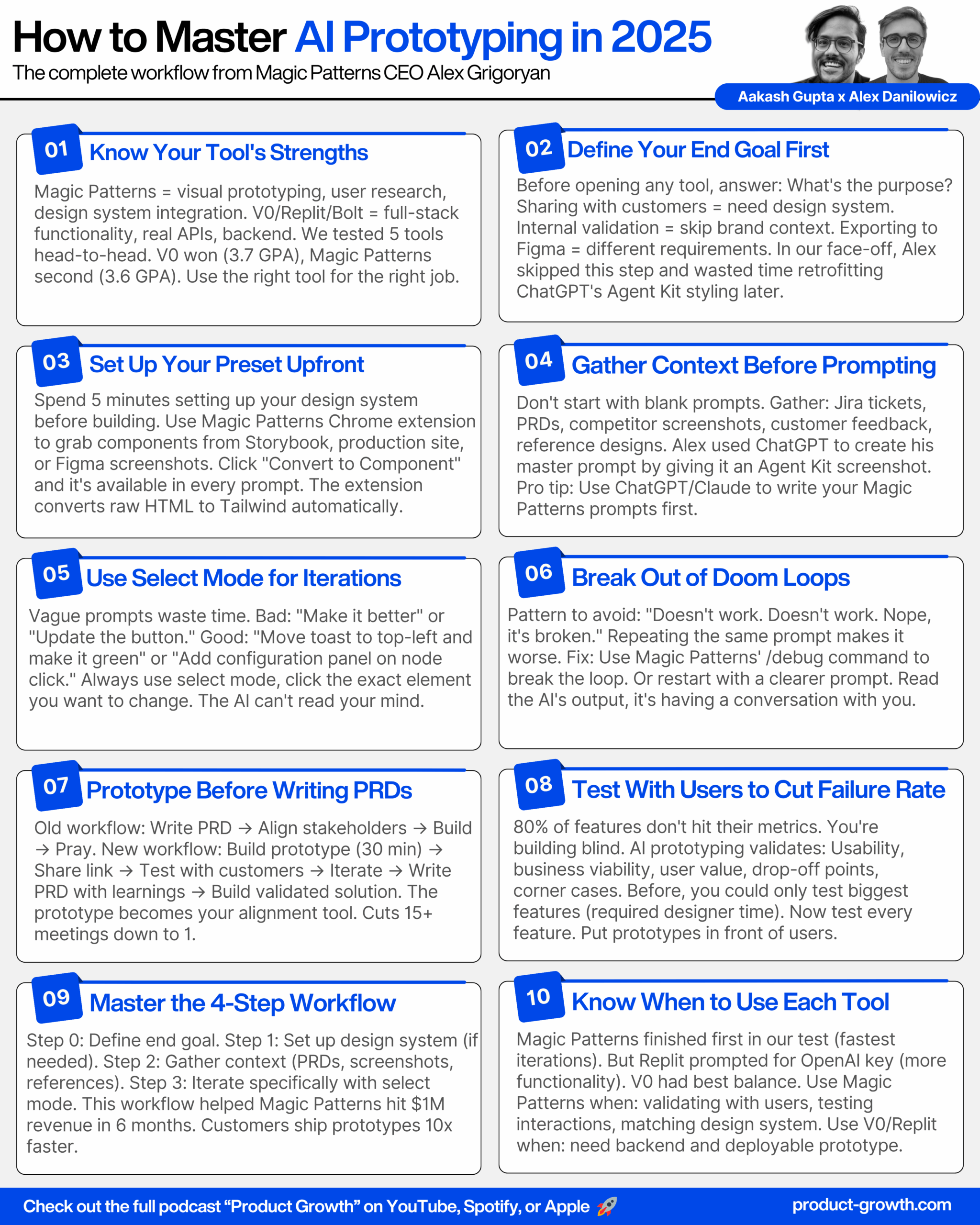
Check out the conversation on Apple, Spotify and YouTube.
A comprehensive guide to AI prototyping from Magic Patterns co-founder Alex Deniowicz. Learn how they crossed $1 million in revenue in 6 months, why 80% of product features fail, and the exact workflow for building prototypes that validate ideas before you write production code.
Here is the transcript:
Introduction (00:00:00 – 00:01:42)
Aakash: Every PM needs to master AI prototyping in 2025. Meet Alex Deniowicz. Today we’re going to face off my tool, Magic Patterns against many of its common competitors, and we’ll let you decide who the winner is. How big is Magic Patterns? What usage or revenue numbers can you share?
Alex: This summer we crossed a million dollars in revenue in a very short time, about 6 months.
Aakash: It’s like over 80% of product features that are built don’t hit the metrics they were trying to go for, but if you take a real prototype, you put that in front of the user, you can check against all of those risks.
Alex: Totally, it’s absolutely a superpower.
Aakash: You’ve been doing this since 2023. What made you start this so early before everybody else saw the key trend here?
Alex: My co-founder and I worked as front-end engineers where all we were doing was just implementing Figma mockups, and one day I said, Teddy, let’s try to add AI to our component library editor that we were building at the time.
Aakash: If you had to give people a roadmap to becoming experts in AI prototyping in 6 months, what would be the roadmap for them?
Alex: So the first roadmap would be learning just a little bit about how LLMs work.
Aakash: So we’re both gonna create a prototype, and we’ll compare how this initial prototype does, how the iterations do in terms of quality.
Alex: Let’s do it, I can’t wait, the real deal.
Magic Patterns Growth and Introduction (00:01:42 – 00:02:46)
Aakash: Really quickly, I think a crazy stat is that more than 50% of you listening are not subscribed. If you can subscribe on YouTube, follow on Apple or Spotify podcasts, my commitment to you is that we’ll continue to make this content better and better. And now on to today’s episode. Alex, welcome to the podcast.
Alex: Thanks very much for having me.
Aakash: So, how big is magic patterns? What usage or revenue numbers can you share?
Alex: Yeah, so this summer we crossed a million dollars in revenue in a very short time, about 6 months since, starting, and, We are in the during the summer we were only 2 people actually, but now we are hiring very, very rapidly and supporting some of the largest enterprises on the planet.
Setting Up the AI Prototyping Challenge (00:02:46 – 00:04:46)
Aakash: Very cool. So, Alex, if people follow me, they know that I have put these tools head to head before. Magic patterns has won some of those. I wanna do that live for everybody today. Let’s put magic patterns to the test. You and I are gonna compete. Is that OK?
Alex: Let’s do it. I can’t wait. The real deal.
Aakash: All right, Amazing. So we’re both gonna create a prototype and we’ll compare how this initial prototype does, how the iterations do in terms of quality. As well as how long it takes to create these things. You’ll use your best tools. I’ll use mine. So let’s get started. What we have not agreed yet what to build. So, what are like good candidates of things to build that you think will allow us to see which tools the best?
Alex: Yeah, totally, well, I’ll say the way most people use magic patterns is in a product development context, right? In the earliest parts of the product development life cycle, say I’m working on a new onboarding flow or I’m working on a new dashboard or a new feature, and then using our existing styles to, to do that, but we also have people building websites with us, we also have people building, you know, little hobby projects with us and then syncing that to GitHub, so we really could do, could do anything.
Aakash: Yes. So I built a website. I built an AIPM portfolio using magic patterns. I’ve also been building a lot of prototypes. I think that most people, they’re really doing a lot of prototypes for like big features that they’re building that really need that extra layer of user research, that iteration on the solution. So why don’t we big, build like a big feature like, I was thinking one interesting feature might be. We, we just heard, Chat GPT released agent kit. It’s more of a developer-focused agent tool. What if we help chat GPT build like a consumer-facing, kind of like a NAN or zappier style consumer-facing workflow builder?
Alex: Let’s do it.
Aakash: All right, this is the product I need in my life right now, so we’re gonna code it. So what we’re gonna do, guys, is we’re not gonna be looking at each other’s screens. You guys are gonna be able to see our screens in full. You’ll be able to see what we’re doing, how we’re doing it, and we’ll kind of be talking back and forth, but we’re gonna go and we’re just gonna do the initial version, just like the initial 5 to 6 minute version here, and then we’ll come back and compare.
Alex: All right.
Aakash: And so you’re gonna be using magic patterns. , we both can get started now. I personally, I’m gonna try to use 4 tools at once just so we can get a sense of how they all compete against each other.
Building the Prototypes Live (00:04:46 – 00:07:23)
Aakash: Did it.
Alex: So I’m just working on my prompt right now.
Aakash: Me too, I’m doing two different things, because this is a face-off, I’m doing one where I’m just prompting as quickly as possible and then also I’m just gonna go to chat GBT actually and create like a master prompt in chat GBT and just kinda give me a little backup here, so.
Alex: Nice, yep, I’mbergan my master prompt and clawed.
Aakash: What’s pretty cool is I know that Chat GPT knows about magic patterns, so it’s helpful you can say I’m building a prompt for magic patterns, a UI generation tool, and then, you know, give it that so, oh nice.
Alex: I’ll use that as well.
Aakash: So here I am just copy pasting my prompt, it’s actually, this is a thing that I picked up from a lot of power users, I’ll see that they’ll commonly use tools like chat GPT or cloud to kind of make these master prompts. Which is very similar, right, to as if you have a PRD or you have a user story in Jira already and you paste that context in, in this case, because we’re doing this completely live, right, like, you know, agent Kit, it’s the first time I heard about this. I don’t really have any context, so I’m asking Chachi BT to create one for me.
Alex: Awesome.
Aakash: I’m also telling it like giving it a couple of other examples of Lindy and NAN. Because those are kind of the ultimate experience that we’re. Trying to copy here.
Alex: Cool. So you’ll see, on my end, my first one just finished where all I did was I set a workflow builder like N8N, and here we go. Here’s my schedules trigger. I can select it, my node ID apply configuration. Now I’m just kind of observing like what works, how this is kind of. I’m just reacting to it right now, right? I’m looking at, OK, what do I, what do I need next, but you’ll see I already have a, a working prototype here, so I’m gonna see if I can draw some connections and then, you know, see how this is working.
Comparing the Initial Prototypes (00:07:23 – 00:09:43)
Aakash: So let’s come back together. Let’s maybe first look at magic patterns, and we’ll, let’s start to, just look at everything first and then we can give out our grades once we’ve seen everything. Does that sound good?
Alex: Let’s do it.
Aakash: All right. So my, my hands are in the air. I am no longer prompting here. So yes, I actually created two. The first I did was this massive chat GBT prompt, and then there was another one where I just did a simple little workflow builder prompt, like exactly what just came to mind, and I’m actually liking the simple one that I did. More, and so it’s pretty cool, so like I can just drag and drop nodes, there we go, and I can drag this one, and then I can actually connect them. , I can connect them. I was commenting that it was like a little finicky connecting them when I was building this, and you know, I didn’t really spend the time, you know, nitty gritty trying to fix that, That feature, but I got like a my one my run workflow button hooked up, you know, I, my save button what happens? OK, I have a toast if I was actually prototyping this, I would probably the next thing I would do is, hey, move my toast to the left corner and make it green, right versus covering my nav bar here and but like that I can just refresh that. And I got my export. And yeah, what would you like to see? Anything you’d like to see in particular?
Aakash: I think we got a good view of it. So yours is working, it looks nice. it seems like it understood roughly what you’re doing. What is the entry point into the workflow? Did it create like a landing page?
Alex: No, so it just, I’m just like it just created workflow builder ready to go so I can even name it as like, you know, workflow builder and hit enter here, this is the entry point there’s no other pages. I just literally prompted a workflow builder like N8N and here we are.
Related: designing AI products the right way.
Reviewing Competing Tools (00:09:43 – 00:16:34)
Aakash: Awesome. All right, let’s take a look at mine and then we’ll come back and grade everything. And if we, actually, let’s, before we even grade everything, let’s look at everything and see like if we wanna make any iterations or anything like that. All right, so let’s start with V0 here. So, V0 finished first on my end. You can kind of still see cloud code working in the background there. So, V0 created this flow AI. You can, yeah, you can change the workflow name. You can drag things on to here. And I think you can connect them. Yeah, it’s funny, we had the same, the same issue.
Alex: Yeah, some funny connection issue.
Aakash: , you can put in AI agent. You can change, you can add some. Interesting things about the agent. So you could build like a whole thing, like manual trigger to AI agent to send email. Right now, it looks like you just can’t, sometimes you can connect it. And then it has a little test workflow, a little save, little share option. So that’s V0, I would say. Overall, pretty nice. This is what Replet built. So Relit, you click into it via chat. Then you can kind of drag some stuff in here. chat agent. It’s so interesting to see too, you’ll notice on the left actually rep led I see is prompting you, hey, add your open AI key, let’s actually hook up the AI chat agent, right? That is like something that would not happen in magic patterns because. We’re again not trying to, we, we actually are just now releasing an integration on OpenAI so this is an interesting example, but like we’re, we would not specifically prompt you to like add that full functionality. We’re much more focused on like, hey, did we get the interactions correct, right? So pretty cool to see that from Repplet. I mean it, it goes to show like the power of their use case.
Alex: Yeah, for sure.
Aakash: So I think this is pretty nice as well. I think maybe like. One thing I did like about what Replit did for this example is it started in Chad GPT, so that was like a nice touch there. , looks like Lovable also tried that too. So starting in Chad GPT. Going to agent mode or sources or how does one. How does one get into agent mode? Maybe try entering something. OK. It’s a little janky way to get in, might deduct a little bit from there, We got agents. Can we click into these agents? Yeah, we can do a little bit with them. Yeah, we can do a little bit. We can test, save workflow. Wow. So, they’re all remarkably similar, honestly.
Alex: OK.
Aakash: And then we got this manual trigger here. , In bold, it doesn’t look like the dragging is working quite yet, right. OK, so that’ll hurt it in this side to head test. But it, and it didn’t have the entry point.
Grading the Tools (00:16:34 – 00:18:50)
Aakash: OK. So we got the rough results from everybody. Let’s maybe, let’s do this. Let’s grade it on all of these, and we’re gonna actually add another row below. Which we should do, which is like iterations. And we can look at iterations after we come back, but let’s get the initial results. And we can come back and do overall at the end as well. So UX magic patterns. Maybe you can just show us again. And we’ll decide what our final grade is.
Alex: Totally with me it’s just I’m just the individual contributor here. I’m not part of the judging panel. That’s for that’s for sure.
Aakash: Oh, you’re in the judging panel too, yes, you are. Maybe for the other two.
Alex: I, I can’t judge my own. I can’t judge my own, but, it’s OK.
Aakash: No, I mean, definitely what I, what I, what I can judge is, totally, you know, slightly disappointing that we see. V0 had the exact same problem, right, which just kind of flagging, something of all these tools are ultimately just using usually a version of clawed sonnet 4.5 or 4 or 3.7 under the hood and so I imagine it’s like under the hood this is probably just some issue in the sonnet training data, right, of why it can’t, yes, exactly so it’s it’s very funny to me that we all have that same same issue but. Yeah, so what’s the first thing on the, on the rubric?
Aakash: So UX, so I think I would, I think it was one of the better looking ones. I think the only ones that maybe looked as good. We’re, replit V0 and lovable. So with the issue on the entry point and the issue on the tying the work flows together, I’m inclined to give it a B. Does that sound good?
Alex: Sounds good to me. Yeah, I’ll give, I’ll give a shout out to Lovable. I think it’s very interesting how they were like the only one with dark mode. I’m not sure if you prompted for that.
Aakash: Yeah, just they came up with dark mode on their own. It’s interesting. I wonder like that might be something under in the system prompt, right, that it’s optimising for that or very interesting.
Alex: Yup.
Aakash: All right. So let’s go back over to the rest here. So, I guess let’s start with V0. V0, the UX did connect together, which was nice. It didn’t start at chat GPT did have this text workflow, this changed name. Had some different types you could click into them. So I think I’m inclined to give it a B+. Does that sound good?
Alex: Sounds good to me. I agree. I thought they did a great job with the node, that node configuration.
Aakash: Awesome B+ for them. Replet also looked quite nice, and all the connectors worked and they started it in chat GPT. So I think they probably. Alongside the lovable, lovable had the weird intro interaction, so they, I think got the highest grade. They get the A relit. And. You know what, Cursor plus cloud code is still working, so I’m just gonna disqualify that.
Alex: I think that’s also a lot of people, I’m just gonna comment on that for a second. A lot of people always ask, you know, how do you differ from cloud code and, and cursor, right? Like the more technical folks, and I think that that’s the speed, right? Like, even if it was running, it’s on local hosts 3000, how do we actually share that URL with the stakeholder, right? Like it’s just a completely different workflow, so.
Aakash: Yeah, totally. so let’s do this, Let’s, let’s keep it in there, but we’ll just give it an F for speed. That hurt us. At least in this task, it’s not the fastest. We really like replit, so we give it an A. We thought that it was the best, Lovable, we said it looked pretty good, but it had this janky entry point into it where you had to just type something which doesn’t really make sense. , And then I think it had this issue, right? Did it have this issue? No, it didn’t. So. I think with the Janky entry, it’s probably a minus. Or B, yeah, probably a minus and then we got bolt. Bolt was the one that wasn’t working. So I think that’s gonna hurt it the most, right? That’s probably a C grade. Cursor and cloud code no grade. Do we agree on the UX?
Alex: Agreed, yeah, totally for this prompt.
Speed and Functionality Grades (00:18:50 – 00:21:00)
Aakash: All right, perfect. And then speed wise. I mean, magic patterns when, you were talking about your iteration right away. So you get the A+. V0 was next, so I think it gets the A. After that we had lovable relit, so I think we just kind of go down and order. Be minus. , probably minus. Does that sound good, Joy?
Alex: And just to add some colour here, like, in fairness, Replit’s doing an awesome job where they are prompting you, Hey, do you wanna hook up your open API key, right? Like there’s probably some tool call under the hood that’s saying, oh, this is the user is trying to make an agentic workflow. Let me prompt it to. Let me prompt them to add their open API key which might infect the slowness, right? Because it’s like giving you that option versus again in magic patterns we’re hyper focused on like visually communicating so we’re not wasting time doing that and it’s up to you like is it a time waste or not? Well, if you don’t actually need to hook it up, that’s when the you might use a tool like magic patterns versus the others.
Aakash: Exactly. So I think on functionality, yeah, we would, we suffer. I just, I put my nail in the coffin with my last comment there. I mean, we’re doing a prototype use case, so I think we just need to compare it on the prototype functionality. And Did you have this pop up, these pop up windows when you click on things?
Alex: I do. I’ll share my screen. I’ll share my screen here, so I do have the pop up functionality, you know, in one of my versions it’s not that. Significant in my other version, it’s much more fleshed out, which is kind of interesting, right? Like probably the result of when I gave it the chat GPT prompt somewhere in here it’s telling it, hey, like add a configuration panel versus in my little baby prompt. I did not tell it that much so, yeah, OK, cool.
Aakash: So if we go back over to our grades and we assign our functionality grades. We know that Bolt is gonna get the hardest review obviously there cause it wasn’t working, so. Unfortunately, it’s gonna get a C in this test. Lovable had that weird interaction, so I think it’s gonna get a, otherwise, it was working. Replet had the nice chat GPT entry point and was working. So I think it’ll get the A, but it did have that connection issue, so I think it’ll get the minus. Funk visa was working, so I think it’s the A and then you guys get the minus for the connection issue. Does that sound right?
Alex: Sounds fair to me, yeah, totally.
Iterations and Final Grades (00:21:00 – 00:26:17)
Aakash: OK, perfect. And then iterations, so. We’re running low on time. So what was your subjective grade on the iterations? How was it responding to your iterations?
Alex: , very well. So you, I mean, you’ll see, I actually was prompting a lot, like, and I had two different versions going. I was promptingly mainly on styles, right? I wanted it to look like the chat GBT, interface, so, Yeah, however, like if I were to go down the rabbit hole of again adding functionality, like replit would smoke us there, you know, so which one did you get farthest with? How many did you prompt any multiple times?
Aakash: Yeah, I prompted them all multiple times because I added, I ended up putting like the redesigned to chat GPT style next, and I didn’t think that Viser really did a great job. Like this is not chat GPT style. Neither did Replet. Bolt and Lovable at least tried to because they had that chat GPT entry point at the very beginning, but neither of them, none of them really matched the colours. So, I wouldn’t say any of the iterations were very good. I would give BV0 the highest grade on the iterations just because they were super fast and so it was easier for me to do a lot of them. So this is where I think I would rate out my iterations, B+ for V0, B for relit, B for lovable, and minus for bolt.
Alex: I, I appreciate your grading. You should change this to a B+ because in fairness, my prompt was like, I took a screenshot of the Chachi BT agent builder and I said, hey, Chachi BT, give me a prompt for magic patterns, but like it was still kind of off, so, I refuse to not be fair here.
Aakash: Today’s episode is brought to you by the experimentation platform Chameleon. 9 out of 10 companies that see themselves as industry leaders and expect to grow this year say experimentation is critical to their business. But most companies still fail at it. Why? Because most experiments require too much developer involvement. Chameleon handles experimentation differently. It enables product and growth teams to create and test prototypes in minutes with prompt-based experimentation. You describe what you want, Chameleon builds a variation. Of your web page, lets you target a cohort of users, choose KPIs, and runs the experiment for you. Prompt-based experimentation makes what used to take days of developer time turn into minutes. Try prompt-based experimentation on your own web apps. Visit chameleon.com/prompt to join the waitlist. That’s K A M E L E 00 N.com/prompt. Today’s episode is brought to you by Jira Product Discovery. If you’re like Most product managers, you’re probably in Jira tracking tickets and managing the backlog. But what about everything that happens before delivery? Jira product discovery helps you move your discovery, prioritisation, and even roadmapping work out of spreadsheets and into a purpose-built tool designed for product teams. Capture insights, prioritise what matters, and create roadmaps you can easily tailor for any audience and Because it’s built to work with Jira, everything stays connected from idea to delivery. Used by product teams at Canva, Deliveroo, and even The Economist. Check out why and try it for free today at Atlassian.com/product-discovery. That’s A T L A S S I A N.com/product-discovery. Jira Product Discovery, build the right thing. Today’s episode is brought to you by the AIPM certification on Maven, run by Mikdad Jaffer, who is a product leader at OpenAI. This is not your typical course. It’s 8 weeks of live cohort-based learning with the leader at one of the top companies in tech. As you know by now, the future of PM is AI, and this certificate will give you the learnings plus the hardware to show you’re ready for an AIPM role. I myself took the course and recommend it. Put on by the amazing team at product faculty, including Moa Lee and Paul Mulhern, it’s worth it. Former students come from companies like OpenAI, Shopify, Stripe, Google, and Meta. The best part, your company can probably cover the cost. So, if you want to get $550 off, use My code Akash 550C7. That’s A A K A S H 550C7 and head to Maven.com/product faculty. That’s M A V E N.com/P R O D U C T dash F A C U L T Y.
Aakash: All right, perfect. So, where do these come out? I feel like I need to just drop this into an LLM, but let’s do it by hand here. So, I don’t know. I think we do need to put this into a. LLM, I’m too LLM filled at this point for this. What are the final overall grades? Claude, you’re gonna decide. Claude is the objective judge. What is your go to LLM right now?
Alex: So you know, I just, because it was first, I use chat GBT a lot. And even though I know cloud is better for some tasks, I mean, in terms of coding, like cloud is way better.
Aakash: Yeah All right. These are the final grades. A minus for magic patterns. All right, I think you tied for the win.
Alex: Yay.
Aakash: With V0 with plus V0 gets 0.1 above according to Claude. So very nice.
Alex: OK, let’s go for that then just to be accurate. 3.6, 3.7. OK, so it’s like your GPA, right?
Aakash: Exactly. We, you know, we’re an honours student just about. Poor bolt. All right, so the winner in today’s challenge was V0 by a hair. Interesting. Any reflections on the, the loss?
Alex: Yeah, so I think one reflection is, well, other than the fact that I adjusted my, my own grade to, to a minus, but. One reflection is like I think the bake-offs are very powerful and and and they’re fun, but you know there’s an inherent randomness in it, right? And look, I am saying this is one of the tools that came out on top in terms of iteration and speed and things like that, but like I recognise all the tools are amazing but like notice sometimes when you prompt. There’s some randomness, right? And like maybe it’s actually you gotta think about where you’re spending 90% of your time, which is iterating, it’s usually not the first prompt, like it’s so funny to me, folks say, oh well my first prompt was better with this tool, and then they proceed to spend 500 prompts on that tool like iterating, right? Like, you know. It takes a lot of time, but the real way to test these tools is like keep, keep using it, keep prompting it a lot, get to version 500 with one of these tools. When you’re, when you realise that you don’t actually need Supabase, but you’ve spent 2 hours debugging Supabase, and all you need is an interactive prototype, then you might have wanted to lean toward a tool like Magic Patterns instead, you know.
Aakash: Yeah. Well said, all right. That concludes our challenge.
Integrating Design Systems (00:26:17 – 00:34:00)
Aakash: So I wanna. Help people understand, you know, one of the big differences we did here is we were just building a prototype, right? How do you, when people want, and none of them really did an amazing job of integrating with the design system. So can you tutorial for us? How do we integrate, because most of us are PMs working on existing products, integrate magic patterns or in a prototyping tool to fit our existing design system.
Alex: So. So if you go to the magic patterns dashboard, you’ll see a very important concept which we call a preset, and this is something that the other tools don’t have because they’re focused on other use cases, right? They’re like idea to app versus were idea to. You know, production interface that can be copy pasted into your, into your front end code base, right? So, here we have our presets, you’ll see some defaults selected, but let’s pretend I work at Stripe, right? And we can kind of show you a final version here which is, I have the Stripe preset, I named it Stripe, I connected it to my component library, which I’ll talk about in a. Second, and then I have this default prompt. Now this default prompt I commonly see from other companies, from our customers, they have design systems teams that are like creating these prompts actually and putting them into magic patterns or design ops people, and so in this instance, you know, I’m just kind of doing a demo. I created it with Chachi BT where I said, hey, bold minimal typography, here’s some hex codes and things like that. And then the way that we actually get components in there is showing that here, let’s just do one from scratch. So let’s pretend I have all my components in storybook or on Stripe.com. I’ll show both. So let’s pretend this is like Stripe storybook. one thing we can do is open up the preview in storybook and use the magic patterns Chrome extension to actually import that. So you’ll see I just selected it. And now here are my components, and if I click convert to component, I can select stripe. And create that component. And so now, once that’s done across all my designs, I can reuse that button component every single time.
Aakash: And is this using tailwind or what is this using in behind the scenes?
Alex: Yeah, so interestingly one powerful part about our Chrome extension, which we’ve had for a long, long time now, and it’s pretty cool like we see a lot of other kind of smaller competitors in the space now have Chrome extensions like people have realised the power of it, is under the hood what this is doing again I’m on storybook here, it is grabbing the underlying HTML code. And it is converting it to tailwind, right, because LLMs, magic patterns, lovable, replate, like all of these tools under the hood they’re generally producing tailwind code and so what we’re doing here when I click convert component we are converting like that raw HTML like to tailwind.
Aakash: Yep. And so I have it here, and so there we go, like there’s my button component ready to rumble, if I click publish. And then I go back. You’ll see if I go to my library here on magic patterns and I go to my stripe library, you’ll see here are all the components that I’ve created, right? So like here’s that stripe link logo and so now all I need to do is prompt like use my at stripe. You know, Icon button and like I don’t even need to add the link logo I can say and my link logo and when I hit enter what RAI under the hood is doing is it’s knowing what are all the components that I have available and then leveraging those in the prompt automatically.
Alex: Very cool. So If we were to do this, I guess the ideal way for most people, you would want to select using the HTML selector of the Chrome extension, all of the components you’d wanna use in a particular prototype, presuming you wanna match the design system, then you would go in, select that preset, and then prompt.
Aakash: That’s right. Well, you know, what’s funny is you get a lot of value. I’ve seen customers get a lot of value where they just go ahead right out of the gate and they just use this base preset here, right? One of the things I recommend is if you know you need it to use your existing components and it’s very important to you that it looks like where you work, right? Or you have existing brand context, spend some time setting up a preset and yes connecting your components where the way I did that is I use the Chrome extension but of course we could also just take a picture so if I go to Stripe.com, you know, and I take a picture of my input and I copy that and I go back here. And I go to component I could say, you know, a text input component and all I did was I just created the. Created it with a screenshot. So there’s different methods you can use screenshots and things also work.
The AI Prototyping Workflow (00:34:00 – 00:40:48)
Aakash: Amazing. So people have seen us do the challenge. If you had to put this into a generic workflow of how to AI prototype like a pro, what would be the key steps?
Alex: Yes, so what I always recommend to all of our customers, again, product managers, designers at large enterprises, or even small startups. I always have them think like what’s the end goal, like what am I trying to accomplish with this? You know, in magic patterns you can export to Figma, so you can keep that in mind, like is my end goal passing this off to a designer or am I just gonna share the prototype link with a customer, you know, if I’m sharing with a customer, then brand context becomes very, very important, right? versus if I’m just sharing it with my best buddy at work, we both know that we work at Stripe, right? We don’t need to spend that much time on ingesting existing context. Yeah, and that’s kind of hinting at step number 1 right here, right? Like step 0 is what’s my end goal. Step number 1 is, do I need it to look like my existing design system, right, which is basing it off of who is my intended audience here, like how much does that matter to me. Yeah, cool. And then step number 2, I always highly recommend gathering your existing context, right? And so it’s interesting in our, in our little bake off today, you and I, we were kind of building something new from scratch like our existing context was what OpenAI released the new agent builder that was our context. I fed it literally a picture from the PR, the, the press release, And You know, but what I most commonly see at other companies is maybe it’s a Jira ticket, maybe there’s acceptance criteria, maybe there’s a user story, maybe I wrote a PRD, right? A lot of people ask me, should I do a PRD or should I do a magic patterns link, and it’s like, well, actually, maybe the PRD is your prompt for the magic patterns design, right? Or maybe the magic patterns design is gonna influence what you write in your PRD because you’re gonna align visually. , cool, and then lastly, I always recommend iterating very specifically, like using select mode and, and what being very specific on exactly what you wanna update. Yeah, I think that the quality of iterations, the quality of prompting there matters a lot. A lot of people have heard some of what we said about, hey, create a master prompt and those types of things, so they get to start, right, but they don’t get that iteration, right? So that’s really important.
Aakash: What are the biggest mistakes PMs make when prototyping?
Alex: Yeah, very similarly. To prompting very specifically, failure handling, you know, the most common support ticket we get is someone messages us, hey, it’s not working, and then you, and then they say, hey, check it, check out my prompting history. To help me and we look at their prompting history and there’s a little bug, right? Like we’ve all experienced that with all of the tools and they just keep prompting, doesn’t work, doesn’t work, nope, it’s broken, nope, it’s broken, and this is 10 prompts in a row, right? Versus we have a feature as an example backslash debug that’s a command that actually under the hood is. Prompting the AI please reflect on your actions, rethink it, whatever you’re doing is not working, right? Like we have a feature to break it out of a doom loop, but instead I, I feel that people, I don’t blame them, but they get frustrated very easily and they’re like doesn’t work, doesn’t work, doesn’t work, doesn’t work, which is only making the problem worse.
Aakash: 100%. I’ve done it myself, but it doesn’t actually help the AI and it destroys the context.
Alex: Exactly, yeah, another thing that I always highly recommend, you know, there’s a lot of debate these days, do I need to learn how to code or not? And look, my perception is if you’re working in software. It is helpful to know a little bit about software and how it’s built. It’s amazing how these tools empower us to create mockups immediately, right? And you know we need to know how to code less than before, right, because the AI can do a lot of it for us, but I think there’s certain prompting. There’s certain prompts that’ll just help you if you know a little bit about tech like web technology as an example, right? Like in this example we mentioned local storage that’s a way where you can kind of persist things in the browser tab, and so if you know a little bit about that when the AI tells you I, I’m gonna use local storage to persist something, you know what they’re referring to, right? That’s where I, I recommend that.
Aakash: 100%, yeah, and it just helps a lot of the time I think that you can follow along what it’s doing theoretically so that you can give it better prompts.
Alex: Exactly, right, reading the output is another one that should be included in here, you know, sometimes people, the AI repeats something or tells you something and you don’t read it. What it’s telling you, it’s having a conversation with you. Yeah.
Aakash: And then the final one here is not using the select tool or specifying what you want to change.
Alex: Yeah, just like the, I can’t emphasise enough the importance of context, right? You know, there’s the classic example is let’s say you’ve been working on a prototype, 100 versions, and you tell it like update this button or update a button, update the button to be blue. What button are you talking about? You know, I think people forget that like it can’t read your mind, right? and, and so that’s very important and and that kind of in a similar vein and we saw this in our little face off is the importance of like giving it context up front, you know, if I know I want it to look like Chachi PT I probably should have included that in my preset and made some components right out of the gate, right? That’s why we see so many like enterprises get so much value from us is. Using their design context up front.
Aakash: Yeah, that’s absolutely critical. So miss missing best practises in two regards, not choosing the select tool and being really specific and not starting with a preset. Make sure you do both of those.
How AI Prototyping Changes Product Development (00:40:48 – 00:43:02)
Aakash: So how with AI prototyping, everybody’s wondering, you know, does this replace the PRD. How should you really be using an AI prototype?
Alex: Totally. Well, you know, in the classic answer is it, it depends, right on the team as we’re talking about a little bit. If you already have a PRD, I don’t think it replaces the PRD, right? Like use the PRD as the prompt. If you don’t have a PRD yet, use the visual mockup to influence what you need to update about the PRD like what assumptions did you learn from the prototype, right? and so talking about, you know, a bit about it here, I do think the new workflow is like instead of starting with the PRD like guaranteed, right, opening up Google Docs or your notes is gathering context. Right? What do I need to build? Who’s the audience? Do I need to use my design system? Using the prototype to cut down alignment time, it’s crazy. I, I hear from folks that are like, I used to spend 15 hours or 15 meetings just aligning with stakeholders, but now they’re just sharing the magic patterns link around to, to cut down that time. And then iterating on that, right? Suddenly everybody can be in the conversation and there’s something to like tangibly talk about versus just words in a Google Doc, and then the final step of course is building it right? like idea to production interface faster.
Aakash: Yeah, I think what is key is this new workflow. The time it takes to do that is less, even though it’s the same four steps, right? That there’s a lot less back and forth because when we were just working through a PRD and maybe a napkin sketch, a lot was left to the imagination. People had lots of questions versus what I find is that when you force yourself as a PM to build the prototype, you actually learn some of the corner cases and edge cases and things that they would have asked you earlier, and people can answer a lot of their own questions when they use it. So that’s one really important thing where the time is reduced. And then the other really important thing is you can finally actually use this in solution discovery. So many times when you’re a PM you want to do this step, but you can only do it for the biggest and most important features because it required designer time to create that prototype Figma, then it required user research time to go to them. Now you just skip that designer time figma to like 10 minute prompt to magic patterns.
Alex: Yeah, exactly, it’s, it’s, it’s pretty incredible. We never actually when we started the company, we never imagined like people using it directly with customers like we, you know, I’m a front end engineer by trade and what we were trying to do is, my job, my whole job was like taking Sigma mockups and then implementing them, right? And that was, you know, we’re solving our own problem with magic patterns, but then I’ve seen through customer iteration and talking to customers like they actually use the link to, to talk to their customers. And I never expected that, right? But it’s like, it’s just cutting it way down, it’s like now the product manager has a direct line to the customer. And it’s by far the best way to reduce risk because it’s like over 80% of product features that are built don’t hit the metrics that they we were trying to go for. But if you take a real prototype, you put that in front of the user, you can check against all of those risks. Hey, is it actually usable? Hey, is it actually viable for our business? Do they actually understand what to do next? Are they gonna actually finish the flow? Are there any drop offs? And I think it’s. It’s something that now that you have this power as a PM you should be trying to bring it to as many of the features you build as possible.
Aakash: Totally, it’s absolutely a superpower.
The Origin Story of Magic Patterns (00:43:02 – 00:45:59)
Aakash: I wanna end a little bit on. You guys, what you’ve been doing this since 2023. What made you start this so early before everybody else saw the key trend here?
Alex: Yeah, totally. Well, we had my co-founder and I worked as front end engineers where all we were doing is just implementing Figma mockups and so we were always hovering around the design tooling space and you know, we, we were built a component library editor, we built a, a tool to manage design tokens, and we’re pivoting and 11 day I just said Teddy, the best engineer I know, my co-founder, I said, Teddy, let’s do an internal hackathon and let’s just try to build. Let’s try to Add AI to our component library editor that we were building at the time, right? It was like, how can I use AI to actually edit components and this was. August of 2023, the first line of code for magic patterns was August 2023. And what’s crazy is like at the time none of these other tools existed. V-Zero launched October 2023 and it’s funny at the time people told us, oh my God, V-Zero launched like you guys are dead, like don’t even bother and we’re like, no, I think we’re onto something here, but although the models sucked at the time, like the models were like GPT 35, which people forget how bad they were like you would prompt like a login form and it was the ugliest login form you’ve ever seen.
Aakash: So, did you, did you just see that, did you have the aha moment that, OK, it can do it and the models are gonna get way better and so this is gonna be a product or how did you get so early to it?
Alex: Yeah, so it was definitely, look, it was, we have been hovering around the space for a long time, right? And that’s what I think. It was like every iteration was just leading us to oh what if we added AI to this again right before that we were building a component library editor and so you’ll notice how magic patterns right now is like one of the only tools that has component libraries really baked in as a first class citizen and that’s because we were approaching it from day one with that problem set, right? How do I prototype with my actual components in production. You know, we weren’t approaching it from a different angle, and I think that’s, you can kind of see where every tool approached it from, right? Like both as an example they used to be stack blitz where they had this crazy web container technology where you could like run anything in the browser that’s the angle they approached it from, right? We approached it from the component library angle, Very interesting, so part of it is observing what technology trends are happening in the space you’re building your startup in.
Roadmap to AI Prototyping Mastery (00:45:59 – 00:47:51)
Aakash: If you had to give people a roadmap to becoming experts in AI prototyping in 6 months, what would be the roadmap for them?
Alex: Yeah, so the first roadmap would be learning just a little bit about how LLMs work, right? What is a context window? What is context rot? That’s like another term, right? What are the best prompts? What’s like really happening under the hood, you know, and with all of these tools that are returning code, right? So what does that mean? How is it returning code? What type of code is it returning? Getting a little bit into the technologies under the hood, right? As an example, we use react, right? Look, these are things you don’t need to know to be successful, but I noticed our power users, they understand the context window, they know a little tiny little bit about what to prompt specifically, right? so I always highly recommend those things.
Aakash: Love it. Well, PMs, I hope that you will feel more confident using a prototyping tools. You’ve seen how both of us use them. They are a huge unlock for your ability to go from 80% failure rate to something like 50% failure rate, and that’s gonna mean a huge difference for your success as a PM. Good luck with the tool. Let us know in the comments if you have any questions, and we’ll see you in the next one. So if you want to learn more about how to shift to this way of working, check out our full conversation on Apple or Spotify podcasts. And if you want the actual documents that we showed, the tools and frameworks and public links, be sure to check out my newsletter post with all of the details. Finally, thank you so much for watching. It would really mean a lot if you could make sure you are subscribed on YouTube, following on Apple or Spotify podcasts, and leave us a review on those platforms. That really helps grow the podcast and support our work so that we can do bigger and better productions. I’ll see you in the next one.
Final Takeaways
This conversation with Alex Deniowicz reveals the transformative power of AI prototyping in modern product management. Magic Patterns’ journey from zero to $1 million in revenue in just six months demonstrates the massive demand for tools that help PMs validate ideas before expensive development.
The head-to-head comparison of AI prototyping tools provides clear guidance on when to use each tool. While v0 edged out Magic Patterns by a narrow margin in this specific test, the key insight is that each tool excels in different scenarios. Magic Patterns dominates in speed and design system integration, making it ideal for enterprise teams needing brand consistency. v0 and Replit shine when backend functionality matters.
The essential workflow Alex outlined – defining your end goal, deciding on design system needs, gathering context, and iterating specifically – provides a proven framework any PM can adopt. The biggest mistakes to avoid are failure handling doom loops, ignoring AI responses, and not using select mode to specify changes.
Perhaps most importantly, AI prototyping fundamentally changes the product development lifecycle. By enabling PMs to create working prototypes in 10 minutes instead of waiting days for designer mockups, teams can test with real users earlier, align stakeholders faster, and validate assumptions before writing production code. This reduces the 80% feature failure rate that plagues most product teams.
For PMs looking to master AI prototyping in 2025, the message is clear: start learning the basics of how LLMs work, practice with one tool consistently, and integrate prototyping into your workflow for every significant feature. The gap between PMs who can prototype and those who can’t is growing rapidly. The tools are here, mature, and ready to use. The question is: will you adopt them before your competition does?