Claude Code MCP means connecting MCP servers to Claude Code, so that it can read from and act in your other tools through the Model Context Protocol. In my content repo I run servers at three scopes: 2 in the project’s .mcp.json, 1 at user level and 1 local to the project, plus 15 claude.ai connectors available in this session, 12 of them authorized, and a Chrome extension. This page covers how to add a server per Anthropic’s docs, how output limits behave, the servers I run, and the lessons that cost me time.
What MCP does for Claude Code
Anthropic’s MCP docs describe MCP as an open source standard for AI-tool integrations. MCP servers give Claude Code access to your tools, databases and APIs. The docs give a plain test for when to connect one: connect a server when you find yourself copying data into chat from another tool, like an issue tracker or a monitoring dashboard.
My servers follow that test. My never-pay-to-transcribe rule in CLAUDE.md exists because every podcast already has a free YouTube transcript, and the YouTube data server is how Claude reads it. The Levels.fyi server gives Claude pay tables to read directly.
How to add a server
For a remote server, the docs recommend HTTP, the most widely supported transport for cloud-based services:
claude mcp add --transport http <name> <url>Their example connects Notion: claude mcp add --transport http notion https://mcp.notion.com/mcp. A local server uses the stdio transport, and everything after a double dash is passed to the server untouched, as in claude mcp add --transport stdio myserver -- npx server. Claude’s own options, such as --transport, --env and --scope, go before the double dash.
Servers that need a login use OAuth. The docs say Claude Code supports OAuth 2.0, and a server that answers 401 or 403 gets flagged in /mcp, where you complete the sign-in.
Where the config lives tells you the scope
The docs list three installation scopes: local, project and user. The files make them concrete. The docs refer to a project-scoped .mcp.json entry or a local- or user-scoped server entry in ~/.claude.json. That matches what I see in my own setup:
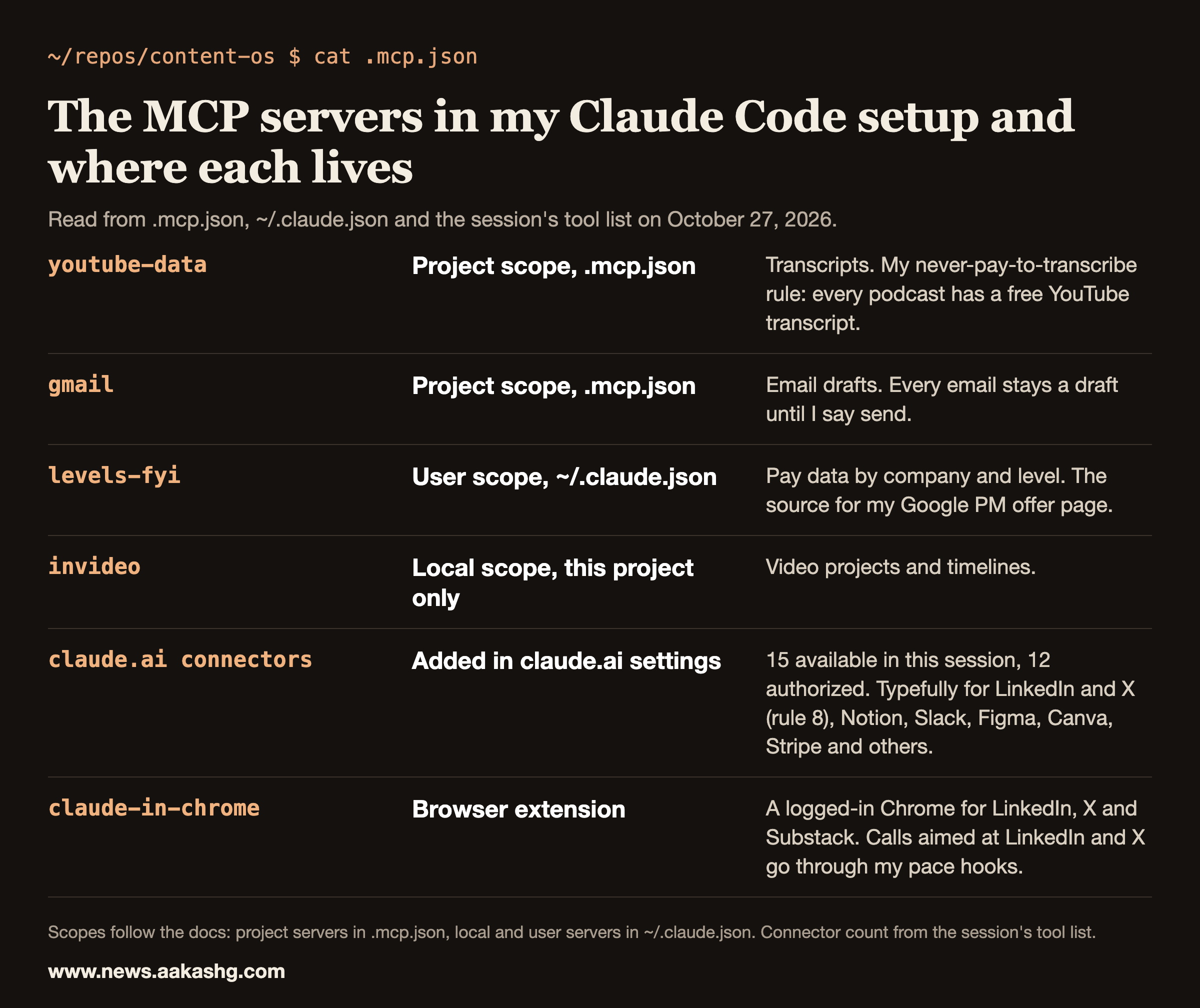
- Project scope. My repo’s .mcp.json holds 2 servers, youtube-data and gmail. The file travels with the repo, so every checkout gets them.
- User scope. levels-fyi sits at the top level of ~/.claude.json, so it is available in every project on my machine.
- Local scope. invideo sits under this project’s entry in ~/.claude.json, so only this project sees it.
The servers I run
| Server | Scope | What I use it for |
|---|---|---|
| youtube-data | Project | Transcripts of YouTube videos. My never-pay-to-transcribe rule in CLAUDE.md: every podcast has a free YouTube transcript. |
| gmail | Project | Email drafts. Every email stays a draft until I say send. |
| levels-fyi | User | Pay data by company and level. It is the source for my Google PM job offer page. |
| invideo | Local | Video projects and timelines. |
| claude.ai connectors | Account | 15 available in this session, 12 authorized, including Typefully, which rule 8 makes my way to schedule LinkedIn and X posts. |
| claude-in-chrome | Extension | A logged-in Chrome for sites with no API I’m allowed to use. Calls aimed at LinkedIn and X go through my pace hooks. |
The docs cover the connector route in a section on using MCP servers from claude.ai. A connector you authorize in claude.ai settings shows up in Claude Code. The same page has a section on disabling claude.ai connectors, which is worth reading once you have more than a handful, because every connector adds tools to every session.
What each server is allowed to write
A server that only reads, like youtube-data or levels-fyi, costs me context and nothing else. A server that writes gets a rule, and some of those rules also get a hook. Three examples from my setup, with what is and isn’t covered:
- Gmail: every email stays a draft until I say send. No hook enforces this. My email guard passes a Gmail send, so it is a rule I keep by checking.
- Typefully: rule 12 says to check the queue before scheduling, with 10-plus minutes of spacing and a report of the neighboring posts. A hook covers part of it. For my personal LinkedIn account it blocks a time outside my two default slots (10:00 AM and 9:00 PM Pacific), a booking made without a fresh read of LinkedIn’s scheduled list, and a day where that list already shows two posts. It doesn’t check the spacing.
- The Substack list: my email guard blocks a Substack publish, send or scheduled-release call, a send-email flag set to true and a few mass-mail provider endpoints, because sending emails my whole list. It checks every tool call except file reads, searches and writes, so a Substack call made through Bash, Chrome or an MCP tool is caught, and a script written to disk is not.
Output limits: what happens to a big result
MCP tool output can be huge. The docs set limits: Claude Code displays a warning when MCP tool output exceeds 10,000 tokens and limits output to 25,000 tokens by default. You change the limit with the MAX_MCP_OUTPUT_TOKENS environment variable. Text results longer than 50,000 characters are saved to a file unless the server raises its own limit.
I hit the file route while pulling the transcript of a 50-minute Y Combinator interview with Boris Cherny through the YouTube data server. It came back as 222,905 characters across 9,942 lines, and Claude Code saved it to a file. I searched the file for the passages I needed and read only those. The lesson is general: when a server can return a whole document, ask for a slice or search the saved file. Don’t pull the full text into your main context.
Hooks can see MCP tool calls
Claude Code names MCP tools in the form mcp__server__tool. That naming lets a hook match them. The hooks docs show a matcher where mcp__memory__.* matches every tool from the memory server. Mine use the same idea. My LinkedIn pacing hook matches every tool from the Chrome extension and then acts only on calls aimed at linkedin.com, and my slot guard matches the Typefully create-draft and edit-draft tools. My email guard scans MCP tool inputs too, so a Substack publish or send made through a connector is blocked the same way as one made in Bash. It does not stop a Gmail send. That one is a rule I keep by checking. The full list is in my guide to Claude Code hooks.
If you want help turning a setup like this into interview answers, Land a PM Job is my 12-week cohort for that. It starts November 9, 2026, and the live sessions, six 1:1s and reviews of your materials are all part of it.
Five lessons from running them
1. Test a permission with one call before you fan out. When I tested the Gmail connector in September, send and modify were separate scopes and the default connection had send but not modify. The symptom was that forward and reply succeeded while every label call failed with “Insufficient scope”. I now run one label call before I brief any agent for bulk work. A connected status doesn’t tell you which scopes were granted.
2. A new connector can be missing from a running session. On October 2 a Buffer connector showed as connected in claude.ai settings but never appeared for the main session or any subagent, because subagents inherit the parent session’s tool list. My note from that day says the fix is a fresh session (or /mcp), and that relaunching agents doesn’t fix it.
3. Two agents at a time per connector. In September, five or six subagents on the Gmail connector at once stalled in one of my runs, and three died at the 600-second watchdog. I cap MCP-heavy subagents at two. The reasoning is in my page on Claude Code subagents.
4. Read what the server tells the model. The Levels.fyi server’s instructions say every company, location and job family is identified by a canonical slug, and that you must resolve names with its search tools first. For my Google offer page, a search for “Google” returned the slug google, and a search for “product manager” returned the slug product-manager. Passing a guessed slug is how you get an empty or wrong table.
5. The extension must match your account. On October 15, after I logged in to a different claude.ai account, Claude in Chrome reported that the browser extension was not connected. The extension has to be signed in to the same claude.ai account as Claude Code.
For the layer above these tools, see how I structure the whole setup in Harness Engineering, and for what Claude should already know before it calls a tool, my guide to Claude Code memory.
Claude Code MCP FAQ
What is MCP in Claude Code?
The Model Context Protocol, an open source standard that lets Claude Code connect to external tools, databases and APIs. A connected server’s tools show up as mcp__server__tool names that Claude can call.
How do I add an MCP server to Claude Code?
For a remote server, run claude mcp add with the http transport, a name and the server’s URL. For a local one, use the stdio transport and put the command after a double dash. Servers that need a login are authorized from /mcp.
Where is Claude Code MCP configuration stored?
Project-scoped servers go in a .mcp.json file at the repo root, which you can commit. Local and user-scoped servers go in ~/.claude.json. Connectors you add in claude.ai settings also appear in Claude Code.
Is there a limit on MCP output?
Yes. Claude Code warns when a tool’s output passes 10,000 tokens, limits it to 25,000 tokens by default, and saves text results over 50,000 characters to a file. MAX_MCP_OUTPUT_TOKENS changes the token limit.
Can I run many agents against one MCP connector?
I wouldn’t. Several concurrent subagents on one connector stalled in my runs, so I cap it at two and test a permission with a single call first.
