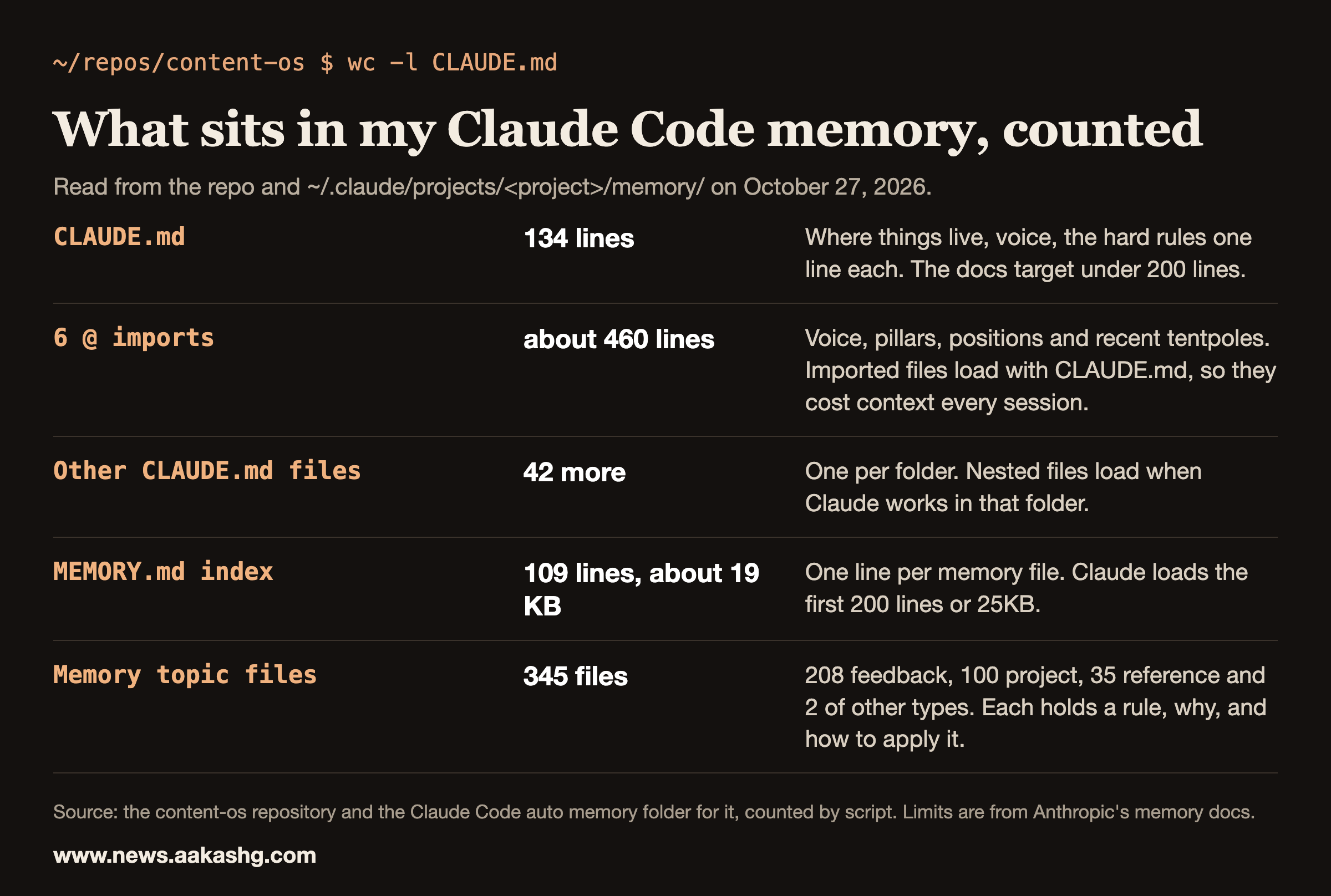
Claude Code memory is two things: CLAUDE.md files that you write, and auto memory that Claude writes itself. Both are how knowledge survives between sessions, because each Claude Code session begins with a fresh context window. As counted on October 27, 2026, CLAUDE.md in my content repo is 134 lines with 6 imports, and the auto memory folder holds 345 files behind a 109-line index. This page covers how each works according to Anthropic’s docs, what the limits are, how I set mine up, and what to check when Claude ignores something.
The two kinds of memory
Anthropic’s memory docs start from the same fact: each session begins with a fresh context window, and two mechanisms carry knowledge across sessions. CLAUDE.md files are instructions you write to give Claude persistent context. Auto memory is notes Claude writes itself based on your corrections and preferences.
The docs compare them in a table, which I’ve shortened:
| CLAUDE.md files | Auto memory | |
|---|---|---|
| Who writes it | You | Claude |
| What it contains | Instructions and rules | Learnings and patterns |
| Loaded into | Every session | Every session (first 200 lines or 25KB) |
| Use for | Coding standards, workflows, project architecture | Your preferences, corrections you give Claude, project context Claude can’t derive from the code |
Both load at the start of a session, so both cost context before you type a word. That is the main design constraint for either.
Memory loads as context and nothing enforces it
The docs are direct about this. CLAUDE.md content is delivered as a user message after the system prompt, and Claude reads it and tries to follow it, but there’s no guarantee of strict compliance, especially for vague or conflicting instructions. The memory page also says Claude treats them as context, not enforced configuration.
So I sort rules by what happens when they’re broken once. A preference goes in CLAUDE.md. A rule that costs money or an account goes in a hook, and my guide to Claude Code hooks covers the seven I run. The docs make the same call: to block an action regardless of what Claude decides, use a PreToolUse hook.
How I set up CLAUDE.md
My CLAUDE.md is 134 lines. The docs say to target under 200 lines per CLAUDE.md file, because longer files consume more context and reduce adherence.
It works as a routing table. This is the top of its Where things live section, as the file reads on October 27:
## Where things live
Each folder has its own `CLAUDE.md`. Read that before working in it.
- `context-library/`: `voice/` and `pillars/` (imported below), `styles/` (one guide per platform),
  `frameworks/`. **Tier 3, on demand:** `source-material/`, `analytics/` (its `CLAUDE.md` lists what
  to read before concluding anything), `past-content/` (Substack 611 posts in `substack/archive/`,
  grep it, don't read it; LinkedIn 717 in `linkedin/archive/`, `index.csv` first).
- `outputs/`: drafts, versioned `[YYYY-MM-DD]-slug-v1.md`.
- `.claude/skills/`: slash commands. **Voice files override the 13 MIT ports** (`ATTRIBUTION.md`).
  `.claude/agents/`: `anti-ai-editor`, `buyer-panel`, `deck-design-critic`.
Further down it says which skill to run for each platform and what the hard rules are. The hard rules are one line each, and the file points to advanced/hard-rules.md for the full wording and the reasoning. Each folder has its own CLAUDE.md that I read before working in it. The repo has 43 of them in total. The docs say nested files load on demand when Claude works in that part of the tree, which keeps the root file short.
Imports cost context
CLAUDE.md can import other files with @path/to/import syntax, up to four hops deep. I import six files: my voice guide, my anti-AI writing rules, the banned words list, my content pillars, my positions file and a generated list of my recent pieces.
The docs say imported files load together with the CLAUDE.md that imports them, so each import adds to the context cost of every session. Those six files add about 460 lines, about 32 KB, to every session in this repo. I pay that on purpose, because the voice has to be present for any writing task. Count your imports the same way before you add one.
What stays out of CLAUDE.md
The imports are the only reference material that loads every time. Everything else is on demand. My CLAUDE.md labels the heavy folders “Tier 3, on demand”: source material, analytics and the past-content archives. For the archives the instruction is five words: grep it, don’t read it. The Substack archive alone holds 611 posts, and reading even a fraction of them would use up the context before the task started. A routing line replaces the content, such as the analytics folder’s own CLAUDE.md that lists what to read before concluding anything.
The docs back the principle. They say to move instructions that matter for only part of the codebase into path-scoped rules, which load only when Claude works with matching files.
How I set up auto memory
Each project gets its own memory directory under ~/.claude/projects/. Inside it, MEMORY.md acts as an index of the directory, and Claude keeps topic files beside it. The docs add that auto memory is machine-local: files aren’t shared across machines or cloud environments. A cloud session of mine can’t see any of this.
My folder holds 345 topic files: 208 typed feedback (a correction or a rule), 100 project (the state of something in flight) and 35 reference (how a system works), plus 2 of other types. A feedback file starts like this, shortened:
---
name: resumed-subagents-stall-spawn-fresh-oct-26-2026
description: "Oct 26: SendMessage to a completed subagent resumed it but it ended after about 5 tool calls with no report and no file changes (3 of 3 times); spawn a fresh agent with a self-contained brief instead"
metadata:
  type: feedback
  # ... node_type, originSessionId and modified left out
---
**Why:** resumed agents seem to lose the thread of their own work; the harness reported "ended without delivering a report".
The file then has a How to apply line. Every entry carries a rule, the reason for it and what to do next.
The index has a byte limit before a line limit
The docs load the first 200 lines or 25KB of MEMORY.md. Mine is 109 lines and about 19 KB. Each index line is a link plus a one-line hook, so lines average about 174 bytes. At that length I reach 25KB at roughly 143 lines, well before line 200. The bytes bind first.
Two habits keep the index inside the limit. Each entry is a single short line whose job is to say when to open the file. And when a project finishes, its entries move out of the index into an archive file that the index links to. My index has one such line for finished project states from October 6 to 13.
What earns a memory entry
I don’t save everything. An entry earns its place when a mistake would otherwise repeat. These are four lines from my index as they read today:
- Batch bookkeeping: docs, memory and commits wait for session end.
- Verify the effect: logs and APIs lie.
- Snapshot before replacing: dump editor content to disk first.
- Agents never pkill: kill only own PIDs.
Each links to a file that says what happened, why it matters and how to apply it. The index line only has to tell Claude when to open the file.
Audit what Claude saved
The docs say to run /memory and select the auto memory folder to browse what Claude has saved, and that everything is plain markdown you can read, edit or delete. The same command lists your CLAUDE.md files and lets you turn auto memory on or off. I read my folder before I trust a rule in it, because an entry written in a hurry can be wrong.
What survives /compact
The docs answer this directly. The project-root CLAUDE.md survives compaction: after /compact, Claude re-reads it from disk and re-injects it. Nested CLAUDE.md files and path-scoped rules load again on demand. If an instruction disappeared, it was given only in conversation, lives in a nested file that hasn’t reloaded, or is a rule that hasn’t matched a file since. The fix in the docs: add conversation-only instructions to CLAUDE.md to make them persist.
Why I built my own memory layer
I tested two well-known memory setups before building my own. In my post on the subject I wrote that neither GBrain nor Karpathy’s second brain fit my PM-OS and Job Search OS setups perfectly, and my conclusion was that memory has to fit the harness it sits in. I Built You Memory for Claude Code, Hermes, and OpenClaw is the paid write-up, and Harness Engineering shows where memory sits among the other layers.
If you are building an operating system like this and want it to show in your job search, Land a PM Job is the 12-week cohort I run for that, starting November 9, 2026. Live sessions and six 1:1 coaching sessions are part of it, along with reviews of your materials.
A checklist for when Claude ignores your memory
The docs give a debugging order that I follow:
- Run
/contextand check the list under Memory files. If a file isn’t listed, Claude can’t see it. - Open the files with
/memory. - Look for contradictions. The docs warn that if two instructions contradict each other, Claude may pick one arbitrarily.
- Check length. The docs say files over 200 lines consume more context and may reduce adherence, and that Claude Code skips a file over 4 MiB.
- Check where the instruction lives. A rule given only in chat is gone after /compact.
- If auto memory is the problem, you can turn it off with CLAUDE_CODE_DISABLE_AUTO_MEMORY=1 while you debug.
Claude Code memory FAQ
What is CLAUDE.md in Claude Code?
A markdown file of instructions you write, which Claude Code loads at the start of every session to give Claude persistent context. It can live at the project root, in subfolders, or at user and organization level.
Where does Claude Code auto memory live?
In a per-project folder under ~/.claude/projects/, with a MEMORY.md index and topic files. All worktrees and subdirectories of the same git repository share it, and it stays on the machine where it was written.
How long can MEMORY.md be?
Claude loads the first 200 lines or 25KB of it at the start of a session, whichever comes first. With long index lines, the byte limit arrives before the line limit.
Does Claude Code memory survive /compact?
The project-root CLAUDE.md does, because Claude re-reads it from disk after compaction. Instructions that were only in the conversation don’t.
Is CLAUDE.md enforced?
No. The docs call it context rather than enforced configuration, and say it’s delivered as a user message after the system prompt. For a rule that must hold every time, use a hook.
