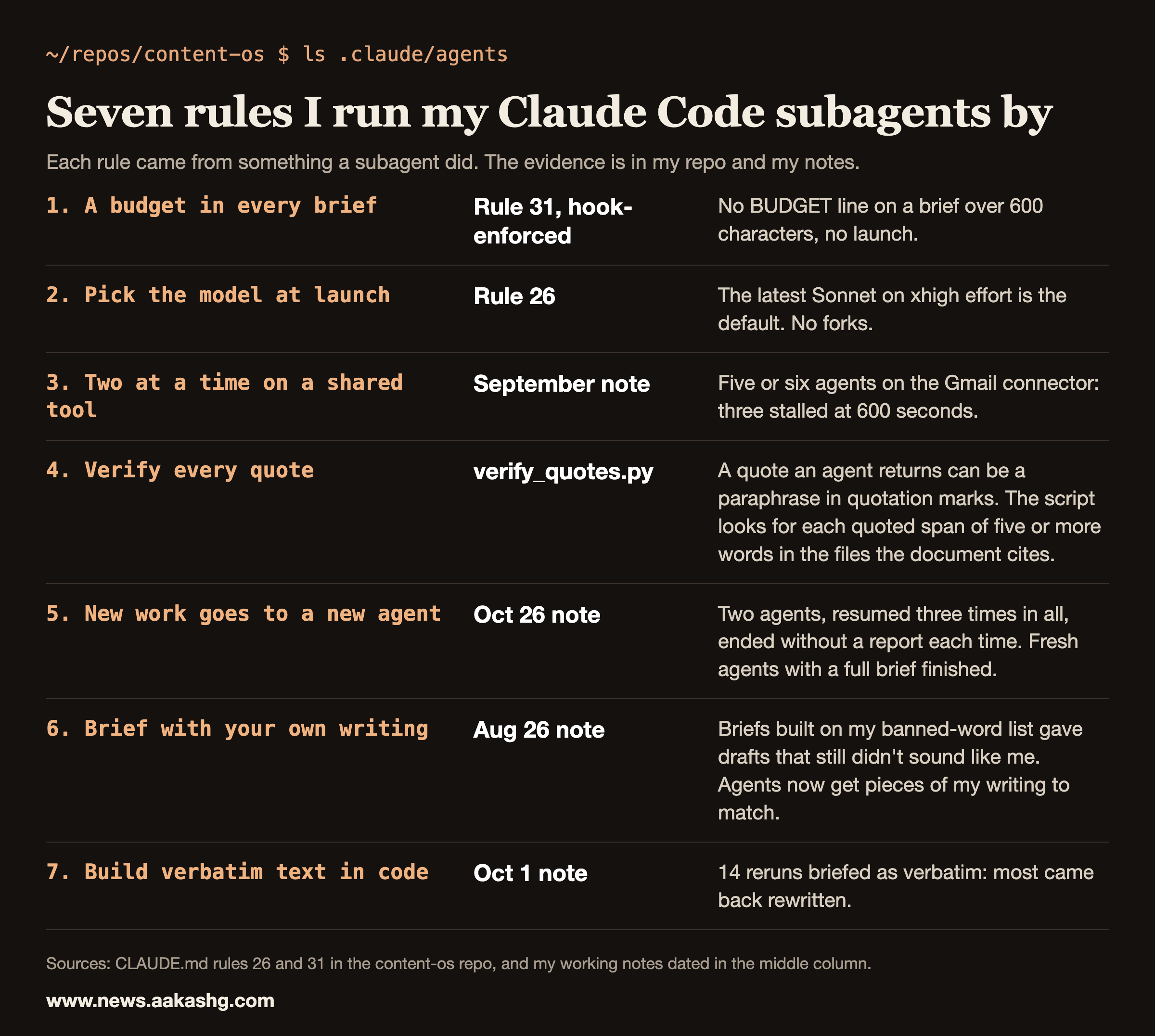
Claude Code subagents are separate Claude instances with their own context window, system prompt and tool access. Each does a side task and sends back only a summary. I keep three custom subagents in my content repo and launch many more as one-off workers. This page covers how subagents work according to Anthropic’s docs, the three I keep, and the seven rules I run them by, each tied to something that went wrong or right.
What a subagent is
Anthropic’s subagents docs say to use one “when a side task would flood your main conversation with search results, logs, or file contents you won’t reference again”. The subagent does that work in its own context and returns only the summary. Each one runs in its own context window with a custom system prompt, specific tool access, and independent permissions.
Three details from the docs matter for how you run them:
- Descriptions drive delegation. Claude uses each subagent’s description to decide when to delegate. Those descriptions take up context, and Claude Code shows a warning at startup when the combined descriptions exceed 15,000 tokens.
- Subagents spend your usage. A subagent sends its own requests, which count toward the same usage limits as your main conversation.
- Built-in agents exist. Claude Code includes Explore (a fast, read-only agent for searching and analyzing codebases), Plan (used during plan mode) and a general-purpose agent. Explore and Plan start without your CLAUDE.md files to keep research fast and inexpensive.
Custom subagents are markdown files with frontmatter. The docs list the fields: description, tools, disallowedTools, model, permissionMode, mcpServers, hooks, maxTurns, skills, memory, effort, background, isolation and a few more. A project’s subagents live in .claude/agents/ and the docs suggest checking them into version control. A personal one goes in ~/.claude/agents/.
The three subagents I keep
My repo has three, each a markdown file with a name, a description and a role. The index in .claude/agents says what each is for.
| Subagent | What it does | Who calls it |
|---|---|---|
| anti-ai-editor | Scans a draft for AI-detectable patterns and rewrites them | Optional since August 6, 2026. Rule 3 says it isn’t a ship gate. |
| buyer-panel | Role-plays a prospective attendee and ends on an explicit BUY or NO-BUY | The /webinar skill, steps 3 and 5 |
| deck-design-critic | Reviews rendered slides for overflow, alignment, contrast and balance | The /webinar skill, step 5. It doesn’t touch copy. |
The most useful line in any of them is in the buyer-panel description, because Claude reads it: “Spawn one subagent per persona so verdicts are independent.” When one agent plays all four buyers, it writes each later verdict with the earlier ones in view.
The top of the file is all the frontmatter it needs:
---
name: buyer-panel
description: Independent buyer-persona reviewers for a sell webinar, outline, or offer. Each persona role-plays a real prospective attendee and gives an honest critique, then an explicit BUY / NO-BUY verdict. Use to pressure-test an outline or deck before ship. Spawn one subagent per persona so verdicts are independent.
---
Mine use two fields, name and description. The model isn’t pinned in the file, because I choose it at launch (rule 2 below).
Rule 1: Put a budget in every brief
Rule 31 in my CLAUDE.md: “Every agent brief carries BUDGET: max N tool calls, max 2 review rounds. Never unbounded. Hook-enforced.” A brief looks like this at the end:
BUDGET: max 60 tool calls, max 2 review rounds.A subagent costs real usage, so the number is the point. My spend_guard hook blocks a launch whose brief runs over 600 characters and either has no BUDGET: max N tool calls line or has an N over 300. Shorter briefs pass whatever they say. The hook doesn’t hold an agent to the number in its own brief. The hard stop is the same for every subagent: after 300 tool calls, 60 minutes since its first call or 50 million tokens, its next tool calls are blocked. The comment at the top of the file records the spread those ceilings were set against: 242 normal subagents since September 23, median 3M tokens, p90 20M, p99 115M.
Rule 2: Pick the model at launch
Rule 26 says to pick models by current knowledge-work evals and to pass model and effort on every launch. Today that means the latest Sonnet on xhigh effort is the default, and the biggest model is for the 2 to 3% of tasks worth a 10x model. The hook blocks a non-fork launch that leaves out the model. It doesn’t look at the effort. It also blocks a fork once the parent session’s context passes 100,000 tokens, because a fork inherits the parent’s whole context and re-reads it on every turn.
Rule 3: Run two at a time on a shared tool
In September, five or six subagents hitting the Gmail connector at the same time stalled in one of my runs. Three of them died with “Agent stalled: no progress for 600s”. My note from that run caps MCP-heavy subagents at 2. The same shape shows up in my other rules: Max 2 Chrome agents at once (rule 29, the blocked-fetch rule), and one LinkedIn agent at a time (rule 36).
Parallel agents have a second failure on the parent side. In my write-up of Hannah Stulberg’s Team OS episode, the fix is that each agent writes to a temp file, because if ten agents return work to the parent simultaneously, the context window overflows. The orchestrating agent then compiles the final document from the temp files.
Rule 4: Verify every quote an agent hands you
Agents that mine transcripts can put a paraphrase inside quotation marks, so a quote an agent returns is a claim until it is checked. .claude/scripts/verify_quotes.py takes a research file, finds every double-quoted span of five or more words and looks for it in the files that document cites by absolute path. It also confirms those paths exist, and it exits with a failure if a quote or a path is missing. It doesn’t check numbers, so I grep every number an agent returns against its cited file. I do both on any research file an agent wrote before I use a line of it.
Rule 5: Start a fresh agent for new instructions
On October 26, on the version I was running then, I sent new instructions to two finished build agents with SendMessage. Each time they ended after 5 to 9 tool calls with no report, and file timestamps showed nothing had changed. It happened three times in all. Fresh agents with a complete brief did the same work in 47 to 108 tool calls each.
So now new work goes to a new agent. The brief names the existing scripts to reuse, the exact outputs and the checks. Before I trust any report, I check file modification times.
Rule 6: Brief agents with your own writing
On August 26, 2026, after several rejected drafts on an AI PM piece, I traced the problem to my briefs. I had been sending agents my anti-AI style file and my banned-word list as the whole instruction. The drafts dodged the listed tells and still didn’t sound like me. Now the brief names specific pieces of my own writing, starting with sections I rewrote by hand, and tells the agent to match them.
Rule 7: Don’t ask an agent to copy text
On October 1, two subagents built 14 Substack Note reruns from old LinkedIn posts under a brief that said to keep the text verbatim. Most came back rewritten. One condensed 517 words down to 300, some gained em dashes the original never had, and the “original” section was cut to about 50 words, which hid the drift.
Text that has to stay identical is a job for code. The rule I wrote down after that: pull the stored post text, apply only a short list of mechanical fixes in code (typos, dead lnkd.in lines, repost footers, a stale number), and compare word counts between the original and the rerun before I look at it.
When a subagent is the right tool
The docs’ test is a side task that would flood your main context. My version: reading and research go to subagents so the main thread holds decisions. When I asked for this in August, I put it as “keep ur own context low”.
The Y Combinator Lightcone episode with Boris Cherny has a good example for debugging. In the transcript, a host describes adding a line to his CLAUDE.md that asks for one agent on the logs and one on the code path when fixing a bug. A later speaker, answering with “This is something I do all the time too”, says they set the number of subagents by the difficulty of the task: three, five or even 10, researching in parallel. The transcript has “>>” marks but no speaker names, and the marks are not a reliable guide to who is talking. The next question asks why he doesn’t put that in his CLAUDE.md file, which suggests the second speaker is the guest, Boris Cherny, but the text doesn’t confirm it. Another line is useful for PMs: when you keep repeating an instruction, it goes in CLAUDE.md, and otherwise you can just prompt. A subagent definition is the same trade. Write one when you keep spawning the same kind of worker.
Land a PM Job is my 12-week cohort for PM job seekers, starting November 9, 2026. Six 1:1 coaching sessions sit alongside the live sessions, and your own materials get reviewed along the way. If a build like this is on your resume, that is where you can work on how to describe it.
Two related pages: Claude Code plan mode, which uses the built-in Plan subagent, and Claude Code hooks, which enforce the limits above.
Claude Code subagents FAQ
What are Claude Code subagents?
Specialized assistants that run a side task in their own context window, with their own system prompt, tool access and permissions, and return only a summary to the main conversation.
Where do I put a custom subagent file?
In .claude/agents/ in your project, which the docs suggest checking into version control, or in ~/.claude/agents/ for a personal one. Each file is markdown with frontmatter that holds at least a name and a description.
Do subagents cost extra?
They draw on the same usage limits as your main conversation, because each sends its own requests. That is why I put a tool-call budget in every brief. A hook blocks long briefs that lack one and stops any subagent at 300 tool calls.
How many subagents should I run at once?
For work that shares one connector or one browser, I run two. For pure research in separate contexts, the Lightcone episode mentions three, five or even 10 for hard tasks. Check the quality of what comes back before you scale the count.
Can a subagent spawn other subagents?
It depends on its tools. The docs say that if you leave Agent out of a subagent’s tools list, it can’t spawn subagents, and that listing Agent lets it spawn its own while the depth limit allows.
