Claude Code plan mode is a permission mode where Claude researches and writes a plan without editing your files, and the edits stay blocked until you approve that plan. Rule 6 in my content repo requires it for every newsletter and every video script. This page covers how to turn it on, what it does according to Anthropic’s docs, how my repo uses it, what the creator of Claude Code said about its future, and when to skip it.
What plan mode does
Anthropic’s permission modes docs describe it in two sentences: “Plan mode tells Claude to research and propose changes without making them.” Claude reads files, runs shell commands to explore, and writes a plan, but does not edit your source. Edits stay blocked until you approve the plan, with one exception the docs spell out: interactive terminal sessions where bypass permissions are available.
There are three ways in:
- Press Shift+Tab. The docs say Shift+Tab switches permission modes in the CLI. My rule 6 notes it as two presses.
- Prefix a single prompt with
/plan. - Start the session in it with
claude --permission-mode plan.
Pressing Shift+Tab again leaves plan mode without approving anything. When the plan is ready, Claude presents it and asks how to proceed. One of the choices is “Yes, and use auto mode”, which approves the plan and starts in auto mode.
Plan mode also holds when nobody is at the keyboard. The docs say it keeps its blocks wherever Claude Code runs without an interactive terminal, including non-interactive runs with -p.
How it works underneath
Boris Cherny, who created Claude Code, was asked about plan mode in a Y Combinator Lightcone episode that Y Combinator published on February 17, 2026. His description of the prompt side was short: “there’s no big secret to it. All it does is it adds one sentence to the prompt that’s like please don’t code.”
The docs describe the enforcement side: blocked edits until approval. Put together, plan mode is one added sentence in the prompt plus a permission gate on edits.
While Claude plans, a built-in subagent does some of the research. The subagents docs list a Plan agent that is “used during plan mode to gather context before presenting a plan”, with read-only tools and Write and Edit denied. They also say Explore and Plan start without your CLAUDE.md files to keep research fast and inexpensive. If a rule matters to the plan, say it in the prompt. Don’t rely on CLAUDE.md alone to reach the research pass.
Rule 6: every newsletter and script gets a plan
Rule 6 in my CLAUDE.md is one line: “Plan Mode for any newsletter or YouTube script.” The full-wording file says “Plan Mode (Shift+Tab ×2)”.
Two of my skills carry the rule. My /video-script skill starts with step 1: “Enter Plan Mode (rule 6). Present the outline before drafting.” My /video-gen pipeline lists plan mode again at its script stage. My newsletter skill has no plan-mode step, so for newsletters the rule is the line in CLAUDE.md alone. A long piece is where an unplanned draft costs the most: a wrong structure shows up late, when a plan would have shown it in a paragraph.
What a plan has to settle for a paid deep dive
My rules fix several decisions before a word gets written, so the plan has to settle them:
- The hook. Rule 2: 10 hooks before any long-form piece.
- The paywall. Rule 21: at least 5,000 words, 3,000 of them gated, and a named five-item teaser.
- The sources. Rule 10: every claim traces to a source. A plan that lists claims with no source is incomplete.
- The angle. Rule 9b: match the reader’s problem in my positions file, build on my newest piece on the topic, and search the archive by my framework names.
That turns the plan into a checklist the draft is graded against, and approval is the moment to catch an angle that repeats a recent piece.
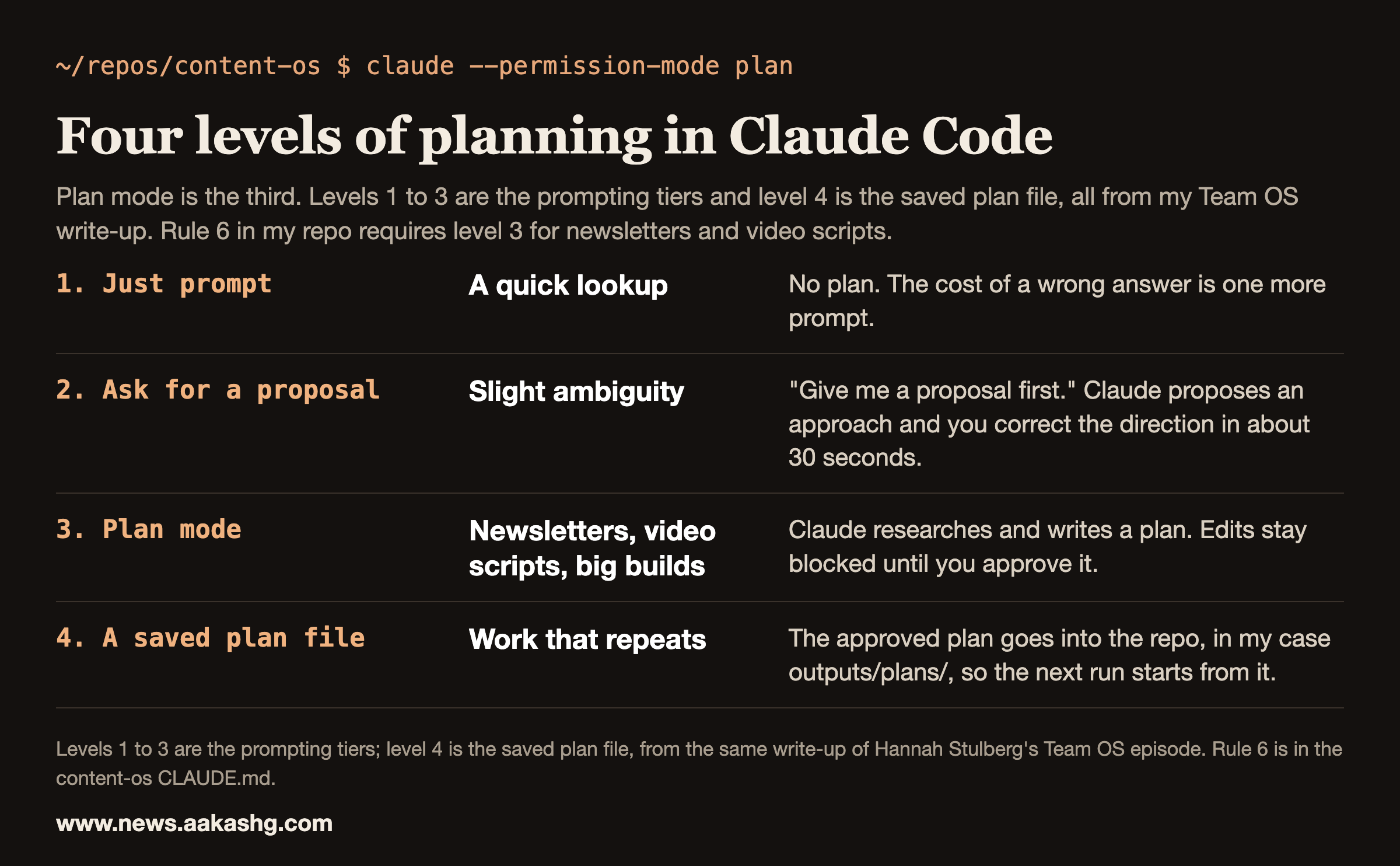
Four levels of planning, all from my Team OS write-up
I learned the ladder from Hannah Stulberg’s Team OS episode, and I wrote it up as three prompting tiers:
- Basic prompt. You type a request and Claude decides everything. Fine for quick lookups, terrible for strategy docs.
- Lightweight alignment. Add “give me a proposal first.” Claude proposes an approach and you correct direction in 30 seconds. The write-up says to use this for anything with even slight ambiguity.
- Full plan mode. Claude’s bias for action is removed and it can’t execute until you approve the plan.
The same post gives a rough matrix for choosing. A clear task gets a lightweight proposal, about 30 seconds. A complex doc with some ambiguity gets full plan mode, with 15 to 30 minutes spent on the plan. Highly ambiguous multi-phase research gets full plan mode with Claude interviewing you, which can take hours across a day. Recurring work gets a saved plan file, so you start at 80% done every time. That saved plan file is level 4 on the card, and it has its own section below. I didn’t benchmark these timings. They come from that episode write-up.
What to check before approving a plan
The plan is where your attention goes. My write-up of the Codex design episode puts it this way: “Read that plan the way you’d read a junior PM’s spec before a kickoff.”
Three checks come from the Team OS episode:
- Which files will it read? A structured repo means only the relevant ones load. If the plan names the wrong folder, fix it before approving.
- Which writing guide and which skill? The post warns that skills auto-invoke only about 70% of the time, so name the skill in the plan.
- What did it ask me? Claude uses the ask-user-question tool in the planning phase. Answer its questions.
The episode’s advanced move is a prompt that makes Claude interview you after the plan exists:
Use ask-user-question tool to push me on my thinking.
Help me consider other angles for this document.
Challenge my assumptions. Take as long as you need.
The prompt makes Claude question the plan before it executes anything.
Save the plan if the work repeats
A plan you spent an hour on has value after the task is done. My plan files live in outputs/plans/ in the repo. The Team OS post makes the case: if you spent three hours on a plan, save it, and next time you start at 80% done. It also notes that your team can reuse it.
A real plan file
This is part of outputs/plans/2026-08-06-graph-library-experiment-plan-v1.md, the plan for rebuilding section 4 of my paid Graphs for PMs post. Steps and sections left out are marked.
## The experiment protocol (per graph)

1. **Fixtures.** Frozen inputs from instagram-pm-os (+ synthetic gap-fill). Same inputs to both arms. No arm sees the other's output.
# ... steps 2 and 3 left out
4. **Blind judging.** 3 independent Opus judges score both outputs unlabeled on: factual accuracy / fabrication flags, blind-spot coverage, evidence traceability, actionability, depth. Fabrication is an auto-fail dimension.
# ... step 5 left out
6. **Receipts logged.** Judge scores, specific catches ("verifier caught 'billed daily' vs 'invoiced monthly'"), iteration diffs, agent counts. These become the proof points in the library and infographic.

- **Fable:** main-loop orchestration, graph-doctor redesigns, final section-4 prose. Nothing else.
- **Opus:** one-shot baselines, blind judges, hard graph nodes (PRD writer, adversarial reviewers).
- **Sonnet:** parallel scanners, asset drafters, fixture generation, easy/medium nodes.
# ... phases and deliverables left out
Open calls for Aakash: (1) approve/edit the 12-graph list, (2) where the library ships (new public GH repo like pm-prompt-library, vs Notion like the prior one), (3) go/no-go to start Phase 0.
The protocol and the model budget are settled in the plan before any work runs, and the last line lists the three calls the plan leaves to me.
PMs who use Claude Code to build things they can show hiring managers are who Land a PM Job is for. The cohort runs 12 weeks from November 9, 2026. Expect live sessions, reviews of what you bring and six 1:1 coaching sessions.
Plan mode has a shelf life
In the same Lightcone episode, a host asked whether, in six months, you won’t need to prompt that explicitly. One speaker replied “Maybe in a month,” and a few seconds later a speaker said: “I think plan mode probably has a limited lifespan.” The transcript has “>>” marks but no names, and the marks don’t always line up with who is talking: the block that starts at 25:11 puts a question and the start of its answer under one mark. So the text alone doesn’t tell me whether that second line is Boris or a host. It reads like Boris, because the chapter that starts four seconds later is titled “A world without plan mode?”. What Boris does say, in the answer that follows, is that Claude Code can now enter plan mode by itself and that the team is trying to make it enter at the point where a human would have wanted to.
Boris also describes his own use. In my Taste at Speed guide I wrote that he runs five terminal tabs, each with a parallel checkout, and starts Claude Code in plan mode in each. The practical read for a PM: use plan mode while the model needs the pause, and notice when it starts entering plan mode on its own.
When I skip it
Rule 6 covers newsletters and YouTube scripts. Everything else in my repo has no plan-mode rule. A data pull, a link check or a one-file edit gets a prompt. A task with a little ambiguity gets level two, a request for a proposal first. The cost of plan mode is your attention on the plan. If a wrong first attempt costs less than that attention, skip it.
For the rest of the setup, my guide to Claude Code hooks covers the rules that must hold every time, and my guide to Claude Code memory covers what Claude should already know.
Claude Code plan mode FAQ
What is Claude Code plan mode?
A permission mode in which Claude researches and proposes changes without making them. It reads files, runs exploratory shell commands and writes a plan, and edits stay blocked until you approve the plan, except in an interactive session where bypass permissions are available.
How do I turn on plan mode in Claude Code?
Press Shift+Tab to switch permission modes, prefix a single prompt with /plan, or start the session with claude –permission-mode plan. Press Shift+Tab again to leave plan mode without approving a plan.
Can Claude edit files in plan mode?
Not until you approve the plan. The docs say Claude does not edit your source in plan mode, and edits stay blocked until approval, except in an interactive terminal session where bypass permissions are available. The blocks hold in non-interactive runs.
Do I still need plan mode with newer models?
Possibly less over time. In the Y Combinator Lightcone episode with Claude Code’s creator, one speaker, most likely Boris Cherny, says plan mode probably has a limited lifespan, and Boris says Claude Code can already enter plan mode on its own. Until then, I plan anything where a wrong structure is expensive.
What is the difference between plan mode and asking for a proposal?
Plan mode is a mode with a permission gate: Claude can’t edit until you approve. A proposal request is a prompt, so nothing stops Claude from acting. I use a proposal for small ambiguity and plan mode for newsletters, scripts and big builds.
