Check out the conversation on Apple, Spotify and YouTube.
What We’re Covering Today (0:00)
Aakash: I’ve been following Xinran online and I think she is one of the world’s leading experts on design with AI — the title of her newsletter. I’m really excited for her to bring this knowledge to everybody. One of the first things we need to do is build the neural circuitry to understand what design with AI actually means. So, Xinran, welcome to the podcast.
Xinran: Thank you so much for having me.
Aakash: Can you explain to us what is design with AI? What is the universe of Design with AI that people should know?
Xinran: Design with AI covers a lot of things — design and AI are very broad topics. So to make things easier to understand, I actually did a mind map. First of all, there’s the part of design with AI that’s about prompting — like how can we prompt better in order to get better results. There’s also the technical side, like how can we ideate with AI better, using AI as an assistant to generate ideas that humans find hard to think about on their own. Not to mention there are other design areas such as design and prototyping with the help of AI, and there are some workflows I can explain more. Last but not least, there’s a part of the landscape that fewer people talk about — staying conscious with AI. That means bringing more intention and thoughtfulness into the things we’re designing, and being aware of different kinds of risks and how to mitigate them.
Prompting with AI (3:16)
Aakash: Let’s start at the top — prompting with AI. A lot of people might roll their eyes. I’ve seen so many influencers post prompting frameworks. What do they need to know about prompting with AI to use these AI design tools well?
Xinran: To its core, prompting with AI is just about how humans interact with AI to get better results. I try to make things as simple as possible from a design perspective. The very first area is clarifying the ask before you ever even engage with AI. It’s important to know what you want to get out of it — what you want to include, what you want to avoid. And if you don’t know those things, that’s OK too. We can leverage people for help, or even ask AI for help to gain clarity.
Context is also very important. You’ve probably seen that “context engineering” is becoming a trendier term than “prompt engineering” — it’s because people are realizing how important context can be. And the key insight is that more context doesn’t always mean better. It’s about providing the necessary context that is related to the goal. That means: your role, the unmet user needs, your timeline and technical constraints, any existing ideas, your prioritization criteria, who the audience is, and what the design principles and brand guidelines are.
Aakash: How much should you define the exact design you want? Because AI will do a much better job if you’re really specific — but then you lose the exploratory magic.
Xinran: I think it’s an art. Sometimes you want more control of the outcome, and sometimes you want to give AI more space to brainstorm. It’s really a fine balance — as if you are hiring someone. Sometimes you want to be very specific and sometimes you want to give them a vast amount of creative space. Based on my experience, some structure helps if you can introduce it relatively early. That often helps as opposed to starting everything from scratch.
Ideating and Designing with AI (8:32)
Aakash: Let’s go into ideation with AI.
Xinran: I actually have two parts — ideating with AI, and design and prototyping with AI. They really go hand in hand. For early stage ideation, things like brainstorming fresh product ideas benefit from providing business goals and problems, user goals and problems, relevant user insights, and relevant constraints. Convergent thinking is also important because AI can get really, really wide and extensive. That’s why we also need things to converge a bit — asking for ranked ideas, or asking for examples for better evaluation. Sometimes AI gives you ideas without telling you where they came from, so you can ask AI to provide sources so you can do your due diligence.
Regarding design and prototyping with AI, some common best practices are: specifying instruction, specifying context, brainstorming design options, keeping track of design variations, and navigating between options. As more and more AI tools have recognized these pain points, they’ve started to introduce features that make it easier for designers — and non-designers — to design with AI.
I put workflows into two big buckets. One is more like from an idea to design, leaning more heavily on text or ideas. The other is from an existing experience to design, which requires more guardrails around what you want to do — maybe you have an existing website you can take snapshots from, or an existing Figma file.
Being Conscious with AI (14:54)
Aakash: What’s that fourth area — being conscious with AI?
Xinran: Aside from all the tactics of how can we use AI to design better, smarter, and faster, I want to bring another layer. It’s basically how to bring more intention and thoughtfulness around what you’re generating, as opposed to being 100% driven by AI. Some control as a human, some intentionality, can go a long way.
For example, awareness about risks: when brainstorming with AI, we need to be aware of hallucination, biased insights, outdated insights, irrelevant insights, or low quality generic insights that can be subconsciously brought in. If I’m designing a restaurant booking experience and just ask ChatGPT for the main pain points, it might give me very generic or biased insights tailored around a specific type of user — that could be dangerous.
Ways to mitigate risk include: keeping humans in the loop during research and ideation, double-checking sources, and empathizing with the people you’re designing for — because everyone can rely on AI to generate something, but AI is not human. It does not really have enough empathy. Including diverse perspectives in the process becomes very important. And nuanced information matters — behavioral cues like sarcasm or hesitation in user research are really hard for AI to understand from mere transcripts.
Workflow 1: Custom GPT to PRD for Prototyping (19:00)
Aakash: If you had to pick two workflows to demo, what are the things people need to walk away knowing?
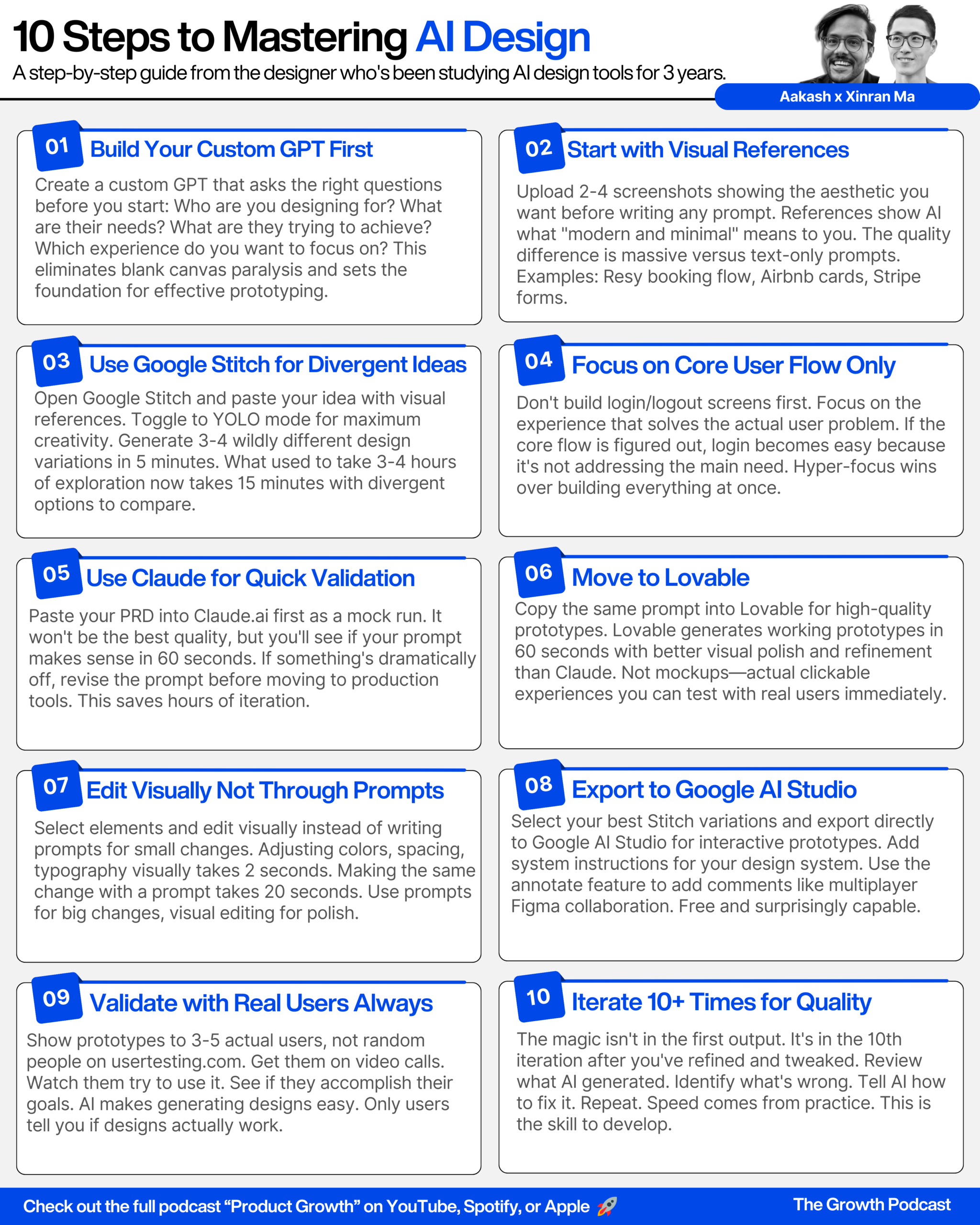
Xinran: The first workflow is about using a custom GPT to generate a PRD for prototyping. I’ve built a custom GPT — you can think of it as a ChatGPT with my personal instructions. I follow steps within that custom GPT to generate an effective, lightweight spec for prototyping. It’s not a broad PRD for everything — it’s specifically for AI prototyping. Then I can copy and paste that spec into any AI prototyping tool I want.
Aakash: Can you show people like, what are the inputs you’d put into the custom GPT?
Xinran: Sure. The key questions are: what is the main goal of your product, who are the intended users, what platform is it for, and which core user flows do you want to focus on. I specifically do not want the GPT to recommend login or logout flows because that’s not the key user flow we need to focus on first — it’s not directly solving the user problem.
Something important: I know many people are always facing the blank canvas question — “I want to design something out of AI but I’m not really clear about what I want to design for.” That’s why I built this GPT. The very first prompt will set the stage for a lot of things. So this GPT is specifically meant for crafting that very first prompt to an AI prototyping tool.
Aakash: And you didn’t use Claude for the prompt — you preferred ChatGPT for the prompt.
Xinran: Yes. I know Claude can be very powerful for code-related tasks, which is why I like to offset things that are not code-related to ChatGPT or Gemini. I like to shift clarity-related tasks to ChatGPT in order to save tokens for Claude.
Aakash: I feel your pain on Claude tokens.
Xinran: I’m on the 20X max plan and I even still hit the limits.
Aakash: So theoretically, you could build the equivalent of this custom GPT as a Claude project or a Claude skill.
Xinran: Exactly. You can also use Gem by Gemini — it’s more like a simplified version of a custom GPT, but it’s also free, which is good.
[Sponsor Break]
Running the Workflow Live (23:40)
Xinran: So once I have the final markdown output from the custom GPT — which I specifically ask for in markdown format because it retains the hierarchy of the spec better, making it easier for AI to understand — I paste it into a prototyping tool. Let me start with Claude.
The reason I like Claude is not because it generates the best visual design — it’s more about being a well-rounded tool that gives me a quick mock run of what to expect from this prompt. It’s like a lightweight check to see if the prompt makes sense before feeding it into more robust tools.
Aakash: Yeah, I see you’re kind of doing two things here — you’re not making the prompt too long so that you experience context rot, but at the same time you’re being very specific about these are the four screens I want to see. You’re defining the front end precisely, but nothing else.
Xinran: I try to find a balance. Some people prefer a little bit more detail, some prefer less — but this is more like a sweet spot I’ve found for a lot of my use cases.
Now I’m going to paste the same prompt into Lovable. Across all the tools I’ve tried, Lovable, V0, and Bolt were established relatively early. Lovable is a well-rounded tool that delivers good design results — if you don’t mind paying for that. For V0, design quality is similar to Lovable. I also like that you can edit the code without upgrading to a paid plan, which makes it more accessible. For Bolt, I no longer use it as much, but if you want a full-stack prototype, Bolt has better integrations because of the team behind it.
There are also newer tools like Google AI Studio — it’s been around for a long time but recently shifted its focus from a developer-based tool to a vibe coding tool that everyone can use. It’s free, which helps with accessibility, but design quality is still catching up. There are also tools like Subframe and Magic Patterns, which are more specific. Magic Patterns explicitly does not have a backend — that’s a deliberate business decision, and there are pros and cons depending on what you need.
Aakash: Magic Patterns is totally free for paid subscribers of my newsletter, by the way.
Xinran: As you can see with Lovable, there are small areas that are more refined compared to the Claude artifact experience. The layout, the dropdown, the color — it’s more polished. They’ve extended a lot of work between the LLM model layer and the actual presentation layer. It’s not just a Claude wrapper anymore.
Workflow 2: Google Stitch + Google AI Studio (41:31)
Aakash: So shall we move into workflow two?
Xinran: The second workflow is a new combination of tools: Google Stitch and Google AI Studio. About two months ago, Google AI Studio announced its new vibe coding engine that lets you build prototypes within Google AI Studio — which is exciting news. However, Google AI Studio still lacks something: early stage design exploration. Not a lot of AI tools out there can empower that.
Stitch is a good example of a tool that can. Stitch is a Google product — about two months ago, Google acquired Galileo AI and rebranded it as Stitch. It’s been actively updating its features at a very fast speed. You can think of the Stitch and Google AI Studio combo as getting the best of both worlds: Google AI Studio for prototyping interactions, and Stitch for early stage ideation.
Aakash: I haven’t seen much about Google Stitch yet. Excited.
Xinran: It’s very new. So let me show you. You can paste your prompt directly into Stitch, but for this workflow I want to show something special. I’m going to go to Redfin — a real estate platform — and take a snapshot of their “Ask Redfin” AI chat section on a home detail page. The question is: given this existing experience, what could be the design variants we get from AI? This is a totally different design challenge than the one we talked about earlier.
I’ve already prepared an initial prompt that has the context, the business goal, the user goal, and my ask — to evaluate the existing experience, identify actionable improvements, and generate better design ideas for the Ask Redfin section. I toggled to web and selected the Gemini 2.5 Pro thinking model. By default, it generates two options. And I can also use the “variation” feature which I use more often.
Aakash: Should we try to ask it to give even more divergent options?
Xinran: Yes. In variation mode, I can define how many options to generate and set the creative range. I can make it very refined or YOLO — which is going crazy. Let’s go more divergent at this point. Aspects to vary: layout, color schemes, text content. Let’s generate variations.
Aakash: YOLO means you only live once, if somebody’s wondering.
Xinran: It’s funny that they put that directly into their product.
Aakash: Shout out to the Canadian rapper Drake making it into a Google product.
Xinran: So the hack here is: use YOLO mode in Stitch to get divergent solutions, and then we’re gonna take these from Stitch to Google AI Studio. You can keep ideating from here, or you can export to Google AI Studio for further prototyping. I can even select multiple frames and export them together.
Something to call out: for Stitch, you can export to Figma — but only if you’re in the fast model mode. Just a heads up.
The redesign model is also very interesting — it gives you a lot of creative ideas by doing a full redesign. Worth checking out.
Ranking the Tools (55:00)
Aakash: If you had to rank the prototyping tools, how would you rank them?
Xinran: If price is not a factor, I like Lovable the most in terms of how well-rounded it is, followed by V0, followed by Google AI Studio — and those are judged purely by visual design quality. I don’t put Claude in the same bucket as Lovable or Google AI Studio because Claude is really a well-rounded tool that can do a lot of things. It’s more of a mock-run tool for me.
Aakash: And what about cursor? They just released their visual editor.
Xinran: I’ve seen some exciting updates about Cursor — the browser tool, and now visual editing. But I feel like Cursor still has a slow learning curve even with all those updates. It is not very friendly for non-technical folks. Regarding quality, it can really go from OK to great depending on your skill set. In terms of speed, tools like Claude artifacts, Stitch, and V0 are much faster than Cursor because they work in a browser-based environment with no setup. In terms of use cases, if you’re really wanting to seriously build something, Cursor is a well-rounded, flexible tool compared to those browser-based options. But a lot of people out there are still not comfortable with Cursor, and those other tools are better for those needs.
Advanced Tips for Google AI Studio (56:08)
Aakash: Are there any advanced tips before we close out on Google AI Studio?
Xinran: If I had to give one tip: you have the ability to type system instructions on the main page — it’s sort of hidden, but you can type there. For example, you could be very specific about the style you want to generate, or other constraints. It provides actual context. Similar to how Lovable has a knowledge base feature — it’s a similar idea.
Another thing worth calling out: in the interface there’s a feature called “Annotate App.” It’s similar to visual edit. You can drag things and make comments, and then reference those comments in the chat to make revisions. It simulates the multiplayer way you would normally iterate on a design in Figma — but with AI.
Key Takeaways (59:39)
Aakash: Xinran, this was a master class. If I had to sum it up: we covered the four key areas of what it means to design with AI, and we deep dove into two really important workflows.
Workflow number one: build a custom GPT, a Claude project, a Claude skill, or a Gemini Gem to help you prompt your prototyping tool well — because that prompt sets the context.
Workflow number two: use a tool like Google Stitch to dream up divergent solutions. When you use YOLO mode and the redesign mode, you can generate 15 or 16 different ideas. That’s how you get alpha from using AI. You don’t want to use AI to do a worse job of what you would have done before — you want it to enable you with new superpowers. The designers and PMs who have new superpowers from AI will replace the designers and PMs who are just using AI generically.
If you want to use Xinran’s custom GPT, the link is in the description below. It’s also in my newsletter issue, where you can find all of the details of the workflows and the mind map she shared today. Xinran, thanks for this master class.
Xinran: Thank you so much for having me.