Here is how to use OpenClaw: it is a free, open-source AI assistant under the MIT license that runs on your own computer and answers you in chat apps such as Slack, Telegram, WhatsApp and Discord, and you start with one install command that launches an onboarding wizard to verify your model access and set up the Gateway.
Three ways to install OpenClaw
| Install route | Best for | What it does | Where it is documented |
|---|---|---|---|
| Installer script | Most people on macOS, Linux, WSL2 or Windows | Provisions a supported Node.js runtime when needed and starts onboarding for you | README |
| npm package | People who already manage Node.js | Installs the published package, and you run onboarding yourself | Installation guide |
| Docker, Nix and other paths | Servers and sandboxed setups | Covered in the installation guide, with the lifecycle script contract | Installation guide |
I took the routes and commands on this page from OpenClaw’s README on November 10, 2026, because the project has changed fast since it went viral, including its install flags.
What OpenClaw is
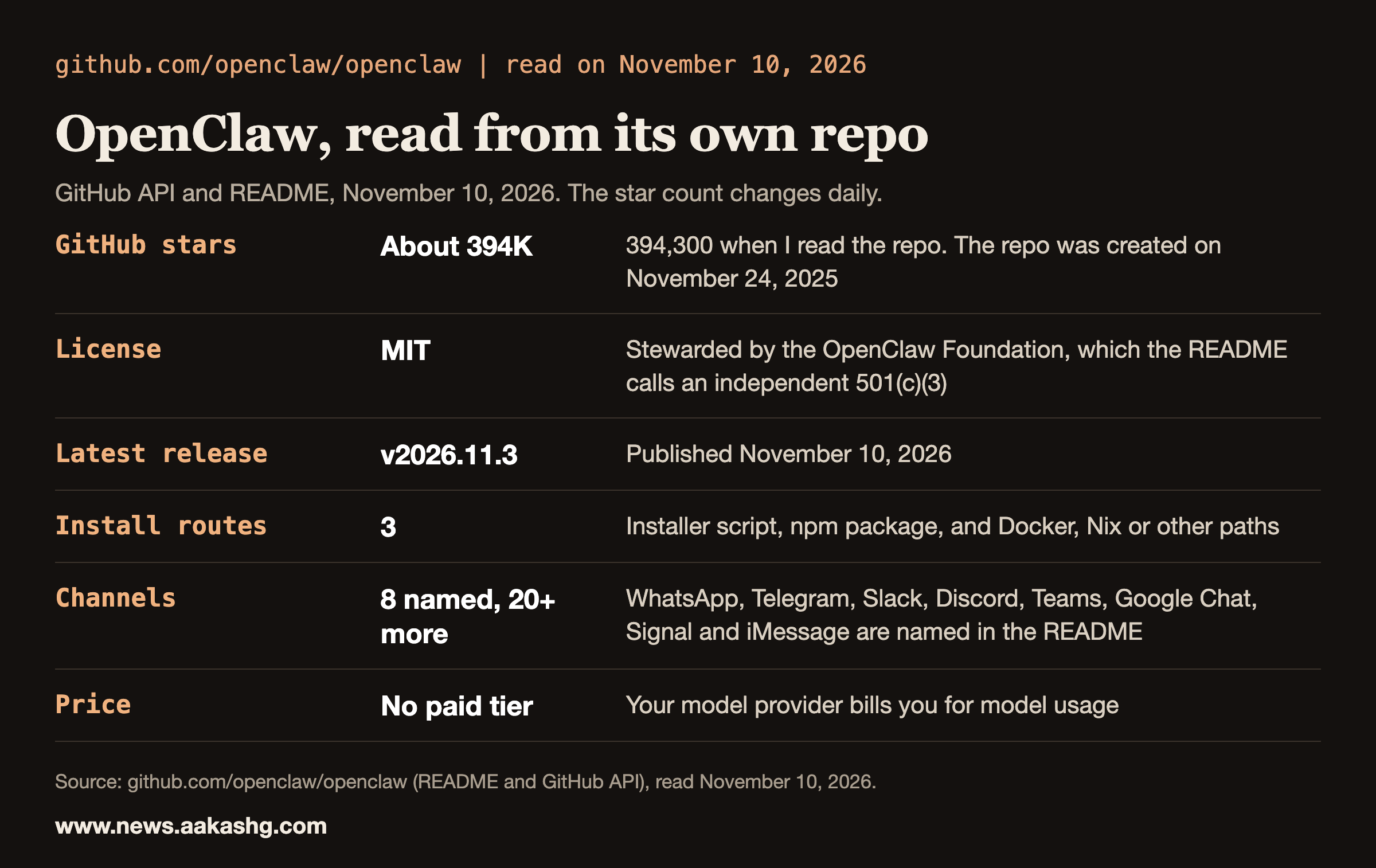
The README describes OpenClaw as an open-source AI assistant that runs on your own computer and meets you in the channels you already use. Its state, memory and credentials live on your hardware, and the models are plugins you can swap. The README also says it has no paid tier, hosted service or token, and that it is stewarded by the OpenClaw Foundation. You still pay your model provider for usage.
It has had three names. My February 3, 2026 guide was titled “Openclaw fka Moltbot fka ClawdBot – Your Complete Guide,” and I wrote in it that when I started writing, it was still Moltbot. As of November 10, 2026 the repo shows about 394,000 GitHub stars, and it was created on November 24, 2025.
How to install and run it
On macOS, Linux or WSL2, the README’s command is:
curl -fsSL https://openclaw.ai/install.sh | bashOn Windows PowerShell:
iwr -useb https://openclaw.ai/install.ps1 | iexOn a fresh install, the installer scripts start onboarding automatically. If you manage Node.js yourself, the README gives an npm route for Node 24.16.0+ on 24.x or 26.1.0+:
npm install -g openclaw@latest --allow-scripts=openclaw
openclaw onboard --install-daemon
The --allow-scripts flag is for npm 12 or npm 11.16+. On npm 11.15 and earlier, the README says to omit it. After onboarding, two commands check your setup:
openclaw gateway status
openclaw dashboard
The README says onboarding verifies model access, creates the workspace and configures the Gateway, and that the dashboard command opens the Control UI, where you send a message to confirm the assistant works. The getting started guide covers channel setup and troubleshooting.
In my February guide the install was a single curl command and about 10 minutes. In my March 17, 2026 episode with Naman Pandey, the install section walks through a three-command npm install and a Slack connection; the post closes that section with “Three commands. 15 minutes.” The curl command is the same one the README gives today. The npm route has changed: the README now adds a flag for npm 12 and npm 11.16+, so use the commands above.
How the pieces fit
Per the README, the Gateway is the local control plane for sessions, tools, events and channel connections. The Control UI, CLI and terminal UI connect to it. Channels bring the assistant to messaging services, and companion apps add voice, camera and screen actions on supported platforms. Tools, skills and plugins extend what an assistant can do.
If you use Claude Code, the idea will feel familiar. Instructions and memory are files on your machine, and skills are folders of instructions. I wrote about that pattern on my page on how I set up Claude Code.
Security first
OpenClaw has shell access to your machine. That is what lets it act, and it is also the risk. The README tells you to treat inbound messages as untrusted input, and it says tools run on the host for the main session unless you configure sandboxing. Read the security guide before you connect other people or expose the Gateway remotely.
In my February 2026 guide I listed the steps I would take at the time. They still match the README’s direction:
- Run it on dedicated hardware, such as a Mac Mini that cost about $600 in February 2026, or a cheap VPS.
- Never expose ports publicly, and treat your gateway token like a password.
- Turn on sandboxing for anything beyond your own main session.
- Start with low-risk integrations before you connect your bank or primary email.
That guide also quoted Peter Steinberger, who built OpenClaw with the community, from early in the project: “Yes, most non-techies should not install this. It’s not finished. I know about the sharp edges.” It reported researchers finding over 900 publicly exposed instances on Shodan in the first week. Both facts are from February 2026. Check the current docs before you rely on either.
What a PM runs on it
The best production example I have is a CPO. In my episode with Mikhail Shcheglov, the CPO at OLX, he said that the whole stack runs on OpenClaw and Hermes, and that his knowledge graph had formed over five months. OpenClaw is his base runtime, and Hermes adds automated skill generation. He tested it across five core topics and saw a 31% improvement in recall when the agent answered with those generated skills. He also reported his agent’s product context at 54%, which he described as enough to work like a capable junior-to-mid PM making backlog decisions.
His use cases include status reports, an email and calendar digest, a gatekeeper for stakeholder feature requests and recruiting. The full interview is on my site and on YouTube. If you want the Hermes side, my Hermes starter kit is the paid guide.
Land a PM Job is my 12-week cohort for PMs who want to build with AI and land offers. The next cohort starts November 23, 2026, with live sessions, six 1:1 coaching sessions and reviews of your real materials. I cover tools like this at www.news.aakashg.com.
OpenClaw FAQ
What is OpenClaw?
OpenClaw is an open-source AI assistant that runs on your own computer and replies in the chat apps you already use, including Slack, Telegram, WhatsApp and Discord. Its README says state, memory and credentials stay on your hardware and the model is a swappable plugin.
How do I install OpenClaw?
On macOS, Linux or WSL2, run the installer script from the README, which provisions Node.js if needed and starts onboarding. On Windows, use the PowerShell installer. If you manage Node.js yourself, install the npm package and run the onboarding command with the daemon flag.
Is OpenClaw free?
The software is free and MIT-licensed, and the README says it has no paid tier, hosted service or token. You pay your model provider for the usage you generate, and any server you rent.
Is OpenClaw safe to run?
It can be, if you set it up with care. The README says to treat inbound messages as untrusted input and notes that tools run on the host for the main session unless you configure sandboxing. Run it on dedicated hardware with ports kept private, and read the security guide before you expose it.
Is OpenClaw the same as Moltbot and Clawdbot?
Yes. My February 3, 2026 guide covered the project under all three names, and the repo today is called openclaw.
