Check out the conversation on Apple, Spotify and YouTube.
What We’re Covering Today (0:00)
Aakash: I’ve got one of the heads of AI PM at Amplitude, the Principal PM in charge of their agents and MCP products here today, and we’re going to walk you through everything you need to know to master analytics and Claude Code. Frank, welcome to the podcast.
Frank: I’m stoked to be here. Thanks for having me.
Aakash: What is the most powerful AI PM workflow you have seen people use these days?
Frank: It’s got to be managing your whole product process out of Claude Code, Cursor, and hooking it up to some product analytics providers like Amplitude’s MCP.
What Is Claude Code + MCP in Plain English? (1:55)
Aakash: What does connecting Claude Code via MCP really mean in plain English?
Frank: OK, so there’s two different tools. Claude Code — it’s a terminal-based coding agent with access to a bunch of different Claude models, but it has some pretty cool stuff like MCPs, skills, and a bunch of other actions. MCP stands for Model Context Protocol, and the simplest way to put it, it’s the easiest way to connect your AI models with any external tools, actions, and data. We’ve used MCP a lot at Amplitude to connect a bunch of tools and data that we have to a bunch of external AI clients. Big ones include Claude, Cursor, and ChatGPT — and we use that to power a bunch of pretty complex coding and product workflows.
Aakash: So what does this setup allow PMs to do?
Frank: The setup lets you do a lot of things. I automate a lot of my weekly business reporting using a bunch of dashboard agents. I can easily analyse, run successive queries, pull in a bunch of data, and just run a bunch of analysis on my product data. I can deeply investigate different trends that are happening in charts. While I used to be creating a bunch of manual charts, the model is doing all of that for me now. It’s really easy for me to explain why my metrics are moving because I can pull in all of the underlying feedback data to try to hypothesise about why things are changing. I can drill into specific account health of our users and also some timelines about what people are doing within our product just to see what their behaviours are like. I’ve been actually using these models to draft a bunch of PRDs based off of this analysed product context that MCP makes so accessible in Claude Code, and then if you’re really venturous, you can actually take some of those insights that you’re generating, convert them into PRDs, and — if you want to route them to a human — push them into Jira or Linear via MCP. But if you’re really daring, you can also push them directly into Claude Code or Cursor and try to draft some prototypes on your own.
Aakash: OK, so it’s really the gateway drug to all of the 10x AIPM workflows that people talk about these days.
Setting Up Claude Code + MCP (3:45)
Aakash: Before we really get into this, can you show us how to set all this up?
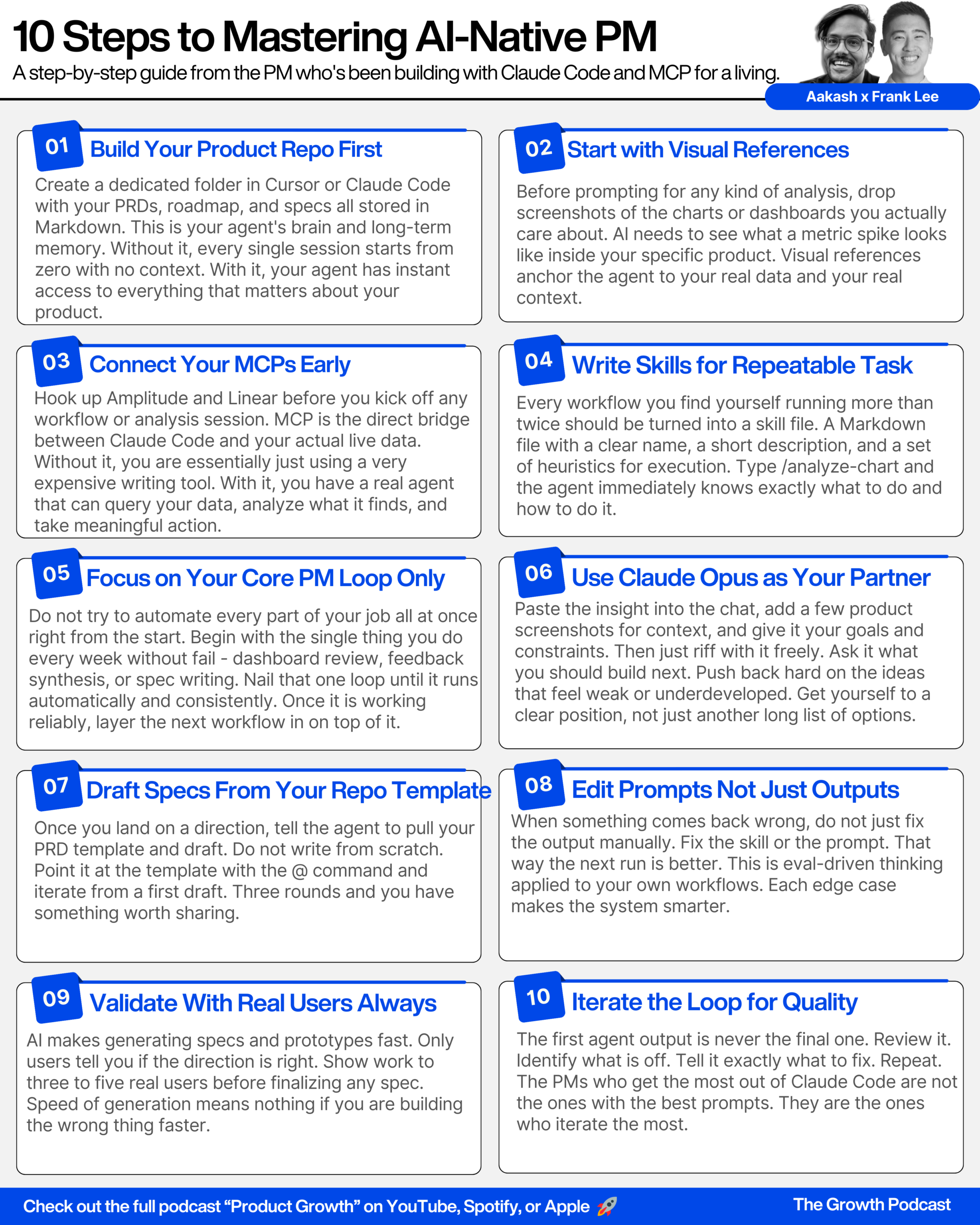
Frank: Sure. So I’m going to jump into Cursor. If you see this repo, I’ve spun up my own Amplitude product repo. On the left-hand side I have a bunch of contexts that I’ve already aggregated about all the different product lines that I work on. For example, we’ve been working on agents, AI feedback, Ask AI, a lot of our enterprise control features, MCP. I have specific folders and contexts and files detailing some of the initiatives that we might have within our roadmap, and some of the specs that I might be thinking about, and also just a bunch of different learnings and verbiage that refer to the specific parts of this product.
Within Claude Code or within Cursor, I can easily refer to some of those pieces of context, brainstorm about it, draft new specs. But I think the most interesting thing is from the most recent changes in Claude Code — they’ve been iterating on a new protocol called skills. I’ve created a specific skill, and the way I simply think about this is: it’s a clear name about what this skill is, a little description about what the skill is and when to perform it — that’s some metadata that the models can use to determine when to use that function. But at its simplest, this is just a prompt. There’s a prompt about what is this specific task I’m accomplishing, what is the set of heuristics or steps I might take, and then also you can configure what set of tools you might use that is connected to MCP in order to accomplish that objective.
Context Management in Claude Code (6:28)
Aakash: What have you learned through trial and error about the right context you should be including in Claude Code? There’s always this concern about using up your context window.
Frank: I actually don’t worry about it too much because you can basically refresh a lot of the context every time you start a different session. Within Claude Code in terminal, if I feel like I’m running out of context, I can just exit out and it’ll refresh the context. Similarly within Cursor, if I wanted to spin up a new agent, I could just jump to the top, spin up a new tab, and it basically forgets what was happening in a prior thread and I have a fresh set of contexts.
That being said, there is a bit of context management you do have to think about. One of the trade-offs of MCP is that a lot of the tools you might have loaded — I have Amplitude’s MCP hooked up, and Linear — the context from what tools are available, the names, the descriptions, and some instructions tied to each MCP fills up some of the context depending on what MCPs you have loaded. That being said, most folks don’t have a huge amount of MCPs loaded up. Even with Amplitude and Linear loaded, I might be using up anywhere from 5 to 10% of my context.
If you are doing a really long analysis — pulling in a huge amount of chart data, doing a bunch of successive queries, pulling in a huge amount of feedback — sometimes you might run into context issues. The one benefit in Claude Code is when you start running out of context, they have this feature called compaction where it starts trying to summarise what happened in that thread and consolidates that into a smaller summary. You can also use the slash compact command — they show you what percentage of your context window you’re using up in Claude Code now.
Aakash: I ran into this problem at about 1 a.m. last night where it said “conversation too long, can’t compact.” So my newest hack is when I’m at like 90%, I will say: write a markdown file of your process, your progress, and what you have left to do. That’s also a good way to transfer the context over if you need to.
Frank: There’s also just a bigger picture take on it. You can worry about context management now, but the reality is in the next few months, a lot of the new models released will probably expand their context windows or have different mechanisms within an agent client to handle some of that complexity for you. So just build for the future and think about pulling in what’s most relevant to give your agent the best types of responses.
How to Structure Your Product Repo (9:24)
Aakash: Can you walk us specifically through what methods you are using to get context like meeting notes into here, and how you’ve structured those folders and files?
Frank: At its simplest, I have a product folder. These are some different product lines I’m working on — agents, AI feedback, enterprise features, MCP. Within each of them I might have some context about what our Q1 plans are, things we’re thinking about like forms of memory, ambient agents, different types of agents. These are basically specs that I’ve converted into markdown files that I can refer to pretty easily using the @ command, if I want to brainstorm from a given PRD or say: hey, we already have a bunch of planning within our Q1 plan, can you fetch all the specific items and turn those into drafts of PRDs?
I also have a few templates for recurring types of tasks. For example, a draft short PRD template — give me a sense of the problem context, talk through in narrative form what a solution workflow might look like, here’s how I want you to format it, here’s some heuristics on how I think and strategise about what to build. And then taking some of those requirements and turning them into acceptance criteria.
I also use Claude Code to pull in my Granola meeting notes. Granola doesn’t have a dedicated MCP right now, so I built a little automation — a script that dumps meeting notes into my product repo, sorted by year, month, and meeting. I can run a command to pull in my recent Granola notes, and there’s a bunch of these meeting notes that auto get dumped in. So if I want to summarise the main takeaways or get specific action items, I can just @ the entire folder and it’s all immediately accessible, consolidated in that one system.
The Top 5 AIPM Use Cases (16:47)
Aakash: What are the top use cases of Claude Code and MCP with analytics for product managers and product analysts?
Frank: I think there are 5 things I’m doing really heavily.
First, anytime there’s an anomaly or some type of big change in my metrics, I’m using skills and tools within Claude Code and our MCP to analyse and do some deep chart analysis. I drop in a link, and the agent can figure out exactly what specific segment or what little group-by or what specific related metric might hypothesise and lead to that change. That saves me a bunch of time.
Second, I’ve automated basically all of my weekly business reviews and dashboard reporting. At Amazon, I used to spend all of my Sundays coming up with metrics and explaining why things are happening. Now I’ve pointed this to Claude Code and some of these Amplitude dashboard agents, and Monday morning I come in and all of the 5 to 6 dashboards I look at are automatically synthesised. I know exactly the 3 to 5 top insights, and I know the one specific urgent issue to tackle with my team. I don’t need to analyse the dashboards anymore — I can just start focusing on solutions with the team.
Third, doing a bunch of deep qualitative customer feedback analysis with Amplitude’s MCP and the AI feedback product. All of our tickets from Zendesk, Slack, Amplitude surveys — that’s all unified in one place. I can just point Claude Code, tell it to analyse the feedback related to AI agents or MCP, and then the agent will navigate all of our tools, consolidate all the data, do its analysis and clustering, and give me a clean report of exactly what the urgent issues are, what the bugs are, and what’s the single most thing people love about our product that week.
Fourth, I spend a lot of time taking those insights coming from those dashboard agents or this Claude Code chart analysis, and then given this context, asking: what’s the right set of actions or plan to resolve this? I’ve given this agent some heuristics on how I think about coming up with solutions, and the agent can go at length, explore a bunch of different ideas, I can drop in some images, and then it can turn that into a spec so that I don’t have to write it anymore. Opus is like the best thought partner I’ve ever had on coming up with design and product ideas.
Fifth, I’ve totally reshaped how I think about what I route to the team to build versus what I just do myself. I can take these PRDs or some of these problem statements that the agent has surfaced, and if it’s easy, I just drop it into Claude Code or Cursor directly and it could pre-draft some of the solutions for me while I’m in a meeting. But if it’s a really tough problem, I can hit the Linear MCP and say: hey, I want to route this to the AI capabilities team, file it under this specific project, and assign it to this engineer.
Aakash: I love these. This is the new vibe PMing workflow. These five use cases.
Live Demo: Deep Chart Analysis (19:29)
Aakash: Can you demo each of these for us?
Frank: Just for context, this is one chart I’m looking at on the MCP side. We’re curious about what is the average number of tool calls that might happen in a given week, and I’m seeing this anomaly where the average number of tools being hit is 8.1 for this week — which is quite different and worth investigating because I need to figure out how to manage the right tools, the descriptions, and make sure nothing’s broken.
So I can take this link, jump into Claude Code. I have a bunch of different skills here — there’s the analyse chart skill. Remember, there’s a name, description, and a bunch of heuristics on what to do. If I do the slash command, that can trigger that specific skill. I’ll type: “Analyse this chart and explain why there’s a jump this week.”
Now the agent is connected to the Amplitude MCP, so you can see it’s parsing the URL, it’s starting to pull in some data on the chart, and then it has some tools that let you navigate the data. The model starts showing its work on how it’s navigating your taxonomy, how it’s navigating relevant charts, maybe it’s navigating the specific events and properties related to that.
This is the format I specified for it — here’s the chart, here’s the time range I looked at, here’s the metrics I analysed, and it walks you through what the spike happened, when it occurred, the underlying data that led to that, and then some hypotheses about it. It detected changes within the types of tools being analysed, it has access to our experiments and feature flags data, and it found some flag activity that provides different tool access and provides possible alternative explanations.
Basically what I would have had to do manually to investigate and explain what’s happening — the agent did it in literally a minute and a half. This would have taken me probably 1 to 3 hours depending on how complex the query was.
Aakash: Yeah, and that’s with having a background as a data analyst. If you’re not coming from that background, it might take you half a day.
Frank: And that’s assuming you know which properties to look at. On the MCP side, we’ve done a huge amount of configuration on how to simplify the names of the tools and the descriptors, and how to improve our underlying search infrastructure to capture the right context about when to use a specific chart or event. If you compare this to an expert of the taxonomy, it’s the difference of this running in 1.5 minutes versus them spending 10 minutes navigating the chart. If this was a person who didn’t know that taxonomy, they would have either gotten the wrong answer or spent 2 days chasing down the right person in the org.
Live Demo: Automating Dashboard Reporting (23:27)
Aakash: What’s the next workflow?
Frank: The next one is around automating dashboards. Similarly, I have an analyse dashboard skill. Here’s when I use it — meeting prep, dashboard investigations. I instructed the agent to look at the URL, query the underlying charts, fetching them 3 at a time because of some context limitations, and look for specific things: if it’s a KPI chart, look at the percentage change; if it’s a bar chart, look for concentrations or gaps. Teaching it some heuristics on how I as a human would think about this data.
Let me show you. Claude, analyse dashboards — can you give me a TLDR on my external MCP usage dashboard?
This is different than before because last time I gave it an explicit URL, and this time I’m giving it a natural language query. If you’re an MCP PM, you have to spend a lot of time thinking about: how do you take those ambiguous natural language questions and teach the model to figure out how to use your search infrastructure or navigate your data so it pulls the right thing?
You can see it started looking for “external MCP usage” — these are different search queries it was running on our search endpoint on the dashboard data. It pulled it, identified the dashboard, and then it has a different tool for querying those charts. Now it’s given me a quick overview about what some of the metrics look like.
I could have spent 10 minutes scanning through all of the charts in my dashboard, and if I found anything interesting, I would have to copy-paste individual data points, pull them into a summary, think about the narrative, jump into AI feedback and run a search on MCP — but the model, given those instructions, did it all in about a minute and a half.
Aakash: That saved your whole Sunday. So if I recall, when I was at Epic Games, PMs used to do the analyst hat as well. I remember on Sundays for my Monday meeting, I’d spend like 6 hours going through various Tableau dashboards, having them load, copy-pasting, interpreting, analysing. How do you put that whole workflow together?
Frank: We don’t do WBRs anymore in the manual sense. I have agents that are automatically pushing these reports into every single product team’s channel. Instead of having to sit and review the metrics on Monday, all of the main takeaways, goals, and main deviations are already drafted there. Each PM, myself included, can have our own planning meetings with our stakeholders or engineering team already focused on solutions rather than reporting. The agents are scheduled via Amplitude’s dashboard agent feature — I pointed it to a dashboard, gave some context about how to think about it, whether for a weekly business review or a monthly review or a new feature report.
Live Demo: Customer Feedback Analysis (29:17)
Aakash: What’s the third workflow?
Frank: The third thing I do religiously on Mondays is deep qualitative customer feedback analysis. This is a product we launched in November — we’re pulling data from Zendesk, Intercom, Salesforce, Gong, public channels, G2, app stores, and we’re prototyping a Slack integration right now. All that data gets piped into AI Feedback and gets auto-analysed, but sometimes it’s not exactly what I want. I might have a specific pointed question.
So once again, I have a specific skill I created: “Analyse feedback, pull in my agents, MCP, and other AI-related feedback — give me a TLDR.”
When teams were doing this before this kind of tooling, they’d basically do it all in spreadsheets. There’d be a huge amount of these customer surveys, or they’d be copying and pasting messages from Slack, or sending crazy Zapier integrations to pipe data from one place to another. Our product pulls it all in one place for you and exposes it via an MCP tool. We have two different tools we’ve tuned for this: one for pre-processed insights, and one for the underlying raw feedback mentioned data.
This is a format I specifically like, but you can also provide the agent free-form context — I only want to look at praises, or I only want to look at references to competitors. Just explain that in natural language and the agent can figure out the right response.
Live Demo: Converting Insights Into PRDs (33:54)
Aakash: So once you have those insights, can you walk us through how you convert them into specs?
Frank: Once we’ve gotten an insight from our customer feedback themes, let’s convert it into actions or specs. I actually typically do this in Cursor because I want to use my specific draft PRD template, but you can also do this in Claude Code because it’s all tied to the same thing — I have this whole product repo in my GitHub, so you can navigate there in either tool.
I typically find that Claude Code is a little bit more powerful — it takes a bit longer but the response quality is marginally better. But Cursor has the benefit of a dedicated IDE experience with @ references, the ability to swap between different models, seeing my specific file system, and making edits directly. I always get hesitant when people say it’s one or the other — I use both extremely heavily.
Aakash: How are these PRDs looking? You’re the actual PM on this — is this a good PRD?
Frank: These ones are correct, but they’re too verbose. I can go back and say: dramatically cut down the words, the narrative of solutions is way too long, condense it to one or two paragraphs, the acceptance criteria is too many — prioritise to the top three. And this is total vibe PMing — just giving feedback to the agent in natural language to refine it. Within Cursor, you can highlight a specific section, hit command K and give quick feedback directly there, or command L to chat with the agent while it’s pointed to those specific lines in that file.
Live Demo: Pushing to Linear or Prototyping in Code (39:24)
Aakash: Let’s say you’ve iterated and the spec is good enough. The fifth workflow is either pushing these to Linear or doing them yourself — can you show us both?
Frank: Sure. For some of these long-running tasks I need to coordinate with the team, I’ll push them to Linear so that people can track it. I have the Linear MCP connected, so I can say: route this to the AI capabilities team, file it under this specific project, assign it to this engineer.
But we’re also in a weird era where there’s a lot of tickets I don’t even push to Linear anymore. I might just take the context and message the engineer directly in Slack — removes one extra step. And since Slack is an MCP, you can even do that through Claude Code.
For the prototyping side — if it’s an easy problem, I just drop it directly into Claude Code or Cursor and it pre-drafts some of the solutions for me while I’m in a meeting. I even have this channel where we’re essentially calling out to Cursor or Claude Code about instructions we want to push to our codebase. I might take this PRD or the specific acceptance criteria and say: @cursor, slash the JavaScript repo, make this change to the AI feedback page, prototype this change — and then spin up a background agent there.
The Biggest Mistakes People Make with MCP (40:35)
Aakash: What is the biggest mistake people make when using MCP?
Frank: I think there are two big ones. One is just wrong expectation-setting for MCP. Sometimes people think that MCPs can do everything. The simplest way to think about it is: MCPs are easy ways for your AI to interact with external systems. They’re not complex orchestration frameworks — there are other tools more relevant for that. Just setting the expectation of being able to pull in data is the first step.
The second problem is sometimes people get excited and connect a bunch of MCP servers, some of which have a lot of tools and some are totally irrelevant to a given workflow. If you have too many MCPs connected, all of those descriptions about what tools are available start being provided as context to the model on queries that might not be relevant. That can lead to higher latency on a given response or slightly skewed, inconsistent responses — because the agent is thinking about these tools even though they’re not relevant to the task at hand. So just be thoughtful. Within Cursor, Claude Code, etc., you can hide or remove tools that aren’t relevant to a given workflow.
Is MCP a Good Standard? (42:18)
Aakash: People say MCP is an unreliable or bad standard. What do you say to that?
Frank: I came prepared — I have a slide. I see four main criticisms. One, people have been overhyped about what MCP can do. Two, MCPs waste a lot of context. Three, there’s painful authentication experiences when setting up MCPs. And four, it’s pretty complicated to actually configure an MCP.
My response to each: first, set the right expectations. MCP is by far the easiest way to connect external systems with most of the AI clients you’re using. Instead of a PM having to pull for a huge roadmap of integrations and spend engineering resources building them out, most AI-native tools at this point are exposing their tools, data, and actions via MCP.
Second, MCPs do require some optimisation. You need to go back and forth on what is the right set of tools to make available in your server, optimise the names, and whenever you find edge cases, it’s similar to eval-driven development for agents. Once you come to the right set of tools, those servers and integrations work very seamlessly.
Third, most AI clients — Claude, ChatGPT, Cursor — everybody has converged around the same standard on MCP now. There’s typically a managed connector flow where instead of dealing with manual URL setup, you can just click one button and the MCP is set up for you, assuming you’re logged into the right tool.
Fourth, there’s been a lot of criticism about context rot, but within the last month and a half that’s dramatically changed. Cursor has done some experiments around dynamic tool calling — instead of having all the tools called every single time, they use RAG to find the right set of tools to call given a natural language question. Claude has adopted something similar. And that’s also one of the reasons they built skills — skills give you specific instructions that only get loaded in context when the model thinks it’s relevant to pull that skill.
Aakash: For my money, skills is one of the most important releases in Claude Code. So we started with it, we’re ending with it.
What Amplitude Is Shipping (45:19)
Aakash: All right, so we’ve talked a lot about MCP and Claude Code. What else is Amplitude cooking up? What are the most powerful agents you guys are building and releasing?
Frank: We’re super excited about February 17th because we’re bringing agents across the whole platform. Internally we actually think about this launch as kind of our cursor moment. When we think about Cursor, they made coding accessible to so many folks that had never coded before — it was the first foray for a lot of folks on how to spin up their own GitHub PRs or pull AI and agents into the workflow. They raised the floor for a bunch of non-technical folks that were never able to code before.
But what’s interesting on the Cursor side is they’re always trying to raise the ceiling of what’s possible. They made this conscious decision on: how do we make the most powerful agent, what are the most powerful features and set of contexts they can provide the model, so that people can code in ways they’ve never been able to before.
With our agents launch, we genuinely think this is our cursor moment. There have historically been problems where folks aren’t super familiar with the data taxonomy or how to navigate the Amplitude UI or what actions are available on the platform to improve their product. We’ve built an agent that’s embedded across the whole platform, has access to every single data point, every single action and improvement that can be taken in Amplitude, and we make it possible for people to navigate the whole product just using chat now.
There are four parts to this launch. One is this embedded Amplitude agent — a global agent that lives across the platform. You can pull it in a side panel and chat, and it has context on whatever’s on the page and all of the underlying tools and data available on the platform.
The second part is sub-agents — more specialised, asynchronous agents. There’s a dashboard agent that auto-monitors your dashboards for anomalies and automates your reporting. A session replay agent that analyses hundreds to thousands of your session replays and tells you exactly what people are doing, what bugs they’re running into, what conversion blockers exist. A feedback agent that pulls in all this qualitative data, cuts it with different heuristics, and tells you exactly what customers are feeling and saying. And a website optimisation agent that scrapes your website and recommends experiments you can run.
Underpinning all of this is MCP — we’ve made all of these tools available externally. So if you want to spin up your own bespoke workflows and agents, you have access to all the creation, read, and edit types of tools across all of the data and actions available in the Amplitude platform. We’ve seen power users build super complex internal workflows mixing Amplitude data with their Tableau data, auto-piping insights and anomalies into Cursor.
The last part of the launch is agents everywhere — in Slack, wherever you work. I think about this as like the Big Short — this is my quant. Anytime I have a question about what data needs to be pulled or what analysis I want to run, I can just hit Amplitude Agent directly in Slack. It’ll run for a few minutes and tell me exactly that analysis without me doing any of the work. It can link back to exactly what charts it looked at, and it can also change anything within the platform — edit a feature flag, run an experiment, launch a survey. You can kick it all off in Slack.
Where to Find Frank (49:55)
Aakash: If people want to learn more or contact you, where can they find you?
Frank: If people want to get started, jump to amplitude.com. If you want to see what’s happening within this launch, go to amplitude.com/AI. Once you’re in the product, regardless of what plan you’re on, you can interact with our agents, set them up in Slack, and connect to all of our data within Claude, ChatGPT, Cursor, and Claude Code using MCP. If you want to hit me up directly, I’m Frank Lee on Twitter, or you can hit me on LinkedIn.
Aakash: Frank, thank you so much for this master class in using Claude Code, using analytics, and the future of agentic analytics.
Frank: Thank you.
Key Takeaways (50:28)
Aakash: All right guys, so we’ve walked through what I think is the future of PMing. We were joking off-air — this is vibe PMing. Just like there’s vibe engineering, vibe coding, vibe designing, this is vibe PMing.
We walked through 5 workflows using Claude Code and MCP connected to your analytics tool.
Workflow 1: Deep Chart Analysis. Drop a chart URL into Claude Code, trigger your analyse chart skill, and in 90 seconds the agent tells you why your metric moved. No manual charts, no chasing down analysts.
Workflow 2: Automated Dashboard Reporting. Point Claude Code at your dashboards. Come in Monday morning with the top 3-5 insights and the one urgent issue already written up. Your Sundays are yours again.
Workflow 3: Customer Feedback Synthesis. Connect all your feedback sources — Zendesk, Gong, Salesforce, Slack, app stores — via Amplitude’s MCP. One prompt gives you a clean weekly report of bugs, feature requests, and what people love.
Workflow 4: Insights to PRDs. Take the analysis output, point it at your PRD template in Cursor or Claude Code, and get a first draft spec in under 2 minutes. Iterate with natural language feedback until it hits your bar.
Workflow 5: Take Action. Push tough problems to Linear via MCP. For easy problems, drop the spec directly into Claude Code or Cursor and let the agent prototype while you’re in your next meeting.
If you are not in an org that is giving you this access, make the request. If you’re a product leader, use this video to get everything through your IT departments — because this makes PMs dramatically more effective. Everybody should be getting Claude Code access. Everybody should be getting Cursor access. Everybody should be getting GitHub access to the codebase. This is what not just teams like Amplitude will be doing, but the Toyotas and the Fords and the United Health Groups — in 2 or 3 years they’ll be doing that too. There’s going to be a huge advantage if you’re one of the teams that adopts this sooner.