Check out the conversation on Apple, Spotify and YouTube.
What We’re Covering Today (0:00)
Aakash: In my opinion, N8N is the most powerful workflow automation tool. Pawel Hearn has been knee-deep in N8N more than almost anyone else in the world. He has tried everything. He’s made all the mistakes. He’s learned all the expert workflows and tips and tricks. So in today’s episode, he’s going to teach you everything you need to know to master N8N.
You can learn a lot of things that matter without coding. Without going too much into tech, what are some of the use cases? Like, I understand the word workflow. I understand the agent, but like what is this practically going to do for me? That’s all we need, starting from simple business workflow automations, chatbots, automatic competitor monitoring, multi-agent research systems. Sky is the limit.
What are the other N8N skills people need to know? First best practice is to set a dedicated error workflow. Another good practice is this max iterations. Another one setting this retry on fail. If we now try to execute this step, it should call Perplexity 6 times for each of the rows, and we should get 6 search results. Would you need a pro version of N8N or Perplexity to do this? I’m using a free version of N8N. Holy guacamole.
If you get any value out of this podcast, do me a huge favour and follow on Spotify and Apple Podcasts and subscribe on YouTube. It helps the show tremendously.
If you become an annual subscriber to my newsletter, you get access to 9 incredible AI products for an entire year. This is an over $3000 value across tools like Mobbin, Linear, Descript, Magic Patterns, Reforge Build, Relay, Deepsky, Dovetail, and Arise AI. Most of these brands have never done a product package like this, so go take advantage at bundle.akashg.com.
And now, into today’s episode.
Why N8N Matters (1:55)
Aakash: Pawel, welcome back to the podcast.
Pawel: Hey Akash, it’s great to be here.
Aakash: So why should people care about N8N?
Pawel: In my opinion, N8N is the most powerful workflow automation tool that combines two perspectives. One is automating traditional workflows, and the second perspective is building AI agents and multi-agent systems. This is by far the most intuitive tool that you can use to automate any workflow, not specific workflows or simple workflows that might work in some cases and not necessarily in others. N8N can do everything. That’s why it’s my favourite framework, and we can of course dive into the details.
The Use Cases (2:33)
Aakash: What are some of the use cases? Like, I understand the word workflow, I understand the agent, but what is this practically going to do for me? What problems is this going to solve? What time is this going to save? What is this going to automate?
Pawel: Anything that can be automated can be designed and mapped in N8N. Starting from simple business workflow automations like we’ve been implementing for many years, even before AI, to what companies currently implement like chatbots, automatic competitor monitoring, multi-agent research systems, workers that monitor your inbox and based on, for example, your email, take actions in your systems. Sky is the limit.
Aakash: Amazing. Well, can you show us it in action and teach us how to use it well?
Building Your First Workflow (3:14)
Pawel: Sure, I would like to, instead of starting with the theory, build a workflow together with you. Let’s start from a classical workflow that will use an LLM as one of the steps, and we will then increase the agency until we reach the N8N AI agent level. Does that sound OK?
Aakash: Yep, makes sense. Although some people may not know what we’re talking about, so you’re about to see this in action.
Pawel: Yeah, let’s just get into building. Just to start, imagine that we have a product—I actually have a product which is Acredia, a digital courses and credentials platform—and I would like to monitor my competitors. Every, let’s say every week, I would like to get an email summary of everything that happened: new features, marketing events, customer complaints that go viral on Reddit, and so on.
To do that we can use N8N. The first step would be just to create a new workflow. The workflow can start in different ways. We can start it manually, we can schedule it to run based on a schedule, or it can be an event in an external system that triggers something that is called a webhook, which is like an inbox for a web process. But in this case, let’s start with a manual trigger. It will be the easiest to test.
Connecting to Google Sheets (4:27)
Pawel: The first step, because I know that I want to monitor competitors, will be getting the list of competitors. Does that make sense? So we need to look for some action that will connect to Google Sheets. When I type “sheets,” as you see, I have this action, Google Sheets. What I would like to do is to read the list of competitors so that I can do something with this list.
So here it will be “get rows in a sheet.” I previously configured my credentials, so N8N already knows how to connect to my Google account. If you don’t know how to do it, if you click “create new credentials,” it will guide you through all the required steps. There are also docs that you can read and they are not complicated.
The document that we are interested in is Acredia Competitors. So let’s try to type it. It found the document and the specific sheet. In this document, there is only one sheet, so this will be Sheet Number One. No filters.
So let’s test it before we go further. I will save the workflow just so that we do not lose the progress. Now when we click “execute workflow,” we see the progress step by step. It started with this initial node, which only means that we started the process, and then it connected to Google Sheets. If we open this node by double clicking, we can see that it returned some elements. We see row numbers and “competitor,” which is one of the columns, exactly what we have in this Google Sheet.
Overcoming the Initial Learning Curve (6:01)
Aakash: I wouldn’t say that was the simplest Google Sheet ingestion, and I think one thing is that N8N is so powerful that you might have to overcome some initial anxiety with all the dropdowns and things that you see and just realize that I’m using a full functioning tool. I’m using a full-powered power user tool, so some of these things might be a little bit scary, but once you overcome that hurdle and you figure out, oh, this is how we get the rows, it becomes really easy, it becomes like second nature.
Pawel: Yeah, exactly.
The Pin Data Trick (6:27)
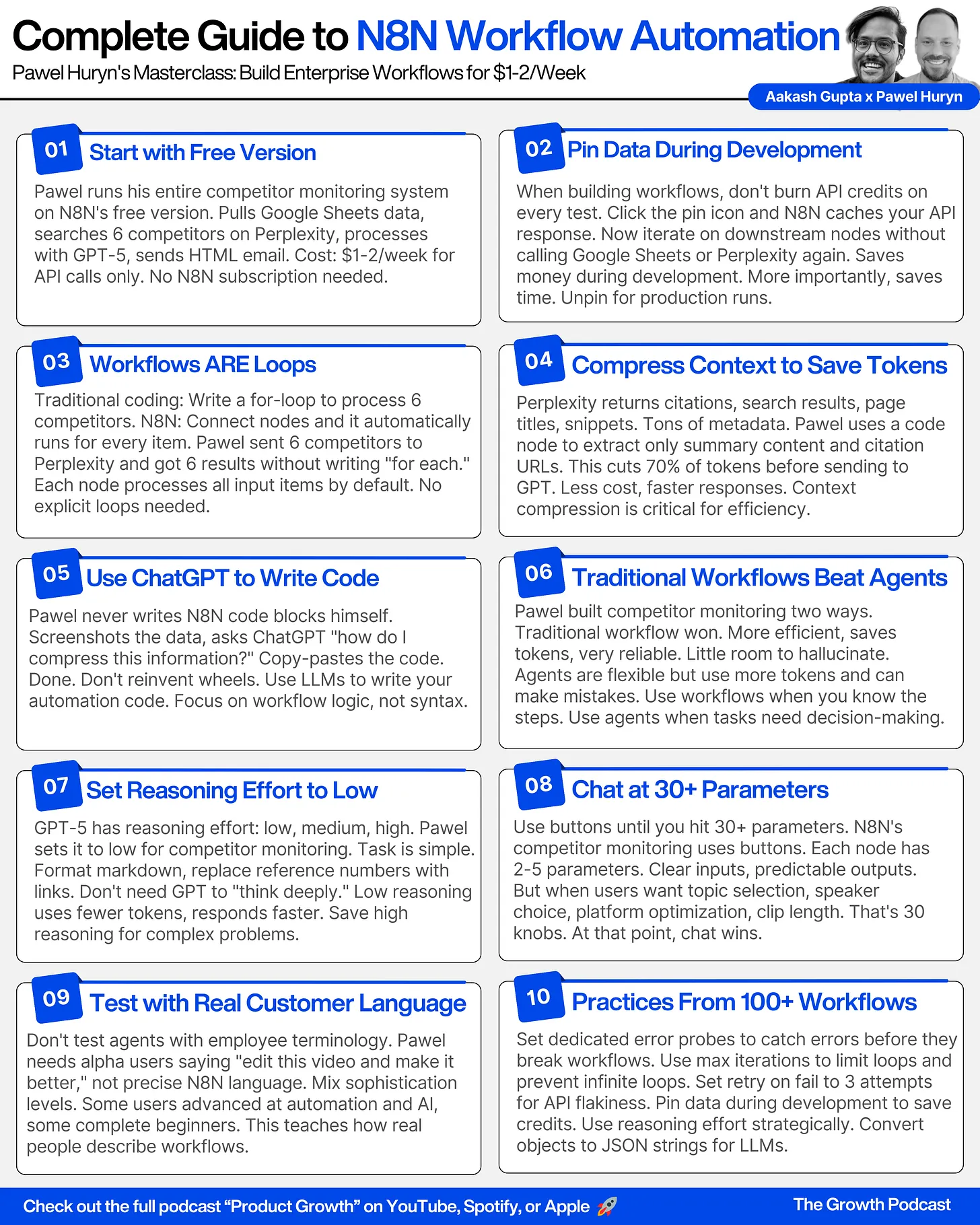
Pawel: The next step, once we have this data—let me show you a trick. We don’t have to keep asking when developing our workflow, developing this process, we don’t have to query Google Sheets over and over again. We can just pin this data and it means that for development purposes, we can just use this collection and it will not actually connect to Google Sheets. We can continue from here. This will simplify everything.
Integrating Perplexity for Search (6:51)
Pawel: So how can we monitor our competitors? You could try to connect to some service like Brave Search to perform a Google query, perform a search based on some query, but what works best for me in most cases is just using Perplexity.
So the next step is Perplexity. You don’t have to remember all those actions. If you just type what you want to achieve, it suggests the right node type. The only possible action here is “message a model.” I already have the Perplexity account, so all I need to do, and I can leave the different options, is to send a message and tell Perplexity what I expect.
In this case, I previously prepared the prompt. Let me explain it. If I click this small icon, we will just extend this area. I explained to Perplexity that I’m conducting market research and the first thing I wanted to do is to find insights about a specific competitor. Here we have a preview of one of the rows, and all you need to do to use this as a variable is to drag and drop this element here. For every row, every competitor, it will send a separate request to Perplexity search.
I have also instructed it what to focus on: new products, capabilities or features, important updates, announcements, changes in pricing, partnerships, user complaints, and so on. Also, I have asked to apply specific formatting so that we have a header with the competitor name and then relevant links and relevant information. If there are no updates, it should reply with “no updates.” That’s all we need.
Running the Perplexity Search (8:34)
Pawel: If we now try to execute this step, it should call Perplexity 6 times for each of the rows, and we should get 6 search results.
Aakash: Would you need a pro version of N8N or Perplexity to do this?
Pawel: For Perplexity, you need an API key which doesn’t require a Perplexity subscription but requires connecting your credit card, and the cost of this—you can make hundreds of calls, especially with the model that is selected by default—for $1 to $2. This is symbolic, and I’m using a free version of N8N.
Aakash: Nice. So pretty much this workflow is gonna cost you, if you’re making hundreds of calls, $1 or $2. Pretty cheap.
Pawel: Something like that, yeah. To run it every week, you can forget about the cost.
Compressing Context with Code (9:24)
Pawel: So what we got from Perplexity—we got 6 responses. For every element, as we see, it generated a lot of text. We have citations, we have search results, we have some title of every page that it browsed, and I don’t need this information. If we try to send this information to an LLM to create a report, we will waste a lot of tokens.
To optimize costs, you would like to select only what matters the most from this response. To do that, I usually ask ChatGPT how to do it. There is a special node type that is called “code” and you can ask ChatGPT, “Hey, how to compress this information because there is a lot of text and I don’t want to send all this text, for example, to OpenAI?”
The response will be that you can do it like here. I would like to select only 2 elements for every website that it found. For every element, I would like to find the response—the response is, it’s even difficult to find, yeah, it’s this one: “content.” This is a summary for a specific competitor, what it actually found. And I would like to also find citations, the websites that allowed it to generate this response. All those previous snippets are irrelevant. I only want a list of sources, and I can drag and drop it here.
Yeah, that’s pretty much it. I never write those code blocks myself. I just take a screenshot and ask GPT how to do it well. It will suggest in this case that you should write this expression and drag and drop selected fields here.
If we execute it—actually let me pin the Perplexity so we do not pay. We are developing this workflow, we might need to run it multiple times, so there is no point in calling Perplexity over and over again. Let’s execute this step and see what we get.
Now instead of all this information that we do not need, we just have a summary for each competitor with citations showing what pages it browsed. When talking about context management—I don’t want to complicate our conversation—but this would be compressing the context, which means that we select only information that matters and we ignore everything else. That’s how we can make it much easier to process for an LLM.
Sponsor Break: Amplitude (12:10)
Aakash: Today’s episode is brought to you by Amplitude. Replays of mobile user engagement are critical to building better products and experiences, but many session replay tools don’t capture the full picture. Some tools take screenshots every second, leading to choppy replays and high storage costs from enormous capture sizes. Others use wireframes, but key moments go missing, creating gaps in your understanding. Neither approach gives you a truly mobile experience.
Amplitude does things differently. Their mobile replays capture the full experience—every tap, every scroll, and every gesture with no lag and no performance hit. It’s the most accurate way to understand mobile behavior. See the full story with Amplitude.
Sponsor Break: Vanta (12:52)
Aakash: Trust isn’t just earned, it’s demanded. Whether you’re a startup founder navigating your first audit or a seasoned professional scaling your GRC program, proving your commitment to security has never been more critical or more complex. That’s where Vanta comes in.
Businesses use Vanta to establish trust by automating compliance needs across over 35 frameworks like SOC 2 and ISO 27001, centralized security workflows, complete questionnaires up to 5 times faster, and proactively manage vendor risk. Vanta can help you start or scale your security program by connecting you with auditors and experts to conduct your audit and set up your security program quickly.
Plus, with automation and AI throughout the platform, Vanta gives you time back so you can focus on building your company. Join over 9,000 global companies like Atlassian, Quora, and Factory who use Vanta to manage risk and improve security in real-time. For a limited time, my listeners get $1,000 off Vanta at Vanta.com/Akash. That’s V-A-N-T-A.com/AKASH for $1,000 off.
Understanding N8N’s Auto-Loop Feature (13:53)
Pawel: You might have noticed, Akash, or maybe we might have people that are more technical. People who are more technical might be used to creating loops. Usually when you get a collection of items, we draw a loop like “for” or “while” and then repeat the process and draw an arrow back to iterate over collection.
In N8N you do not need to do that because it automatically repeats the actions for every input item. That’s why I do not have to go back. It is possible, but it’s just not needed in this specific scenario, and in most scenarios you don’t need that.
Aggregating Data (14:28)
Pawel: But the next thing I would like to do is to send all this data to OpenAI and ask to prepare a report, to prepare an email template that I can send. But we have 6 objects and I would like to have one variable that I can use in my prompt.
To do that, we can use the default action which is about aggregating responses. We would like to get all the data, all those 6 responses, and create one field. So instead of 6 items, we will have 1, and we can now give all this information easily to an LLM.
Aakash: Should I repeat it, or do you have any questions?
Pawel: Let’s move on.
Aakash: Yeah.
Pawel: OK, we will simplify it in the agentic workflow version. We started with the most basic one, which requires the most manual work.
Creating the Email Report with OpenAI (15:20)
Pawel: So the next step is—I have all this information that I downloaded about my competitors, and I would like to give it to an LLM. In this case it will be GPT to summarize this information and prepare an email template. For that I do not need an agent. I only need to message a model, which should be here: OpenAI, message a model. It will send a prompt to an LLM.
In this prompt, let’s open it here. I already prepared the prompt, so we will not waste time on it. I have very specific requirements. “You are a Perplexity resources formatter. Your task is to create a clean competitor monitoring report.” I defined how the outputs should be structured, how every competitor report should start. This is a header of the report. We should use headings for every competitor and also how to format references that we shouldn’t use, for example, those numbers that people wouldn’t really understand what they mean. Instead, we should use a link from citations.
Let me demonstrate. Here I still have links like this, like reference number 2, and I would like an LLM to replace it with the right link from citations from the list.
What else? This is about how to create references and how to display links. What are the rules for the content: normalize this phrasing, avoid speculative language. And an example of the report that I would like to get. I have used this example—this is mixing markdown with XML so that the LLM understands that this markdown, it’s not the same as markdown used in the prompt. Mixing those notations works pretty well for me.
When it comes to special expressions, honestly, I didn’t write it myself. I probably wrote the first paragraph and everything else was generated by ChatGPT. I asked ChatGPT to generate a prompt and then I experimented with it. I probably also added this example, but everything else was generated by an LLM.
And of course, I need to provide the context, so it needs to know what the data is. For that we will use one of the expressions that are critical to remember: if we have those structured objects, objects with some structure, and we would like to convert them into text—as you see right now, we have a preview, so it will be “object, object, object, object.” It doesn’t make sense. An LLM will not understand it. So we need to convert it into a string, and this is the special expression: toJsonString. That way an LLM gets the content that it can understand.
You just click into that—it’s one of the expressions that are important to remember. Otherwise you will not be able to get this object and send it to an LLM.
Configuring the Model (18:31)
Pawel: The model that I’m going to use, let’s say it will be GPT-5. We probably don’t need it. We could use something simpler, but I want to later compare it to agentic workflows and AI agents, and that’s why let’s use the same model everywhere.
One of the helpful options when working with LLMs, especially with OpenAI, is reasoning effort. I know that in this case, I do not need an LLM to think a lot about the answer. Let’s try to find it. So reasoning effort is low.
Aakash: Can we use 5.1? Have they put 5.1 into it yet?
Pawel: Yeah, they probably have. I saw it today. I think 5.1 came out like a day or two ago.
Aakash: OK.
Pawel: We have experimental. So they’re updating it pretty quickly because some of these tools I’ve used, it may take a week or two.
Aakash: OK.
Pawel: And that’s everything we need. So let’s try to test it. And again, a very nice thing about pinning this data is that right now if I execute the workflow in this test mode, it will not connect to Google Sheets again, it will not send any requests to Perplexity. I can even modify this data by clicking a pencil icon, for example, to change the text. That’s really helpful. Let’s try to test it.
Comparing Complexity to Other Tools (19:57)
Aakash: So if I looked at this workflow so far, and I had seen some of my other videos on like Lindy and Relay, I would say this was a lot more complex than those tools.
Pawel: Yeah, but you can do much more and I will, in a moment, also demonstrate how you can do it more easily. It looks scary now, but we’re gonna show you—once you start playing with it, it is not that complex. But the version that we are implementing right now is the most efficient. It saves the most tokens and it will work the most reliably. There is very little space to hallucinate because all the LLM does is create a report based on this data from Perplexity. If we use an agent with multiple tools, it can make a mistake. So that’s—and it will think longer.
Converting Markdown to HTML (20:49)
Pawel: OK, so what we got from GPT-5.1—we have a response with the report that we asked for with sources, everything formatted as markdown. But we cannot send markdown. Well, we can, but it will not look nice. So we need to convert it to HTML.
Of course I could ask the model to create HTML, but again, it will not be efficient because HTML will consume much more tokens. So instead we used markdown formatting and now we will convert it to HTML. We can do it by typing “markdown.” We will select the text, but first let’s switch the mode. This is markdown to HTML. This is markdown, just drag and drop the text. It will produce HTML, I hope, and we have it here.
Let’s pin the data again.
Sending the Email (21:45)
Pawel: The last step is sending an email, but not using the default functionality. I would like to use the Gmail connection. Send an email, send a message. I will send it to myself. I already have connection to my Google account. “Weekly competitor report.” Email type is HTML. We have this HTML and the message will be this. We can see it in data, so drag and drop. Maybe instead of preview, I will run the entire workflow. So let’s do it like this and let’s see if you get an email.
Aakash: Yeah, I will check it. I am using the screen, but I will present my email.
Pawel: OK, so it looks like this: monitoring report, no updates, no updates. Here we have a list of updates for Certifier with the sources that should work.
Aakash: Wow, this is pretty powerful, although it took quite a bit of work. So what’s the simpler version?
Building the Agentic Version (22:49)
Pawel: What was complex here? First we need to understand the steps. Of course: get competitors from a spreadsheet, ask Perplexity—that was pretty logical. But then this code execution, aggregation, this is specific to N8N and the markdown conversion. This is my optimization. We could ask a model to create HTML directly.
Another version would be to make it more agentic. Let’s build it here. I will just move the trigger below and more agentic—you can just have a floating workflow up there and it won’t execute because there’s no trigger. It will not execute.
More agentic is to use AI agent. You can do it by just searching “AI” notes and there is, I would argue that there is one key node type that you need to understand, which is AI agent. I will close it for a moment.
Understanding AI Agents (23:46)
Pawel: So what is an agent? Every agent to work needs some LLM. So LLM is a brain for an agent, and in this case, my favourite model for agentic applications is OpenAI. I have done a lot of tests and yeah, we can share them later or maybe I can also demonstrate those results.
Aakash: GPT 5.1, right?
Pawel: So we use the same model here, the best instruction following that OpenAI has done yet. And the reasoning, let’s set low reasoning effort because this is not very complex.
Another thing is memory. We could attach long-term memory or short-term memory if an agent had to understand previous interactions, but here it is not the case. It doesn’t need to remember what happened, for example, an hour ago or a month ago. So we can skip that.
Giving the Agent Tools (24:39)
Pawel: But what’s important is giving an agent, this agent, some tools so it can pursue the goals. We will define the objective and an agent needs to use the tools to achieve that objective.
The tools are similar, although we will not use all of them. So the first tool is a tool to get competitors from Google Spreadsheet, Google Sheets tool. If we click those sparkles, we can let an agent decide which document it has to use and which sheet and so on. But because I know that there is only one document that should be selected, I can just pre-select it. Similarly, I can pre-select the sheet so that we do not have to waste tokens for thinking because there’s nothing to think about here. If it needs to get information about competitors, it should use this Google Sheet tool.
Another tool that it will need is Perplexity. Does it make sense? So it can perform some search. Previously, we have defined a complex prompt for Perplexity. Here, we can skip it entirely and say that our model will decide what to put here. So the prompt—you can think about it as a sub-agent. The prompt for this Perplexity call will be defined by our AI agent.
What other tools does it need? I will keep those two nodes just because there is nothing to think about. If an agent creates a report and converts markdown to HTML, it can be done by an LLM, but it is wasting tokens, wasting cognitive abilities. So for those reasons, in this version, I will once again just use the agent output and convert it to HTML and send the message. And later we will add more agents.
Defining the System Prompt (26:47)
Pawel: But we have not told the agent what we expect it to do. So to do that, let’s open an agent, define the system prompt, which is an extremely, extremely important part of the agent—the most important thing.
And I also prepared the prompt previously, so I will just explain it. “You are a market researcher. Your goal is to find competitor insights published within the last 30 days.” What to focus on—so the objective for the agent to pursue.
Many people when building agents do it like this: we define reasoning steps. So step one, instead of doing it when we mapped the process, we map it in English. Step one: read competitors stored in a Google Sheet. Then for each competitor, use Perplexity to find the relevant information. It will have to decide what the prompt should be. Step 3: from the responses, take only citations and content to compress the context. So it creates this temporary artifact and doesn’t focus on all the other information that comes from Perplexity and creates a final report in markdown formatting and follow other instructions.
So this is the second section: how to reason. And the last is report formatting. I just copied it from the previous version. And as you know, the previous version, the formatting was generated by ChatGPT, so there is not much to think about here. Formatting, links rules, content guidance—this is all generated by an LLM. I just added this additional section, report formatting, so that it is wrapped in a dedicated section.
Setting Max Iterations (28:35)
Pawel: And one more thing, this is a good practice. We probably don’t need it now, but I would like to demonstrate it already. By default, N8N agents can do no more than 10 iterations. So if it has a lot of tools and some of the tool calls might fail, each tool call will be an additional iteration, and if it iterates too much, it will just stop without achieving the objective.
So for that reason, I usually put the number 30 here. So it means that it will just keep iterating and even with a lot of tool calls, it will not stop prematurely. Makes sense.
Let’s save just to make sure that we do not lose the progress and let’s execute this workflow.
Aakash: It’s a pretty basic agent workflow with that sub-agent that you mentioned because it’s determining its own prompt for that step.
Pawel: Yeah, that’s an agentic element here. Deciding, calling the right tools and deciding what the prompt should be.
Aakash: The other one wasn’t because it was all defined even though it had a system prompt.
Pawel: The other one is what we call a workflow, and I call this a standard workflow. It of course can have switches, it can check some conditions, it can have loops, but this doesn’t really differ much from everything that we have been doing for years when automating different processes. The only difference here is using this LLM node, which is about sending text to LLM and getting a response. And similarly Perplexity, this is like an external service. You don’t even have to think about that there is an LLM inside, but there is an LLM inside.
For me, this is not agentic at all. This is just a workflow with an LLM. This one is more agentic, although the agency is pretty limited here.
Analyzing Agent Execution (30:35)
Pawel: It didn’t send the message for some reason, but let’s see what the agent did. By the way, we can do it—we can see it in logs. So here we have full breakdown of everything that happened. First it got our request, then it decided to call Google Sheets. Then with those Google Sheets, as we see, it already has information about competitors in the prompt. And then it called Perplexity.
If we look at the times, the starting time and end time, those calls were done in parallel, not sequentially. And we have this final call where it gets all the information, the list of competitors, results for Perplexity. This is quite a lot of text, and it generated this report.
What is the difference? The previous execution was about 5,000 tokens and like I tested it before, it’s like 30, 40 seconds. Here because it is more agentic, it is 1.5 minutes and 12,000 tokens and we will pay for every token.
Aakash: Wow, huge difference in cost. So that little bit of extra setup, you really reap the results on token cost and time it took.
Pawel: Yeah.
Sponsor Break: Test Cube (32:02)
Aakash: AI is writing code faster than ever, but can your testing keep up? Test Cube is the Kubernetes-native platform that scales testing at the pace of AI-accelerated development. One dashboard, all your tools, full oversight. Run functional and load tests in minutes, not hours, across any framework, any environment. No vendor lock-in, no bottlenecks, just confidence that your AI-driven releases are tested, reliable, and ready to ship. Test Cube: scale testing for the AI era. See more at testkube.io/Akash. That’s T-E-S-T-K-U-B-E.IO/AKASH.
Sponsor Break: Chameleon (32:38)
Aakash: Today’s episode is brought to you by the experimentation platform Chameleon. 9 out of 10 companies that see themselves as industry leaders and expect to grow this year say experimentation is critical to their business, but most companies still fail at it. Why? Because most experiments require too much developer involvement.
Chameleon handles experimentation differently. It enables product and growth teams to create and test prototypes in minutes with prompt-based experimentation. You describe what you want, Chameleon builds a variation of your web page, lets you target a cohort of users, choose KPIs, and runs the experiment for you. Prompt-based experimentation makes what used to take days of developer time turn into minutes. Try prompt-based experimentation on your own web apps. Visit chameleon.com/prompt to join the waitlist. That’s K-A-M-E-L-E-O-N.com/prompt.
Sponsor Break: Pendo (33:30)
Aakash: Today’s podcast is brought to you by Pendo, the leading software experience management platform. McKinsey found that 78% of companies are using Gen AI, but just as many have reported no bottom line improvements. So how do you know if your AI agents are actually working? Are they giving you the wrong answers, creating more work instead of less, improving retention or hurting it?
When your software data and AI data are disconnected, you can’t answer these questions. But when you bring all your usage data together in one place, you can see what users do before, during, and after they use AI, showing you when agents work, how they help you grow, and when to prioritize on your roadmap. Pendo Agent Analytics is the only solution built to do this for product teams. Start measuring your AI’s performance with agent analytics at Pendo.io/Akash. That’s P-E-N-D-O.io/AKASH.
Fixing Errors and Testing (34:19)
Pawel: And yeah, it failed because I need to fix this field. So instead of using—yeah, probably the field is called differently. Maybe like this. Let me pin this data and try it again.
OK, and here if I run it again, it will send the message. There we go.
Aakash: It’s a live podcast, guys, sometimes there are errors. It would be suspicious if there were no errors at all.
Pawel: Let me check my inbox. OK, it didn’t send the message. The message was empty, like you see here. So let’s take the correct HTML report from the previous node. You can just drag it like that. Yeah, and execute it again. It will skip the agent part because we pinned the data.
Aakash: That pin hack is really a good hack that you guys should be using to optimize this in time.
Pawel: OK, so as you see, I just got this email. It’s formatted a bit differently. Perhaps my instructions were not precise enough, so I should probably go to ChatGPT or maybe fix the formatting, fix the prompt manually so that we have the source that is clickable instead of inline links, but this is a problem with the prompt, not the problem with the LLM. Let’s leave it like this.
Aakash: Yeah, we would have to compare the prompts between the agent and the model to understand what is the difference.
Building the Most Agentic Version (35:47)
Pawel: The last version will be the most agentic. I think I can just copy this one and adjust it.
Aakash: We’re taking our workflow and we’re creating an agent now.
Pawel: Yeah, and what we have demonstrated so far is how people implement agents in like 90, 95% of cases. True agency is not that common. And before GPT-5, I would argue that it wasn’t even possible.
Now, I would like an agent to do everything: get competitors, call Perplexity, send an email. So you need to give it the send email tool. Yeah, it needs that tool. I would like to make sure that I’m using this email and the subject and the message will be defined by the model, so there is nothing predefined.
Another thing that I would like to adjust—because technically what I presented previously, you can call it an agent. For me, it’s a bit like coding in English because, OK, we define the goal. There are reasoning steps, but yeah, it’s like “read competitors stored in a Google sheet” and we fixed the sheet so no decision can be made here. “For each competitor use Perplexity”—the only thing that an agent can do is to define the prompt, but other than that, this is coding in English. Then another step: take citations, compress the context.
For me, an agent is something that gets the goal, gets a set of tools, and uses those tools to figure out how to achieve the objective. If we define the reasoning steps, of course it will work, but it’s difficult to call it an agent for me, even though this is just an LLM call because LLMs also can use tools. The agency is extremely limited here.
The True Agent Prompt (37:35)
Pawel: So a true agent will only get an objective. I have prepared the prompt previously and let’s see the difference. “You are a market researcher. Your goal is to find competitors”—you can find competitors using the spreadsheet, this was important because it doesn’t know this—”and use the available tools to send me a well-structured, scannable Gmail summary.”
I’m not talking about, I’m not explaining that it should convert those numbers into links, inline links, avoid unnecessary details, place inline links. Everything else that is related to formatting, processing the results, and order in which tools should be used—this is up to an agent. So it will do everything.
I assume, I hope that it will figure out that it cannot message Perplexity if it doesn’t know which competitors to ask about, and similarly it should send an email message after generating some kind of report.
Let’s execute it and see how it will work. But yeah, I have pinned the data, it doesn’t make sense. So let’s try again. The data will be unpinned because I copied it from another place.
Aakash: So we would expect this to take a bit longer just like we saw on the last one.
Pawel: Yeah, but we see the correct order. So it read the data from Google Sheets. It was thinking again. Now it’s calling Perplexity. It should do it several times.
If we look into logs, it doesn’t do it in parallel. I’m not sure this is a GPT-5.1 limitation or a wrong choice. I’m sure that GPT-5 can do it in parallel. Maybe if we defined in the tool—we can test it in a moment. Sometimes it’s important to provide the right tool description so that the agent understands how the tools should be used and whether this tool can be called in parallel. Because Perplexity, it can have some limitations on how many calls I can make, maybe just in case it did it sequentially.
And the last step should be sending an email. And I have not explained how the email should be formatted.
Aakash: Let’s see what it’ll look like.
Pawel: Yeah, every time it will be a little bit different.
Analyzing the Fully Agentic Results (40:00)
Aakash: Right, we got workflow executed successfully. Moment of truth with the email.
Pawel: So this is what it generated without my help.
Aakash: Whoa, this is like the best one yet.
Pawel: Yeah, it might be one of the best. And look at that.
Aakash: So how many tokens and how long did it take? Previously it was like 1.5 minutes, 12,000 tokens, 12,000, right? And this one here, it was 90,000 tokens. Holy guacamole. So it’s 8 times more tokens. And how long did it take?
Pawel: 1 minute 30.
Aakash: Same amount of time though.
Pawel: Yeah, a little bit longer. This can fluctuate, but yeah, overall, it will take a bit longer, but not that much.
N8N Best Practices (40:43)
Aakash: That’s the basic master class of the three levels of workflows. What are the other N8N skills people need to know?
Pawel: There are different skills. So we will discuss best practices later, right?
Aakash: Let’s just go into it.
Pawel: Yeah, we don’t have too much time left. We have about 2 minutes left.
Aakash: So best practices.
Pawel: First best practice is to set up a dedicated workflow that will be activated when there is an error in my workflow. We can do it here by going to the settings and we can select an error workflow, which is a workflow that will be called whenever there is some problem with the execution. That way, you can send, for example, an email or an email notification or Slack message when there is a bug on production.
Another good practice, one we already discussed, is this max iterations. Another one will be in different tools and in AI agents setting this retry on fail. Because, for example, a model might not be available for a brief period of time. We can retry, for example, 3 times every second. This drastically reduces the number of errors that influence the execution.
A good practice is providing tool descriptions. You can do it here. You cannot do it in MCP, and that’s one of the reasons why I prefer built-in connectors over MCP servers, is that now I can tell the model “this tool can be”—I don’t know how to spell it—like this. So we can provide the tool description. Often when you work with MCP servers or building connections, connectors on different platforms, those tool descriptions are inaccurate. They lack examples. They lack correct examples and common mistakes to avoid.
Adding those descriptions every time I see a problem in my workflow—and another thing that we can consider is in some places you cannot click this icon. In that case, there is a special expression, probably the 2nd or 3rd one that we discussed here: fromAI. This is just something to remember and it informs an agent that it should come up with some value for this parameter. So for example, prompt for Perplexity. This is not very creative, it’s red, but it would work in real life. I can just trust—if we execute the agent, it’ll be executed correctly. That’s the right way to define it.
So in some cases you might need it. In others, if this special icon is available, you can use this icon.
When to Use Agents vs Workflows (43:28)
Pawel: A good practice—and you might not like it, Akash—is, of course, this report was the best. I tend to agree, but at the same time, the risk of hallucination, the risk of mistakes here is the highest. This is the most expensive solution. In the weekly competitors monitoring, it doesn’t make much difference, but if that was something that is run and the user is waiting for the response, we want to minimize this time. The way to minimize this time is to define it like this.
If you run some simple automations that you just want to run in the background or you can wait, it’s perfectly fine. But if you want a process that will run on production, if you have something that can be expressed as code, it should be coded and we should leave agents for cognitive work.
If we really don’t know how the process will look like, there are different tools, we need to serve a diverse set of questions—like we have a Trello agent and it can create a new list, create a new board, move cards between different lists, complex scenarios—and you cannot predict each possible scenario, then we should choose an agent. If we have one process that we want to run regularly, it’s better to convert it into a workflow.
As an individual, it doesn’t make much difference. If you are running something in production and you have thousands of customers, that’s the right way to do it. Yeah, use an agent only when you have to.
Aakash: The agent seems fancy. We did it last, but actually you want to do what we started with when you can. You want to simplify both for time and cost spent.
Pawel: And we need to remember that when we are talking about Landon Bauer—people who use agents for their personal use cases will probably not see a difference. But if you have an LLM-powered product and you want to scale this product, you have to remember that this cost will scale proportionally to the number of users. So, especially if you want to have a premium version, that might be tricky.
Multi-Agent Research System Demo (45:36)
Pawel: One more example that I have prepared, and we can conclude or make some summary, just to demonstrate what an agent can do. This is not only about simple workflows. I would like to demonstrate a multi-agent research system. This is the next level.
Yeah, this is the next level. I often see infographics where people explain the difference between LangChain and other systems and they portray N8N as this linear workflow platform. It is completely not the case. You can perfectly—and this is an example of N8N used to map multi-agent research system by Anthropic.
So this is from the paper that they published, how they implemented it. And there is the lead agent that gets the research topic and distributes tasks between sub-agents. Then each sub-agent performs a scoped research. At the same time, it is aware of the overall context of the research. It creates a report and finally, this lead agent, which is an orchestrator, creates the final response for the user. And I did the same in N8N.
How many minutes do we have?
Aakash: 10 minutes.
Pawel: So just briefly, “give me research on Amazon.” I’m using a simple interface and this is an interface provided by N8N, but you can perfectly combine N8N with Lovable, Claude or another coding agent by creating something called a webhook. We will not be able to demonstrate it right now.
So this first agent that I defined verifies if the question that I asked makes sense and it needs more information, of course, because it was extremely imprecise. So here: “Amazon market share 2020-2024 by region, by continent.” And if I submit it—so it has a memory, it remembers the previous interactions.
The next step is going to this lead agent, which orchestrates sub-agents. It creates a list of tasks, for example, “give me Amazon revenue for Europe” or “give me Amazon revenue for Asia,” and then each of those sub-agents will pursue the goals. As you see, we have like 10 sub-agents, each running simultaneously, something like this.
Each sub-agent will use Brave search, will fetch website content, will use an additional LLM to compress the context. So there is a basic LLM chain, so we do not use the entire, the full HTML, but extract the most important information. Each of those sub-agents gets like 3 to 10 websites, and we are not using Perplexity. This is done manually.
Finally, lead agent combines all those reports, sends them to a copywriter agent. And the copywriter agent creates a file that is then stored in a Google Drive.
So I do not have to wait. It will run in the background. We can see the previous report, for example, this one I created previously. So we have Amazon revenue, executive summary, yeah, and different sources that it browsed with tables. We could format it, maybe improve the formatting, but other than that, it does the research. So I also have versions that generated much more complex reports with like 10-15 pages. It depends on the research topic.
Practical Use Cases for PMs (49:15)
Aakash: OK, so we walked people through all these levels of workflows. We have ended at the highest level, the multi-agent workflow. What are the most repetitive tasks that PMs still do manually that they should automate with N8N?
Pawel: There are many examples. One of the examples is just automating work with the software that they access the most. For example, you can use N8N to summarize emails or draft responses to every email that you get, move emails between folders.
Competitor research is one of the examples. I also have agents that write PRDs based on the input that the user provides. And it can search Slack, it can search your files like Google Drive, find relevant information, and then based on the prompt and your ideal PRD template, it can create this PRD, for example, as a Google Doc. There are many examples.
I personally also use it to automate tasks for my products. For example, I had to get information about exchange rates and import this information to my local database. I use it to import information about new subscribers to Substack. Processes like this—all can be done.
Free Plan Hacks (50:38)
Pawel: Yeah, this all can be done on the free plan. There are certain limitations. Like for example, the free plan has a limited history. So in theory, you can browse probably like 24 hours, but there is a simple workaround you can use to remove this limitation. Most of this article is—probably the entire article is behind the paywall, for sure, the entire introduction is without a paywall: “The Ultimate Guide to N8N.”
So this—best practices, we discussed them. We removed the paywall because it doesn’t make sense to keep the paywall. Webhooks, intermediate steps, error handling—you can read it later. But hacks: remove the limit of one day workflow storage. And I presented how you can do it in Docker.
Basically you need to use Hostinger, which is one of the cheapest platforms to host N8N in the cloud. It’s like $5 a month and you get a virtual machine with unlimited executions. You can run in the cloud and it can run 24/7, so it’s better than running it on your local machine.
All you need to do is to go to this editor and copy and paste this text. So I demonstrated how to do it. And unless you are selling N8N to others, as long as you use it for your internal purposes, this doesn’t break the license agreement.
Using Data Tables as Global Variables (52:18)
Pawel: Another thing that is helpful is that in free version, you do not have global variables, so you cannot do it. But you have a thing like tables. So if we go here, there are data tables and we can just create a table that will contain our global variables. For example, competitors, even competitors can be global variables, secrets, let’s say.
And here I can add columns, so it’s like a spreadsheet, but it’s stored directly inside N8N. And now every workflow can read it. Maybe another example. Yeah, those are some templates that are available for all the workflows that they have. So we do not have to use a paid version for it.
The Workflow History Hack (53:06)
Pawel: And the last ethical hack for N8N is workflow history. Because in N8N, in the free version of N8N, you only have the last version. You do not have the full version history theoretically. As you see, it’s limited to one day.
My workaround for it is to create an N8N workflow that will—let me just present it—that will just export N8N workflows regularly to a Google Drive. So I scheduled this workflow, which is executed daily.
Aakash: This is such an awesome—it’s turtles all the way down.
Pawel: N8N has an API and this API is free to use and it is available in the free version. So every day I get all workflow definitions. We can test it. I don’t have to describe it. And the next—it iterates over those elements and saves those definitions as files so you can later import them from file here. You just download the specific workflow, imported from this top menu, and that’s all you need.
If we go to this folder name, updated, so we can understand which files are the newest ones—we could also organize them into folders like a folder by day, but this is just a demonstration—so those are all my workflows. It was just exported. So now I could take this workflow definition, download this file, upload this to N8N, and we have a full version history for every workflow.
Another way to organize it would be to create a folder for every workflow and then for every day have a workflow history. So that’s pretty much it, and those are the most painful restrictions and you can easily work around them.
Pricing and Getting Started (54:48)
Aakash: We discovered 80% of N8N in 80 minutes. Should every product leader be getting their team a license to N8N?
Pawel: It depends because N8N license is like $20 a month, if I remember correctly, for 100 or 1,000 executions. In any case, it’s pretty expensive. But you can go to Hostinger. Right now, there is a Black Friday sale, but even without sales, frankly, this is like $5 to $6 a month for unlimited executions.
And yeah, if you claim the deal, you just select self-hosted in the end. This is here. This is not a Black Friday sale. This is the price that will also be available after the Black Friday is over. So for example, this one, this is a powerful machine with 8 gigabytes of RAM memory. And it will just create an instance. You get—so this is what I see—so I have my own N8N. I can manage it.
Learning AI with N8N (55:48)
Aakash: How can we use N8N to learn and ramp up on AI/PM?
Pawel: That’s a good question. There are—that’s one of the reasons I like N8N because you can learn a lot of things that matter without coding and without going too much into tech.
You can start from prompting and how to formulate precise instructions for your agents. You can understand context engineering because also, I didn’t demonstrate that, but you can easily include retrieval or generating embeddings and sending your documents to a vector store like Pinecone, which is also free.
You will understand how to compress the context, which I already demonstrated in this multi-agent research or in competitor monitoring, so that you are careful about the amount of information that you provide to an agent.
You will learn that the context matters. So sometimes instead of defining precise instructions, it is important to communicate the larger objective and the context in which the work is to be executed and how the success will be measured. And often an agent can figure out specific steps on its own if you describe the context well enough.
You can experiment with RAG, with different RAG architectures. You can combine N8N to Lovable or to Claude Code and build an interface so that you get a RAG chatbot or RAG system. Virtually everything that AI PMs needs to do, even evals and guardrails are currently supported by N8N.
So that covers, maybe not prototyping, but other than that, everything that you need to understand about agents, about managing context, about evaluating LLM systems, you will get this feeling and you will develop an AI intuition so you will understand what are the practical limitations and what agents are good at and when they sometimes still fail. So that’s a great platform to experiment and learn.
Conclusion (57:53)
Aakash: Wow, this has been a master class. If you guys want to see more about teaching N8N and AI PM using N8N, check out our other episode. Pawel, thank you so much. We’ll have to have you back again soon.
Pawel: Thank you, Akash.
Aakash: And be sure to check out his newsletter, Product Compass.pm. It is one of the best resources you can find on AI and product management, and we’ll see you guys in the next one.
I hope you enjoyed that episode. If you could take a moment to double check that you have followed on Apple and Spotify podcasts, subscribed on YouTube, left a rating or review on Apple or Spotify, and commented on YouTube, all these things will help the algorithm distribute the show to more and more people.
As we distribute the show to more people, we can grow the show, improve the quality of the content and the production to get you better insights to stay ahead in your career. Finally, do check out my bundle at bundle.akashg.com to get access to 9 AI products for an entire year for free. This includes Dovetail, Mobbin, Linear, Reforge Build, Descript, and many other amazing tools that will help you as an AI product manager or builder succeed. I’ll see you in the next episode.