The most effective and time-tested user story format is: "As a [persona], I want [action], so that [outcome]." As a PM leader who has hired and managed teams at companies like Meta and Google, I can tell you this isn't just a template—it's a critical thinking framework.
It forces you to articulate the who, what, and why for every single feature before your team writes a single line of code. Mastering this format is a non-negotiable skill for any PM, from entry-level to senior leadership. Get it right, and you prevent the costly rework that derails sprints.
Why The Classic User Story Format Is A Must-Have Skill
The "As a…" format, which evolved from the original Connextra template, is powerful because it creates a shared understanding of user value. It's no surprise that a huge empirical study found that a staggering 99% of Scrum teams use user stories. They are the lingua franca of agile development. And with 87% of Agile teams still running on Scrum, this is a foundational skill for career progression. An aspiring PM who can't write a crisp user story is unlikely to get past the interview stage at a top tech company. A practicing PM who writes vague stories will consistently see their team's velocity and morale suffer.
To see how user stories fit into the broader picture, it's helpful to understand the fundamentals of agile methodology best practices.
Breaking Down The Core Components
So, what makes this format tick? Each piece plays a critical role in guiding your development team and keeping the focus on value.
Let's break down the "who, what, and why" using the Connextra user story template. I’ve put together a quick table to show you how each component functions, along with a practical example from an e-commerce app.
Anatomy of an Effective User Story
| Component | Purpose & Strategic Value | Example (E-commerce App) |
|---|---|---|
| As a [Persona] | This defines who we are building for. It pushes you beyond generic "users" to consider specific customer segments. A "new online shopper" behaves differently from a "power user with a saved credit card." This is your first line of defense against building generic, low-impact features. | "As a repeat customer who values convenience…" |
| I want [Action] | This is what the user is trying to accomplish. It keeps the focus on their goal, not the technical solution. The user wants to "save my payment info for next time," not "build a button that calls a payment API." This component forces clarity on the feature's core function. | "…I want to save my credit card details after a purchase…" |
| So that [Outcome] | This is the why—the value proposition. It connects the feature directly to the customer's benefit and the business's goals (e.g., increased conversion, higher retention). This is critical for prioritization and team motivation. If you can't articulate a strong "so that," the story isn't worth building. | "…so that I can complete future checkouts much faster." |
Thinking through each of these components ensures your user story is robust, clear, and focused on delivering real impact. An engineer who knows they’re helping users "complete checkout 30% faster" is going to be far more engaged than one who is simply told to "add a save card feature."
This simple flow is what makes the format so powerful.
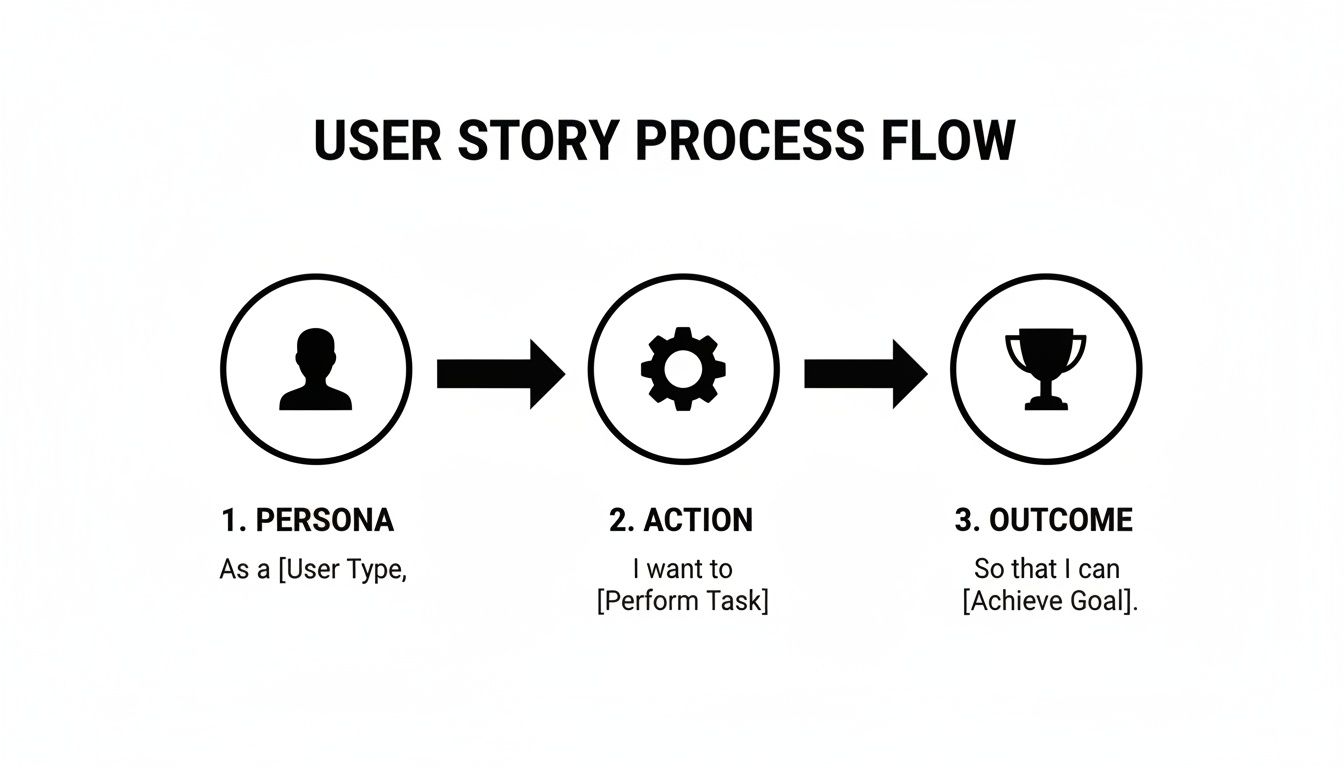
As the diagram shows, you start with a clear user, define their needed action, and tie it all to a meaningful outcome. It’s a framework that keeps the customer at the heart of every decision. If you're looking to really level up this skill, you might want to dive deeper into our complete guide on how to write better user stories.
Writing Bulletproof Acceptance Criteria Developers Actually Understand
A great user story sets the stage, but the Acceptance Criteria (AC) directs the action. Without clear, testable AC, you’re not writing a specification; you’re writing a wish list. This is where I see many PMs, especially those early in their careers, lose control of a feature's scope and quality, leading to endless back-and-forth with engineering.
Forget simple checklists. The gold standard for writing bulletproof AC—the kind your engineering team will thank you for—is the Gherkin BDD (Behavior-Driven Development) format. It’s a structured language that reads like plain English and serves as an unambiguous contract between product and engineering.
The Power of Given-When-Then
The Gherkin format is built around a Given-When-Then structure that describes a specific user behavior or scenario. This simple framework moves your AC from a vague list of requirements to a concrete, testable script that leaves zero room for misinterpretation.
It breaks down like this:
- Given: This sets the stage. It describes the initial state or context before the user does anything. (e.g., "Given I am logged in and have items in my cart…")
- When: This is the specific action the user performs. It should be a single, clear trigger. (e.g., "When I click the 'Checkout' button…")
- Then: This is the expected outcome. It’s the verifiable change in the system that happens because of the user's action. (e.g., "Then I am taken to the payment page.")
This structure forces you to think through every step of the user's interaction, covering not just the "happy path" but also crucial edge cases. For a deeper dive, check out these excellent examples of user stories with acceptance criteria that show this format in action.
Here's a classic example of the Gherkin syntax from Cucumber.io, a popular BDD tool.

The image shows how the Given, When, and Then keywords structure a scenario that’s perfectly clear to both technical and non-technical team members. No guesswork needed.
Gherkin in Action: A Login Flow Example
Let's put this into practice with a common feature. Imagine our user story is: "As a returning customer, I want to log in to my account so that I can access my order history."
Here’s how you’d write the AC using Gherkin, covering different outcomes.
Scenario 1: Successful Login (Happy Path)
Given I am on the login page
And I have previously created an account
When I enter my correct email and password
And I click the "Log In" button
Then I should be redirected to my account dashboard
Scenario 2: Invalid Password (Error Handling)
Given I am on the login page
And I have an existing account
When I enter my correct email but an incorrect password
And I click the "Log In" button
Then I should see an error message stating "Invalid credentials"
And I should remain on the login page
This level of specificity is a game-changer. It removes ambiguity for developers and QA engineers. They know exactly what to build and test.
Using AI to Generate Comprehensive AC
As an AI PM, I use AI to accelerate my workflow daily. You can leverage large language models like ChatGPT-4 or Claude 3 to brainstorm and draft your AC, ensuring comprehensive coverage.
Here’s a prompt I use regularly that you can copy and paste:
"Act as a Senior Product Manager at a top-tier tech company like Google. I have the following user story: '[Paste your user story here]'. Generate a comprehensive set of acceptance criteria in the Gherkin 'Given-When-Then' format. Your output should include scenarios for:
- The happy path (successful interaction).
- At least 3 critical edge cases (e.g., empty state, invalid input).
- Specific error handling messages.
- Any relevant non-functional requirements like performance or accessibility (e.g., page load time, screen reader compatibility)."
This prompt saves hours of work and helps you think like a senior PM, spotting scenarios you might have missed and turning a good user story into a truly development-ready one.
Applying the INVEST Checklist for a Healthy Backlog
You can't build a great product with a backlog full of half-baked ideas. A high-quality backlog is defined by high-quality stories, not just a high quantity of them. This is where the INVEST checklist comes in—it’s the quality control framework I’ve seen separate the best product teams from the rest.
Think of it as your pre-flight check before a story enters a sprint. In my experience, teams that are disciplined about applying these criteria always see their velocity improve and frustrating scope creep disappear.

Deconstructing the INVEST Acronym
The acronym stands for Independent, Negotiable, Valuable, Estimable, Small, and Testable. Each letter targets a common way user stories go wrong and end up derailing a sprint.
Independent: Can this story be developed and shipped without being chained to another story in the same sprint? Hidden dependencies are sprint killers. If the "Upload Profile Picture" story can't start until the "Create Profile" story is done, they're dependent. You either combine them or ensure the first one is completed in a previous sprint.
Negotiable: A story is the start of a conversation, not a signed contract. It should outline the "what" and "why," leaving room for the engineering team to bring their expertise to the "how." A story that dictates specific database fields or UI controls stifles your team's creativity and problem-solving ability.
Valuable: Does this story deliver clear, tangible value to a user or the business? Every story must connect back to a meaningful outcome. If you can't confidently explain the "so that…" part, the story is likely a low-priority "nice-to-have" and should be challenged.
I constantly push my teams on this point. If a story doesn't deliver obvious value, it’s noise clogging up the backlog. It burns precious engineering time that could be spent on features that actually move the needle on your key metrics.
Ensuring Stories Are Sized and Testable
The final three letters are what make a story genuinely actionable and predictable. Nailing these is a core skill for anyone trying to manage a product roadmap effectively.
Estimable: Is the story clear enough for the team to put a realistic size on it (using story points or time)? Vagueness is the enemy. If developers say, "I have no idea how to estimate this," it's a red flag. The story needs more refinement, clearer acceptance criteria, or a better shared understanding of the problem.
Small: The story must be small enough to be completed within a single sprint. Large, epic-sized stories are impossible to estimate accurately and almost guarantee carry-over work. A critical PM skill is slicing a big idea like "Build a recommendation engine" into smaller, shippable increments like "Display three recommended products based on browsing history." If you're struggling with this, our guide on how to prioritize a roadmap can help you break down large initiatives.
Testable: This ties directly back to your acceptance criteria. There must be a clear, objective way to prove the story is "done." If you can't write a Given-When-Then test for it, the requirements are too fuzzy to be built correctly.
Real-World User Story Examples From Good to Great
Theory is great, but the real test of a Product Manager is their ability to transform a vague stakeholder request into a crystal-clear, sprint-ready story.
Let's walk through how a story evolves. We'll start with a fuzzy request and refine it into something an engineering team at a company like Salesforce or Spotify could immediately build.
This transformation is a core competency. I’ve seen too many junior PMs toss underdeveloped ideas over the fence, creating confusion and delays. A great PM doesn't just manage a backlog; they deliver clarity.
B2B SaaS Example: Custom Reporting
Imagine you're a PM at a B2B SaaS company. A stakeholder gives you a classic, vague request: "Our enterprise clients want better reporting."
A junior PM might translate that into this story:
BAD: As a user, I want to create custom reports so I can see my data.
This story fails every test on the INVEST checklist. It’s not specific, not valuable in a measurable way, and certainly not estimable. Who is the "user"? What data? What kind of reports? This is a recipe for a painful sprint planning meeting.
Let's improve it. After interviewing a few enterprise account managers, you identify the key persona and their specific job-to-be-done.
GOOD: As an Account Manager, I want to build a report showing sales performance by region so I can prepare for my quarterly business review (QBR).
This is much better. We have a clear persona (Account Manager) and a specific, valuable outcome (prepping for a QBR). But we can still make it truly sprint-ready by adding precise constraints and ensuring it's small enough for one sprint.
GREAT: As an Account Manager, I want to create and save a sales report that filters deals by 'Closed-Won' status and groups them by sales region for the current quarter, so that I can efficiently prepare for my QBR presentations.
Now we're talking. This version is actionable and nails the INVEST criteria. It’s Independent, Negotiable (the UI can be discussed), Valuable, Estimable, Small enough for one sprint, and Testable.
From Vague to Actionable
The table below breaks down this transformation, showing exactly how we moved from a weak starting point to a sprint-ready user story. For more detailed breakdowns, check out these additional user story examples for Scrum.
User Story Transformation Before and After
| Element | Bad Example (Vague) | Great Example (Specific & Actionable) |
|---|---|---|
| User Story | "As a user, I want custom reports so I can see my data." | "As an Account Manager, I want to create and save a sales report that filters deals by 'Closed-Won' status and groups them by sales region for the current quarter, so that I can efficiently prepare for my QBR presentations." |
| Persona | Generic "user" | Specific "Account Manager" with a defined job-to-be-done. |
| Action | Vague "custom reports" | Concrete "create and save a sales report with specific filters and groupings." |
| Outcome | Unclear "see my data" | Business-critical "efficiently prepare for my QBR presentations." |
| Acceptance Criteria | Impossible to define. | Easy to write in Gherkin format: "Given I am on the reporting page, When I select 'Closed-Won' and group by 'Region,' Then the report displays the correct data." |
This iterative refinement—moving from a vague idea to a precise, actionable instruction—is a core skill for any PM aiming to lead high-performing teams. It's the difference between causing confusion and creating clarity.
Common User Story Pitfalls and How to Avoid Them
Even seasoned PMs fall into common traps when writing user stories. I’ve seen every one of these mistakes in my career, and learning to spot them early will make you a far more effective product leader.
A clean backlog built on well-formed stories is the engine of a smooth, predictable development process. Let's look at the hurdles that trip up most teams.
One of the most frequent errors I see is the "technical story." This is a classic trap where a story describes an implementation detail instead of a user outcome.
You might see something like this: “As a developer, I want to create a new database table for user preferences.”
This isn't a user story; it's a task. It completely omits the "why" from a user's perspective. The fix is to always trace technical work back to the user value it unlocks.
Corrected Story: "As a returning user, I want the website to remember my language preference, so that I don't have to select it on every visit."
See the difference? This revised story focuses squarely on the user benefit. The engineering team can then determine that creating a new database table is the right how to achieve the what and why described in the story.
Navigating Stakeholder Demands for Solutions
Another common pitfall is letting stakeholders dictate the solution. They'll often come to you with a request like, "The user needs a new dropdown menu here." This frames the problem around a specific implementation, boxing your team in before they've even started.
Your job as a PM is to gently redirect the conversation back to the user's actual problem. A simple, effective script I've used countless times is:
- "That's an interesting idea. Can you help me understand the problem the user is facing that makes them need a dropdown menu?"
This simple question shifts the focus from a predetermined solution to the underlying need. The real user story might be something like, "As a shopper, I need an easy way to filter products by color, so I can find what I'm looking for faster."
A dropdown is one option, but maybe clickable color swatches or a text filter would be better. By focusing on the problem, you empower your design and engineering teams to find the best possible solution. For more on this, our guide on writing better product specs offers deeper insights into framing requirements effectively.
Your User Story Questions, Answered
Let's tackle the questions I hear most often from PMs about writing user stories. This is your rapid-fire round to clear blockers and get back to building.
How Detailed Does a User Story Need to Be Before a Sprint?
A story is "sprint-ready" when it meets your team's Definition of Ready (DoR). This isn't a universal standard; it's a working agreement between you and your engineering team.
Typically, a DoR requires that a story:
- Follows the "As a…" format.
- Has clear, comprehensive acceptance criteria (ideally in Gherkin format).
- Has been reviewed, discussed, and estimated by the engineering team during a backlog refinement session.
- Has any necessary designs or mockups attached.
The story should never dictate the "how"—that’s engineering’s domain. But it must make the "what" and "why" so obvious that the team can build it without a dozen clarifying questions mid-sprint.
Can I Use the User Story Format for Tech Debt or Bugs?
Yes, but you adapt the format to frame the value proposition correctly. The key is to always articulate the benefit, even when it's not directly visible to an end-user.
- For Technical Debt: Frame it from the perspective of the developer or the system to highlight the business impact. For example: "As a developer, I want to refactor the payment module's logging service, so that we can reduce bug resolution time by 50% and improve system stability during peak traffic."
- For Bugs: Tying it back to the user's pain is more powerful than a simple technical description. "As a shopper, I want to apply a discount code without the page crashing, so that I can complete my purchase and avoid frustration."
Who's Actually Responsible for Writing User Stories?
The Product Manager is the ultimate owner of the product backlog—its quality, its prioritization, and its alignment with the product vision. That said, the best stories are always created collaboratively.
As a PM leader, I can tell you that stories written in a vacuum are a massive red flag. Your job as the PM is to initiate the story and guide the conversation. But involving engineers, designers, and QA in the refinement process is non-negotiable. They will spot edge cases, identify technical constraints, and ask clarifying questions that make the story infinitely stronger before a single line of code is written.
What Are the Best Tools for Managing User Stories?
High-performing product teams use a mix of tools. For managing the backlog and in-sprint work, Jira and Azure DevOps are the industry standards. A PM's salary and career progression are often tied to their proficiency with these tools, as seen in many job descriptions (e.g., "5+ years experience with Jira").
For the earlier, messier stages of ideation and story mapping, visual collaboration tools like Miro or FigJam are essential. It's a common workflow at places like Google and Meta to run discovery workshops in these tools, and only transfer polished, sprint-ready stories into Jira for the engineering handoff. This separates creative ideation from the structured world of sprint execution.
At Aakash Gupta, we're dedicated to helping you master skills like this to accelerate your product career. Join thousands of PMs who get actionable insights delivered straight to their inbox. Learn more about our resources.
