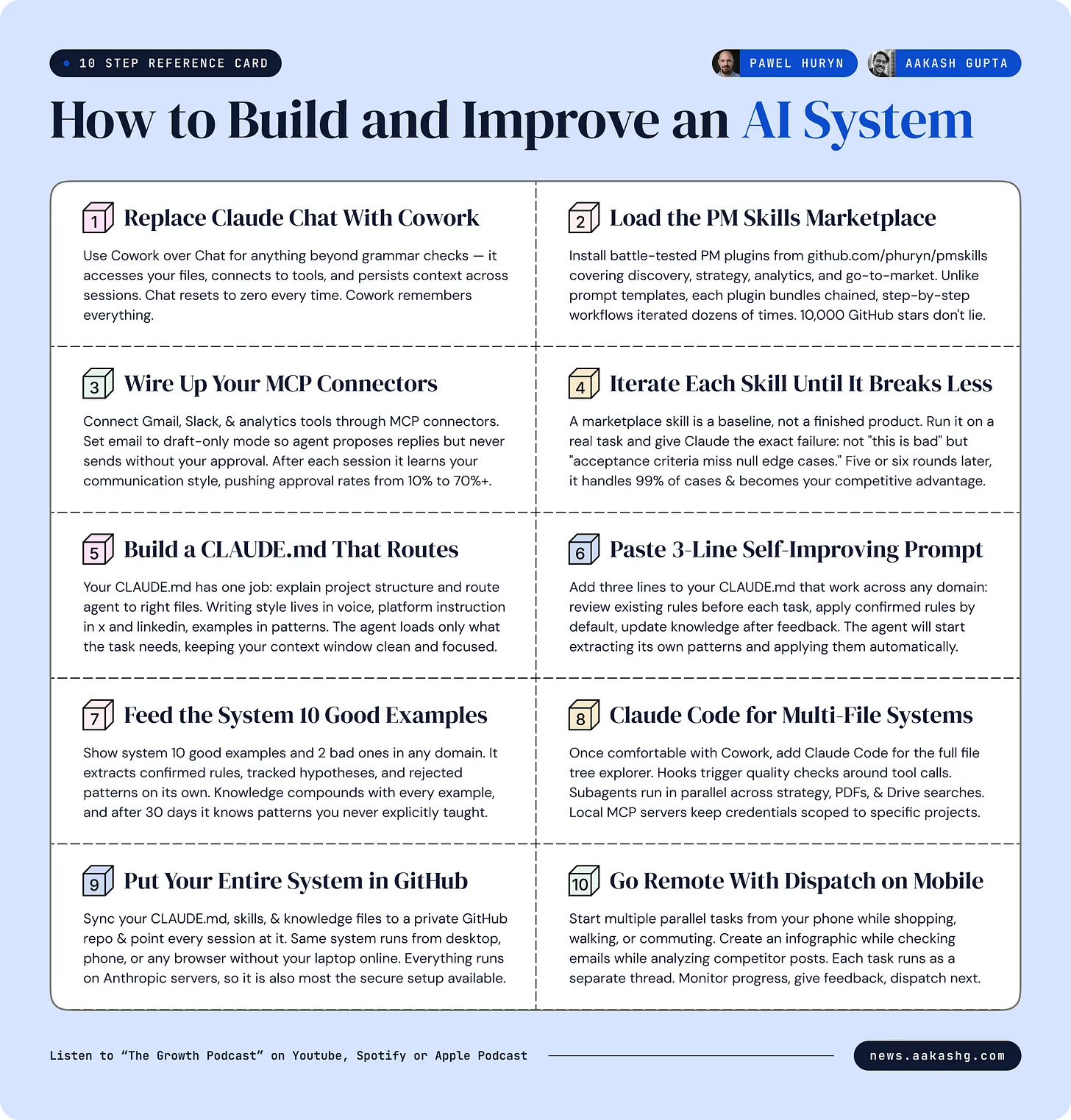
Check out the conversation on Apple, Spotify, and YouTube.
Cowork power user demo (0:54)
Aakash: Pawel, you have spent more time in Cowork than almost anyone, you use it for a lot of your everyday tasks. Even though you are a former engineer who could use terminal just fine. So can you walk us through what a power user, what a master setup looks like in Cowork and how you use it?
Pawel: In Cowork we can organize work in projects or folders. Most people stay in chat forever. That is like using Photoshop only to crop photos. And today we are going to discuss chat which is part of the Claude desktop but also Cowork, Claude Code, Dispatch which allows you to control remote sessions for Cowork and Code web sessions and how to use them all to 10x your productivity.
Anthropic’s shipping velocity (3:08)
Aakash: Recently, you have been writing about how many features the Anthropic team shipped. I think you cataloged something like 74 features in 52 days. What does their velocity tell you about the future direction?
Pawel: What I can see by observing Anthropic is that they are adjusting. Many companies are adjusting their workflows to AI. They do not use AI to replace steps in their processes, but to redesign their processes around what is currently possible. Product managers will need to step outside their comfort zone and understand strategy, understand how it drives revenue for the business, how it connects to business goals, product strategy, understand how it translates to revenue. The future is super PM or super individual contributor with maybe a PM focus, maybe an engineering focus, but having skills from multiple areas, not just one.
Why stop using chat (6:07)
Aakash: One of the craziest things you told me was that there is no good reason to use chat anymore. Can you break this down?
Pawel: I would lie if I told you that I do not use chat at all. I use it sporadically, just if the window is open, I can ask some questions like is this grammatically correct or something. Most of the time when starting a session, you do not know what exactly you will need. And when you start a session in chat, there are certain restrictions. Sooner or later you cannot continue. Imagine you have started your work, you are in the middle of the work, and you have to leave your desktop. You cannot continue on mobile. There are restrictions related to what if you decide that now you want to code something. Chat cannot do that. You want to create an HTML page, then export this HTML page to an infographic and you need this infographic in your email. So once again you need to start a different session with a different context.
Cowork vs Code vs Dispatch (10:12)
Aakash: Most PMs I talk to, they are finally on a Claude Pro or Max or Enterprise subscription. And what they really need is a very clear mapping. You have mapped all of this out for us. Can you show us when should a product manager be using Cowork versus Dispatch versus Code?
Pawel: Chat is like a chatbot, like ChatGPT, what we are used to. You type a question, it answers. When it comes to Cowork, it is about working with real files and executing workflows. By real files, I mean reorganizing files on my desktop or creating HTML infographics. Cowork can also plan long-running tasks. If completing a task requires taking five, six, seven or more steps, it can do that and execute those steps one by one. It can also spawn sub-agents, so some tasks can be parallelized.
And Code is the same but it is for coding. Except other than connecting to all those systems and working with real files, it can execute scripts on your real machine because Cowork runs in a virtual machine. It has a different set of plugins, not adjusted to knowledge work, but adjusted to designing front end, working with databases, debugging and so on.
Skills and MCP connectors (18:44)
Pawel: It also dynamically loaded skills which are like procedures. Skills are activated based on the task that the agent currently is executing. A skill has a description and based on this description, an agent can decide that this skill is about working with PDFs. I am working with PDFs, so let me see what is inside. And then it will read detailed instructions, detailed procedures of how to work with PDF files. We call this progressive disclosure. You are going to have dozens or hundreds of skills, and Claude will read the detailed instructions only when the skill description matches what you are trying to do.
It can connect to external and local services and the most popular format is MCP server. By MCP servers, I mean in Claude they are called connectors. We have connectors for Google Drive, for Gmail, for Slack, and for dozens of other apps. It connected to my Gmail account. It can also draft emails. This one cannot send. It can only create the drafts, but you can also connect a connector that can send emails for you.
After every session, Cowork or Code, depending on what interface I use, verifies my responses and tries to learn from them. So the next time it will get better.
PM skills marketplace (25:03)
Aakash: Can you show us the PM skills marketplace? This hit 10,000 GitHub stars.
Pawel: What I have done is I created a set of plugins. A plugin is like a collection of skills and commands for different domains like data analytics, execution, go to market, market research. You can load each of those plugins separately. Inside each plugin you have skills. For example, if we open product discovery, there is analyze feature requests, brainstorm ideas, plan experiments, create metrics to track your feature and so on.
I also have defined workflows that aggregate more than one skill. For example, product discovery can analyze customer needs, then based on those needs it will map the opportunities, then it will ideate how we can solve those problems, map the assumptions, and plan experiments to prove or disprove them.
Strategy canvas demo (29:06)
Pawel: Sometimes if Claude has general knowledge about a certain area like product strategy, it thinks it knows something but you want to override this knowledge. Without doing it explicitly, it can default to the training data. So it loaded the skill, and now it will interview me to get more information, but it is all part of the skill.
It will create a product strategy canvas. We have product vision, market segments. Relative costs, so it adjusted colors, figured out what the layout should be. Also icons. Trade-offs, so what we are not going to do. Key metrics, so how we are going to track that our strategy is working. North Star metric. It even suggested guardrail metrics. Growth strategy. Unit economics. This is pretty advanced. It is not a single layout, not just tables. Different layouts, different icons.
Aakash: There are two really mind-blowing insights. One, Claude is way better at using PowerPoint than it was a month or two ago. There is no excuse to walk into a meeting with a bad presentation anymore. And the second is that it used this skill, specifically some of the things Pawel had defined around having a north star metric, having guardrails. That is why if you have a good skill, you basically get a McKinsey level output in a minute or two.
Skill iteration cycle (35:14)
Aakash: I would tell everybody iterating on your skills is one of the highest ROI activities I personally have done. Take Pawel’s skills as a baseline. But then as you encounter some feedback for his skill, give that feedback to Claude and say I want you to improve my assumption testing skill. Read our chat and see the feedback I gave you. Understand the root cause of what drove you to give an output that I had to give feedback on and rewrite the skill from first principles so that it does not make that mistake again.
Pawel: It is like in evals. You need to see how the system performs in real life and then identify failure modes. You cannot just sit and use some magic technique to get it right on the first try. It does not work like that.
[AD] Amplitude (40:35)
Why PMs need Claude Code (40:46)
Aakash: We just showed people Cowork. Cowork should really be replacing chat for you for a lot of use cases, but there are even more powerful things you can do with Code. Pawel, please break down for us as a product manager, what can they do in Code that they cannot do in Cowork?
Pawel: Cowork is not adjusted to working with codebases and as a product manager you will be working with codebases a lot. If you are building complex systems that involve multiple files then this view that we see in Cowork is not adjusted to it. You need this view in which you see folders, you can expand folders and you can see what is inside.
You also have better control over life cycles. What happens before calling a tool, after calling a tool, you can block the request. You have local MCP servers. When you configure an external connection in Cowork, it works for all Cowork sessions, but maybe you have secret credentials that should be available only to a specific app. In Code, you can define those local MCP servers, local skills, local instructions.
Building a second brain for agents (44:43)
Pawel: Recently, Karpathy presented this system in which you use LLMs to build a personal wiki or knowledge base for humans. I have been doing it since February 2026 and instead of building the second brain for myself, I started building second brain for my agents. I am the curator of the information and what I do is I send articles, I send infographics that I find on social media. I can also ask to analyze the last 10 posts by someone above 200 reactions. Why they worked. Voice. Hooks.
I asked what made this post or infographic work and the agent replied with some information. In some cases it knew the answer so I was able to note it. In other cases it replied with a hypothesis. So I decided that instead of noting this myself, I will ask an agent to build a knowledge database and every time I give it some article or infographic, organize it by domain. Then write the rules for which you have a lot of information. If you see repeating patterns, save this pattern as a rule. And if you are not sure, save it as a hypothesis.
Every viral infographic I publish was generated by Claude. Not by me. The system maintains a growing library of HTML components. I do not code at all. I do not even review the code. If I want to know how something works, I just ask questions in the chat window.
Self-improving knowledge system (56:00)
Aakash: How do you make this system self-improving? What are the tips and tricks that people need to know around CLAUDE.md files and folder structure?
Pawel: A lot of people are discussing the CLAUDE.md file. You can put your instructions there. But the problem is that if you put all the instructions inside, it will keep growing and eventually it will consume a lot of your context window. Every time you ask a simple prompt in your project, all this CLAUDE.md context will be included.
A smarter approach is to organize your knowledge in files dedicated to specific domains. I have CLAUDE.md. The only goal of CLAUDE.md is to explain what this project is about. It does not have detailed instructions. All this information is inside other files and the only goal of CLAUDE.md is to give instructions on how to find the knowledge and what to do with new knowledge.
The most important part is when asked to study and analyze. Every time I give it some posts, it knows what tools to use. It will extract hook patterns, structure, sound bites, and engagement metrics. Then it checks against the existing patterns and hypotheses. If there is an existing hypothesis, it will update the existing hypothesis with new evidence. If there is an existing hypothesis but we see that a specific post did not work, we can demote the hypothesis.
This is the most important part that you need to paste to your CLAUDE.md. This is not content specific. Whatever Claude does something in a specific domain like testing software, writing marketing materials, maybe writing release notes, it should review the rules and hypotheses from this domain. It should apply the rules that were confirmed to its work. And it will try to extract the rules. When you ask it to perform a task, you show it 10 good examples and 2 bad examples, then ask it to create another offer. It will review the existing rules and hypotheses. It will also keep learning. Every time you give it new information, it will update its knowledge.
Agent browser vs Chrome MCP (1:06:01)
Pawel: I do not use Chrome MCP anymore. Chrome MCP is basically an MCP that controls your browser. It works well. The problem is that those extensions rely heavily on taking screenshots. Screenshots mean a lot of tokens. You can easily consume like $100 in an hour, especially with Opus.
What I use instead is Agent Browser by Vercel Labs. This is the most reliable according to my tests. It also uses a real browser. But it can do that in a headless mode and it explains the structure of the page to the agent without presenting the entire HTML. It is token efficient. The agent does not have to see HTML and does not have to interpret HTML, but can take actions. It waits for rendering.
Dispatch and remote work (1:10:00)
Pawel: Dispatch is a new tab that appeared in the desktop app and also on your phone. This is a single interface in which you can interact with Claude Code and Cowork. It is like a walkie talkie. You can start multiple background tasks. Every time the task is completed, it will report back what the status is.
I really use all three surfaces. Most of the time I use Dispatch and web sessions. The reason I use Dispatch so much is that I just do not work with my laptop. I go for shopping, I go somewhere with my kid and I just dispatch tasks. I provide text feedback in the chat and then Cowork presents me the results.
But for Dispatch to work, your computer must be online. When I do more complex work, I switch to Code web sessions. You can think of it as Visual Studio Code and Claude Code but in the cloud. It is hosted by Anthropic. My editor project is synced with GitHub, so all those files, knowledge files, hypotheses, sound bites, hooks, this is all synced with my private GitHub repository. Even when my laptop is offline, I can go from my mobile phone and ask it some question and it will work in the cloud.
Aakash: The coolest thing is you can start a chat on your desktop, then go to your phone. You can be working 24/7 with your system.
PM mistakes and future (1:21:07)
Aakash: What is the biggest mistake PMs make when setting up Claude?
Pawel: The biggest mistake would be to prompt it every time from scratch instead of using Claude. Claude can learn from its mistakes, either from your feedback or from data. Not organizing your knowledge, not learning from mistakes and just having everything in your head.
Aakash: If a PM only had a little bit of time to learn one, which one should they choose?
Pawel: I will start with Cowork because everything you will learn in Cowork will help you better understand Code. I use the same repo from Cowork and from Claude Code. Start with Cowork and understanding how to work with agents, how to aggregate knowledge, how to define workflows. Then once you feel comfortable, add the terminal aspect.
Aakash: What is your hot take on where AI PMs are headed?
Pawel: I doubt that in 12 months the role will disappear. But we are heading into super individual contributor PM. Most of the time you will be working with agents orchestrating multiple agents at the same time. It will not be easier, the work might be even more demanding. But there will be less trivial things because those can be automated.
Aakash: What is overhyped versus underhyped in the Claude ecosystem?
Pawel: Everything is underhyped right now. People still have not realized what agents can do, especially with the right harness and with the right systems around them.
Is n8n over? (1:26:04)
Aakash: Your n8n episode did really well. Is n8n over?
Pawel: No. There are two types of automation. One is when you automate things for yourself. You can use Claude Code for personal automation. But when you want to automate production processes, the logic I presented is part of the prompt. And the agent can respect it, it may not respect it. We just create text files and we hope that agents will follow our instructions. This does not scale, this is not secure enough for production processes.
Aakash: If you are going to build a true production-grade automation for your company, you are still going to be using n8n.
Quadathon and closing (1:30:26)
Aakash: We have walked you through the AI PM tool universe. Be sure to subscribe to Pawel’s newsletter. He has an upcoming Quadathon starting May 9th which you may want to participate in.
Pawel: We are starting to build with Claude. The previous edition had 250 students. This time, we will focus on Claude Code and n8n at a deeper level to build real agentic workflows. There are only 60 places in total.