Check out the conversation on Apple, Spotify, and YouTube.
Introduction and why Claude Code still matters (0:00)
Aakash: Claude Code just hit $2.5 billion in annualized revenue in 9 months. It is the fastest B2B software product ramp in history. So why are most people still using it like a chatbot? OpenAI just acquired OpenClaw. Anthropic released Cowork. And the question on the top of everybody’s minds is, does Claude Code still matter? Carl Vellotti has been knee-deep in these tools and he says the answer is yes. His last two episodes crossed over a million views across platforms. If the first episode was the beginner version of Claude Code and the second episode was the advanced masterclass, today is the operating system layer. If you are already an 80 out of 100 on Claude Code, we are going to bring you to a 95 out of 100.
Carl: With a lot of these new tools, they are amazing. Claude Code was the first, the most powerful, where everything else is built on top of. You have tools like Cowork which is basically a UI that builds on top of Claude Code that tries to make it easier to use. It is a good tool but ultimately it is built on top of Claude Code. So all of those features exist in Claude Code first in a more powerful way and then they kind of get constrained by Cowork. If you want the most power to be able to do things and do work, Claude Code is still the number one tool. With OpenClaw, it is a lot like Claude Code where essentially it is a way that you can connect to Claude Code or a Claude Code-like service from other channels. You can have it running all the time. It is really good for monitoring and tasks where you can let it run autonomously. But if you need to be in the loop and you need to be in the driver’s seat and you really want the most power in the tool, you do that with Claude Code.
Aakash: For product managers where you need to be in the driver’s seat, AI still cannot do the thinking for you. Claude Code is still going to be the tool of choice. Both you and I have been living in Claude Code pretty much 8 hours, 10 hours a day for the last 6 to 8 months and we have encountered four major friction areas that we are going to help people solve in today’s episode.
The four mastery topics (4:05)
Carl: When I look at our first two episodes, we did an intro, we did advanced, and I would consider this one the mastery course where you are really good at using Claude Code but there is still another level deeper. The first is context management. How can you make it so that your context window does not fill up so fast and then you have to wait and compact. The next one is figuring out how can you use skills to shore up other major weaknesses of Claude Code. People say Claude Code is not very good at research. They say it is not that good at UI design. It cannot design slides very well on its own. Most of the time what you need to do is figure out how can you provide the tool that Claude Code can use to do those things better.
Then we will answer one of the biggest questions that people have when they are working with AI, which is how can you trust the results. For product managers and people who are really accountable for a very small number of documents, they do not need lots of work done. They just need the work that they do to be very high quality and very trustworthy. Today we will look at an example of how you can do that with data using Claude Code where you can know exactly how it got its answers and that you can reproduce them deterministically every time.
And then we will put all of this together. That is the last major question people have about Claude Code. It can do all these things but how do you actually put it together in a cohesive system so that when you are using it you are not just having files go all over the place.
Setting up the context status line (6:27)
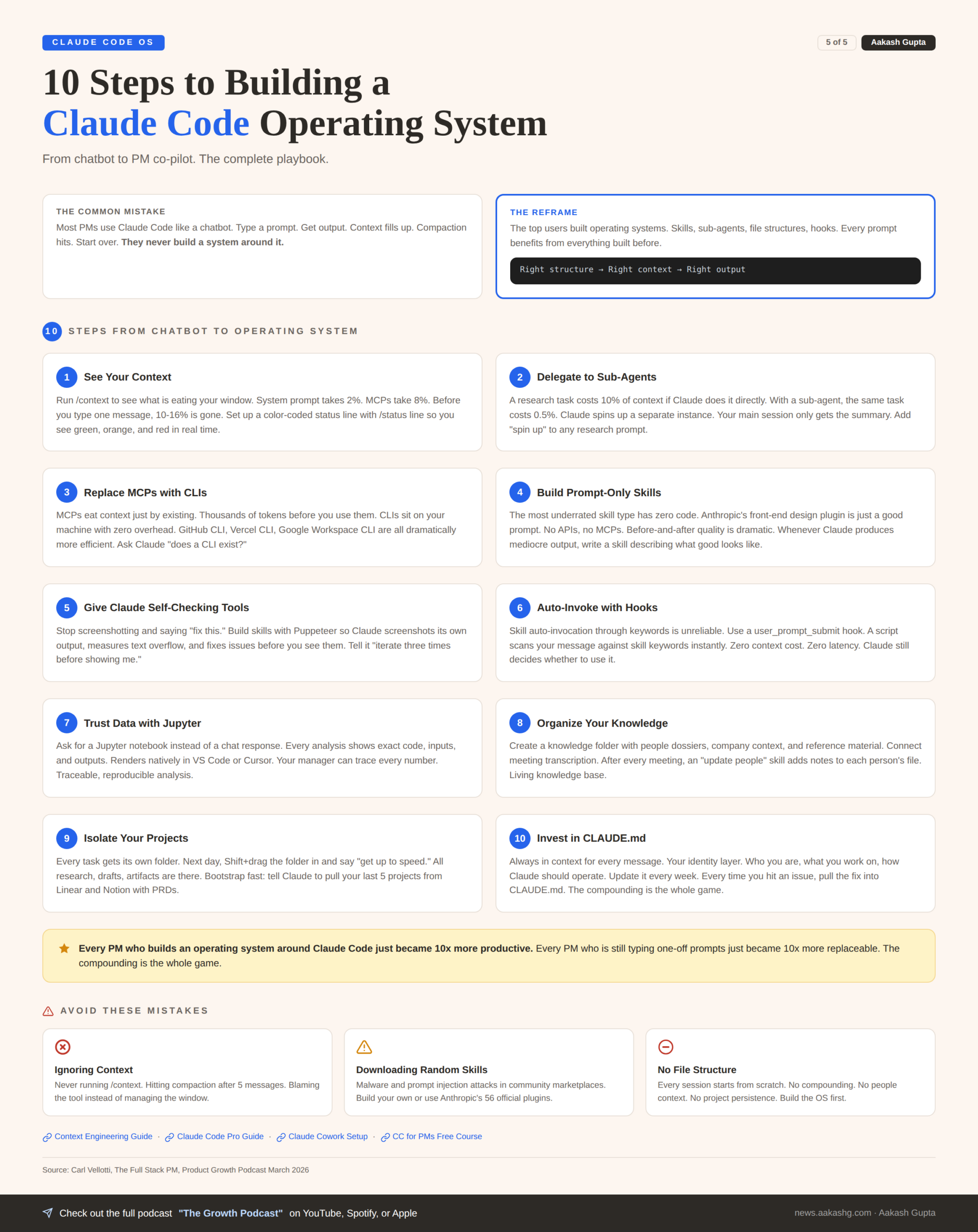
Carl: The first thing to do is you can actually customize a lot of different elements of the Claude Code UI. There is something you can customize called the status line. You can actually have Claude Code show you how much context you have used at any given point throughout a conversation. You really get a much better sense of how is your context filling up, what types of requests are filling up the context. It is incredibly easy to set up the status line. There is a slash command called status line. We are going to have it show us what model we are using right now, what folder we are in, and then make a little UI for the amount of context that we have used so that we can visualize it as we go. It is almost like a tiny little piece of software where when you have a lot of context left, it is green. When you have a medium left, it is orange. And then when you are almost filled with your context window and Claude Code is about to compact, it turns red.
Aakash: And for people who maybe have not encountered this issue, why are we so obsessed with managing the context? What happens if you hit the context limit?
Carl: Compacting is kind of one of the worst things about using Claude Code. Especially if you give it a long task and it runs a bunch of web searches and every single time it uses a tool call and every time it reads a web page, it is eating into that context window. If you have a bigger project where you are working with a lot of files at once, it is easy for this to get to 100% with just like five messages and then you are waiting two or three minutes for it to compact.
The real even bigger and more important lesson is that everyone says it is not about prompt engineering anymore, it is about context engineering. That is the golden rule of using AI and using these really powerful tools. They are able to work with the information that they have. You want to make sure that they are only having the information that you actually need them to have, but that when they need that information, it is everything that they could possibly use.
Aakash: There is still this phenomenon of context rot, which has been measured, which is that as you get longer into the conversation, the quality degrades. As you use up your context window, you are going to see that happen. So you actually want to give AI the minimal amount of context to have it understand what you want it to do.
Sub-agents for preserving context (12:08)
Carl: One of my favorite ways to manage context is using sub-agents. We are at 16% context used. I am just going to run a pretty normal command. Research the top five Claude Code tips from this week. What Claude decided to do is instead of running that search on its own, it spun up a sub-agent. When you have a sub-agent like this, what is awesome is that instead of doing that in its main session, it has spun up basically a clone of itself that is now doing all that work. What we are going to get back here in our main session is just the summary of it. So you save your main session from having to do all those tool calls and read all that information.
We had 16% to begin with and now we are only at 16.5%. If we did this type of thing without the sub-agent, it would fill up to 25%. It ran 10 tool uses and used almost 30,000 tokens. All of that information is saved from our main session because we had it use this sub-agent.
Aakash: And to implement this agent I believe it is two parts. In your CLAUDE.md you tell it to use sub-agents and then you create the sub-agent.
Carl: Claude can do two things. One, it can make it on the fly, make a new instance of itself and give it a task. Versus we also have dedicated sub-agents that are already defined. Both work. If you do not want to take the time to actually define a sub-agent, the on-the-fly approach works for any task.
Creating skills live and the spin-up shortcut (17:25)
Aakash: You guys see how easy and natural language it is. Skills is the unlock. Whenever you feel like there is a weakness, spin up a skill. And now it is going to write its skill for itself.
Carl: One thing you can always do is hit Escape two times and then that will give you all of the messages that you have done. This is also another way to save context. If you ask a question and you realize it was the wrong question, you can always just roll back to earlier and that will get rid of all of that. Anything you roll back and erase is literally completely gone.
Aakash: I think now is a good time to warn people. Do not download too many skills from random skill marketplaces. Especially if you are probably running Claude dangerously in skip permissions mode. There have been a lot of malware and prompt injection attacks in those skills that people have been analyzing online. It is generally best if you are going to get a skill, get it from me or Carl, somebody you super trust, or just create them yourself.
The ask user questions tool (23:53)
Carl: My absolute favorite feature of Claude Code is the ask user questions tool. What is so cool here is that Claude will dynamically come up with a list of questions to ask us, but it will be in a custom UI within Claude Code. So we can say okay I want this one and I want this one and when we hit submit it will now have that in its memory. I use it all the time. If you are coming up with a list of requirements for a feature, you can say please use your ask user questions tool to grill me on all the possible requirements for this spec so that we can fill all that in.
The main reason that people do not like the output from AI is because there are so many assumptions and so many things that it gets wrong because it did not have that in its context. If you have it ask you, it will predict where its weaknesses are and where the assumptions are that it needs from the user. Sometimes it will be 10 or 12 questions. One person on Twitter said that it asked them 67 questions.
Aakash: So it is sort of like that idea that you are not engineering this massive prompt or building this massive skill to solve the problems for you. You are saying please ask user questions if you need clarification.
Skills that fix weaknesses and the front-end design skill (28:04)
Carl: Whenever you are going through your workflow and you realize you are doing the same thing multiple times, that is a great time to add a skill. The other main time is areas where you think Claude Code is really weak. One of the most impressive skills is Claude’s own front-end design skill. What is so amazing about this skill is that it does not give Claude Code any specific new abilities. All it is is just a really good prompt. It tells it the aesthetics, tells it do not be AI, follow these rules. You can have an incredibly powerful skill that does not have any MCPs or APIs or any code with it. Just a really good prompt that you perfect over time can make a really good skill.
Web research skill with Tavily and Firecrawl (33:39)
Carl: Those results that Claude Code gives from web search are just notoriously unreliable. It is basically just running Google searches and grabbing stuff from the first page. So this is another example of where people say you cannot really trust Claude to do reliable research. Well, if you just give it better tools, it can actually do better research.
In this skill we have it connected to Tavily, which is a much more powerful almost Perplexity-type search that gets much higher quality results. And then Firecrawl, which will scrape URLs and get really clean markdown. Normally when Claude goes to a website, there is a bunch of extra HTML and JavaScript. Firecrawl just gets the raw information that the AI actually needs.
One thing that is cool is that Firecrawl is not an MCP. MCPs are good but they eat up a lot of context just right off the bat. Versus CLIs. A CLI is kind of like an older technology but AIs are really good at using command line interfaces. The AI can use the command line directly from your machine so it does not have to have context just holding it in there.
Aakash: Andrej Karpathy said it himself, you should prefer a CLI connection. The hierarchy is basically MCP at the bottom because it eats up so much context, then API, CLI at the top.
Carl: The other CLIs that are just awesome are the GitHub CLI, basically mandatory if you are doing anything with GitHub. Claude is aggressively competent at the GitHub CLI. And the Vercel CLI is another really good one for deploying apps, checking logs, configuring environment variables.
Aakash: I think this is one of the most underrated hacks. If you take anything away from this episode, stop using MCPs, start using CLIs.
Make slides skill with Puppeteer self-checking (39:04)
Carl: If you just tell Claude to make a graphic or a slide, the results are usually not that great. Usually not laid out the best. Alignment issues. Space not filled well. Instead of you screenshotting and saying fix this fix this, think can I give Claude Code a way to check its own work. That is just a huge unlock for anything you are doing with visual design.
This skill actually has code in it telling Claude how to use code to check its own work. It uses Puppeteer which is a classic front-end development tool. You can take screenshots of HTML pages exactly as they look when rendered. We are saying you have access to Puppeteer, use it in this particular way. It does a calculation to see does any of this text fall off the page. And that is something that if Claude does not have a tool to check, it cannot really do on its own. But with a tool, it can do it basically perfectly.
One thing I found is if you just say you must iterate three times before you show me, it will be much better than if you say just go until you are done.
Aakash: There is also this crazy phenomenon where if you repeat yourself with your skills, the AI does better. There was just a Google paper released where they showed that literally just pasting in a prompt twice helps. I have been using this in almost all my skills these days. I will say after I execute it once, go double check against the skill again and it really improves it.
Carl: I have heard that called the builder-validator pattern where when an AI just runs its own work, it does not really have that self-reflection to know if it did it right. Just having it do a second pass with the rules, the quality goes up so much.
Auto-invoking skills with hooks (43:38)
Carl: The way skills are supposed to work is it says use when the user mentions make slides, create slides, presentation. So it is supposed to just know from when you message it. It does not really work that way. Auto-invocation of skills is really finicky.
One thing you can do is list the skills in your CLAUDE.md. That makes a difference but then you are adding to your CLAUDE.md and eating up context for no reason. So the way to do it is with hooks. A hook is basically some sort of thing that you can have happen around the whole Claude Code workflow. It can be when you send a message, when a message comes back, before compaction, after compaction.
We are going to use a user prompt submit hook. Every time I run a message, this hook will fire. We have a script that says are any of the words in the thing that the user just typed in matching the keywords of the skills that exist. This is nice because it is just a script. It is not having the LLM look, which would be very slow. It is a script that says if there is a match then I will give it to the LLM and then the LLM can decide now is the right time to use that skill or now is not.
Trustworthy data analysis with Jupyter notebooks (46:49)
Carl: For product managers who have to really be able to rely on results being right, one of the biggest areas of concern is using AI to do data analysis. You really need the result to be correct. If you are not a data analyst and you do not really know exactly how the LLM is coming up with its results, you are going to be presenting these to people and showing your boss this data. Where does that data actually come from and how is it calculated is a major area where people just do not trust AI.
The best way to do this is Jupyter notebooks. This is the standard artifact that analysts use. The very cool thing is that we can create a Jupyter notebook which shows what were the exact queries used, what were the results, and it can visualize that all for you. A Jupyter file will render natively in Cursor or VS Code so you can stay in the tool.
Aakash: If you ever go look over your data scientist’s shoulder, they live in Jupyter notebooks. How do we add proof of work to our analysis? The Jupyter notebook is solving that problem for you.
Carl: Once you get more familiar with the types of data questions that Claude can answer, it is like you are working with a data analyst that will just answer any questions you want about your data. It will segment it in any way. You can do pretty sophisticated statistical analyses. All types of things that if you are working at a company, getting access to an analyst’s time used to be a whole process.
Aakash: The really powerful mental model for Claude Code in general is take the roles that you work with. You almost want to create versions of Claude Code for those various roles. The front-end design skill is doing the designer role. Here we are trying to distill what an analyst might be doing.
The operating system file structure (55:00)
Carl: The main way is you use it and then you figure out where should files go. For things where you just want to be able to reference that do not change very often, having a knowledge folder with some of the key things. Who are the people you work with, what are different reference materials, research.
People love the people folder. It is like a little dossier about different people at your company. What is so cool is now that Claude Code is becoming more central to everything, you can connect to Granola which is the meeting transcriber. They have an MCP that connects. You can pull in your meeting notes. You could literally have a workflow called update people that would look at what did people say in the meeting that you just had with them and then add notes about what types of things they care about into their file.
Aakash: Actually putting in the time to build this, I am not kidding, it will 10x the outputs. If you spend the hour to add in this really important context and then structure it in this way, the outputs you get will look nothing like the outputs somebody else using Claude Code is building.
Carl: The other main one that I personally find most helpful is a projects folder. Anytime I am starting any kind of new task, I will create a new folder. Anytime that I am doing any work, it goes in that folder. The next time, instead of having to figure out what was all the information related to that project, you can just drag the folder in and say here is all the research I have done, get up to speed, and then let us work on it.
Aakash: It might be worth people doing a one-time download to build a projects folder. Hey, here is our Linear and our Notion. Please build out my last five project folders. Pull the initial PRDs, pull the feature results write-ups. That is how you can practically implement this pretty fast.
CLAUDE.md and the standup command (1:02:00)
Carl: The CLAUDE.md file has a special use in Claude Code which is that it is automatically in context all the time. It is not just there in the first message, it is there in the background for every message. This is the type of context you want it to always be aware of. Good to include things about how you like Claude to work with you, who you are, what you are working on.
The standup skill will pull in information from GitHub, from our tasks folder, from our calendar if we had it connected, it will check Linear. And then it will put it all together for us. Once you get to a certain point it is like I do not want to have to leave Claude Code. I do not want to have to go check Google Analytics. I want to just be able to ask Claude. And that would be almost an impossible analysis to do if I was just clicking into those individual UIs. But when you have Claude Code connected to everything and you have a place for that information to go, it just becomes more and more compounding and more and more powerful.
Aakash: There is a lot of alpha in continuing to iterate on your CLAUDE.md file every week, every month, every time you run into an issue with Claude Code. Pull it into your CLAUDE.md file and update it.
Where to find Carl and wrap-up (1:05:14)
Aakash: You have a lot more at ccforpms.com, the Full Stack PM newsletter, on your LinkedIn and Twitter. Where else should people find you?
Carl: CC for PMs is my free Claude Code for product managers course. I have another version CC for Everyone that is a more general version. The cool thing about those courses is that they are Claude Code taught in Claude Code. You say start lesson and then Claude Code will actually guide you through a bunch of the stuff I showed you today. And then my newsletter The Full Stack PM.
Aakash: Check him out. Subscribe and like and comment if we should have him back another time.