Check out the conversation on Apple, Spotify, and YouTube.
The future of PM teams (05:46)
Aakash: You and I were chatting off air and the way product management teams are heading, product managers are supporting more and more people, whether that’s more designers and engineers or more cross-functional team members. It feels like one PM is supporting something like 20 people. What does the future look like in this world?
Hannah: I think the future is both that one PM is supporting a lot more people, but also we’re seeing that roles are merging together. Engineers are building product, designers are building product, PMs are shipping code. Not only is one PM starting to support more and more people, but everyone is also starting to be a PM.
One of the things I’ve been thinking a lot about is how do you scale context throughout the organization when everyone is building product and everyone is making product decisions? At the same time, everyone’s also starting to do other functions. I’m doing a lot more data analysis than I used to. The engineers on my team are also building product and writing more queries too. So how do you help everyone make amazing product decisions? And how do you get the best of other functions for these merged roles?
Aakash: I’ve been thinking a lot about this too. One thing I’m noticing across companies in every geography is that PMs are supporting more and more people. One PM might have supported three or four engineers in the past. Now they’re often being asked to support ten. On top of that, where they might have just concerned themselves with design and engineering in the past, now they have to interface with everybody. Sales, marketing, support. The list goes on. How are you dealing with this and what does the future look like for PMs in this world?
Hannah: The future looks like exactly what you’re saying, which is that a singular PM is going to be supporting a broader set of functional roles and at a much higher number than in the previous team sizes. At the same time, roles are starting to merge together. It used to be that generally all product decisions were made by the PM and then engineers were just writing code and design was just doing design. But now engineers are building products and maybe even deploying them without a PM, designers are prototyping and building product and everyone on the team is starting to make product decisions. As PMs, we’re starting to do a lot more data analysis, also prototyping, making designs. We’re seeing a lot more blended functions where everyone needs to have the best context that used to be isolated within different roles on the team.
Introducing the Team OS (11:16)
Aakash: So your answer to this is to create a well-organized high-context repo. I, for one, had never heard of this until I saw you writing about it and talking about it. I think it’s a genius idea. Can you just unwrap the covers and show us exactly what this looks like?
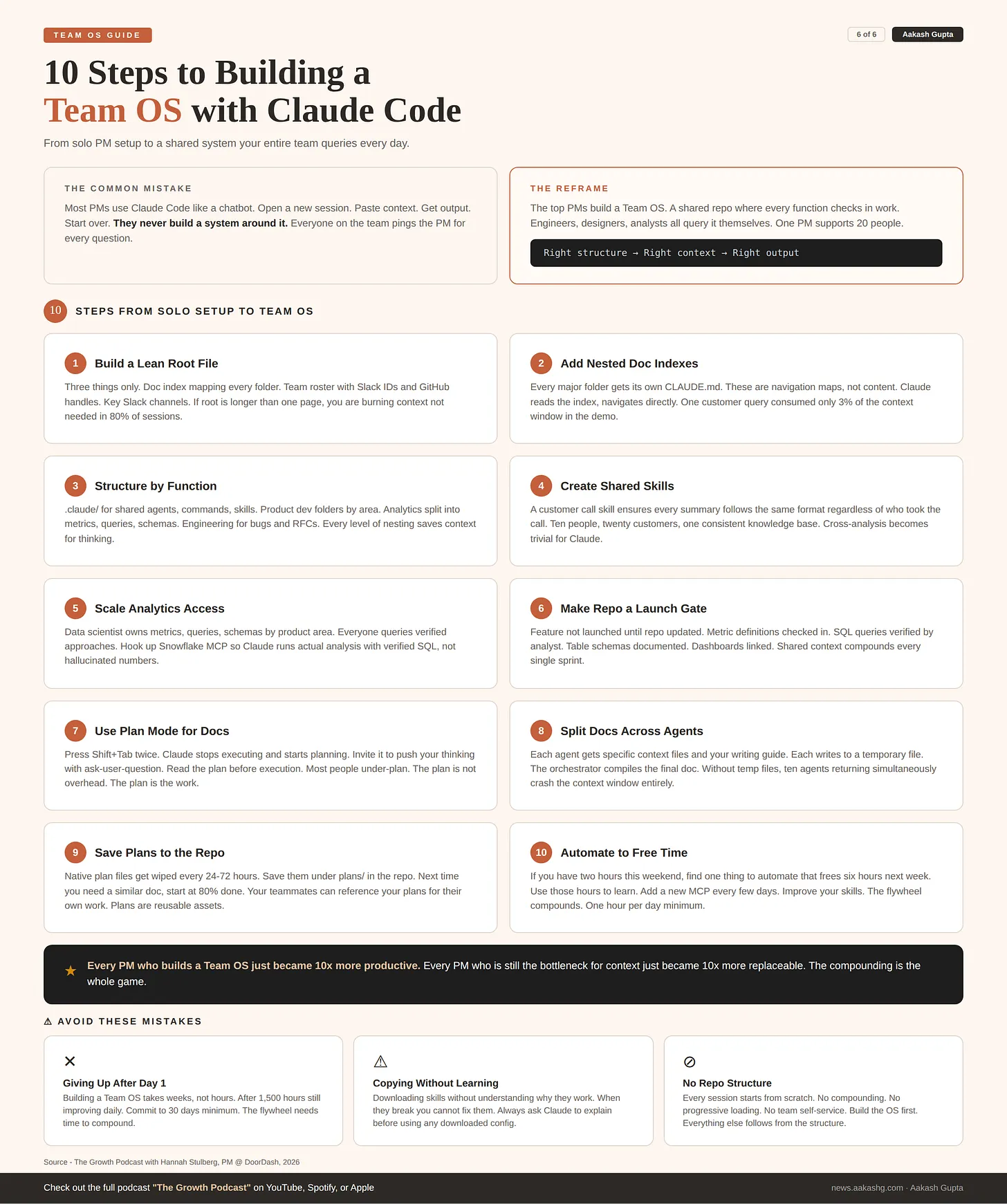
Hannah: So this is what I call the Team OS or Team Operating System, which is your team’s knowledge base storing all of your team’s shared context in one place that helps everybody on the team move faster and do their job to the best of their abilities, especially being able to get context across many different types of functional roles.
There are three main parts of the Team OS. You have the .claude folder. This is where you might put shared agents, commands, and skills that are shared by everyone on your team. Then I have the product development folder. Here you’re going to see a lot of different subfolders across different functions. And then we have a team folder where you might have team level documents like onboarding guides or retros.
At the top we have the Claude MD at the root level. This is the guiding route for Claude throughout your repository. It has a few key components. First is a doc index. This tells Claude how to navigate the repository. Claude needs to know where to go to look up different types of information so that you can do natural language queries in the repo and get the answers you need.
The other two things I like to have at the root level are who is on my team along with their handles in key products and then key Slack channels or DM groups. You want Claude to know who’s on your team so that you can write queries like “Slack Alex about the bug that came up on the customer call today.” Because the Claude MD file is loaded every single time, it’s going to load Alex’s Slack ID and be able to use the Slack MCP to send Alex a message.
Context management theory (16:57)
Aakash: How has your Claude MD file changed over time? What have you learned in the 1,500 hours you’ve put in through trial and error?
Hannah: I think this is actually what a lot of people get wrong about Claude MD, which is you don’t want very much in your Claude MD file. Claude MDs should be very lean, especially in a team repository. If we start looking through the repository, there are actually multiple levels of Claude MD files. The root level loads every session. The remaining files start to load progressively as you type natural language queries.
This is really important because the repo is structured around the theory of context management. There are four key concepts you need to know about context. One is what is context? Context is the information that is in a given session with an LLM, what information the LLM can access at a given point in time.
The next is the context window, which is how much information the LLM can hold. All the frontier labs recently upped this to a million tokens, which basically means it can hold seven to eight novels worth of text. That sounds like a lot, but the amount of docs produced by a given team and company is much more.
The third is compaction. When your context window gets full, all that information needs to get compressed down so the LLM can keep going. But you lose a lot of fidelity. You have a compressed summary which is much less useful.
The fourth concept is thinking room. This is the difference between how much information you have in the conversation and how big the context window is. That is where the model can think and reason. The more information you have, the less room there is to think and reason.
The whole repository is structured around helping Claude read and use the right information at the right time. I have a little bar in my status line that monitors how much context I’m using as we write queries.
Nested Claude MDs and doc indexes (19:49)
Aakash: I hadn’t actually seen the nested Claude MD files before. What do those look like inside?
Hannah: The Claude MDs are generally just doc indexes. This tells Claude what is in this folder and what the purpose is. If you didn’t have these doc indexes, Claude would need to run explore agents to search the repository for any queries you write.
In the product folder, one of the things we might have is who our customers are. I’m going to say “who are my top customers?” and we’re going to see how Claude navigates it. It’s loading these Claude MD files and using the doc indexes to navigate throughout the repository and find the exact information needed. We’ve only used 3% of the context window.
Claude’s not looking in the wrong places. It didn’t go into the analytics folder. It didn’t go into the data engineering folder. It didn’t read a single unnecessary piece of information to answer my query, which means we still have a ton of room to think.
Aakash: So the art of having good Claude MD files is actually minimizing the amount of context that Claude needs in order to answer a given question.
Hannah: It’s minimizing the amount of context that’s consumed and making sure that you’re only consuming context that’s relevant to what you are actually trying to do. If I’m asked about my customers, I don’t need to go read a bunch of SQL queries.
Customer context and structured summaries (21:50)
Hannah: We can also start to do more interesting things. I can say “who did I meet with over the last two weeks and what did I learn?” because I store all my customer information inside the repository in a really structured manner. Under my customers folder, I have a file for each of my customers and a Claude MD on each customer.
What you want in a Claude MD is things that you need on 80% of sessions. For a customer, you might want to know who are the key contacts and what do they do, what’s their segment, and then a doc index for how to find key resources on this customer account.
What’s important here is Claude is only reading the summary files. It’s not going into every single transcript. My customer calls can be more than an hour. Claude would not be able to quickly synthesize 50 transcripts at high fidelity, which is why the repo is set up so that it only needs to go into the transcripts if the summary doesn’t have what it needs.
Shared agents, commands, and skills (23:44)
Hannah: You basically are always wanting to think about how to structure information so that Claude can quickly and easily find what it needs. This goes to another topic within the repository, which is your shared agents, commands, and skills.
While LLMs can work really well with unstructured information, it is obviously easier if information shares a common structure. Teams using this system should try to organize information in a structured way for Claude so that all customer call summaries follow the same format. When Claude needs to do a synthesis on hundreds of different customer calls, they’re all following the same format which makes it much easier for Claude to work.
That’s why you might have a customer call skill. Everyone on your team who’s summarizing a customer call summarizes it in exactly the same way, puts it in exactly the same place. Then when you need to do cross-customer analysis, everything is organized in a very consistent fashion.
Aakash: So you’re multiplying leverage by creating these skill files to take unstructured inputs but then structure the summaries in a similar way.
Hannah: Exactly. All of your summaries come out with the exact same format, even if your company has a ton of different account managers who would all synthesize things differently.
The analytics folder and scaling data analysis (28:03)
Hannah: I think it’s really important to talk about the other functions as well, because this is how everyone scales themselves. I don’t view the Team OS as something to help everyone become a better PM. I view it as a way for everyone on the team to scale themselves and leverage what’s best about all of their teammates.
In your analytics folder, you might have links to all your dashboards, all of your experiment analysis and the results, investigations that were done. The most important part is metrics, playbooks, queries, and schemas. This is how you scale data analysis across the team.
I like to organize by topic area and then product area. Here we’ve outlined all of the metrics for the billing part of the product. We have linked all of the dashboards that are relevant. We also have a link into where the queries are for these metrics. Under queries, under billing, you have all of the SQL queries. In the schemas, we have all of the table schemas that back these metrics.
If I wanted to do data analysis, I would have all the references I need as a PM to do correct analysis. I basically get access to the analyst on my team’s brain and everything that she’s set me up for success in doing analysis correctly.
Querying metrics and reducing hallucinations (31:00)
Hannah: For example, I might say “how do we calculate generation success rate? Show me the metric definition, the SQL query and the table schema.”
Now I get to know everything about how to calculate this metric, what data tables to use, how it’s defined, what tables it comes from. This is really important because once you have anything more than a very early stage product, your data tables can get really complex. The right way to query different metrics is not always obvious. If you don’t have the right guidance for Claude and you just point it at a database, it might not do it correctly.
When I put that query in, it knew exactly what files to reference. It went in the SQL, the table schemas, the metrics. Then it was able to tell me how this metric is defined, how to query for it, and what schema backs it all.
If this was not a demo instance, you could actually have this hooked up to Snowflake MCP or another Analytics MCP and start having Claude do the analysis for you.
Aakash: Very cool. You’d have an analyst or data scientist really audit some of these playbooks and table descriptions.
Hannah: Exactly. The repo is something the whole team should be building together. On my team, the data scientist owns our analytics folder. Every time we’re building a new feature, her and I are aligning on the metrics, the backing queries, and the tables. Then we make sure it’s all documented in the repository.
When we roll out a feature, I can check how it’s doing without being reliant on a data scientist. Our engineers can also check how it’s doing because they’re empowered with all of the queries.
There’s a reason to split out the metrics, queries, and schemas. It goes to this theory of context management. You might just want to know what the metrics for the billing feature are. You don’t want Claude to then pull all the queries and all the schemas to answer that question.
Feature launch rule (35:04)
Hannah: We actually make this part of our feature launch process. When we’re rolling out a new feature, the feature is not rolled out until the repository is updated. That’s how we know we’re continuing to create that shared context so that everyone has what they need to do their job effectively as our product grows more complex.
Engineering folder and bug investigations (36:06)
Hannah: The repo benefits every function. In an engineering folder you might have bug investigations and RFCs for technical design documents. This goes to helping everyone have shared and historical context.
You might store all the bug investigations across your product because unfortunately we usually have bugs more than once, and often in the same part of the product. It’s really helpful for the person investigating a bug to see all the bugs that have happened there. When was it investigated? What was the scope? What parts of the infrastructure did it touch? How was it analyzed? What was the root cause? How was it fixed?
If someone has to investigate another bug, they have all the context of how every bug was ever investigated.
Ownership and shared responsibility (37:23)
Aakash: Who owns the engineering folder, like your tech lead?
Hannah: On my team, everyone is an owner of our knowledge repository. Each of the functional leads takes ownership of their area. But the team as a whole needs to agree on the way to structure the information.
It becomes the onus on everyone to be updating the repository and making the team’s shared context better. This is how teams become really high performing in an AI native era. Everyone is working to improve the repository.
Everyone should be writing shared skills that benefit the team, shared commands, agents that help the team. We can also set up shared automations, which I think of as the third pillar. For example, using the information in the repository to run a weekly report that synthesizes all the customer research. With the way the repo is structured, you can have that be an automation that runs every week, synthesizes all the research, and posts a message in your Slack channel so everyone stays up to date.
Checking in daily work (38:54)
Aakash: We got the 80-20 of the repo setup. You check in all your day-to-day product work into the repo. What does that look like tactically?
Hannah: Tactically, I only work in Claude Code these days. I write every single doc first in Claude. Then I check it into the repo for my team to review. That’s how everyone on my team works as well. My whole design team works in Claude, the engineers work in Claude. We’re all working in the shared repository. My data scientist is also working this way.
People think this is only for technical roles. That is a very wrong assumption. All of my business operations, product operations, strategy and operations partners are also participating in this shared context repository, putting up PRs, adding their context into the repo. We’re all collaborating together in this space every day.
Pull requests and collaboration (40:03)
Aakash: Where would I put a first draft of my strategy document for next quarter and how would I check that in?
Hannah: You would have written that doc in Claude. Under your strategy docs folder, you can organize by quarter. You would put up what’s called a pull request or PR. When all the work is ready to review, you put up a pull request for your team to review.
Something really nice about doing all of this in Claude is you can have the GitHub CLI or MCP hooked up. Because Claude knows who everyone on my team is, I would literally write “put up a PR for Morgan to review this PRD” and everything would just work. Never leaving Claude at all.
We also have shared commands for creating PRs that post a Slack message to our team’s channel with certain structures depending on who put up the PR, what the contents are, and who should review it.
Aakash: So you’re basically saying you don’t just have a code base. You have a code base of your team’s context for Claude. You’re pushing, pulling and sending PRs for that context. And it’s not just PMs doing it. It’s analysts, designers, engineers, go-to-market partners. Everybody is participating.
Hannah: Exactly. My strategy partner takes even more customer calls than I do. She checks every customer call into the repository so that I can review what we learned. She’s completely non-technical. She had never opened GitHub in her life two months ago, and now she is putting up PRs every single day.
I feel very passionately about this. I see a lot of chatter online that this way of working is only for PMs, or only for engineers, or only for technical people. I think that’s very incorrect. Anyone can learn how to do this. And when everyone does, we can all work so much better together.
GitHub 101 for PMs (44:07)
Aakash: What’s the 60 second summary of GitHub for those who are scared of it?
Hannah: The process is basically you put all of your work onto a branch as you’re working. Every time you finish a certain milestone, you commit it. This means you’re saying I reached a stopping point and I want to save my work. When a given item is done, you open a pull request and ask for review. This is where you tag a reviewer. They might give you feedback. Then when everything is done, you merge it into the main branch, which means everyone in all of their local repositories has access to your work.
Plan mode deep dive (45:06)
Aakash: I want to talk about creating high quality documents. How does someone use this repo to create a 10x PRD or strategy document?
Hannah: Having a shared context repository helps with writing really high quality docs, but that’s not the only piece of the puzzle. The other piece is knowing how to plan effectively with Claude.
For those who don’t know, “clear” is a way to wipe the context of your current session. It’s really important to do this when switching tasks, because Claude is going to use the information in that conversation to guide its work.
I want to show the difference between not using plan mode and using plan mode. I’m going to put a basic prompt saying “research the most recent Google Stitch release and tell me about what happened.” And then in another terminal, the same thing but with “give me a proposal for what you’re going to do.”
When you’re doing basic prompting, you don’t really know what Claude is going to do. I like the junior employee metaphor. Claude is like a really eager and highly talented junior employee. If you don’t give them any guidance, you don’t totally know what you’re going to get back.
In the other terminal, Claude did a little bit of research and is giving me a proposal. It’s using the context from the repo to generate the proposal. It came to conclusions itself using context from the repository against the natural language query. But if I was writing a doc, this is still probably not what I would have wanted.
Plan mode walkthrough (49:24)
Hannah: To get into plan mode, you press Shift+Tab twice. Now plan mode is on. Think of LLMs as having a bias for action in order to be helpful. The goal of the LLM is to get into action. It’s like a horse chomping at the bit. Plan mode takes away that bias for action. It’s like taking away the keys and saying we’re not going into action right now, we’re only going to plan.
Here, Claude is researching the release and my code base at the same time. When you have all this context in your repository, you’re already set up to load a lot of context into your documents.
Aakash: It also shows how much potential tokens are there, like 25K and 98K, but it’s not burning through 130K tokens. It knows where to look.
Hannah: That’s really important. People tell me they burned hundreds of thousands of tokens and hit their usage limit in 30 minutes. That’s generally because their work is not organized and optimized for Claude to traverse easily. Claude is only loading stuff relevant to my query. It went into my competitive research folder, checked my writing guide and existing vision docs.
Context rot and keeping the repo updated (52:53)
Hannah: This is a very important practice. You need to keep the context repository updated. Otherwise you have what’s called context rot, which means Claude is going to use context that’s outdated.
Aakash: When you’re checking in this PR, it’ll have two components – the strategy doc and the update to the competitive intel.
Hannah: The PR is going to contain every single thing that I’ve changed in the repo as it relates to this task.
In order for your work to be reviewable, you want to put chunks of work together. Something that contains 85 file changes is going to be really hard for anyone to review. I like to segment my work for the reviewer. If I’m working on a design brief for my designer, a PRD for an engineer, and updating a metrics file for the analyst, I would open three separate PRs and tag each different person as the reviewer.
Advanced planning techniques (55:15)
Aakash: We’re thinking with high effort here. Looks like you keep it at the max settings.
Hannah: I pretty much always use high effort. For anything that involves writing or reasoning, you’re going to get the best results with high effort. It’s worth waiting.
Aakash: What I usually do in the downtime is spin up my second agent and start having two, three, four going.
Hannah: Usually I wouldn’t have this downtime because I would go start working on something else. Here is where I see people not go right with plan mode. These files can be pretty long. It’s pretty hard to read them in the terminal. But you can open them up and read them. The most important part of having a good plan is actually reading it.
If you’re going to send someone off to burn a bunch of your tokens, you probably want to know what your employee is going to do. I always read through the plan and make sure I’m aligned on it.
Expanding the plan with parallel research (56:57)
Hannah: Claude is proposing a structure for my strategy doc. But I might not just want to research this most recent release. What I might want to say is, actually, I want to research anything that any of my competitors have shipped in the last three months. I want a sentiment analysis on the news coverage. I want to understand which publications cover these releases. I want a deeper comparison of how the landscape has changed. And I want this research to be parallelized. Once the research is done, let’s have a check-in and then we’ll write the doc afterwards.
A couple of things are happening there. One, Claude does not naturally parallelize plans. I’m creating phases of work. I’m broadening the scope so I can get more work done at once. For this plan, after the research comes through, I might want to review that research to shape the strategy doc. So I create a checkpoint in the plan where I check in with Claude before the next phase.
Verification in plans (58:48)
Hannah: Another important part is verification. Verification is how Claude knows that the work was done and done well. There’s actually no verification on how the research is being performed. In real life, I might talk to Claude about how I want that research verified. If it’s making claims, I might ask for sources to be cited. I might ask for URLs to the news releases.
Another example is if you’re building a front end feature, you can have Claude use something like Playwright MCP to go in a loop and actually check the front end and validate its own work before telling you it’s done. The ability to tell Claude what good work looks like and how to know the work is done is a key part of planning.
Parallel agents and plan file storage (1:00:26)
Hannah: We can see here that Claude is actually using six agents at once to do this research. Other things I would do in a real plan is go through the strategy doc structure. Claude is proposing a structure, but that might not be the way I want the doc structured. I would continue to give feedback about what sections I want, what the narrative should be.
While we’re waiting, the other concept is storing plan files within the repository. When you’re doing a longer and more complex plan, you’re putting time and effort into writing that plan. Teams are starting to store the plan file itself in the repository.
The reason to store these is to speed up everyone’s work and have historical context. If you spend a couple hours with Claude figuring out how to do something, you might need to do something similar in a month. You don’t want to start from zero. You’d like to have a previous plan to reference.
OpenAI actually published this recently in an article on harness engineering, where they talked about making plan files first-class artifacts of the shared repository.
Aakash: Even your plans, not just the final strategy docs, when you’re checking in that PR, you’d include the plan document. Do plan documents get summaries?
Hannah: No, you don’t want to summarize the plan because you want another session to be able to build off of that plan in its entirety.
Agent prompts and writing guides (1:04:01)
Hannah: Another concept as it relates to planning is asking Claude to show you the agent prompts it’s going to use. When Claude as part of a plan is kicking off other agents, now you have a junior employee kicking off even more junior employees.
You might want to know how this employee is going to direct the work of the other employees. In my plan files on complex plans, I like to have Claude write out what it is going to prompt every single agent with. What is that agent writing? What context will it get? What files will it read?
This is really important for writing tasks. If not all agents get the same context, you don’t know they’re going to have the right context to write effectively.
The reason to split long doc writing across multiple agents is the context window. Writing is a pretty expensive operation. When you’re writing a very long form doc with all the thinking, reasoning, and docs you need to synthesize, you generally cannot have one singular agent read 40 context files and write a great doc.
I like to be directive about the sections, the context each section needs, who’s going to write each section, and then synthesize them together with the orchestrating agent. You want all agents to write their output to temporary files. If you have ten agents running and they all return their work to the parent agent simultaneously, everything crashes and you lose all the work. It’s very important that each agent stores its work in temporary files and then the orchestrating agent compiles the final synthesis.
Inviting Claude as a thinking partner (1:07:04)
Hannah: I want to show how I invite Claude as a thinking partner. Throughout the planning process, Claude was using the Ask User Question tool to ask me questions. But I like to actually invite Claude to push my thinking.
I’m going to say “use the ask-user-question tool to push me on my thinking and help me consider other angles that we might want to pull into this document, different sections that we might want to add, or other questions that you need to clarify my goals for why we’re doing this.”
Now Claude is going to ask me questions. You can have Claude interview you pretty in depth. It’s saying what’s driving the timing of this document. What are other angles we should address. Maybe there are fights we want to walk away from. It’s catching gaps in my reasoning, pushing me to consider things from different angles.
Aakash: Most people rush in, let it write the first draft, then yell at it. Your approach is spend time getting the plan right and then iterate on it.
Hannah: It’s not always two to three hours. Generally people are under-planning. That’s why you’re not getting the output you want, because you left room for interpretation.
Writing guides and skill invocation (1:11:06)
Hannah: I have different writing guides for different types of docs in my user level .claude folder so that Claude can write in my voice. Whenever I’m doing writing, I make sure in the plan that the agents are given my writing guide because skills only have like a 70% auto-invoke rate. When you’re letting something run for a long time, I don’t see why you’d leave anything to chance. I always explicitly specify in the plan if I want a certain command run or skill called.
Aakash: I always say “use X skill” and triple check. The skill is a lot of the alpha. The value is when she has that skill, sees another PM wrote an amazing strategy doc, tells her skill to improve based on that example, runs a whole process, sees where it fell apart, and iterates. The skill itself improves over tons of iterations.
Plan mode summary and phased plans (1:13:14)
Hannah: You don’t generally need to spend two to three hours planning. Generally people are under-planning. I try to tailor the level of planning to the level of complexity and ambiguity. The more ambiguous and complex something is, the more time you should invest in the plan.
Even just asking for a lightweight alignment proposal gets a lot better results. I still find that this gets much better and more consistent results.
If a plan has phases, I outline the different phases and have Claude track when each phase is complete. This way, if you need to compact or stop in the middle, Claude knows exactly how to pick up.
The natural plan files have cute names from Anthropic with three words, but they are ephemeral. They’re stored in your .claude folder at the user level and are wiped every 24 to 72 hours. If you spend a lot of time on a plan, save the plan file down so you can reference it in the future.
Aakash: Does everything get a plan?
Hannah: I don’t think there’s a right or wrong. Generally anything that is relatively complex and requires synthesis or deep thinking benefits from having a plan.
Aakash: Things that are less certain and more undefined is where planning is more useful. Sometimes you have a PRD where the team has already agreed and you have a meeting transcript. Then you might not need as much depth.
Hannah: Exactly. I try to tailor the level of planning. For straightforward tasks, I still like Claude to quickly tell me what it’s going to do. I give a quick correction and sign off. You get much better and more consistent results.
Beginner’s mindset (1:17:16)
Aakash: One of the practices you have that I think is genius is how you apply a beginner’s mindset to learning. Can you walk us through that?
Hannah: Getting started can feel very overwhelming. You can feel like you’re so behind. But I think it’s really important to have that beginner’s mindset where you feel comfortable asking questions. I will ask Claude about anything I don’t understand and ask it to teach it to me. I might say “explain to me the benefits of why this repository is structured the way that it is, and also things that could be improved.”
This is also how I improve what I’m doing. I’m still learning every single day. I like to use Claude to help me learn and make sure I understand why things are working or not working.
Aakash: I use a similar prompt every day with a slight tweak. I tell Claude to research everything Anthropic has shipped in the last 90 days and create a calendar. Then research the top Claude Code influencers and their best posts. Then compare my setup to the latest features and what influencers are recommending and tell me how to 10x my setup. That prompt has been huge because Claude’s training data is stale, from 2024. It doesn’t even know about its own latest features sometimes.
Hannah: Here’s another good example. I have a feature index in the repo as a YAML file. If someone didn’t understand why this was a YAML file, I would ask Claude to explain the benefits. I see people downloading skills and commands and agents and using them without knowing why they work. Whenever I’m using anything, I always start by having Claude teach me why it’s good or not good. That makes me more comfortable iterating on it. If you’re just downloading and copying things without understanding them, when it doesn’t work, you won’t know how to fix it.
Biggest mistake PMs make (1:21:20)
Aakash: What’s the biggest mistake PMs make when using Claude Code for product?
Hannah: The biggest mistake is that people give up too early. Learning anything new takes time. Building out this type of context repository is not something you’re going to do overnight. People try it for a day, don’t get good results, and decide it’s not for them. I’ve spent 1,500 hours in Claude and I’m still iterating on my setup and improving it literally every single day.
When to use which AI tool (1:22:01)
Aakash: There’s Claude, ChatGPT, Cursor, Cowork. When should PMs be using which?
Hannah: There’s not a right or wrong answer, although for most advanced PM work, you should be using some type of coding agent. For chat, it’s generally if you need a quick answer that doesn’t need super high context. Otherwise, ideally you’re building a context repository that you can leverage with any coding agent.
If you only have two hours (1:22:48)
Aakash: If a PM only has two hours this weekend, what steps should they take?
Hannah: The single biggest piece of leverage you have is freeing up your time to learn. If I had two hours this weekend, my question would be what can I do to create six hours for myself next week? I would find something to automate so that I can free up six hours to learn. You should be trying to carve out at least an hour a day to just play with AI. In order to have that hour, you need to automate work to free up your time so you can learn and also help uplevel your teams.
Underhyped vs overhyped (1:23:38)
Aakash: What’s underhyped versus overhyped in AI for PMs?
Hannah: Underhyped is following your curiosity. There’s a lot of pressure to always be on top of the exact latest news. I think we’re all going to have more fun and learn better if you’re following the things you’re curious about. If AI evals don’t get you out of bed in the morning, don’t start there. Start with automating something that frees up your time, or if you love design, start with prototyping.
The other thing that’s underhyped is building expertise in one area. Right now a lot of people are very shallow at many different things. It takes time and investment to really learn a topic. I’d say spending the time to go deep is underhyped, even if that means you’re not learning other areas right now.
Claude Code is the most misleading name in AI (1:24:50)
Aakash: You said Claude Code is the most misleading name in AI. Why?
Hannah: Because it’s not just for coding. While I do code in Claude Code, most of my time is not spent coding. It’s writing docs or doing analysis or building local HTML prototypes or other types of prototypes. It is not just for coding and it’s not just for people who are technical. My operations partners are spending all day in Claude. They’re contributing to our repository. It’s really the best tool right now for doing knowledge work.
Advice for PMs scared of the terminal (1:26:04)
Aakash: What would you tell a PM who’s scared of the terminal, scared of IDEs?
Hannah: Don’t be afraid to be a beginner again. There’s not a big difference between typing into a chatbot and typing into the terminal. Once you’ve done it for an hour or two, you’ll start to feel pretty comfortable.
Essential MCPs (1:26:32)
Aakash: What MCPs do you need to hook your Team OS up into?
Hannah: Every single MCP that you can access. The limit does not exist. I am adding a new MCP every couple of days. Most companies are going to operate on a certain stack. You’re going to have certain software vendors that hopefully have either MCPs or CLI tools. Claude works really well with both. The goal is any core piece of software that you use in your day-to-day work should be hooked up.
Outro (1:27:14)
Aakash: This has been a master class. I’ve done seven or eight Claude Code episodes and I was learning every single minute of this one. We covered how to create a Team OS, how to set up that repo, how to write amazing documents by creating a comprehensive planning process, and how to have a beginner’s mindset with Claude Code. Hannah, thank you so much.
Hannah: They should go read my Substack which is called In the Weeds. You can find it at hannahstulberg.substack.com. Or on my LinkedIn.
Aakash: Her Substack is a must-subscribe if you’re a Claude Code enthusiast like me. Until the next episode, we’ll see you later
Related: a full write-up on building a shared context repo that works across any AI harness.
Related: how a chief AI officer built product loops in Claude Code with shared agents.