Writing user stories is the non-negotiable skill that separates the average PMs from the top 1% leading teams at places like Google or Meta. It’s the difference between building a feature users genuinely love and one that needs a costly, soul-crushing rewrite six months down the line. A top-tier PM with this skill at a company like OpenAI can command a salary well over $350,000, while a PM who writes vague tickets struggles to justify their impact.
Think of user stories less like developer instructions and more like strategic contracts. They’re the tool you use to align your entire team—from engineering to marketing—on delivering tangible value. This guide provides the tactical frameworks, AI prompts, and real-world examples you need to master this skill within the next 48 hours.
Why Elite User Story Crafting Defines Your PM Career
Honestly, mastering the art of the user story is the single most impactful skill you can develop for your career. At its core, a good user story creates shared understanding. It’s a simple, powerful narrative that connects a real user’s need to a specific action and, most importantly, a measurable business outcome.
When you nail this, you kill the ambiguity that dooms projects and burns through engineering cycles.
Imagine a feature launch at a B2B SaaS company. One PM writes a ticket in Jira that says, "Implement CSV export for the user dashboard." The engineers do exactly that—they build a basic, clunky export function. It technically works. An entry-level PM might make this mistake.
A senior PM, however, writes a user story: "As a Data Analyst at a Series C startup, I need to export my dashboard view into a CSV file so that I can perform advanced analysis in Excel and share key metrics with my leadership team for our Q3 board meeting."
This tiny reframe sparks a conversation. It leads to a feature with customizable columns and date ranges—a solution that actually delights users and drives adoption. The first PM delivered a ticket; the second delivered real value.
From Simple Tickets to Strategic Contracts
This shift from ticket-writing to story-crafting isn't just about semantics. It's a fundamental change in how you operate as a product leader. Vague tickets create friction, demand endless clarification meetings, and almost always result in features that miss the mark. High-impact user stories, on the other hand, become the source of truth for everyone involved.
A well-crafted user story is your primary tool for focusing the entire team on a shared goal. It translates abstract business objectives into concrete, buildable pieces of value, ensuring that every engineering hour is spent solving a real user problem.
This isn't a new idea, but its importance has only grown. Between 2003 and 2013, the use of user stories absolutely exploded within agile frameworks. Research from that time showed 80% of practitioners stuck to the classic template because it worked, reporting major boosts in defining precise needs which led to better productivity and higher-quality products. You can explore the research on user story adoption to see just how long-standing its impact is.
The difference in outcomes is stark. A PM who masters this skill shows strategic thinking, builds a collaborative environment, and consistently ships products that succeed. These are the exact qualities that hiring managers at top tech companies are looking for.
To really drive this home, let's look at the career-defining results of great stories versus the costly consequences of bad tickets.
High-Impact User Stories vs. Low-Value Tickets
| Attribute | High-Impact User Story (Top 1% PM) | Low-Value Ticket (Average PM) |
|---|---|---|
| Team Focus | Aligned on solving a specific user problem. | Focused on completing a technical task. |
| Outcome | Delivers measurable business value and user delight. | Delivers a feature that "works" but may miss the mark. |
| Collaboration | Sparks conversation and creative problem-solving. | Creates confusion and requires constant clarification. |
| Efficiency | Minimizes rework and wasted engineering cycles. | Leads to scope creep, delays, and costly rewrites. |
| PM Perception | Seen as a strategic leader who drives impact. | Viewed as a project manager or "ticket writer." |
| Career Impact | Accelerates career growth and leads to top-tier roles. | Stagnates career; struggles to show strategic value. |
The takeaway is simple: moving from the right column to the left is how you build a reputation for shipping incredible products and become an indispensable leader.
The Anatomy Of A Killer User Story
Let's shift from the high-level 'why' to the tactical 'how.' The secret to crafting a user story your engineering team actually loves isn't writing a novel. It's about delivering a short, powerful statement that screams value. This is your hands-on guide to building stories that create clarity, not confusion.
We’ll start with the industry-standard Connextra format. It's a simple but potent template you'll see in job postings from nimble startups to the biggest names in tech. Think of it as your foundation for framing what users need in a way that hooks directly into business goals.
Mastering The Who, What, And Why Format
The classic template for a user story is simple and effective: As a [Persona], I want [Action], so that [Value].
This isn't just a formula; it's a tiny narrative designed to build empathy and provide critical context. Each piece plays a crucial role in getting everyone on the same page.
- As a [Persona]: This is the 'Who'. It forces you to get specific. We're not building for a generic "user." Is it a first-time e-commerce shopper, a power-user data analyst, or a freelance content creator? Getting this right is your first line of defense against building bland, uninspired features.
- I want [Action]: This is the 'What'. It describes the user’s immediate goal—the capability they're missing. Crucially, this should be about the user's intent, not a pre-baked technical solution. For instance, "I want to save articles to read later," is miles better than, "I want a bookmark button."
- So that [Value]: This is the 'Why,' and honestly, it's where you earn your paycheck as a PM. This clause connects the user’s action to a meaningful outcome. It justifies the engineering effort and makes sure every story ladders up to a bigger objective. A weak 'so that' is a massive red flag.
The "so that" clause is your direct line to business impact. It transforms a simple feature request into a compelling argument for value creation, giving you the leverage to prioritize effectively and articulate your product strategy to leadership.
From Bad To Great: Real-World Examples
Let’s get practical and look at how this plays out across different products.
Fintech App (The Bad Story)
"As a user, I want to see my transaction history."
- Why it fails: "User" is way too broad. The "want" is just a statement of fact, and with no "so that," the team has no idea why they're building it. This isn't a story; it's a chore.
Fintech App (The Good Story)
"As a budget-conscious millennial, I want to categorize my recent transactions so that I can track my monthly spending against my financial goals."
- Why it works: The persona is specific, the action is crystal clear, and the value proposition hits a core user need—getting a handle on their money. Now we're talking.
B2B SaaS Platform (The Bad Story)
"As an admin, I want to export data."
- Why it fails: Who is this "admin"? What data? In what format? And for what purpose? This is dangerously vague and invites endless back-and-forth.
B2B SaaS Platform (The Good Story)
"As a Marketing Operations Manager, I want to export a CSV of new leads from the last 7 days so that I can import them into our CRM for the sales team's weekly outreach campaign."
- Why it works: This story is packed with context. The engineering team instantly understands the user's workflow, where the data is going, and the urgency tied to a weekly sales cycle.
Acceptance Criteria: Your Definition Of "Done"
A user story sets the stage, but Acceptance Criteria (AC) are the rules of the game. They are the specific, testable conditions a feature must meet to be considered complete. ACs are your best defense against scope creep and the dreaded "this isn't what I meant" conversation.
One of the most effective ways to write them is using the Gherkin syntax: Given-When-Then. This structure forces you to think through user scenarios logically and leaves no room for interpretation.
This format turns user behavior into a structured test case, making it crystal clear for developers and QA engineers what "done" really looks like.
Let’s apply this to our good fintech story:
User Story: "As a budget-conscious millennial, I want to categorize my recent transactions so that I can track my monthly spending against my financial goals."
Acceptance Criteria (Gherkin format):
- Scenario: User successfully categorizes a transaction
- Given I am viewing my list of recent transactions
- When I select an uncategorized transaction for "Starbucks"
- And I choose the "Coffee Shops" category from the dropdown
- Then the transaction should be labeled with "Coffee Shops"
- And my "Spending by Category" chart should immediately update to reflect this change.
This level of detail is a game-changer. User stories are everywhere in agile development, but studies show natural language can cause ambiguity in roughly 30% of cases. Integrating Gherkin-style AC—a practice used by 40-60% of mature agile teams—is how professional PMs turn vague requests into verifiable outcomes.
Writing clear AC is a skill that gets better with practice. For more inspiration, check out these sample user stories and acceptance criteria.
Applying The INVEST Criteria To Bulletproof Your Stories
So you've nailed the "Who, What, Why" structure for your user stories. Great. But that's just the first pass. The next step is to put them through a rigorous stress test, and the gold standard for that is the INVEST framework.
Think of INVEST as a quality checklist. It's how you ensure every story is truly ready for development before it hits a sprint. Consistently applying these criteria is one of the clearest signs of a senior PM who knows how to run a tight ship, minimize nasty surprises, and keep the team shipping.
This isn't just theory—it's your practical, in-the-trenches tool for backlog grooming. It's what turns a decent story idea into a bulletproof piece of work for your engineering team.
I: Independent Stories Prevent Bottlenecks
A user story needs to stand on its own two feet. It should be a self-contained unit of value that can be developed and delivered without being chained to another story. When you create dependencies, you create bottlenecks that grind sprints to a halt.
Red Flag (Dependent):
"As a user, I want to create an account so I can log in."
This seems logical, but it bundles two distinct jobs into one. The team can’t work on logging in until signing up is fully done.
Better (Independent):
- Story 1: "As a new visitor, I want to sign up for an account using my email so that I can access member-only features."
- Story 2: "As a returning member, I want to log in with my email and password so that I can access my account."
Now the team has options. They can tackle these in parallel or in a different order, giving you much-needed flexibility in sprint planning.
N: Negotiable Stories Foster Collaboration
Remember, a user story is a conversation starter, not a rigid contract handed down from on high. It defines the what and the why, but crucially, it leaves the how open for discussion with your design and engineering partners.
Red Flag (Too Prescriptive):
"As a user, I want a dropdown menu on the top right with the options 'Profile,' 'Settings,' and 'Log Out' so I can navigate my account."
This story dictates the UI implementation, shutting down any chance for the team to find a better, more creative solution.
Better (Negotiable):
"As a logged-in user, I want to easily access my account management options so that I can update my profile or sign out."
This framing opens up the conversation. Is a dropdown menu really the best choice? What about a dedicated account page or a sidebar? This collaborative approach, which I cover more in my guide to writing better specs as a PM, almost always leads to a stronger final product.
V: Valuable Stories Drive Business Impact
Every single story must deliver tangible value to the user or the business. Full stop. If you can't clearly articulate the "so that" benefit, that story is dead weight in your backlog.
This sounds obvious, but it’s amazing how often technical chores or vague ideas get disguised as user stories.
Red Flag (No User Value):
"As a developer, I want to upgrade the database library so that we are on the latest version."
While this might be a necessary task, it has zero direct value to the user. It’s a how, not a what or a why.
Better (Tied to Value):
"As a user, I want my dashboard to load in under two seconds so that I can get the information I need without frustration."
This story is all about user value. Now, upgrading that database library might be one of the technical tasks required to achieve this outcome, but the story itself stays laser-focused on the user's benefit.
A story that lacks clear value is just noise in the backlog. Your job as a PM is to be the gatekeeper of value, ensuring every development cycle is spent on work that moves the needle for the user and the business.
E: Estimable Stories Enable Planning
If your engineering team looks at a story and just shrugs, you've got a problem. They need to be able to give a rough estimate—in story points, t-shirt sizes, whatever your system is—of the effort required.
A story that's too big or too vague is impossible to estimate. And if you can't estimate it, you can't prioritize it or plan it into a sprint.
Red Flag (Too Vague):
"As a user, I want a better search experience."
What does "better" even mean? It's completely subjective and un-estimable.
Better (Estimable):
"As a shopper, I want to filter search results by price range so that I can find products that fit my budget."
This is concrete. The team can immediately start thinking about the UI components, the API calls, and the backend logic needed. They can have a real conversation and land on a reasonable estimate.
S: Small Stories Create Momentum
Good user stories are small. They should be bite-sized pieces of work that can be completed within a single sprint, ideally in just a few days. Large, monolithic stories are a recipe for disaster—they drag on for weeks, hide nasty surprises, and delay critical feedback loops.
Red Flag (Too Big – An Epic):
"As a user, I want to manage my entire profile."
This isn't a story; it's an epic. "Managing a profile" involves a dozen different actions.
Better (Small and Focused):
- "As a user, I want to change my password so that I can secure my account."
- "As a user, I want to update my shipping address so that my orders arrive correctly."
- "As a user, I want to upload a profile picture so that I can personalize my account."
Breaking epics down into these small, shippable stories allows the team to build momentum and deliver a steady stream of value.
T: Testable Stories Define "Done"
Finally, every story must be testable. If you can’t define how you'll prove it works, it's not ready. This is where your Acceptance Criteria (AC) come into play. A story without clear, objective AC is just an invitation for scope creep and arguments about what "done" really means.
Red Flag (Untestable):
"As a user, I want the site to be more intuitive."
How do you write a test case for "intuitive"? You can't. It's a feeling, not a function.
Better (Testable):
"As a first-time visitor, I want to complete the checkout process in under 5 clicks so that I can purchase my item quickly."
Now we're talking. This is directly testable. A QA engineer can literally run through the flow and count the clicks. It either passes or it fails. No ambiguity.
The INVEST Framework Health Check
To make this even more practical, I use this checklist during backlog refinement sessions to audit stories with my team. It helps us quickly spot issues and fix them on the fly.
| Criterion (INVEST) | Definition for PMs | Common Red Flag | How to Fix It |
|---|---|---|---|
| Independent | Can this story be developed and deployed all by itself? | "We have to finish Story X before we can even start this one." | Split the stories into smaller, self-contained pieces. Isolate the dependency and tackle it first if needed. |
| Negotiable | Does it define the problem but leave the solution open to talk? | The story dictates specific UI elements like "a blue button" or "a dropdown menu." | Reframe the story around the user's goal. Let the design and engineering teams propose the how. |
| Valuable | Does this story clearly benefit the user or the business? | The "so that…" clause is missing, vague, or describes a purely technical task. | If there's no real user value, it's a tech task—not a story. Link it to a user-facing story that it enables. |
| Estimable | Can the engineering team give a rough size estimate for this? | The story is too vague ("improve the dashboard") or too massive (an epic). | Break it down. Get more specific about the user action and the desired outcome until it's a manageable size. |
| Small | Can this be realistically completed within a single sprint? | The story represents an entire feature or will take multiple weeks to build. | Slice the story vertically. Find the smallest possible increment of value you can ship and build from there. |
| Testable | Do we have clear, objective criteria to confirm this is "done"? | Acceptance criteria are subjective ("should be easy to use") or non-existent. | Write specific, binary acceptance criteria. "When the user does X, Y happens." It passes or it fails. |
Using a checklist like this turns INVEST from an abstract concept into a concrete, repeatable process. It's the most reliable way I've found to ensure the stories we commit to are solid, clear, and ready for the team to knock out of the park.
Splitting Epics And Managing Your Story Backlog
A perfectly written user story is great, but a backlog clogged with massive, multi-sprint epics? That's a product manager's nightmare. This is where the real craft of managing a product backlog comes in: breaking down those huge ideas into small, shippable stories your team can actually build.
Strategic splitting isn’t just about making tickets smaller. It's about finding the absolute thinnest slice of value you can deliver from end to end. Think less like cutting a cake and more like peeling an onion—each layer is complete on its own. This is how you build momentum, get feedback faster, and dodge the dreaded two-month feature build that lands with a thud.
Battle-Tested Patterns For Splitting Stories
When I’m coaching new PMs, I tell them to stop seeing the feature as a single block and start looking for the seams. Where can you make a clean cut without wrecking the user experience?
Here are some of the most reliable ways I've seen to split up epics:
- By User Role: A feature often serves different types of users. "As a shopper, I want…" is a totally separate story from "As an administrator, I want…". Splitting by role lets you ship value to one group at a time.
- By Workflow Step: Most user journeys follow a clear sequence of actions. Just map out that workflow and turn each distinct step into its own story. For an e-commerce checkout, you could have separate stories for adding an item to the cart, entering a shipping address, and completing payment.
- By Business Rule or Scenario: Features almost always have to handle different conditions. The "happy path" story (where everything works perfectly) can be split from stories that handle errors or edge cases, like an "invalid credit card" message or an "item out of stock" warning.
- By Performance Constraints: Sometimes, the first version is functional but not fast. You can create one story for the basic functionality and a separate one later to hit performance targets, like, "As a user, I want search results to load in under 500ms…"
Before any story is truly ready for your team, it needs to pass a quick gut check: is it valuable, small, and testable? This decision tree is a great way to visualize that process.
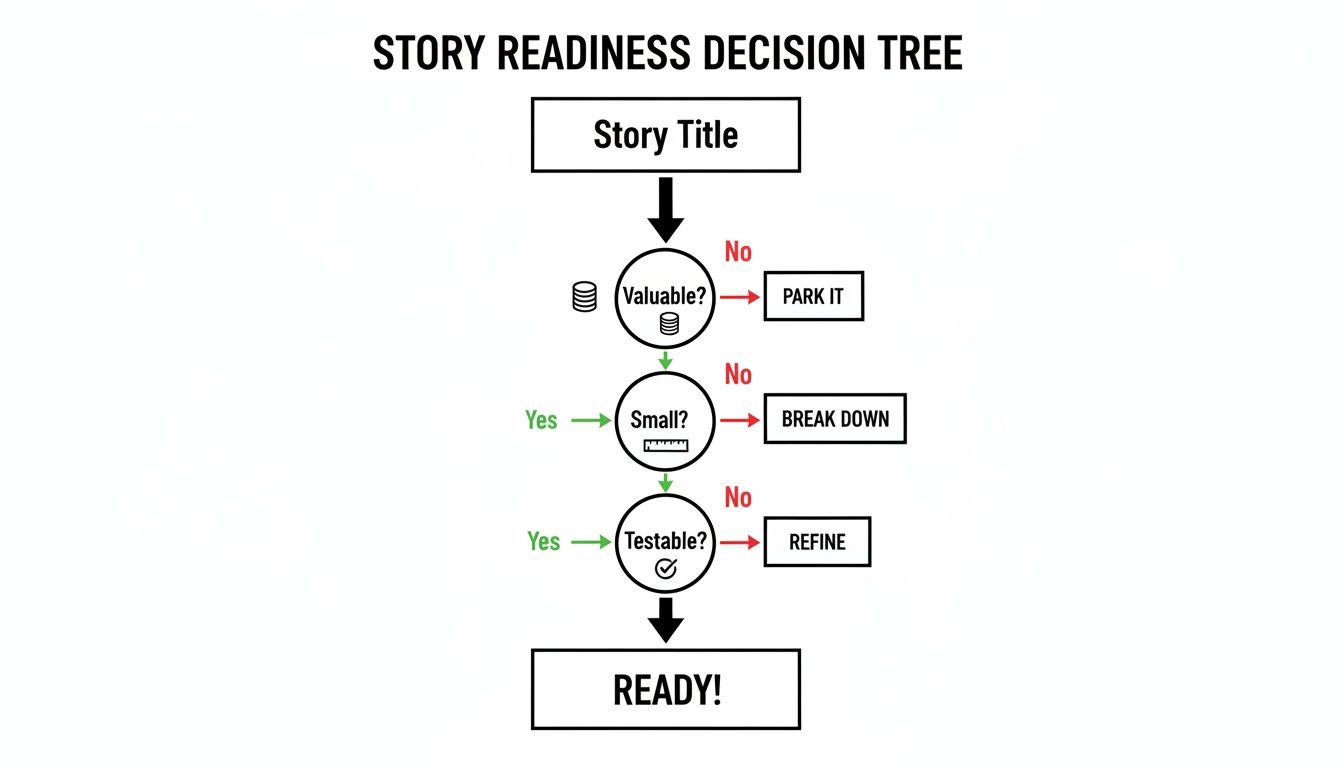
This simple flow is a powerful mental model to use during backlog grooming. It helps guarantee that every story you bring to the team is truly ready to go.
Beyond The Story: Practicing Good Backlog Hygiene
A clean, functional backlog is your best tool for moving fast. A messy one quickly becomes a black hole of half-baked ideas and technical debt. A huge part of good hygiene is realizing that not every single piece of work needs to be forced into the "As a user…" format.
In fact, one real-world audit of a product backlog showed that about 85% of items were solid user stories. Another 10% were technical tasks that were better left in a different format. Aiming for an 85/10/5 split is a healthy target. It keeps your team focused on direct user value while still carving out space for necessary technical work. For more on this, Mike Cohn offers great insights on using FDD features as an alternative.
To keep this balance, you need to know what kind of tickets you're working with:
- Technical Task: This is work that enables future user value but has no direct, user-facing component itself. Think database upgrades, setting up a new API endpoint, or refactoring code to improve performance.
- Research Spike: This is a time-boxed investigation to answer a specific technical or design question. The deliverable isn't code; it's knowledge. It's all about de-risking a future user story.
- Bug Report: This describes a specific, reproducible problem with existing functionality. It should clearly state what went wrong, what was supposed to happen, and the exact steps to recreate the issue.
Using these different ticket types keeps your backlog organized and your priorities crystal clear. For a deeper look at organizing all these items, check out our guide on how to prioritize a product roadmap.
Your backlog is a living document, not an archive. It should reflect your current strategic priorities. A well-managed backlog tells a clear story about where the product is going and why.
This requires active and continuous grooming. You have to regularly review, re-prioritize, and delete items that are no longer relevant. This discipline is what stops the backlog from turning into an overwhelming junk drawer and ensures the team is always focused on what matters most.
Advanced Tactics: AI Prompts And The PM Review Workflow
Once you've got a handle on the fundamentals of a good user story, it's time to start operating like a senior product leader. That means integrating modern tools and locking down your review process.
This is how you scale your impact, kill ambiguity before it derails a sprint, and show the kind of process-driven ownership that gets you promoted. First, we'll make AI your co-pilot for drafting, then we'll guarantee quality with a bulletproof review workflow.
Using AI As Your Product Co-Pilot
Let's be clear: AI tools like ChatGPT and Claude won't replace your strategic brain. But they are ridiculously powerful for blasting through the more tedious parts of writing user stories. Think of them as an accelerant for brainstorming, drafting initial versions, and even poking holes in your own logic. This is particularly crucial for the emerging role of the AI Product Manager, who must move at the speed of modern model development.
It's all about augmentation, not automation.
This simple prompt-and-response format is your canvas for rapidly generating and refining product requirements.
The secret? Don't give the AI a lazy, one-sentence prompt. The quality of your output is a direct reflection of the quality of your input. Feed it a rich, detailed feature brief.
Example AI Prompt for Brainstorming User Stories:
Act as a Senior AI Product Manager at a B2B SaaS company building a product similar to Gong.io. I am building a new feature: 'AI-Powered Sales Coaching.'
Here is the feature brief:
- Objective: Allow sales managers to get automated coaching insights based on AI analysis of their team's recorded sales calls.
- Key AI Features: The system will use a large language model to transcribe calls, identify key topics, detect filler words, and flag moments where the salesperson missed a key talking point from their script.
- Target Persona: A Sales Manager at a mid-market tech company overseeing a team of 10-15 Account Executives.
- Business Goal: Reduce manager time spent on call reviews by 50% and increase the team's average deal size by 10% through more consistent coaching.
Based on this, generate 5-7 distinct user stories following the 'As a [Persona], I want [Action], so that [Value]' format. Include stories for both the manager and the sales rep persona. Also, generate a set of Gherkin-style acceptance criteria for the most critical story.
A structured prompt like this gives the AI all the context it needs to spit out relevant, high-quality story ideas. This can save you a huge amount of initial drafting time. For a deeper dive, check out our comprehensive guide to the best AI tools for Product Managers.
Formalizing The PM Review Workflow
A well-drafted story is only half the job done. A story isn't truly "ready" until it has survived the scrutiny of your partners in engineering and quality assurance.
Enter the "3 Amigos" session—a focused meeting between the Product Manager, a Development Lead, and a QA Lead.
This isn't just another calendar invite; it's a critical quality gate. The goal is to forge a shared understanding and get collective buy-in before a story ever gets near a sprint. Honestly, this one practice is probably the single most effective way to cut down on in-sprint scope creep and keep your team's velocity predictable.
The '3 Amigos' workflow transforms backlog refinement from a PM-led monologue into a collaborative diagnostic session. It's the moment a story's ambiguity is stress-tested and its assumptions are either validated or dismantled by the people who will actually build and test it.
Running An Effective 3 Amigos Session
To keep these sessions from turning into a rambling debate, you need structure. Each "amigo" brings a unique and vital perspective to the table.
- Product Manager (The 'What' and 'Why'): You own the user problem and the business value. Your job is to present the story, champion the "so that" clause, and clarify any questions about user intent.
- Development Lead (The 'How'): They bring the engineering reality check. They're listening for technical feasibility, hidden dependencies, and anything that screams "this is way harder than it looks."
- QA Lead (The 'What If'): They are the master of edge cases and the champion of Murphy's Law. Their job is to think of all the ways this could break, poking holes in the acceptance criteria and asking the "what if" questions that lead to a more robust feature.
Keep the agenda simple and tight.
- Story Presentation (5 mins): The PM quickly walks through the user story and its acceptance criteria.
- Clarifying Questions (10 mins): Dev and QA pepper the PM with questions. This is where the real work happens and ambiguity dies.
- Agreement on "Ready" (5 mins): The group gives a collective thumbs-up, agreeing the story is clear, testable, and ready for estimation.
Putting this structured review workflow in place is a total game-changer. It builds trust, massively improves the quality of your backlog, and shows a level of operational maturity that’s non-negotiable for anyone looking to move into senior product leadership.
Common Questions About Writing User Stories
Even with the best frameworks in place, some questions about writing user stories pop up again and again. These aren't just for beginners; I've seen senior PMs at top companies debate these exact nuances during backlog refinement.
Let's clear up the most common challenges with some straight, actionable answers.
How Detailed Should A User Story Be?
This is the classic balancing act. You need to give the engineering team enough detail to grasp the problem and put a reasonable estimate on it. But you absolutely can't be so prescriptive that you stifle their creativity and turn the story into a rigid spec sheet.
Your goal is to start a conversation, not end one.
Provide the "what" and the "why," but leave the "how" open for discussion with your design and engineering partners. You want just enough context to frame the problem, backed by clear, testable acceptance criteria.
A great user story is an invitation to collaborate. It defines the boundaries of the user's problem without dictating the exact solution, empowering your team to build the best possible feature.
Who Actually Writes The User Stories?
While the Product Manager is the ultimate owner of the product backlog—and responsible for making sure stories are well-defined—that doesn't mean you should be writing them in a vacuum. The best user stories are born from collaboration.
Typically, the PM drafts the initial story, really nailing the user persona, their goal, and the value it delivers. Then, during backlog grooming or a "3 Amigos" session, that story gets refined with input from engineering and design. This process is critical for ensuring technical feasibility and building a shared understanding before a single line of code gets written.
How Do You Handle Non-Functional Requirements?
Non-functional requirements (NFRs)—things like performance, security, and scalability—are incredibly important but often don't fit neatly into the standard "As a user…" format. Trying to force them can feel awkward and unnatural.
There are two effective ways I've seen this handled:
- As Acceptance Criteria: For many NFRs, the cleanest method is to simply add them as specific AC to a related functional story. For instance: "Given a user performs a search, When they submit the query, Then the results must load in under 500ms."
- As Standalone Stories: For bigger, cross-cutting concerns, it makes sense to write a standalone technical story. For example: "As the system, we need to upgrade our database to version X.Z so that we comply with new security patch requirements and improve query performance by 15%."
Choosing the right approach really just depends on the scope of the NFR. You can explore a variety of examples of user stories with acceptance criteria to see how different types of requirements can be structured.
At Aakash Gupta, we provide the frameworks and insights you need to excel as a product leader. Explore the newsletter and podcast for more career-defining product strategies.
