Check out the conversation on Apple, Spotify, and YouTube.
The code vs canvas debate (02:22)
Aakash: There is this debate that I am seeing with the new wave of designers. One prefers the flexibility of designing with code, using Codex to actually lead the design process and maybe bring Figma in later. The other still prefers the free form of the canvas, the more traditional design process. What is your take on this design in code versus design in the canvas debate?
Gui: We are in such an interesting time right now where finally we do not really have to choose. The two camps to me are really interesting because I have often found the canvas to be a place where I can just quickly riff on ideas and do a lot of lateral exploration. And I still feel it is the gold standard for that. Whereas code has just enabled me to go super deep and really make my ideas real very quickly.
Before, I used to have to choose which mode do I have to engage in to get to the thing that I want to do. And now I do not. The new shift that we should embrace is navigating seamlessly between both. That is why I am really excited to be here talking with Ed about how we enable designers and PMs and teams to move fluidly between AI coding and agents like Codex to move between exploration and convergence.
Ed: It is a little bit of a false dichotomy in a way because as a designer, as a creative, you have a toolkit and there is the right tool for the job. If you can code and you want to test out some interactions, hopping into a codebase is maybe the easier option. You can create a branch of main and play with a prod version of what you are jamming around with. Just like there are still architects out there who still work by pencil, there is a sliding scale of how you represent ideas.
I come at it really practically. If you are being super exploratory, you want to sketch stuff out. If you want multiplayer, you want to be able to collaborate and show work and print it out and put it up on a wall and tear it down. But the role of a designer is pretty expansive. If we are shipping a product and we want to get the last mile up to the bar, then it opens up the opportunity for designers to hop in and ship PRs.
If I was a young designer today, I would be so excited to have this insane new box of toys to build all this fun stuff. Your imagination really is the only upper limit and now you have this really broad range of flexible tools that can help you bring your idea to life.
When to start in code vs start in the canvas (06:06)
Aakash: I am hearing from both of you that it is a false dichotomy. What are the tactical ways one should think about this? When do you start in code versus start in a free-form canvas? How do you go back and forth?
Gui: It is grounded on this dogmatic approach we have had to the workflow historically because of tool constraints. We have had to start in low fidelity and work our way up into high fidelity because it is expensive to do high fidelity. We created this very standardized way of working that started from paper doodles and low-fi prototypes all the way to code.
Now our low fidelity start can just be jumping into Codex and doing a functional wireframe. The point is can I start working from something that gets the team talking and gets us thinking about the shape of the solution. My wireframe no longer needs to be a doodle that I made with a marker pen. It can start being something that is functional.
It really just depends on the level and the scale and the type of problem. If you are working on how to finesse a certain component, maybe you want to start straight in code. If you are trying to figure out how you might lay out a whole flow, it might help you visualize the whole flow in front of you. If you are trying to go wide and really try to break a paradigm of interaction, you might want to do a lot looser fidelity. You get to pick whatever tool helps you get further with your team.
Ed: The underlying design process has not changed. You are solving problems, you are representing things in different ways, you are rallying teams and building a vision of a future. It really depends what your objective is. Maybe you are designing a hero image to rally people around it. Then you probably want it pixel perfect, so maybe you want to go into Figma. Or maybe you are getting really crisp on design systems and thinking about how different components interact in different states. Again, maybe you want to be in Figma with all of your tokens and color tests.
But then say you are doing something that is more responsive. You are testing how it looks on mobile web or across different breakpoints or you want to test some interesting interaction design paradigm. There you want to get into the messiness of code.
It is not as simple as starting in Figma and ending up in code. It is this often back and forth. You kind of weave in and out. That is why these cool new integrations are really amazing because the handoff between these tools is softer and it becomes way more fluid.
Live demo: Codex to Figma with the MCP (10:16)
Aakash: A lot of people’s heads are going to go to lossiness as you translate between these tools. So instead of talking about it conceptually, can you show us Ed, how you actually practically day to day are bouncing between these tools?
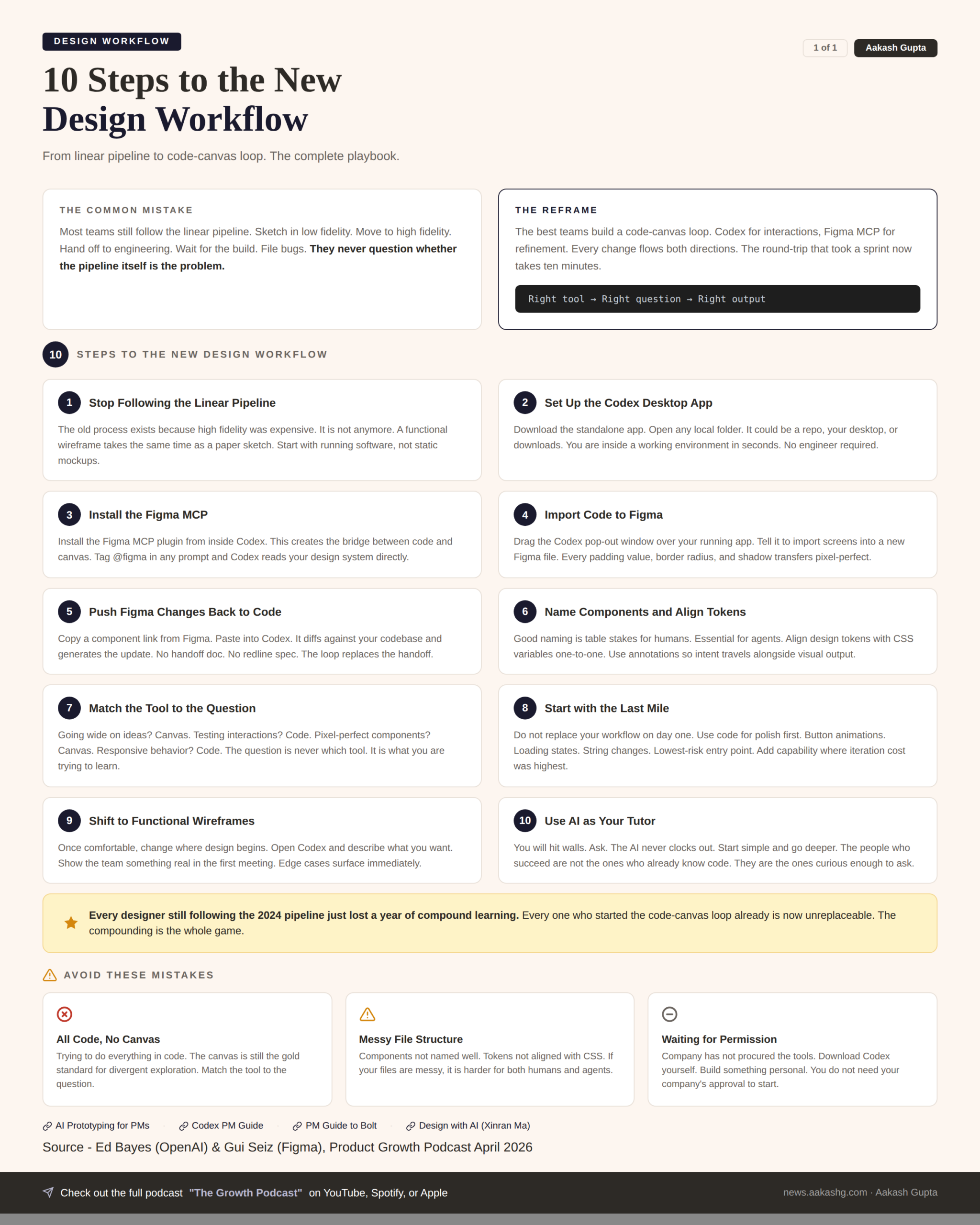
Ed: So I have opened up Codex, which is our desktop app. There is a terminal product, there is an IDE extension, but this is our standalone app. You basically just open up, you add a new project, open your local folder. It could be anywhere, desktop, downloads, a repo you already have open.
I have opened this thing called Codex Composer System. I have already specced out a composer in Figma, but I want to test out some interactions and this is where working in code works really well. If anyone has used our product, we have this dynamic composer system. If the model is asking you for permission to run a command, it pops up this permissions treatment. Or if you are in plan mode it might ask you some questions and you can toggle through.
I built this out in code because I wanted to test these interactions. How the buttons morphed into each other, how the size works, where the different tap targets are. But say I want to go deep on a particular part and get really pixel perfect. I want to make sure the icons are my icons. I want to change maybe some of the labels.
I bring up Codex and use this pop out window. I drag it over the top and say I want to import my homepage and a few composer states into a new Figma file. I tag in Figma. You do not even need to type Figma, if you say Figma it will probably trigger itself.
Because it is getting to know the file system first, it might take a few moments. First it reads what is going on in my React app, then it digs into the Figma MCP. It goes into a file, pops open a window, takes a snapshot of what is going on. Then you click Open in Figma and it opens a Figma file and copies anything you want. You can do interactions, whole websites. And then it specs it out in full flow.
Gui: You are also able to select specific components. In that example you only had the text box. You probably do not need the big white rectangle behind it if you are wanting to work on that. It also allows you the ability to go down your nodes and select the one you actually want and just iterate on that. We want to give you as much flexibility as possible to just work with the data that you want.
Pixel-perfect fidelity in Figma (15:39)
Ed: It has pasted in the screens. The very cool thing is, as you click in, everything is responsive. All of the exact pixel perfect things, the padding, the border radius, it is exactly one to one with the file. Whereas previously, engineers might have to go in and look at the separate numbers and pull out the different values. What is the shadow of this? What are these x, y values? It just does that out of the box.
A designer can go in and spec this out. Maybe I want to play with color, test out a few different shades. And then the very cool thing, let us say I change the model. I can copy a link to this component, paste it into Codex and say update my code with the change I made here. Now it will go the opposite way.
So this handoff is seamless. Maybe you are a designer who can code and you can weave between these. But maybe you are not. This does not block you. Now you and your engineer can collaborate in a more seamless way and it no longer becomes these siloed areas.
Lossiness and the Figma MCP improvements (20:06)
Gui: On the lossiness thing, it is really interesting because it only gets better from here. It is already very good, but as OpenAI releases new models, the better AI gets, the better all of this gets. We have just created the pipeline for this to work, and it can only get better.
In the past I have inherited surfaces from other people that have since left the company. I am trying to figure out where is the Figma file for this thing. Some decisions got made in engineering. They did not get recorded in the Figma file. Being able to capture all of that in the highest fidelity possible is incredible.
Now with the new releases, with the use Figma tool, we are able to do that in relation to your actual design system. When you copy the stuff, because it is just a snapshot of a website, it does not yet bring in your design tokens. With this new tool, you are now able to actually reference your design library and have that pull in those design tokens and local styles. So you are not just working on a facsimile of the thing, you are working on a representation that is using your style guides.
I saw an engineer on Twitter showing their process of aligning their Storybook to their GitHub to Figma with AI running the loop and finding the diffs between them. Now you do not have this overhead of maintenance of like, but we have not updated that component in here and it only exists in there. You can just run a loop and have anyone, irrespective of their preferred modality, be able to have the latest materials available to them.
Ed: While you were chatting, I made a very dummy change. I just changed the string here, changed it to our newest model and ran it. And here it is in the model picker. At this point you can basically go deep. You can build out the component in code. In parallel, your designers can go deep. And then you can just one click update the master from there.
How often do things go wrong in practice (23:03)
Aakash: Practically when you guys are using this day to day, how much do you have to update either the Figma or the code? How often does it get things wrong?
Gui: There are limits to the kinds of things that it is able to infer. Maybe you have some shader effects and we are not set up to run that. Maybe you have specific transitions and a static canvas does not support that yet. But the reality is you can get to a lot through even annotations. A trick that we use a lot is being able to read annotations into the MCP. We are able to communicate a lot of this stuff back.
It does not get a lot of the things wrong once you have set it up with your design systems and everything. You tend to be OK. It is going to be on the more web-specific effects. That is an opportunity for us to evolve the tooling.
Ed: My mental model is working with a colleague. If your Figma files are a bit of a mess or things are not named correctly, then it is harder for your colleague to get up to speed. That is basically the same for agents. In terms of hot tips, making sure that you name your components well and aligning your design system with your CSS tokens in your codebase. Once you get those foundations, which are good for working with humans or agents, it makes things much simpler.
With our most recent model 5.4 as well, I have had a number of designers internally reach out to me and they are like, this model is way better at working with these tools. I think if people have not tried it, give it a go with the Figma MCP because it is materially better than things we have released before.
Behind the scenes at OpenAI and Figma (26:17)
Aakash: You guys have been involved in shipping some pretty important AI features. Can we get a behind the scenes of what it looked like when you were working on one of these features?
Ed: On the Codex team, we are building products for developers. So the designers who work on the team are pretty developer forward already. Many of us code. I probably spend around 70, 80% of my time coding. The nature of the role has changed. There is less of this handoff process on my team specifically, but we have been building zero to one products and moving extremely fast.
From speaking with folks across the team working on other products, what I have seen is a gradual onboarding and a gradual change. In our work in progress Slack channels and design reviews, I just see more and more people arriving with a hybrid. There will be a link to a Figma, but also a URL link and people will hop in and click through and show interactions.
One of our content designers who typically works on UX copy was telling me that she has been shipping to prod and submitting PRs herself. Even if you look at how design has changed on Codex over the past year, it has radically changed. I think something changed in December when we were dogfooding the app. The models hit a certain capability threshold and it just felt like anyone could hop in and change things.
The challenge now for designers is choosing when to go slow if you are building AI products. If developers have been accelerated 10x, which I do not think is an overstatement, designers have maybe been accelerated 1.5 or 2x. So design can become the bottleneck if you are not coding yourself. Then the tradeoff is when do you meet the speed of engineers and when do you choose to go slow and actually go through a deep design process.
Gui: Even if you look back to mid last year, I would have given you a completely different answer. The Overton window has shifted so quickly from my teams being AI curious to banging down the door, they cannot move fast enough without it.
I have teams now that are working directly in staging. They are designers and they have superpowers that are able to do this. To Ed’s point, it is like OK, come back a bit. When are you doing the exploration? You are almost so empowered by this that you have to think about what should I do, not just what can I do.
Mid last year, we were still working from designs to prototypes. We do prototypes in Make. We would then work with engineers to put that into production. Now we might put a flag into production and then finesse some prototypes in Make and try to get little details right. Then bring that back out to GitHub and use Codex to work into that. It is this constant jumping around between the right tool for the right job.
The thing that surprised me the most is how prevalent across Figma this became. When I started it was very much the build tools area which has a lot of technical leaning folk. Now I look around and I have people from monetization building prototypes that are so incredibly technically accomplished in a way that a designer in the past might never have given themselves permission to do so.
We are starting to see a sprouting of interesting concepts because people now have not just the vocabulary to do it, but the ability to get something in front of people without having to task an engineering team. We see projects starting at all different stages. We joked about there are no more P2s. Now everything can just be shipped. A designer can now just go and work on that polished stuff. As a designer, as a builder, there has never been a more exciting time.
The step-by-step roadmap for traditional companies (33:06)
Aakash: A lot of people are maybe at a more traditional company, especially in compliance or regulatory heavy industries. Healthcare, financial services. What is the step-by-step roadmap to get to this new way of working?
Ed: Just give it a go. It is maybe a simplistic statement, but people all the time DM me questions about it. And it is people in GTM, people in finance, people from all backgrounds, technical, non-technical, hopping in and trying these things out. Once you start using them, you realize how creative you can be.
Someone on our GTM team just built this whole iOS app that was on her phone that she showed me at a work event. She does not know anything about iOS. Then just this morning, someone from our comms team wanted to design a seating plan for events. So she designed an HTML file and you could drag people around and type in their name.
How did you learn to do this? I just downloaded it and gave it a go. Maybe you do not have access in the company for whatever reason, but in the evenings and weekends, you can still download these things yourself. Try it in the terminal. If that is a little intimidating, try the app. Or if you have ever coded in an IDE, maybe try the extension.
If you are not sure what to do, just ask. I am going to Japan next week on my honeymoon and my wife and I are building this little app. We are mapping out the cafes we want to go to and the restaurants. And my wife is not technical, but she is hopping in and making stuff. Just remove these ideas that it is not for me and give it a go.
Gui: You do not have to start with code. We all have access to ChatGPT on our phones. You are able to ask any question. I remember when I was trying to learn how to code the hard way before AI and doing all these boot camp courses and trying to figure out what do I need to learn and where do I actually invest my precious time.
Now I do not need to. Now I can just ask a question. Can you build this? And if it starts to do something, I can ask how does that work. It is really up to me how deep I want to dive in. If I do not care about how it is built and I just want it to work, I can just keep asking for new stuff.
There has never been an easier way to get started because if you can ask a question, you can do the thing. And the question does not always have to be about code. Maybe you are asking about strategy. Maybe you are asking about how your team dynamics can be improved. You can ask anything and that will build confidence to ask more complex questions. And before long, you are asking questions about code. You are asking, I have just inherited this system. Can you help me explain the data architecture so I understand where we are making calls. Are there any systems here that are redundant?
What happens at places like Figma and OpenAI is that you are constantly doing this as part of the thing, and so you build that facility very quickly. We are not asking designers at healthcare companies to go and start shipping updates to main. But you could start interrogating the systems around you, and you can start finding where there are opportunities to contribute or to think differently.
Using AI as a tutor and partner (39:26)
Ed: One other thing I would add is there is also thinking of these tools as a tutor or a partner. Even if you do not know how to code and you start coding, I do not think the mental model should be I release control and I do not need to know how to code and I can just build this thing. It is an amazing on-ramp.
If you are a designer working in a company, you still work across the software development lifecycle. You are going to have to go through PR review. You are going to have to understand the codebase. You do not want to introduce foot guns in the code. You want to respect the data model. All of that actually requires knowing how to code.
It is a very empowering new technology to give people an on-ramp. But once you start going down this route, you can also just start asking questions. I have built this React app. What does React do? What do these different pages do? What is the difference between a layout page and a normal page? How does CSS interact? It is this way of getting over this initial hump.
I have been to the same boot camps probably that Gui has. It was a lot of time and investment. And frankly, quite scary for a lot of people. But now you can have this on-ramp and slowly ramp up. Because it is really important to understand the underlying system that you are designing within. None of this obfuscates the need to do that. But it is a really great tool to bring more folks into the fold.
Gui: Curiosity is going to be the defining skill of people that succeed in this new era. Because AI is changing so fast, and you just need to have enough curiosity to ask what does that mean for what I am doing. If you are already asking that, you are already in a good place.
If you think it is a small shift that you can adapt slightly, you might miss the actual bigger picture. There is this mindset of let us ask questions and let us see. And now I have this incredibly patient tutor that never gets tired, never clocks out, and I can just ping it. Explain it to me in simpler terms. And I can get it to work with me at whatever level of abstraction.
If you can develop that curiosity instinct, that is the answer to how do I get started.
How roles are blurring inside OpenAI and Figma (44:36)
Aakash: Where is the line now? These designer and engineer roles are clearly merging. And there is always been this third leg of the trio which is PMs. I would love to know not your prediction of where these roles go, but your description of what it looks like inside OpenAI and Figma today.
Gui: The boundaries between these roles have been blurring for a minute. AI has really accelerated that. For us, the way we are thinking about this is that there are people with spikes. But there are no territories. There are things that people gravitate naturally to do and that has now broadened. I have designers shipping code. I have PMs prototyping stuff and working into designs.
One of the things that we found really interesting is with this advent of things like skills, you are able to guide models to do something. You have this almost pedagogic nature of writing instructions. We have this collective wealth of information. Designers writing skills on how to coach AI to design well. PMs working through skills on how to make interesting product decisions.
It accelerates the blurring even more. As a designer, I can make use of a PM’s mindset to work through decision making, whereas a PM is trying to figure out how to debug something. It creates this really interesting thing where I have a natural spike in design, not so much in engineering, but I now have the ability to stand on the shoulders of giants.
In football, soccer, in Holland in the 70s, there was total football where every position played every position. You did not have a specific thing. Now we are in this thing where when someone moves over here, you can cover over here. You are a much bigger threat as a team.
Teams have a natural interest and spike in things, but they are able to inter-navigate and help each other. Sometimes someone goes out for a day or they are sick, and that is now no longer a bottleneck. You can start making progress. It does not happen on every team yet, but we are starting to see the signs. The empowerment that has come from AI has meant that this idea of rigid org structures is starting to diffuse a little bit.
Why roles are not disappearing (47:20)
Ed: I would agree with a lot of that. Different roles can blend more easily in terms of the day-to-day work. But one counter I would provide is the role of a designer does not go away. The role of a product manager does not go away. The role of an engineer does not go away. Because you actually play very different roles.
If you are a product designer, you are arguably the voice of the user. You are trying to build products that people love and use, same as product managers. If you are an engineer, you are perhaps more focused on systems and performance.
Even though the different tools are more accessible, even if now an engineer can hand something off to Figma more easily, I do not think that impacts the day-to-day work that happens in terms of the different value the different roles provide. You look to the past and actually all of these roles have very different mandates within an organization. Maybe your toolbox is the same, but the role of product managers is building great products and the mandate of an engineer is not necessarily that.
Gui: You have things that you naturally gravitate towards doing and that has informed the trajectory you took your career on. But there were moments where you arbitrarily siloed into that perspective because of the amount of time it took to become proficient in the tool. If I wanted to learn a specific tool, that would gate me in a specific thing.
Now that the tools are becoming easier and these abstraction layers are being built, you are able to step into slightly other domains. It does not mean I am going to become a PM or become an engineer. It means I no longer am working with only a third of the picture. I can start working into product decisions and shaping strategy roadmaps and having a higher seat at the table, but also working much more in implementation if I want to.
My role as a designer and how I self identify is still that I want to figure out, as the voice of the consumer, what are the economics of the thing. What are the ways that I want someone to work through this problem. I do not think people are necessarily jumping ship from one end to the other because they like what they like and they are good at what they are good at. But they are now able to be better at more things.
Ed: Even though I am spending most of my time coding, I would still self-identify as a designer. And I do not think that has changed. It is just you are still solving the same problems. You are still trying to uphold a high bar of craft. And that just means that you work in this different medium.
There is this great phrase, prototypes, not PRDs. Many of the PMs on our team are good examples of this. They bring a working prototype that they are thinking about, or they ship a PR for a feature that they were thinking through to stress test it with some engineers before someone else takes it on and takes it further. It is about how can code help you in your role better achieve the types of objectives that you are trying to do. For product folks, that is often quite different from engineers. But the medium that you use might change.