Claude Code skills are folders of instructions that Claude loads when a task calls for them. Anthropic’s engineering team defines a skill as “a directory containing a SKILL.md file” with instructions, scripts and resources inside. In the Claude Code docs, the summary is short: create a SKILL.md file, and Claude adds it to its toolkit. Claude uses the skill when it’s relevant, or you run it yourself with /skill-name.
In May 2026 I ran 75 tests across 25 skills and wrote up the results in a paid skills guide. The repo that produces my newsletters, posts and podcast material holds 68 skills today. This page covers where a skill lives, how Claude decides to load it, a real skill file in full, and three lessons from those tests.
How a skill loads
A prompt is text you have to remember to paste. A skill is reusable behavior that Claude loads when your message matches what the skill does.
Anthropic’s post calls the design principle progressive disclosure, and the loading has three levels:
- Startup. The agent pre-loads the name and description of every installed skill into its system prompt. That is the only part of a skill Claude reads before it decides anything.
- Use. If Claude decides the skill is relevant, it reads the full SKILL.md.
- On demand. Files the skill points to, such as templates and scripts, load only when needed.
The Claude Code docs say the same thing: in a regular session, skill descriptions are loaded into context so Claude knows what’s available, but full skill content only loads when invoked.
Where a skill lives
Where you save a skill decides which sessions load it. A personal skill sits in ~/.claude/skills/skill-name/ and, per the docs, loads in all your projects on that machine. A project skill sits in .claude/skills/skill-name/ inside a repo, and the docs’ advice is to commit it so your team gets it too. All 68 skills in this repo are project skills. Separately, I keep 11 personal skills in ~/.claude/skills/ on my machine. I counted both by script on October 27, 2026.
The docs list more scopes, including enterprise, plugin and nested folders. When the same name exists in two places, enterprise beats personal and personal beats project. A personal skill stays on that machine: the docs say it loads in all your projects there, but not in Cowork or cloud sessions. A project skill travels with the repo.
Skill, CLAUDE.md or hook?
The docs give a rule I use: create a skill when you keep pasting the same instructions, checklist or multi-step procedure into chat, or when a section of CLAUDE.md has grown into a procedure.
My CLAUDE.md holds one-line rules that apply to everything. A skill holds the procedure for one job. If a rule has to hold even when Claude skips a step, it goes in a hook. The docs’ troubleshooting section says the same: when Claude skipped a rule that must hold every time, move the rule into a hook. I cover hooks on my page on the Claude Code harness.
A real skill, in full
This is /video-captions from my repo, unedited. It is 48 lines. The file says “Aakash’s Mac” because it is written for Claude to read.
---
name: video-captions
description: Word-level timed captions for a finished or nearly finished video, using whichever speech-recognition backend is available, snapped onto the true script text. Use whenever a video needs burned-in captions, subtitles, or a words JSON for the EDL renderer. Works offline in a cloud container with pocketsphinx and on the Mac with Whisper.
---

# /video-captions

Captions need two things: the right words and the right times. The script has the right
words. An ASR model has the right times. `asr.py` joins them.

## Steps

```bash
A=.claude/skills/video-captions/scripts/asr.py
# 1. times from the audio, words from the script
python3 $A transcribe $P/audio/narration.wav -o $P/words.json --script $P/script_plain.txt
# 2. or, with no ASR at all, spread each scene's words over its measured narration window
python3 $A align --storyboard $P/storyboard.json -o $P/words.json
# 3. burn in through the EDL
python3 .claude/skills/video-gen/scripts/storyboard.py edl $P/edit.otio -o $P/edit.json --words words.json
```

`script_plain.txt` is the narration of every scene joined in order.

| Backend | Where | Accuracy |
|---|---|---|
| `pocketsphinx` | anywhere, offline, model inside the pip wheel | exact on a 3-second test sentence, 73% word match on a 51-second technical script, weak on real speech |
| `mlx` | Aakash's Mac | Whisper large-v3-turbo, the one for human speech |
| `faster-whisper` | needs a huggingface.co download | not run here |
| `align` | anywhere | no ASR, exact at scene edges, approximate inside |

Prefer `transcribe --script` over `align` whenever an ASR backend runs, since real word
times beat proportional spreading. `script_match` in the output is the share of script words
the recogniser found. On the proof cut pocketsphinx matched 0.73, missing terms like OpenTimelineIO and headlessly, and the captions still tracked the audio because missed words are interpolated between matched neighbours. Below 0.5 means the audio and script probably disagree, so look at the audio. For real speech use `mlx`.

## Style

Presets by channel are in `/video-edit` (Presets by channel). For a professor-register
explainer use the `phrase` style, 4 words per card, `y` 0.86 on 16:9. One word at a time
(`tiktok`) fits shorts and fights a slow narrator.

Caption text follows `banned-words.md` like any copy. Captions are the script, so a fix
goes in the script and the words JSON is regenerated.

## Verify

`/video-critic` transcribes the final render and reports the median drift between the
captions and what is spoken. Anything over 0.30 s fails.
What each part does:
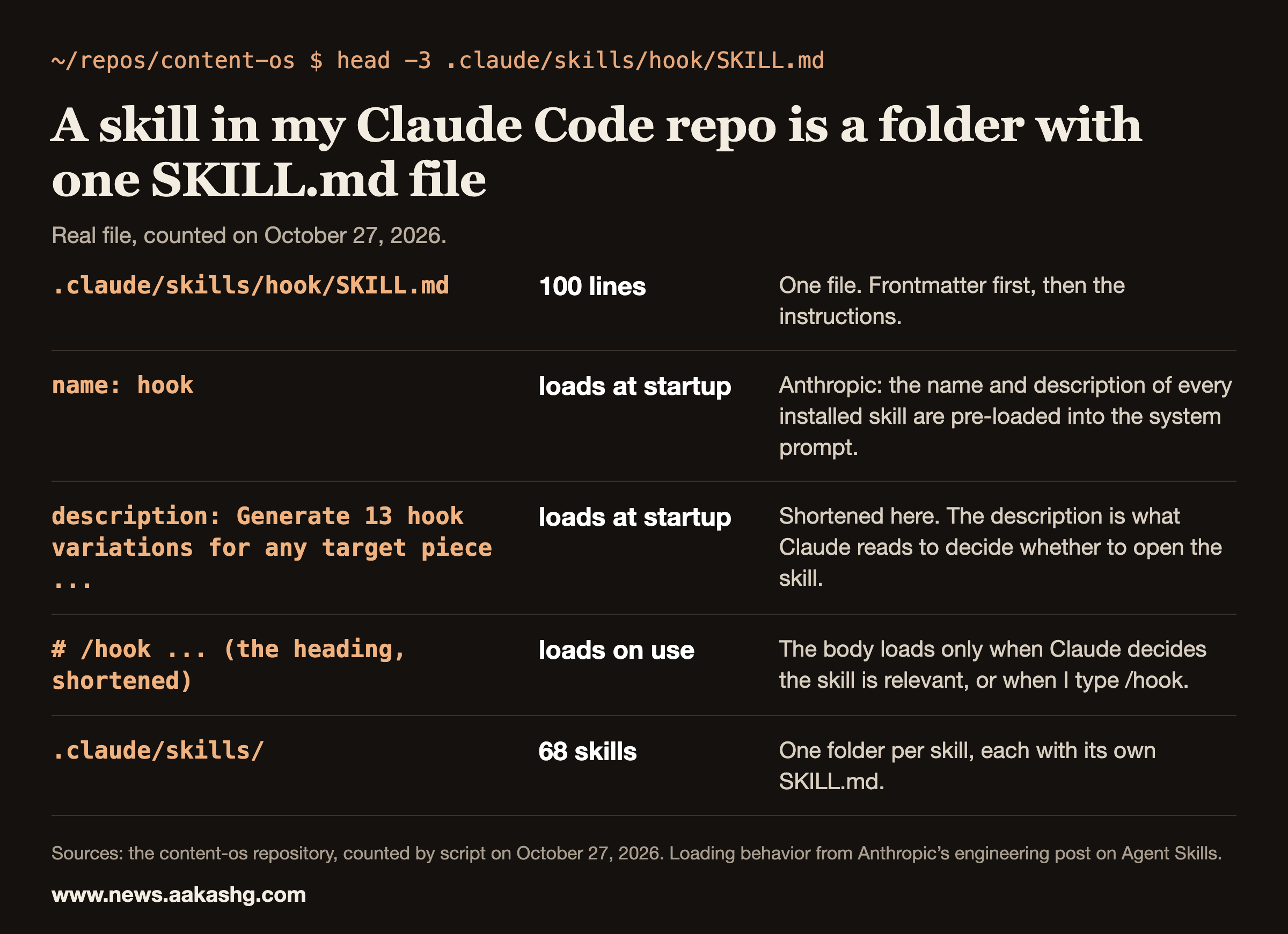
- The frontmatter. The name becomes the slash command. The description is the only part Claude reads at startup, so it says what the skill does, when to use it and where it works.
- The opening paragraph. It says what the job needs, the right words and the right times, and which source supplies each: the script for the words, speech recognition for the times.
- Steps. Commands with real paths and flags that Claude can run. No requests, no “could you”.
- The backends table. It tells Claude which tool to reach for in which environment, with a note on accuracy where I measured it.
- Style. It points to /video-edit for presets instead of repeating them, so there is one source of truth.
- Verify. It names the check that decides whether the work is done: /video-critic transcribes the final render, and a median caption drift over 0.30 seconds fails.
The card above shows the top of a different file, my /hook skill, which is 100 lines long and which I run before any long-form draft. I picked /video-captions to show in full because it has the whole shape: frontmatter, steps, a table and a verify step.
Three lessons from my skill tests
In May 2026 I ran 75 tests across 25 skills and wrote up 10 laws in my paid skills guide. Here are three of them, with the one-line idea of each.
- Engineer the description for routing. Claude reads only the name and description of each installed skill before it decides whether to open one. A recipe skill I tested had a 37-character description, and it missed on most of the 10 prompts I wrote to trigger it.
- Ship a template. A template does better than a description of one. In one test I ran my daily-plan skill on three mornings with the same prompt and got a bullet list, then a narrative paragraph, then a numbered list. The skill triggered and the instructions were clear, but it had no template, so Claude picked a new format each time. In my episode with Jyothi Nookula, the question she asks is what template you want and how you want it structured.
- Pre-empt the shortcuts. Claude takes the shortest path to a response. In my tests, a self-review pass at step 6 of 7 got skipped 4 out of 5 runs, and adding “run the self-review pass” again didn’t fix it, because Claude had already read that instruction and routed around it. The docs’ answer is to move a rule that must hold every time into a hook.
The other seven laws, the fixes and the two skills that write and improve skills are in the paid guide.
What my 68 skills look like
I counted my repo by script on October 27, 2026, from the frontmatter and folders of each .claude/skills/*/SKILL.md.
| What I counted | Result |
|---|---|
| Skills in the repo | 68, all project skills, of which 15 are ports of Corey Haines’s MIT-licensed marketing skills. The repo carries an attribution file for them. |
| Personal skills in ~/.claude/skills/ | 11 |
| Median SKILL.md length | 152.5 lines |
| Description length | Shortest 141 characters, median 407, longest 955 |
| Descriptions that say when to use the skill, with a phrase like “Use when”, “Use whenever”, “Use after”, “Triggers on” or “Triggers include” | 52 of 68, of which 25 use the plain “Use when” or “Triggers on” |
| Skills that keep detail in a references/ folder | 20 |
| Skills with their own scripts/ folder | 6 |
The recipe skill in my test had a 37-character description. The shortest description in this repo is 141 characters.
Audit your own descriptions in five minutes
Claude decides from the description alone, so the description is the first thing to audit. I ran a script over every SKILL.md in my repo on October 27, 2026. It reads the frontmatter and reports each description’s length and whether it says when to use the skill, with a phrase like “Use when” or “Triggers on”. 52 of my 68 match one of those phrases, and 25 use the plain “Use when” or “Triggers on”. The lengths run from 141 to 955 characters.
Do the same on yours. List every description, count the characters, and check each for the words a person would type when they need the skill. Start rewriting with the shortest ones and the ones with no trigger phrase. Then test a few real prompts, the way lesson 1 describes, before you trust the new text.
If Claude isn’t using a skill
The docs’ troubleshooting section covers four cases. Two of them tie back to the lessons above.
- It doesn’t trigger. Check that the description includes keywords users would naturally say, and run the skill directly with /skill-name. That is lesson 1.
- It triggers too often. Make the description more specific, or add disable-model-invocation: true if you only want manual invocation.
- It stops following a skill partway through. If a rule must hold every time, move it into a hook. That is the problem lesson 3 describes, and it’s why my harness has hooks.
- Descriptions get cut short. With many skills, Claude Code drops some descriptions to fit the listing’s character budget, which removes the keywords Claude needs to match your request. Run /doctor for an estimate of the listing’s cost.
Write your first one, in order
- Pick a procedure you’ve pasted into chat more than once.
- Write the description first. Say what the skill does and when to use it, in words a person would type.
- Write the body as steps Claude can run, the way the file above does, and add a template for the output.
- Add a verify step that names the check deciding when the work is done, like the one in /video-captions.
- Test it with prompts you would really type. If it doesn’t trigger, rewrite the description.
- If Claude skips a step you can’t afford to lose, move that step into a hook.
You can draft a skill with Claude. Put your own knowledge in after. In my episode with Jyothi Nookula, she said research has shown that an AI-generated skill file is less effective than a human-written one, without naming the study. Her read: that doesn’t mean you don’t use AI there. Put in your human domain knowledge.
Land a PM Job is the 12-week cohort I run for PMs who want builds like these to carry weight in interviews. The next one starts November 9, 2026. Live sessions, six 1:1 coaching sessions and reviews of your materials come with it.
My other Claude Code pages cover hooks, subagents, plan mode, memory and MCP.
For the PM versions, I’ve covered skills in an episode with Oji Udezue, a three-time CPO, on essential Claude skills for PMs, and in the Claude stack for PMs episode, where I put it this way: a prompt is a one-time instruction, and a skill is a saved playbook Claude reaches for on its own. My Job Search OS is a set of skills for one job. I write about building with Claude Code at www.news.aakashg.com.
Claude Code skills FAQ
What are Claude Code skills?
Claude Code skills are folders with a SKILL.md file that tells Claude how to do a specific job. Claude reads each skill’s name and description at startup and loads the full instructions only when the skill is relevant or when you invoke it with its slash command.
Where do Claude Code skills go?
Put a skill in .claude/skills/skill-name/SKILL.md inside a repo to share it with everyone who works there, or in ~/.claude/skills/skill-name/SKILL.md in your home folder to use it in all your projects on that machine.
What is the difference between a skill and CLAUDE.md?
CLAUDE.md holds rules that apply to every session. A skill holds the procedure for one job. The Claude Code docs suggest a skill when you keep pasting the same checklist or procedure, or when a section of CLAUDE.md has grown into one.
Why isn’t Claude using my skill?
Check the description first. Claude decides whether to open a skill from its name and description alone. In my tests, a recipe skill with a 37-character description missed on most of the 10 prompts that should have triggered it.
Why does Claude skip steps in my skill?
Claude takes the shortest path to a response. In my tests, a self-review step at position 6 of 7 was skipped in 4 of 5 runs, and repeating the instruction didn’t fix it. The Claude Code docs say to move a rule that must hold every time into a hook, so it runs outside the model.
How many skills should I have?
I haven’t tested a right number. On October 27, 2026 this repo held 68 project skills, and I kept 11 personal ones on my machine. Start with one procedure you keep repeating.
