You already know the moment this problem shows up.
A launch gets approved. Leadership wants the same workflow you used last quarter, but for a new market, a new customer segment, or a new product line. You open Jira and realize the “template” lives only as a live project full of epics, stories, subtasks, comments, attachments, and custom fields that took weeks to shape. Now someone has to recreate it.
If you’re still copying that structure manually, you’re not running product operations. You’re doing administrative rework with a high chance of breaking something important.
That’s why deep clone for jira matters. Not as a niche admin utility. As a leadership tool. The PM who can standardize execution across teams is more valuable than the PM who manages one backlog well.
The Hidden PM Bottleneck Costing You Days
Monday morning. Leadership approves a new launch. By Monday afternoon, your team is burning hours rebuilding a Jira structure you already proved works.
That is a product operations failure.
The bottleneck is not strategy. It is replication. Strong PM teams already know how to run a launch, rollout, migration, or onboarding motion. The waste shows up when that proven structure lives inside one old project and someone has to recreate it issue by issue, field by field, attachment by attachment.
Jira’s native clone option does not solve that problem at the level product leaders care about. It can copy an issue. It does not reliably reproduce the full execution system behind a real initiative. So PMs end up doing admin work that should have been standardized months ago.
Why native Jira clone breaks down fast
Native cloning works for lightweight reuse. It breaks once you need to copy the structure that keeps a cross-functional initiative on track.
The gap shows up in familiar places. Parent-child relationships get rebuilt manually. Attachments are missed. Links to dependent work get lost. Custom field values need cleanup. Comments and context live in the old project while the new one starts half-formed. Every manual fix creates another chance to ship an incomplete plan.
As noted earlier, Deep Clone for Jira is built for high-volume, high-fidelity cloning across issue hierarchies, linked work, and supporting data. That matters if your goal is repeatable execution, not one-off ticket copying.
That gap matters when your team is trying to improve time to market without creating more delivery overhead.
| Feature | Jira Native Clone | Deep Clone App |
|---|---|---|
| Clone scope | Single issue focused | Bulk issues or entire projects |
| Hierarchy support | Limited for real initiative replication | Preserves epics, stories, tasks, and subtasks |
| Attachments and comments | Inconsistent for complex reuse | Preserved as part of the clone workflow |
| Cross-project use | Limited | Built for repeatable cross-project workflows |
| Operational scale | Manual and fragile | Designed for large-scale replication |
What this costs product teams
Manual recreation creates three leadership problems.
- You lose PM time to admin work. Time that should go into tradeoffs, customer conversations, and stakeholder alignment gets spent rebuilding scaffolding.
- You get process drift. Two launches that should run on the same playbook end up different because each PM filled in the gaps from memory.
- You surface risk late. A missing dependency, attachment, or review task usually stays invisible until launch week, when fixes are expensive and credibility is on the line.
Here is the rule. If your team repeats a workflow, standardize it. If it is standardizable, stop asking PMs to recreate it by hand.
The best product leaders treat repeatability as part of product quality. They know a clean, reusable operating pattern raises the floor for every team that touches delivery. It helps new PMs ramp faster. It gives engineering and GTM teams a predictable structure. It reduces failure caused by inconsistency, not lack of effort.
Deep cloning is a scale decision
Deep cloning improves more than Jira hygiene. It gives product leaders a way to scale execution standards across the org.
Once you can reliably replicate a proven initiative structure, you stop depending on tribal knowledge. You start building a system. Launches begin with the right tasks in the right order. Cross-functional teams know what is expected. Portfolio work becomes easier to compare, govern, and troubleshoot because teams start from the same operating baseline.
That is how PMs show leadership in a growing organization. They do not just manage their own backlog well. They create repeatable execution that other teams can use without losing quality.
Your First Deep Clone Configuration
Monday morning. A launch slips into the quarter with three days of setup work before anyone can start real delivery. The PM is rebuilding the same epic, the same child issues, the same review tasks, and the same release checklist the team used last month. That is wasted time, and it is avoidable.
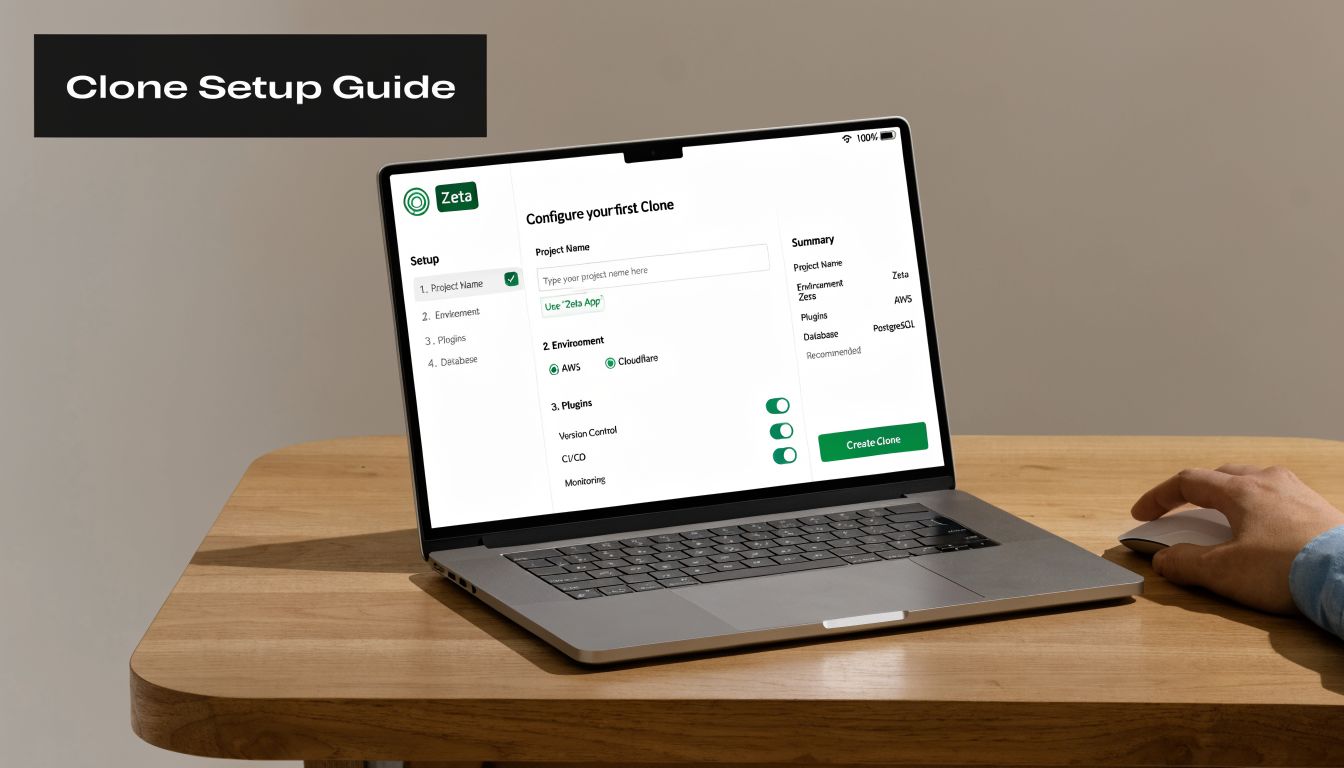
Your first Deep Clone configuration should fix one repeatable operating problem right away. Start small and start with a workflow your team already runs well. A feature launch template is the right first move for most product teams because it turns a known process into a repeatable system.
Pick one workflow your team repeats constantly
Use a source issue set that reflects how you want the org to operate. If the source is sloppy, the clone will spread that sloppiness faster.
Good starting points include:
- A proven launch epic with the right stories, subtasks, approvals, and handoffs
- A standard intake flow for feature requests that need the same triage and validation steps
- A recurring delivery pattern such as a release train, partner integration, or onboarding checklist
Clean up the structure before you clone it. Even basic hygiene matters here. If your issue tree is inconsistent, fix it first, including your sub-task structure in Jira.
Configure the preset like a product operator
The product feature that matters most is the preset. That preset becomes a reusable operating asset for your PM team. Treat it that way.
Set up your first preset around four decisions:
Define the source
Choose the epic, issue set, or JQL result that represents the exact workflow you want to repeat.Choose the destination
Set the target project and issue types deliberately. Check field compatibility instead of assuming both projects are configured the same way.Choose what gets copied
For a launch workflow, copy the hierarchy, reusable attachments, selected custom fields, and issue links that preserve context.Choose what gets reset
Clear anything tied to the old initiative, especially assignees, dates, sprint data, and workflow status.
This is where PM judgment matters. You are not copying work. You are standardizing the starting conditions for work.
Copy the operating model. Leave behind old execution residue.
A clean clone gives the next team a strong starting point. A dirty clone creates confusion on day one.
Use this filter:
| Clone element | Usually copy | Usually modify or exclude |
|---|---|---|
| Epic and child structure | Yes | No |
| Attachments | Yes, if they’re reusable artifacts | Exclude if they’re one-off proofs or outdated files |
| Comments | Only if they contain durable context | Exclude if they reflect old decisions |
| Assignees | Rarely | Usually reset |
| Dates and status | Rarely | Usually reset |
| Custom fields | Copy selectively | Exclude fields that are tied to the old project state |
Clone the process. Skip the residue.
A first preset I would actually approve
Name it something clear and operational, such as Standard Feature Launch v1. Skip cute names. If another PM cannot understand the preset in two seconds, rename it.
A strong first configuration looks like this:
- Source: One successful launch epic with complete child issues
- Target: A new project or a new initiative in the same portfolio
- Include: Hierarchy, reusable attachments, core custom fields, issue links
- Reset: Assignee, sprint, due date, workflow status
- Review before run: Summary naming, project mapping, field compatibility
This is a leadership move, not just an efficiency move. A good preset reduces variance across launches, makes portfolio review easier, and gives new PMs a proven structure on day one.
Test it on a small issue tree first
Do not trust the first run blindly. Validate it on a minimal issue tree, inspect the output, and tighten the preset before broader use.
Check these points:
- Hierarchy integrity: Parent-child relationships should carry over cleanly
- Field behavior: Custom fields, labels, and issue types should map correctly
- Reusable content: Attachments and links should support the new initiative, not drag in stale context
- Team usability: Engineering, design, and QA should be able to pick up the cloned structure without asking what is reusable and what is obsolete
Once that test passes, save the preset and treat it as part of your team’s operating system. That is how product leaders use Jira well. They turn one strong execution pattern into a repeatable standard the rest of the org can trust.
Strategic Cloning Workflows for Product Leaders
Junior PMs use cloning to save effort. Strong product leaders use it to scale systems.
The difference is intent. If you’re only cloning because you don’t want to retype issue details, you’re missing the bigger opportunity. The primary value of deep clone for jira is organizational consistency. It lets you encode a proven way of working and deploy it repeatedly without relying on memory or heroics.
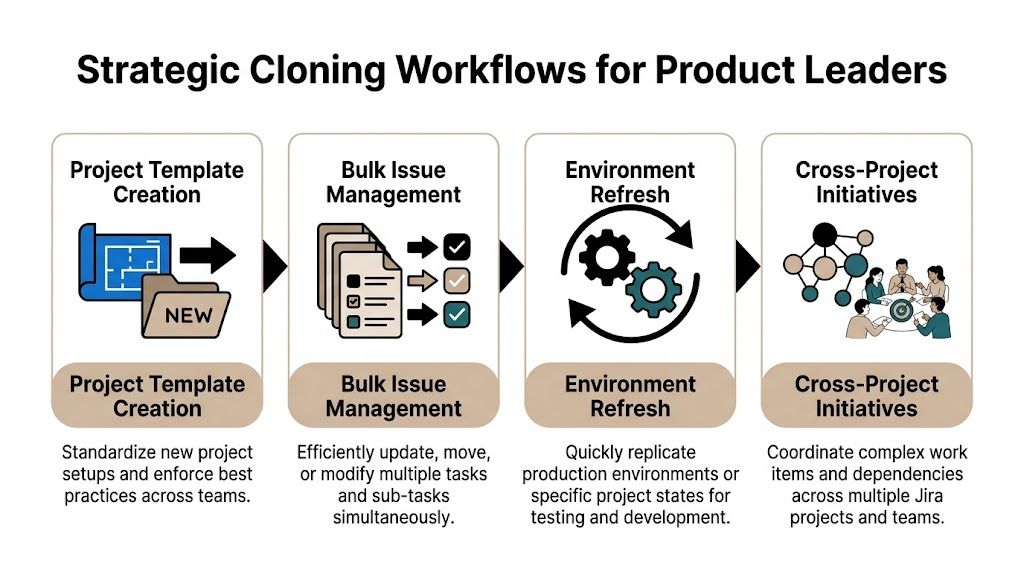
Product initiative templating
This is the highest-value use case for most product orgs.
You take one well-run initiative, maybe a launch, compliance program, platform migration, or monetization rollout, and turn its Jira structure into the standard operating model for the next similar effort. The template bakes in planning discipline. It ensures every new initiative starts with the same dependency mapping, review gates, and delivery checkpoints.
This isn’t bureaucracy. It’s quality control.
A mature PM team should have templates for recurring motions such as:
- New feature launches
- Market entry programs
- Platform or API deprecation projects
- Customer migration initiatives
If your org already maintains a stack of delivery tools, it helps to place cloning inside the broader set of product management tools that support scale. Jira structure, documentation, analytics, and automation should reinforce each other.
Staging to production workflow
Many product teams use one project for validation or intake and another for committed delivery. That split is healthy. It keeps your roadmap cleaner and your discovery process more honest.
The problem shows up when a validated initiative needs to move from one environment to another with all its context intact. PMs often solve this badly. They rewrite the story, copy a few details, and assume the rest can be reconstructed later.
That’s a mistake. Deep cloning preserves decision context. If design files, linked issues, and structured subtasks matter in staging, they also matter in production planning.
Leadership move: Don’t ask teams to “just recreate the essentials.” Move validated work as a complete operational unit.
Team onboarding and operating rhythm
This workflow is underrated.
A new PM, designer, analyst, or engineering manager joins the team. Most orgs onboard them with docs, meetings, and a pile of vague expectations. A better approach is to clone a structured onboarding initiative with every key task already mapped: access requests, shadow sessions, roadmap reviews, customer context, metrics walkthroughs, and stakeholder introductions.
That creates consistency without requiring a manager to remember every step every time.
I’ve seen teams get a lot more reliable once they stop treating onboarding as a custom craft project. The clone gives new hires a visible path through their first month. Managers spend less time administrating and more time coaching.
Market expansion playbook
Cloning becomes a serious strategic lever.
A company launches successfully in one region. The cross-functional team has already figured out the work pattern: localization, pricing reviews, legal checks, support readiness, analytics updates, enablement, and rollout controls. Rebuilding that operating structure manually for each new region is wasteful and risky.
Deep Clone supports cloning up to 100,000 issues in a single job, and its background processing model allows large migrations to run without freezing the UI, which is particularly important for PMs operating in global environments (enterprise-scale Deep Clone overview on YouTube).
That matters because market expansion work often spans many teams and many issue sets. You don’t want the system itself becoming the bottleneck while you replicate a proven playbook.
| Workflow | Business problem | Clone strategy | PM benefit |
|---|---|---|---|
| Initiative templating | Every new project starts differently | Clone a gold-standard initiative | Better consistency |
| Staging to production | Validated work loses context when moved | Clone approved issue trees into delivery backlog | Cleaner handoff |
| Onboarding | New hires get uneven setup | Clone a first-month operating checklist | Faster team integration |
| Market expansion | Regional launches repeat similar work | Clone launch structures across projects | Lower execution risk |
Why this makes you a stronger PM
The PM who can standardize high-quality execution becomes more valuable in every environment. Startups need it because they’re chaotic. Enterprises need it because they’re fragmented.
This capability also changes how people perceive you. You’re no longer the person who “keeps Jira organized.” You become the person who makes cross-functional delivery repeatable. That’s a leadership signal.
Mastering Advanced Data Handling and Automation
Many teams stop too early. They learn how to clone issue structures, then treat the job as done.
That leaves a lot of value on the table.
The better move is to use deep clone for jira as a data handling layer. You’re not just duplicating work. You’re shaping it on the way through. That’s the difference between copying a process and building a scaled operating system.
Use field control aggressively
Deep Clone’s Field Editor allows on-the-fly data transformation and can reduce post-migration data cleanup scripts by an estimated 60-80%, while giving granular control over fields, comments, and attachments during complex cloning operations (Atlassian Community discussion of deep clone behavior).
That’s not just an admin convenience. It’s a product ops advantage.
You should actively decide what happens to fields during the clone:
- Reclassify issue data: Example, clone a support-originated request into a product discovery item with a different issue type.
- Normalize labels or values: Useful when teams use inconsistent naming conventions.
- Reset execution-specific fields: Assignee, status, sprint, due date, and other context that shouldn’t transfer.
- Preserve decision context: Keep comments or attachments when they provide durable product insight.
A lot of PMs avoid this because it sounds technical. It isn’t. It’s operational design.
Build a cloning rule for intake
A practical automation pattern looks like this:
A customer feedback issue gets tagged as a valid feature request. Instead of asking a PM to manually recreate it in the product backlog, your workflow clones it into the discovery project with the right structure, attachments, and context preserved.
That’s exactly the kind of repeatable system modern PMs should be building, especially if you care about an AI-assisted operating model and broader efforts to automate your PM workflow.
Here’s a simple blueprint:
Trigger
Issue updated, label added, or status changed to an approved intake state.Condition
Match only the intake type you trust. Don’t automate noisy sources.Clone action
Send the issue into the target discovery or delivery project with the right issue type.Field transformation
Append a prefix or tag for traceability, reset execution fields, preserve attachments and key context.Post-clone routing
Notify the destination team or auto-place the issue into the correct queue.
Where PMs should use automation first
Don’t automate everything. Automate high-frequency, low-judgment transitions.
Good candidates include:
- Customer feedback to discovery
- Approved discovery to delivery backlog
- Standard initiative setup after roadmap approval
- Recurring operational programs such as audits or partner launches
Poor candidates are messy, politically sensitive workflows where humans still need to decide ownership, scope, or timing.
Automation should remove clerical effort, not eliminate necessary product judgment.
Add AI thinking without overengineering
If you’re an AI-minded PM, this is a useful place to apply that instinct. Not by stuffing AI into Jira for the sake of it, but by designing cleaner system boundaries.
For example, AI tools can help classify incoming requests, summarize long issue threads, or suggest routing labels. Deep clone then becomes the execution mechanism that moves vetted work into the right structured backlog. AI helps decide. Cloning helps operationalize.
That’s the model I’d recommend. Keep the automation path deterministic. Use AI upstream for triage and interpretation, not for unpredictable workflow mutation.
Avoiding Common Pitfalls and Cloning Best Practices
Deep cloning is powerful enough to create a mess quickly if you use it carelessly.
The most common failure isn’t the tool. It’s sloppy operating discipline. Teams rush into a bulk clone without validating field mappings, confirming permissions, or agreeing on what the destination project should inherit. Then they blame Jira when the result is confusing.
The fix is simple. Treat cloning like a release process, not like a copy-paste shortcut.
The mistakes I see most often
A few patterns come up repeatedly:
- Preset drift: Someone saves a preset once, then the underlying workflow changes and nobody updates the preset.
- Permission surprises: The PM can view the source but can’t create everything needed in the target project.
- Field mismatch: Custom fields look similar across projects but behave differently.
- Over-cloning: Teams copy comments, statuses, owners, and stale dates that should’ve been reset.
- No communication: A large clone lands in a shared project and confuses everyone watching the board.
One issue shows up more than it should. Teams try to clone before defining a clean standard workflow. If your source structure is inconsistent, the clone just spreads inconsistency faster.
Use a pre-flight checklist
I’d insist on this before any meaningful clone operation:
- Test on a small sample: Run a single issue or small issue tree first.
- Validate the destination schema: Check issue types, required fields, and permissions.
- Review what gets copied: Especially assignees, statuses, attachments, and custom fields.
- Notify affected teams: If a clone will materially change a shared project, say so in advance.
- Version your presets: Name them clearly and retire outdated ones.
- Document the intended use: Put the purpose somewhere visible, such as a team wiki or operating doc.
If you want a lightweight way to document clone patterns, a structured product management template library helps. The preset handles execution. The template library explains intent.
The most reliable cloning workflow is boring. That’s good. Predictable systems beat clever systems.
What professionalism looks like here
A mature PM doesn’t fire off a big clone because they’re in a hurry. They verify, communicate, and document. Engineering trusts that PM more. Program managers trust them more. Leadership trusts them more.
That matters. Tool discipline is reputation discipline.
Frequently Asked Questions for Ambitious PMs
Can I clone across separate Jira Cloud instances
Yes. You can use Deep Clone for Jira to move work across separate Jira Cloud instances.
Treat that as an operating decision, not a convenience feature. Cross instance cloning is useful during acquisitions, regional team splits, vendor transitions, and enterprise restructures. It saves time only if the destination instance is ready for what you are sending. Field mappings, issue types, workflows, and permissions need to line up first.
One bad assumption here creates hours of cleanup.
What should I do about data from other apps
Assume app-specific data needs manual validation after the clone.
Core Jira data is usually straightforward. The trouble starts with testing tools, compliance apps, time tracking plugins, and heavily customized workflows. If your team relies on those systems, run a test on the ugliest existing example you have, not a clean demo issue. Senior PMs know the edge case is the actual case.
That discipline protects delivery. It also shows leadership, because you are building repeatable operations instead of creating hidden failure points for another team to find later.
How do I justify paying for a cloning app
Make the case in business terms.
- Name the recurring work: Rebuilding launch plans, initiative structures, and migration templates by hand wastes PM and engineering time.
- Show the execution risk: Manual recreation leads to missing dependencies, inconsistent fields, and avoidable rework.
- Explain the operating benefit: A well-designed clone preset turns one strong workflow into a repeatable team standard.
- Tie it to leadership: Standardizing execution across teams reduces project risk and raises the quality bar across the org.
That is the argument executives respond to. You are not buying a convenience tool. You are reducing coordination cost and making good process reusable.
If you want larger scope, start thinking this way now. Operational judgment is part of understanding the full product manager career path in tech, especially if you want to move from shipping features to shaping how the organization ships.
Should PMs own this or should Jira admins own it
PMs should own the workflow design. Jira admins should own governance, permissions, and technical guardrails.
That split works because each side is responsible for different risks. Admins prevent system chaos. PMs decide what should be standardized, what should stay flexible, and which clone patterns effectively help teams move faster. If PMs stay out of it, you get a technically clean setup that does nothing for execution quality.
Own the operating logic.
What’s the best first project to use deep clone for jira on
Start with a workflow that repeats, creates friction, and matters to multiple teams.
Feature launches are a strong first choice. So are quarterly planning structures, customer onboarding programs, and cross-functional initiative templates. Pick the process where inconsistency hurts the most and where better structure will be obvious to leadership.
Do not start with the most chaotic migration in your portfolio. Start with the process your organization should run well every time. That is how you turn a Jira tool into a management system.
If you want more practical PM systems like this, follow Aakash Gupta. His work is consistently useful for PMs who want to get better at execution, scale, and career growth without drowning in theory.
