A bloated story usually looks harmless in backlog grooming. Then engineering asks where to start, design asks what’s in scope, QA asks what “done” means, and the sprint slows down before anyone writes code. That’s the moment when create sub task jira stops being a clerical action and becomes a product leadership skill.
The PMs who grow fastest learn one simple habit. They break ambiguity before the team trips over it. A clean sub-task structure gives developers a starting point, gives stakeholders visible progress, and gives you a better way to spot delivery risk early. It also reduces the kind of busywork that eats away at your week, which is exactly why strong operators build systems to reclaim creative time and eliminate busywork.
A sub-task won’t fix a bad strategy. It will fix a vague handoff. And in most product organizations, vague handoffs are where velocity dies.
From Overwhelmed to Organized in Under 60 Seconds
A story with technical unknowns, design decisions, QA questions, and launch work packed into one Jira issue will stall a sprint fast. People do not need more discussion in that moment. They need a cleaner execution map.
The fix usually takes less than a minute. Open the parent issue, create a few sub-tasks for the work streams that need separate ownership, and make each one clear enough that someone can start without chasing you for context.
That speed matters. PMs who can structure work quickly protect team focus and cut the kind of busywork that steals creative time.
The fast triage method
Use this when a story feels broad but still belongs in one sprint:
- Define the parent outcome: Keep the main issue focused on user or business value.
- Separate execution tracks: Split out design, frontend, backend, QA, analytics, docs, or release tasks when they move on different timelines.
- Create sub-tasks only where coordination improves: If a line item does not need its own owner, status, or acceptance criteria, keep it in the story description.
- Use sub-tasks to expose delivery risk: They should make blockers visible early, not turn one story into a pile of admin work.
A simple test works well here. If a developer opens the story and still asks, “What should I start with?” the work is not structured enough for sprint execution.
Why senior PMs care
Strong PMs use sub-tasks to improve delivery quality, not to make Jira look organized. The goal is cleaner handoffs, faster parallel work, and fewer surprises halfway through the sprint.
That has a direct career angle. Leaders notice PMs who can turn a vague story into visible progress across functions. They trust those PMs with larger launches, cross-team programs, and roadmap areas where coordination matters as much as prioritization.
Used well, a sub-task is not clerical overhead. It is a small operating decision that helps the team move faster and helps you show stronger judgment.
The Core Mechanics of Creating Jira Sub-Tasks
A sprint goes sideways in a very predictable way. The parent story looks clear in planning, but by day two the engineer is asking what to build first, QA is waiting on context, and nobody can tell whether the work is on track. Creating a sub-task in Jira takes less than a minute. Creating the right sub-task is what keeps a small delivery question from turning into a status meeting.
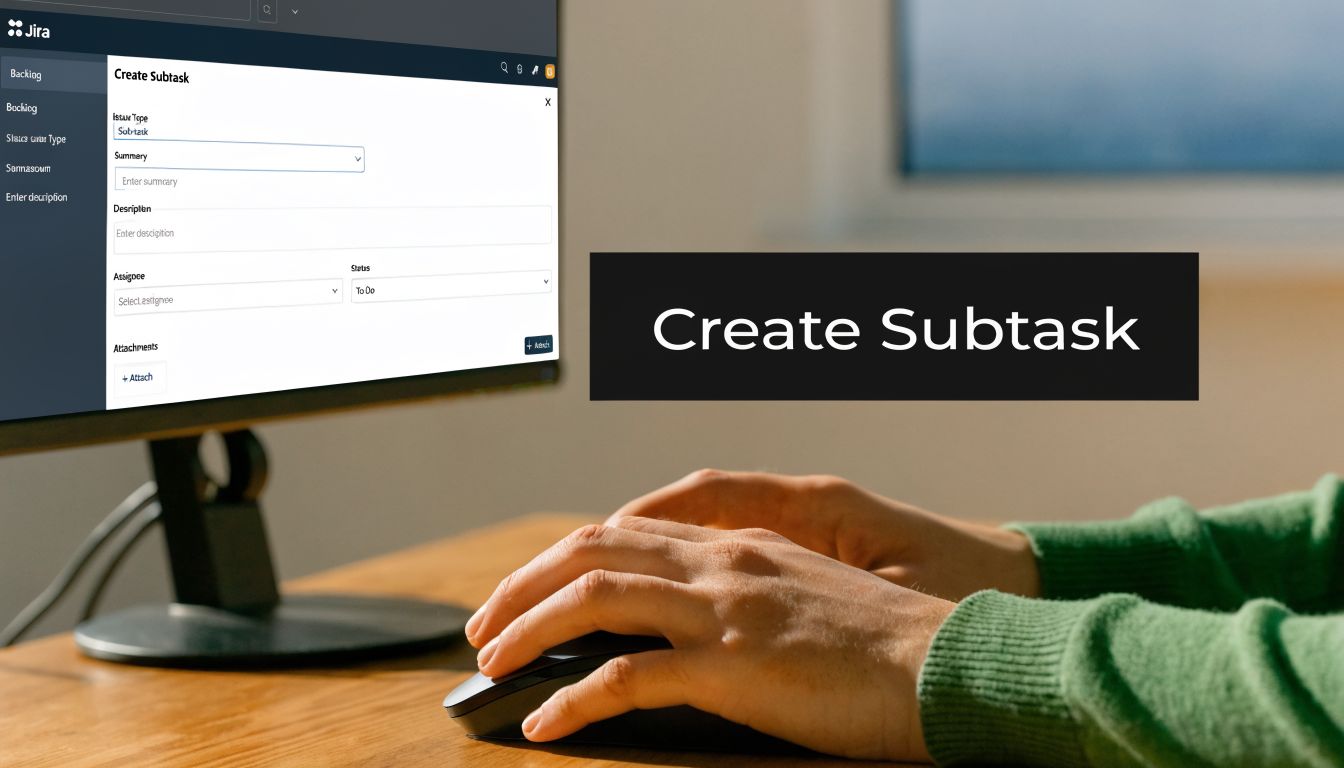
In Jira Cloud and Jira Server/Data Center, the path is usually straightforward. Open the parent issue, select the … menu, choose Create sub-task or Create Sub-task, then complete the form. The label changes slightly by instance and permissions setup, but the operating logic stays the same. You are creating a child issue that tracks one concrete piece of execution inside the parent outcome.
That distinction matters. A good sub-task makes ownership, sequence, or acceptance clearer. A weak one just copies the story into smaller tickets and gives the team more admin to maintain.
Fill out the fields that change execution
Teams lose time when they create the shell of a sub-task and promise to “clean it up later.” Later usually arrives during standup, code review, or QA triage.
Use these fields with intent:
- Summary: Write the next visible action. “Implement billing API validation” gives the assignee a starting point. “Backend work” does not.
- Assignee: Assign it when ownership is known. If ownership is still fuzzy, the work is probably not ready to enter an active sprint.
- Description: Add acceptance details, constraints, links, edge cases, or test notes that only apply to this slice of work.
- Relevant fields: Set priority, component, label, or custom fields if your workflow depends on them for routing or reporting.
Many teams also use a naming pattern such as [DEV], [QA], or [DESIGN]. That can help on crowded boards. The trade-off is clutter if prefixes become a substitute for writing specific summaries. Keep the summary readable first.
If your parent stories are vague, sub-tasks will inherit that vagueness. Tighten the story before you split it. PMs who get good at writing agile stories that are specific and buildable usually see cleaner sprint starts and fewer mid-sprint clarification loops.
Add a Definition of Done at the sub-task level
The parent story’s acceptance criteria are rarely enough for each execution track. Engineers, QA, analysts, and designers often need different completion signals.
After creation, open the sub-task and use … > Edit Issue to refine the details. Add a short Definition of Done directly in the description so the assignee and reviewer share the same finish line.
A practical sub-task DoD often includes:
- Behavior checks: Expected API response, UI state, or workflow result
- Quality checks: Unit tests, regression checks, instrumentation, or accessibility review
- Review checks: Peer review, PM signoff, or design approval
- Release checks: Feature flag behavior, migration note, or environment validation
PM judgment often manifests in very small decisions. Teams that define “done” at the sub-task level create fewer hidden reopen cycles. PMs who build that habit become easier to trust with larger launches because they reduce ambiguity before it spreads.
Here’s a walkthrough if you want a visual before trying it in your own instance.
Use sub-tasks to improve flow, not to manufacture detail
Jira will let you create a lot of sub-tasks under one parent. That does not mean you should. Once a story has too many child issues, the board gets harder to scan, handoffs slow down, and the parent starts acting like a mini project plan instead of a sprint-ready ticket.
A practical rule works better than a hard system limit. If the sub-task list no longer helps the team answer “Who owns the next step?” or “What is blocked?”, the structure has gone too far. At that point, split the parent story, move checklist items back into the description, or reconsider whether the work needs a different planning unit.
This is also where PMs can apply stronger task prioritization techniques. Not every implementation step deserves its own Jira issue. The right threshold is whether tracking that step separately improves execution, visibility, or risk management. If it does none of the three, keep it out of the board.
A good sub-task reduces decision friction. A bad one creates another queue to manage.
Senior PMs treat Jira mechanics as an operating skill. Anyone can click Create sub-task. The career signal comes from using that feature to make delivery easier for engineering, clearer for stakeholders, and more predictable for the business.
Strategic Sub-Task Frameworks for Product Managers
A PM who uses the same sub-task pattern for every story usually creates one of two problems. Engineers lose clarity because the breakdown does not match how the work flows. Stakeholders lose confidence because ticket structure looks busy without making delivery more predictable.

Strong PMs treat sub-tasks as an execution design choice. The goal is simple. Make ownership obvious, surface delivery risk early, and keep the parent story readable enough that a lead can scan it in seconds. Jira supports that well because sub-tasks inherit core context from the parent issue, so the team is not re-entering the same planning information over and over.
Framework one: discipline-based
Use this model when work passes through clear functional owners and each handoff matters.
Typical split:
- Design
- Frontend
- Backend
- QA
- Docs or analytics
This works well in product squads with specialists because every person can see their lane immediately. It also gives PMs a cleaner way to answer a common stakeholder question: “What is left?” If design is done, backend is in progress, and QA has not started, status is visible without a meeting.
The trade-off is hidden sequencing. A “backend” sub-task can still contain API design, data changes, and instrumentation work that should not be bundled together if the risk is technical rather than functional.
Framework two: component-based
Use this model when architecture risk matters more than job titles.
A common breakdown looks like this:
| Sub-task model | Best fit | Risk |
|---|---|---|
| Frontend | UI-heavy product changes | Can hide testing scope |
| Backend/API | Service or endpoint work | Can blur ownership if several engineers touch it |
| Database | Schema or migration changes | Easy to forget rollback planning |
| Instrumentation | Analytics or event tracking | Often skipped under deadline pressure |
This structure is often better for integrations, platform changes, and system migrations because it mirrors the places where things break. It also helps PMs ask better questions in standup. “Is the migration script ready?” is more useful than “How is backend going?”
Framework three: workflow-step
Use this when uncertainty is high and the order of work matters.
Example:
- Research edge cases
- Wireframe final state
- Build and validate
- Release and monitor
I recommend this model for ambiguous product work, especially when the team still needs to learn before committing to a full solution. It makes discovery visible instead of hiding it inside a large story. That matters for career growth too. PMs who show their reasoning, not just their roadmap, build more trust with engineering leaders.
Estimate the story. Use sub-tasks to expose risk, ownership, and sequence.
That habit keeps velocity cleaner. It also prevents false precision. Teams ship better when sub-tasks support execution instead of becoming a second estimation layer that nobody trusts.
How to choose the right model
Pick the framework that matches the source of coordination risk.
- Team topology: If work is owned by specialists, discipline-based usually fits best.
- System complexity: If failure points sit in the architecture, component-based is clearer.
- Discovery load: If the team needs to learn before building, workflow-step gives better visibility.
A fourth filter matters just as much. Ask whether the parent story is clear enough to break down in the first place. PMs who write sharper stories create sharper sub-tasks. A solid parent ticket starts with disciplined product requirement writing, because vague requirements produce noisy decomposition and weak ownership.
Sub-tasks also will not fix weak backlog decisions. If the parent story should not be in the sprint, a perfect breakdown still wastes time. Teams that want cleaner execution should pair sub-task design with stronger task prioritization techniques, so the work is worth tracking before anyone starts splitting it up.
Judgment is the primary career signal for PMs. Junior PMs create sub-tasks because Jira allows it. Strong PMs choose a framework that helps engineering move faster, helps leadership inspect risk earlier, and helps the team ship with less coordination drag.
Scaling Your Workflow with Bulk and Automated Sub-Task Creation
If your team keeps creating the same three to seven sub-tasks for every story, manual creation is a process smell. It means the workflow is standardized enough to automate, but nobody has taken the time to do it.
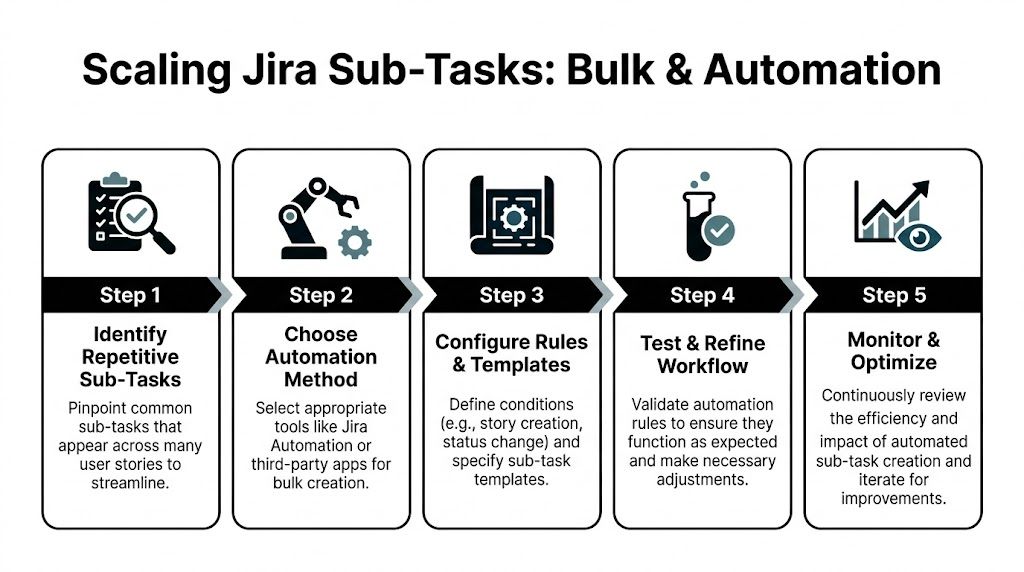
Jira’s own ecosystem now supports high-volume issue operations, and modern Marketplace tools can create up to 200 subtasks from a simple text input, with teams seeing 15-20% productivity gains when they adopt standardized subtask workflows, according to the Atlassian Marketplace listing for Create Multiple Subtasks for Jira.
Start with repeatable patterns
Look across your last ten shipped stories. If you keep seeing the same checklist in ticket form, that’s your automation candidate.
Good examples:
- Feature delivery: Build, QA, analytics, release notes
- API work: Spec review, implementation, test coverage, monitoring
- Operational launches: Config, validation, rollout, post-launch check
Bad examples:
- One-off discovery tasks
- Work that changes shape every sprint
- Stories where ownership is still unclear
A practical Jira Automation setup
You don’t need an elaborate rule to get value. Start with a single trigger.
A clean first rule looks like this:
- Trigger: When issue created
- Condition: Issue type equals Story
- Action: Create issue
- Issue type for created item: Sub-task
- Parent: Current issue
- Repeat action: One action per standard sub-task template
A simple version might generate:
[DEV] Build implementation[QA] Validate acceptance criteria[OPS] Prepare release steps
The value isn’t just speed. It’s consistency. Every story now starts with the same minimum execution scaffolding.
Operator move: Automate only the sub-tasks that reflect your team’s actual working agreement. Don’t automate aspirational process nobody follows.
When to use a Marketplace app instead
Automation rules are strong for predictable, repeated templates. Marketplace apps are better when you need one-time bulk creation from text or when a PM wants speed without building a rule.
If you’re setting up a launch story and already know the work items, a bulk creation app can be faster than clicking through repeated forms. The practical appeal is obvious for large initiatives, especially when one parent issue needs many execution tickets at once.
The broader pattern also matters outside Jira. If your org uses more than one planning tool, studying adjacent workflows helps. Teams exploring bug flows across systems can learn from guides on Linear bug integration support, because the same principles apply: standardize intake, automate repeated routing, and reduce manual coordination overhead.
A lightweight template for PMs
Paste or recreate a pattern like this in your workflow playbook:
| Trigger | Parent issue type | Auto-created sub-tasks |
|---|---|---|
| Story created | Product feature | Dev, QA, analytics |
| Bug escalated | Production bug | Triage, fix, validation |
| Launch ticket created | Release or rollout | Enablement, comms, monitoring |
This kind of operational design is where PMs begin to look more senior. You’re no longer just managing tickets. You’re designing the system the team works inside.
If you want to go further, connect Jira automation with broader workflow tools so repetitive setup, notifications, and handoffs happen automatically. That’s the same mindset behind building AI workflow automations in n8n. The PM advantage comes from orchestrating the work, not manually babysitting it.
Common Pitfalls and Troubleshooting Sub-Task Issues
Most Jira frustration around sub-tasks comes from one false assumption. People think sub-tasks are a flexible hierarchy tool. They aren’t.

Jira has a strict limitation here. You cannot create a sub-task of a sub-task natively. Atlassian Community discussions repeatedly confirm that nested sub-tasks aren’t supported, and that gap often forces teams to use workarounds such as linked issues, as captured in this Atlassian Community discussion on sub-task under a sub-task.
What to do instead of nesting
If you need another layer, choose the workaround based on why you want it:
- Use linked issues when the child work needs its own lifecycle, assignee, or reporting.
- Use checklists when the child work is just a set of steps inside one owner’s execution flow.
- Restructure the hierarchy when your parent should really be a story or task and the current “sub-task” is carrying too much scope.
If your team often wants sub-sub-tasks, that’s usually a signal that the original issue decomposition happened too late or at the wrong level.
Why the create option may be missing
Sometimes the problem isn’t hierarchy. It’s configuration.
If you don’t see Create sub-task, common causes include:
- Issue type scheme problems: The project may not have a sub-task issue type enabled.
- Permission scheme restrictions: Your role may not have permission to create issues or sub-tasks.
- Screen configuration issues: The option exists, but the UI is hiding fields or actions.
When you message your Jira admin, be specific. Say: “I can open the parent story, but I don’t see the sub-task creation option. Can you check whether the project includes a sub-task issue type and whether my role has permission to create it?”
That language gets you a faster answer than “Jira is broken.”
Missing sub-task actions are usually configuration problems, not user mistakes.
Conversion problems and inheritance confusion
Teams also get tripped up when converting a standard issue into a sub-task. The important thing to verify after conversion is whether the issue sits under the correct parent and whether inherited context still reflects how the team plans the work.
If the work starts looking like hidden maintenance, don’t bury it inside sub-tasks. Surface it appropriately. Many PMs underuse sub-tasks for feature work and overuse them for cleanup. That’s where clear thinking about technical debt as a product management decision matters. Debt work often deserves explicit visibility, not a quiet slot under a delivery story.
Advanced Q&A for Aspiring Product Leaders
The PMs who stand out in interviews don’t just know where the sub-task button lives. They know how sub-tasks affect planning, reporting, and team behavior.
Should sub-tasks affect story points?
Usually, no.
Estimate at the story level when the story represents the customer or business outcome the team is committing to. Use sub-tasks to expose execution detail, dependency risk, and parallelization. Once teams start assigning formal estimates to every sub-task, they often create noise in velocity discussions and push planning toward false precision.
A cleaner framing in sprint planning is this: the story gets the estimate, and the sub-tasks tell you whether the estimate still looks realistic.
When should I use a sub-task versus a linked issue?
Use a sub-task when the work is part of completing the parent issue and shouldn’t stand alone in roadmap-level reporting.
Use a linked issue when the work has an independent lifecycle, cuts across multiple parents, or needs to be tracked as a first-class item such as a bug, dependency, or separate task.
A quick decision test:
| Choose | Use it when | Avoid it when |
|---|---|---|
| Sub-task | Work is required to complete the parent issue | The work needs independent prioritization across the backlog |
| Linked issue | The item has its own status, owner, or trade-off discussion | You only need a simple execution breakdown |
This distinction matters because it shapes how leadership sees the work. Hide too much under sub-tasks and portfolio visibility suffers. Use linked issues for everything and the backlog becomes fragmented.
How should PMs talk about bulk sub-task creation in a senior interview?
Talk about systems, not buttons.
A strong answer sounds like this: “We noticed repeated work patterns across stories, so we standardized the execution template and automated sub-task creation for common delivery paths. That reduced manual setup, improved consistency, and gave us clearer execution visibility.”
That answer indicates an advantage. It shows process design, not Jira fluency.
There’s a reason this matters more now. Atlassian support material highlights a 40% spike in Atlassian Community queries on bulk subtasks in 2025, and notes that missed workflow optimization can create a 15-25% productivity loss when teams rely on manual entry, as discussed in Atlassian’s Jira Cloud administration guidance for sub-tasks.
Where AI fits
AI is useful here, but only if you use it for structure rather than delegation theater.
Good use cases:
- Suggesting a first draft of sub-task breakdown from a user story
- Turning acceptance criteria into QA or release validation sub-tasks
- Detecting repeated task patterns that should become templates
Weak use cases:
- Generating a long list of generic subtasks nobody will maintain
- Replacing clear product thinking with autogenerated process clutter
For AI PMs, this is a sharp skill to develop. The point isn’t “AI created my tickets.” The point is “I designed a repeatable workflow where AI accelerates decomposition without reducing clarity.”
The best PM use of AI in Jira is constrained generation. Give the model a story, your team’s template, and your Definition of Done standard. Then review the output like a product leader, not a stenographer.
If you can explain that distinction in a performance review or interview, you’ll sound like someone who understands both execution and scale.
If you want product management advice that goes beyond surface-level frameworks, Aakash Gupta is one of the best resources to follow. His work is especially useful for PMs who want to sharpen execution, communicate with senior stakeholders, and build the kind of operating systems that move teams faster.
