As a Product Manager, you can't afford to fly blind. Yet, getting direct, honest feedback is tougher than ever. Customers are going quiet, and those old-school yearly surveys just aren't cutting it anymore—they don't provide the signal you need to make smart product bets. As a PM leader who has hired and managed teams at places like Google and Meta, I see this as a critical skill gap for many aspiring and mid-career PMs.
Recent data paints a pretty stark picture. Today, only 3 in 10 customers will even bother to tell you why they churned. Compared to just five years ago, 29% fewer consumers share feedback directly with companies. Worse, a full 30% will just ghost you for a competitor without saying a word. This "feedback recession," as some are calling it, means we're often left in the dark.
The Modern PM's Framework: Continuous Discovery
To fight this, top-tier PMs don't just "collect" feedback anymore. They build an always-on system for it. This is the heart of a continuous discovery mindset—moving away from one-off research projects and toward a constant, low-effort flow of insights. This is a system you can start implementing in the next 48 hours.
The goal is to build a framework that captures both what users say and what they do. It's about blending different types of signals into a coherent picture:
- What they say (Qualitative): The deep, nuanced "why" from user interviews, support tickets, and open-ended survey questions.
- What they do (Quantitative): The hard data from product analytics, in-app behaviors, and usage patterns.
- What they say elsewhere (Unsolicited): The raw, unfiltered commentary from social media, review sites, and sales call transcripts.
Putting these pieces together is how you build a real feedback loop, not just a suggestion box. It's a cycle of gathering, analyzing, and then actually doing something with what you've learned.
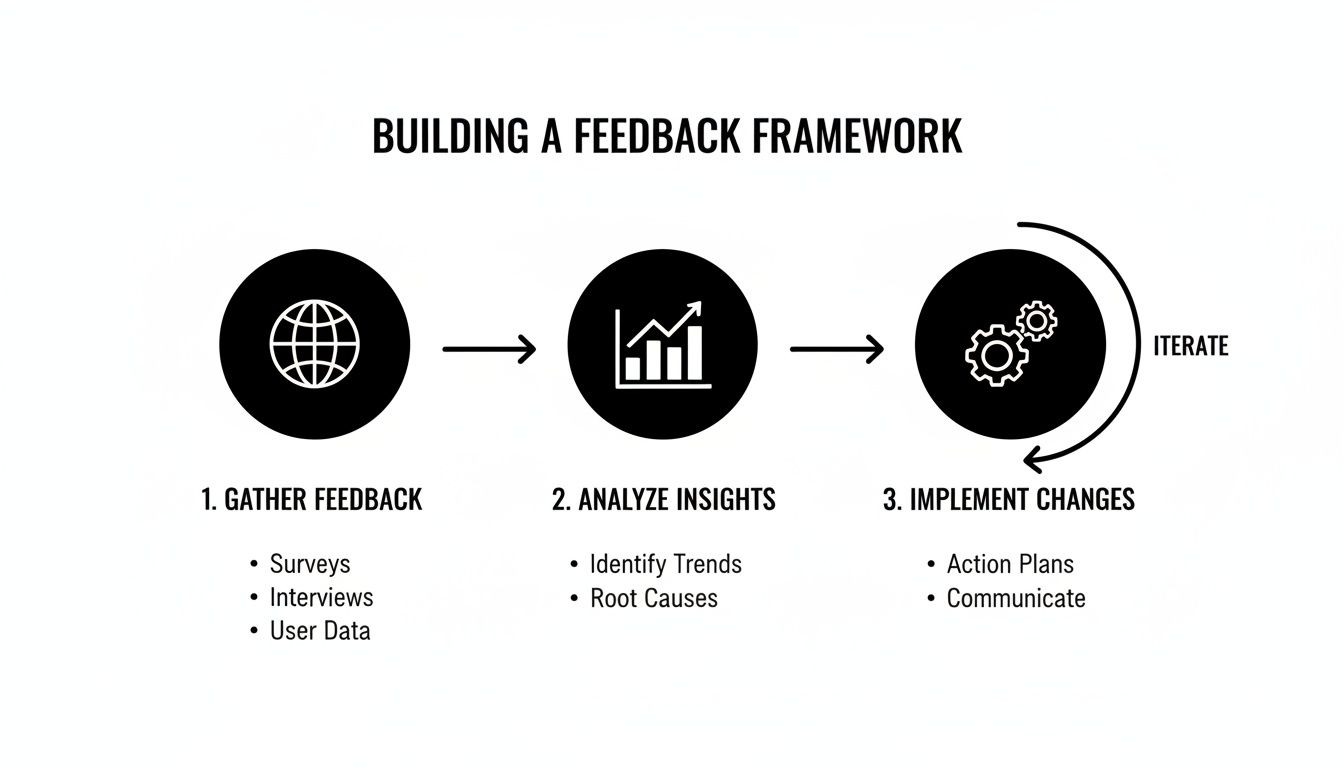
This process is a cycle, not a one-time task. You're constantly tuning your understanding of the customer.
From Old School to High-Signal Feedback
Getting this right means leaving behind the outdated, high-effort methods of the past. It's time to think less like a market researcher from 2010 and more like a modern, data-informed product builder.
Let's contrast the old way with the new.
| Dimension | Traditional Approach (Low Signal, High Effort) | Modern Approach (High Signal, Integrated) |
|---|---|---|
| Cadence | Episodic (quarterly/annual surveys) | Continuous (always-on, in-the-moment) |
| Source | Single channel (e.g., one big survey) | Multi-channel (analytics, interviews, in-app, AI-parsed support tickets) |
| Data Type | Primarily solicited, self-reported opinions | Blends behavioral data with qualitative feedback |
| Analysis | Manual, slow, often report-based | Automated, AI-assisted, integrated into PM tools |
| Action | Delayed, often becomes a backlog item | Immediate, informs daily prioritization and discovery |
The takeaway is clear: modern feedback is an integrated system, not a series of isolated events. It’s about building a living, breathing understanding of your users.
Building Your Voice of the Customer (VoC) Program
This integrated system is the foundation of a real Voice of the Customer (VoC) program. A strong VoC program doesn’t just pile up data points; it synthesizes them into a clear story about user needs, pain points, and desires. To really nail this, you can learn more about what a comprehensive Voice of the Customer program looks like.
As a PM leader who has hired dozens of product managers, I can tell you this: the ability to build and run a feedback system is a massive differentiator. It separates the PMs who follow roadmaps from the ones who shape them. A PM with this skill can command a higher salary—often in the $180k-$220k+ range for mid-career roles—because they consistently de-risk product bets.
Building this operating system for customer-centricity requires a command of customer feedback best practices. It ensures you’re not just listening, but truly hearing what your market needs. Ultimately, this is what gives you the conviction to make bold, informed decisions.
Select the Right Feedback Channels for Your Product
As a Product Manager, one of the first mistakes I see junior PMs make is either casting way too wide a net for feedback or, even worse, just sticking to one channel they know. Your choice of feedback channels has a direct line to the quality of insights you get back.
The secret isn’t doing everything. It’s about being surgical. Are you trying to figure out a totally new problem space, or are you just trying to fine-tune a feature that’s already live? The answer completely changes your channel strategy.
Match the Channel to Your Goal
Before you even think about a tool, you need a crystal-clear objective. "Collect feedback" is not an objective. "I need to understand why new users are dropping off during the onboarding flow" is. That's a goal you can actually build a plan around.
Here’s how I think about mapping common PM goals to the right channels:
- For deep, high-fidelity qualitative insights: Nothing beats scheduled user interviews. This is non-negotiable for any real discovery work. We use tools like Dovetail to organize our transcripts and tag insights, which slowly builds an invaluable research repository over time.
- For in-the-moment contextual feedback: In-app widgets are your friend. A tool like Hotjar (which starts around $32/month) is fantastic for getting quick heatmaps and simple feedback polls running. For something more targeted, Sprig lets you trigger questions based on specific user actions, like right after they use a new feature for the first time.
- For understanding raw, unsolicited user pain: The gold is often in your existing data streams. AI tools can now sift through support tickets from Zendesk or Intercom and even parse sales call transcripts from Gong or Chorus. This is where you find the problems customers are screaming about when they don't think you're listening.
Figma is a great example of this in action. They blend community forums with in-product feedback to source new ideas, while Notion leans heavily on its passionate Reddit and social media communities to spot trends and pain points.
The most sophisticated PMs don't just pick a channel; they design a system where channels work together. In-app survey data might point you to a problem, which you then explore deeply through a series of user interviews.
Quantitative vs. Qualitative Channels
It's so easy to get lost in the data and miss the story, or get swayed by one emotional interview and miss the scale. You have to balance channels that tell you what is happening with channels that tell you why.
A balanced approach is your only defense against misinterpreting signals.
| Channel Type | Primary Goal | Examples & Tools |
|---|---|---|
| Quantitative (The "What") | Measures behavior and sentiment at scale. | Product Analytics (Amplitude, Mixpanel), NPS/CSAT Surveys (Delighted), App Store Reviews. |
| Qualitative (The "Why") | Uncovers motivations, context, and pain points. | User Interviews (Dovetail), Usability Tests (UserTesting), Open-Ended Survey Questions (Typeform). |
Think about it this way: your analytics might show that 70% of users abandon your checkout flow at the payment step. That’s the "what." A handful of quick usability tests will then show you the "why"—maybe the credit card form has a confusing field, or users don't trust the security icons.
If you want to get better at uncovering the "why," you should check out our guide on how to conduct usability testing.
Advanced Channels for Deeper Engagement
Once you have your basics covered, you can start to layer in more advanced methods. These are especially great for pre-launch validation or turning your most engaged users into a true community.
- Beta Programs: Running a closed beta for a new feature is an amazing way to get focused feedback from engaged users before a big public launch. You can manage this with a simple email list or use dedicated platforms like Centercode or Betabound to manage the whole process.
- Social Media Listening: Don't ever underestimate the power of just searching for your product's name on X, Reddit, or LinkedIn. This is where you find the brutally honest, unfiltered feedback. I highly recommend setting up alerts to monitor these conversations in real-time.
- Internal Teams: Your customer support, sales, and success teams are on the front lines every single day. They are sitting on a treasure trove of insights. The easiest win here is to create a dedicated Slack channel (e.g.,
#feedback-voice-of-customer) where they can drop themes and direct quotes. It's low-effort and high-impact.
Ultimately, your ability to select and combine these channels is what separates getting a trickle of random comments from building a steady stream of actionable insights that actually drive your product forward.
How to Conduct Interviews That Uncover Ground Truth
Talking to users is a foundational skill for any PM, yet it's shocking how many get it wrong. I've seen countless product managers, especially earlier in their careers, have plenty of conversations but walk away with… nothing. They fall into the classic traps: asking leading questions, staying on the surface, and getting biased, weak feedback that's worse than useless.
Mastering the customer interview isn't about just talking. It’s about creating a space for raw honesty. It's about digging for the profound insights that customers rarely offer up easily. This is how you find the why behind the what. Your analytics might show a 50% drop-off on a new feature, but a good interview reveals it's because the UI makes them feel stupid. One is a symptom; the other is the diagnosis.
Recruiting the Right Participants
Before you can ask brilliant questions, you need the right people in the "room." Your goal isn’t to talk to the loudest or most convenient users. It’s to find a true representation of your target segments. Honestly, recruiting is half the battle.
Here are the channels I consistently rely on to find great interview participants:
- Your Own Backyard: Your existing customer base is gold. I like to use our own analytics to pinpoint users with specific behaviors—like someone who just used a new feature for the first time, or someone whose activity score has plummeted. A personalized email goes a long way.
- Go-To Recruiting Platforms: Services like UserInterviews.com and Respondent.io are indispensable, especially when you need to look beyond your current users. This is critical for exploring new markets or getting unbiased feedback on early-stage concepts.
- Your Internal Allies: Your sales and customer support teams are on the front lines every single day. They know who's happy, who's frustrated, and who has strong opinions. Ask them for warm introductions; they're usually happy to help.
We've got a whole separate playbook on the finer points of this process. For a deeper dive, check out our guide on how to conduct high-impact user interviews.
Using platforms like UserInterviews.com lets you get incredibly specific, targeting precise demographics and professional roles to ensure you’re talking to the exact people you need to hear from. You can quickly find everyone from general consumers to niche B2B professionals.
Pro Tip on Incentives: Pay people for their time. Always. It shows you value their expertise and dramatically improves the quality of participants. For general consumers, $60-$100 for an hour is a good range. For highly specialized B2B roles (think doctors or VPs of Finance), you'll need to budget more like $250-$500+.
Crafting a High-Signal Interview Script
The best interviews flow like a natural, casual chat, but they are almost always built on the foundation of a well-structured script. You're not there to get their opinions on the future; you're there to get them to tell you stories about their past.
I break my scripts down into three simple parts:
- The Opener: Your goal here is to build rapport and set the stage. Kick things off with easy, open-ended questions to get them comfortable. Something like, "Thanks so much for making the time. To get started, could you just tell me a bit about your role and what a typical day looks like for you?"
- The Core Exploration: This is where you strike gold. Use questions that probe for specific, past behaviors. You have to banish hypotheticals like "Would you use…?" from your vocabulary. Instead, make your go-to prompt: "Tell me about the last time you…"
- The Wrap-Up: Thank them for their insights and always ask for permission to follow up. One of my favorite closing questions is, "Was there anything you thought I'd ask about [the topic] but didn't? Or anything else you think is important?" You'd be surprised what comes out.
One of the most powerful tools in your arsenal is the "5 Whys" technique. When a user mentions a problem, you just keep asking "Why?" to peel back the layers and get to the root cause. It's deceptively simple but incredibly effective.
Here’s how it plays out:
- User: "Yeah, I never use that new reporting dashboard."
- PM: "Oh, interesting. Why is that?"
- User: "It’s just too complicated."
- PM: "Can you tell me more? What about it feels complicated?"
- User: "I can never find the one metric I actually need."
- PM: "Why do you think that is?"
- User: "Well, all the filters I need are buried inside this one dropdown menu that I always forget is even there."
Boom. In just a few questions, we went from a vague "it's complicated" to a concrete, actionable UI problem: hidden filters. This is the kind of insight that leads to real product improvements, and it's a skill that separates the great PMs from the good ones.
Synthesize Raw Feedback into Insights with AI
You've done the legwork. The interviews are done, the surveys are in, and you’ve got a mountain of support tickets and app reviews. Great. Now what? You're staring at a chaotic pile of raw, unstructured data. Your next job as a PM is to find the signal in that noise—the kind of clear signal that actually shapes your roadmap.
Frankly, this is where most teams fumble the ball.
Just collecting feedback is table stakes. The real magic, the part that creates value, is in the synthesis. This used to be an agonizingly manual slog of highlighting transcripts and wrangling spreadsheets for days. Not anymore. AI has completely changed the game, letting us leap from raw data to deep insights in a tiny fraction of the time.
From Manual Tagging to AI-Powered Analysis
The classic way to start qualitative analysis is by tagging. You'd jump into a tool like Dovetail, meticulously read through every interview transcript or open-ended survey response, and apply tags like onboarding-friction, feature-request-exports, or usability-issue-dashboard. This is still a great exercise for building deep, first-hand empathy, but it just doesn't scale.
When you're dealing with hundreds of app store reviews or thousands of support tickets, manual tagging is a non-starter. This is where AI becomes a product manager's superpower. Large language models (LLMs) are incredible at spotting patterns, summarizing themes, and categorizing feedback at a massive scale.
As a hiring manager, I look for PMs who are force-multipliers. The ability to use AI to synthesize feedback isn't just a "nice-to-have" tech skill anymore—it's a core competency that separates a good PM from a great one. It shows you value speed and scale in your discovery process. This is the type of skill that gets you noticed at companies like OpenAI and Google.
Actionable AI Prompts for Feedback Synthesis
The secret to unlocking AI's power here is the prompt. You can't just ask a generic question. You have to give the model a role, provide context, and demand a structured output. I use prompts like these with ChatGPT-4 and Claude 3 Opus almost every single day.
Let's imagine you just got 100 new reviews from the App Store. Don't waste time reading them one by one. Drop them into your favorite LLM and use this prompt:
Act as a Principal Product Manager for a mobile productivity app called "TaskFlow." The app's primary value prop is helping busy professionals organize their workday. Analyze these 100 app reviews I've pasted below and categorize the feedback into three buckets: Bugs, Feature Requests, and Usability Issues. For each bucket, provide the top 3 most frequently mentioned themes, quantify the number of mentions for each theme, and include one representative user quote for each theme. Format the output as a clean, actionable summary for an engineering team.
In about 30 seconds, this prompt transforms a messy wall of text into a clean, prioritized report. You instantly know where the biggest fires are and what users are clamoring for.
Quantifying Qualitative Feedback
Let's be real: stakeholders, especially in engineering and leadership, speak the language of numbers. A huge part of your job is to translate those qualitative themes into quantitative data to build a rock-solid case for prioritization.
Here’s a simple but powerful workflow I use:
- Extract Themes with AI: Use a prompt to quickly pull out the top 5-10 themes from a big dataset, like 500 survey responses.
- Count the Mentions: Now that you have your themes, ask the AI to count how many times each one was mentioned. Suddenly, you can say, "42% of our survey respondents mentioned difficulty with the new navigation."
- Cross-Reference with Product Analytics: Does the feedback align with actual user behavior? If people are complaining about navigation, do your Amplitude or Mixpanel charts show high drop-off rates on those exact screens? This one-two punch of what users say and what they do is incredibly persuasive.
This process takes you from a vague "a few users are confused" to a powerful, data-backed statement like, "This is our #3 reported issue, impacting nearly half of our users and correlating with a 15% drop in feature adoption." That’s the kind of statement that gets resources allocated.
To really get good at this, I’d recommend exploring different customer feedback analysis tools that can automate much of this workflow for you.
Performing Sentiment Analysis in Minutes
Understanding the emotion behind the feedback is also crucial. Is a user just mildly annoyed, or are they absolutely furious? To process the emotional tone of comments effectively, specialized sentiment analysis tools can be a game-changer. But for a quick check, you can also use an LLM.
Here’s another go-to prompt I use for sifting through unsolicited feedback from places like Reddit or X (formerly Twitter):
Act as a market researcher. I'm providing a list of 50 comments about our product from social media. Perform a sentiment analysis on these comments. Classify each one as Positive, Negative, or Neutral. Then, provide a summary of the key drivers behind the negative sentiment.
This gives you a quick-and-dirty barometer of market perception and helps you spot potential PR fires before they rage out of control. By blending thematic analysis, quantification, and sentiment analysis, you build a complete, data-backed picture of what your customers truly need and feel.
Turn Insights into Action (And Close the Loop)
Alright, you've collected a mountain of feedback. Don't pop the champagne just yet. Gathering insights is only half the battle. The real work—and where most product teams fail—is turning those golden nuggets into actual shipped improvements.
As a PM, your credibility lives and dies by your ability to not just listen, but to ship. When users give you their time and you do nothing with it, you're not just ignoring them; you're actively burning trust. They won't bother giving you feedback a second time.
High-performing product teams are separated from the rest by their systematic process for integrating feedback. This ensures that valuable user insights don’t die a slow death in a forgotten spreadsheet or a dusty Dovetail project.
The Feedback Triage Meeting: A PM’s Action-Forcing Function
The first piece of the puzzle is creating a regular, cross-functional ritual: the Feedback Triage meeting. This isn't a free-for-all brainstorming session. It’s a sharp, focused meeting with a tight agenda, attended by a small group of decision-makers—typically the PM, a design lead, and an engineering lead.
Your goal here is to rapidly cycle through newly synthesized feedback themes and make one of three calls for each item:
- Act Now: The problem is critical, or it’s a glaringly obvious high-impact, low-effort win. It gets scoped and pushed into the near-term backlog.
- Investigate Further: The feedback is compelling, but you need more data to justify action. Maybe you need to run a few more interviews or dive into product analytics to understand the scale of the issue.
- Acknowledge and Archive: The feedback is valid, but it just doesn’t line up with your current strategy. You acknowledge it, archive it so it’s not lost, and move on.
As a leader, I expect my PMs to be ruthless prioritizers. Acknowledging that you're not going to build something is just as important as deciding what you will build. It shows strategic discipline.
Prioritizing with RICE Scoring
To inject some objectivity into that "Act Now" bucket, I’m a big fan of a simple RICE scoring model. This framework is a great way to move beyond just acting on the "loudest" feedback and instead focus your energy on what truly moves the needle.
| Component | What It Means | How to Score It (Example) |
|---|---|---|
| Reach | How many users will this feature impact over a month? | 500 customers |
| Impact | How much will this impact individual users? (3=massive, 2=high, 1=medium, 0.5=low) | 2 (high impact) |
| Confidence | How confident are you in the estimates? (100%=high, 80%=medium, 50%=low) | 80% |
| Effort | How many "person-months" will this take? | 2 person-months |
You calculate the final score using (Reach x Impact x Confidence) / Effort. This gives you a hard number to stack-rank requests against one another and against your bigger strategic goals.
The Art of Closing the Loop
Once you’ve made a call—especially when you decide to build something—your job still isn't over. You have to close the loop with the users who gave you the feedback in the first place. This single act is the most powerful way I know to turn casual users into die-hard evangelists.
This doesn't have to be a heavy lift. A little communication goes a long way.
- Personalized Emails: A simple, direct email is incredibly powerful. "Hi Jane, remember when you told us how frustrating our export feature was? We just shipped an update that fixes it, thanks to your feedback." Boom. You just made a customer for life.
- Public Changelogs: Tools like Headway or LaunchNotes make it easy to create a public feed of your updates. This builds community and shows everyone that you're constantly shipping value.
- In-App Notifications: For major updates, let users know right inside the product. It’s even better when you can highlight that the change was driven by people just like them.
Closing the loop is also non-negotiable in public forums. Social media and review sites are goldmines for raw, unfiltered feedback. Research from Nextiva reveals that 21% of customers will take to social media to complain about bad service, but great service can earn you 5.1x more recommendations. Responding directly to that feedback shows you’re listening and can do wonders for customer satisfaction. You can dig into more of those stats in this deep dive on customer service trends.
This virtuous cycle—gathering, integrating, and communicating—is what transforms feedback from a simple data point into a core driver of your product's growth. For a broader look at how this impacts key metrics, you might be interested in our guide on how to improve customer satisfaction scores.
Frequently Asked Questions
Even with the best playbook, you're going to run into some thorny, real-world questions as you start gathering feedback. These are the ones that pop up again and again, both in my own work and with the PMs I mentor. Let's tackle them head-on.
How Often Should I Talk to Customers?
I get this question all the time, especially from junior PMs looking for a hard number to hit. But the goal isn't a quota; it's a mindset shift. You need to build a habit of continuous discovery. The moment you stop talking to customers is the moment your product assumptions start to go stale.
My rule of thumb? If more than two weeks have gone by since your last customer conversation, you're starting to drift.
- For Aspiring or Entry-Level PMs: Shoot for 2-3 customer interviews a week. This is how you build the muscle and rapidly fill in your knowledge gaps. A great course to build this skill is Reforge's "User Insights for Product Decisions," which, while pricey at around $2,000, is an investment I've seen pay off for many PMs on my teams.
- For Senior or Group PMs: Your role changes. You might be doing fewer of the direct interviews yourself. Instead, you're focused on synthesizing the insights from your team's conversations and tying those themes back to the high-level strategy.
The best companies, like Intercom, don't treat this as a "research project." They bake continuous customer conversation right into their culture. It's just how they operate.
What Do I Do with Conflicting Feedback?
First off, don't panic. Conflicting feedback is a gift. It almost always means you have different customer segments with distinct needs. Your job isn't to average their opinions into a bland compromise—it's to understand those differences.
When you get feedback pulling you in opposite directions, resist the urge to find a middle ground. Instead, run through this simple process:
- Segment the Sources: Who are these users? Group them by persona, company size, pricing plan, or how they use your product. Are your power users saying the opposite of your brand-new customers? That's a huge signal.
- Align with Strategy: Okay, now look at your segments. Which group's needs align more closely with your current product strategy and business goals? You can't be everything to everyone, so you have to choose.
- Quantify the Impact: This is where you bring in the data. How many users are in each segment? What's the potential revenue they represent? This helps you weigh the real business impact of choosing to solve for one group over another.
More often than not, conflicting feedback is a bright, flashing sign pointing you toward a new, valuable customer segment or an underserved use case you hadn't fully appreciated.
How Do I Handle Feature Requests Outside Our Strategy?
This one is a constant. A customer asks for something very specific that would be a game-changer for them, but would pull your product into a niche you have no intention of serving. Remember, your job is to be a problem-solver, not an order-taker.
The trick is to use their request as a starting point to dig for the real problem underneath. I always coach my PMs to fall back on the "Jobs to be Done" mindset here.
A fantastic way to respond is: "Thank you for that suggestion, that's really helpful. To make sure I'm fully understanding the problem you're trying to solve, could you walk me through the situation that made you think of this feature?"
This one question completely reframes the conversation. You're no longer in a "yes/no" debate about a feature. You're now a partner, collaboratively exploring their actual need. You'll be surprised how often you find their underlying problem can be solved in a way that aligns perfectly with your strategy.
How Much Should We Pay for User Interviews?
Always, always compensate people for their time and expertise. It's a sign of respect, and it dramatically improves the quality and reliability of your participants. The "right" amount, though, can vary a lot depending on who you're trying to talk to.
Here are some current market rates you can use as a starting point:
- General Consumers (B2C): For a 60-minute interview, $50 – $75 is a pretty standard incentive.
- Business Professionals (B2B): This can easily be $100 – $200 for an hour with someone in a typical business role.
- Highly Specialized Professionals: If you need an hour with a surgeon, an enterprise CFO, or another niche expert, you should expect to pay $300 – $500+.
Recruiting platforms like UserInterviews.com are a great resource, as they publish their latest incentive data. If you're recruiting your own customers, you can also get creative with non-monetary incentives—think discounts on their next bill, early access to a new feature, or even just some company swag.
At Aakash Gupta, we're dedicated to helping you master these skills and advance your product career. For more deep dives, frameworks, and career strategies trusted by over 100,000 PMs, check out the newsletter and other resources at https://www.aakashg.com.
