Testing prototypes is a non-negotiable part of modern product management. It's how you de-risk your roadmap and dodge the massive cost of committing engineering cycles to an idea nobody wants. This isn't just about spotting clunky UI. It’s a strategic deep-dive to gather raw user insights, gut-check your core assumptions, and ensure you’re building a product that solves a real, painful problem. Mastering this skill is what separates the top 10% of evidence-led PMs from those just running on gut feelings and PowerPoints.
At companies like Google and Meta, a PM's ability to run a tight, insightful prototype test is a core competency, often assessed during interviews. A successful PM I hired at Google once told me, "I don't ship features; I ship validated learnings. The prototype test is my primary tool for that." He's now a Director, and his career trajectory proves the point: this skill directly impacts your career velocity and the success of your products.
The Modern PMs Prototype Testing Playbook
Your ability to run a tight prototype test is a genuine PM superpower. It’s the single best way to turn abstract concepts into tangible feedback, which in turn builds stakeholder confidence and saves your team from shipping the wrong thing. In today's market, especially with the rise of AI-powered features, moving from concept to validated learning in days, not weeks, is a baseline requirement for career advancement.
Step 1: Define Your Learning Goals First
Before you even dream of opening Figma, you must define what you’re trying to learn. A fuzzy goal like "see if users like the new AI summary feature" is useless. You must frame your objective as a specific, measurable, and falsifiable hypothesis.
Let's look at the difference:
- Weak Goal: Test the new AI summary feature.
- Strong, Actionable Goal: Can a user, presented with a 2,000-word article, use the AI summary feature to identify the three key takeaways in under 60 seconds and rate their confidence in the summary's accuracy as 4 out of 5 or higher?
That level of detail is non-negotiable. It forces clarity and dictates the prototype's fidelity, the tasks you’ll assign, and your success metrics. A sharp goal ensures every minute you spend testing produces actionable data, not just vague opinions.
"A prototype test is a strategic inquiry, not a design showcase. If you don't know exactly what question you're trying to answer, you're just conducting product theater."
Step 2: Align Your Team and Choose Your Fidelity
Once you’ve nailed down your learning goal, get your core team in a room—your designer, your tech lead, and for AI features, your data scientist or ML engineer. Share the objective and get their input. Aligning this early prevents debates later and ensures the entire team is invested in the outcome.
With alignment, pick the right prototype fidelity. This flows directly from your learning goal. For founders navigating the messy world of innovation, mastering this is key, especially within the bigger picture of software development for startups. This is a foundational part of the entire product discovery process. You can learn more by exploring our complete guide to what product discovery is.
To simplify this, I use a framework to match the prototype's detail to the learning objective. It keeps the team focused on learning quickly without over-investing time.
Matching Prototype Fidelity to Your Learning Goals
| Fidelity Level | Best For Answering | Common Testing Method | Example Scenario (AI Product) |
|---|---|---|---|
| Low-Fidelity | "Does this AI concept even make sense to users?" "Is the core value prop understood?" | Paper prototypes, sketches, quick guerrilla tests with "Wizard of Oz" method (human fakes the AI). | Sketching a UI for an "AI trip planner" and showing it to 5 people, manually typing out the "AI's" suggestions behind the scenes. |
| Medium-Fidelity | "Can users complete a core task with the AI?" "Where do they get stuck in the flow?" | Interactive wireframes (Balsamiq, basic Figma), remote moderated tests with canned AI responses. | A clickable wireframe of an AI email drafter. Users input a prompt, and the prototype shows a pre-written "AI" response. |
| High-Fidelity | "Do users trust the AI's output?" "Is the interaction model intuitive?" | Polished UI mockups (detailed Figma), unmoderated tests, A/B tests with a functional but limited AI model. | Testing two different ways to present an AI's confidence score next to its output to see which one builds more user trust. |
This framework prevents you from sinking weeks into polishing a UI for an AI concept that's fundamentally flawed. It's about maximizing the rate of learning per hour invested.
Choosing the Right Prototype and Testing Method
The success of your prototype test is decided before a single user sees it. It comes down to one critical decision: matching your prototype's fidelity and testing method to the exact questions you need to answer.
Get this wrong, and you'll burn weeks on beautiful designs that fail to answer core strategic questions. Or, you'll collect shallow feedback on a concept that needed deeper validation. A PM I mentored at a Series B startup spent three weeks on a hi-fi AI prototype, only to learn in the first test that users didn't understand the basic premise. A one-hour session with a paper sketch would have saved him that time.
Your job is to be ruthlessly efficient. Know when a paper sketch is more valuable than a pixel-perfect Figma mockup. This isn't about laziness; it's about strategic precision.
Match Fidelity to Your Learning Objective
The rule is simple: the less you know, the lower the fidelity. De-risk your biggest assumptions first. Don't spend a week on animations if you haven’t validated that users understand your core value proposition.
Low-Fidelity (Sketches, Wireframes): Use when exploring fundamental concepts. Your main questions are about the core idea and user journey. Does the user even get what this thing does? Can they grasp the main steps? Lo-fi is perfect for killing bad ideas cheaply and quickly.
High-Fidelity (Interactive Mockups): Save these for when you've validated the core concept and now need to test the execution. Here, you're digging into usability, micro-interactions, and visual appeal. Can users navigate the UI efficiently? Does the design feel intuitive and inspire trust?
Don't fall into the trap of seeking validation for a beautiful design. Your prototype is a tool for learning, not an art piece. A high-fidelity prototype that gets glowing reviews on its aesthetics but fails to uncover a critical flaw in the user flow is a complete failure.
If you're just starting out, our guide on how to create a prototype of a product provides a solid foundation for building these assets from the ground up.
Select the Right Testing Methodology
Once fidelity is locked, choose your testing method. Each offers a different trade-off between speed, cost, and depth of insights.
Moderated Usability Testing
The gold standard for deep, qualitative insights. You sit with a participant (in-person or remote) and watch them interact with your prototype while you ask probing questions.
- Best for: Complex workflows, understanding the "why" behind user actions, testing with specific, hard-to-find user segments.
- Downside: Time-consuming and can be expensive. You're typically testing with a small sample of 5-8 users.
Unmoderated Remote Testing
Here, you use platforms like UserTesting or Maze to send your prototype to a larger group. They complete tasks on their own time while the platform records their screen and voice.
- Best for: Validating specific task completion, getting feedback quickly from a broader audience, gathering quantitative data like success rates and time on task.
- Downside: You can't ask follow-up questions in the moment, missing crucial context.
Guerrilla Testing
The fastest, scrappiest method. You take your low-fidelity prototype to a coffee shop or public space and ask people for five minutes of their time.
- Best for: Rapid-fire feedback on early-stage concepts, validating basic assumptions, and doing it with zero budget.
- Downside: The feedback is from a random sample, not necessarily your target persona, so take it with a grain of salt.
The Rise of Virtual Prototyping
The field is advancing at a breakneck pace. The global virtual prototype market was valued at USD 597.2 million in 2023 and is projected to hit USD 680.51 million in 2024.
Industries like automotive lead this charge because physical prototypes are insanely expensive. For PMs, this trend is a massive signal: investing in virtual and simulated testing is quickly becoming a competitive necessity. You can discover more insights about this market shift on grandviewresearch.com. This approach lets you de-risk complex hardware and software interactions before committing to costly manufacturing. For AI PMs, this means simulating user interactions with an AI model before it's fully built is becoming standard practice.
Recruiting Participants and Crafting Test Scenarios
Getting feedback from the wrong users is a classic rookie mistake—and it’s more damaging than getting no feedback at all. Your entire testing effort hinges on finding people who genuinely represent your target customer. This isn't just about demographics; it’s about finding individuals whose problems, motivations, and workflows match the persona you're building for.
Think of it this way: asking a professional gamer for their opinion on an accounting app is useless. A great prototype tested with the wrong audience will send you down a rabbit hole, building features nobody in your actual market will ever use.
Defining Your Target and Writing Screeners
Before you find the right people, know exactly who they are. Vague personas won't cut it. Get specific with demographic and psychographic traits.
- Demographics: Age, location, professional role. "Mid-career finance managers, aged 35-50, working at mid-sized tech companies in North America."
- Psychographics: Goals, pains, behaviors. "Frustrated with manual expense reporting, actively uses Slack for team communication, and has tried at least one competitor's software in the past year."
Once you have this profile, write a screener survey. This is your filter. A good screener discreetly disqualifies the wrong people while identifying the right ones, without giving away the ideal answers.
Instead of a leading question like, "Do you use expense reporting software?", try something more subtle. Ask, "Which of the following software tools, if any, have you used in the past six months?" and include your competitors in a multiple-choice list. This confirms their experience without signaling what you're really looking for.
This decision tree helps visualize how to align your goals with the right kind of prototype before you even start thinking about testing scenarios.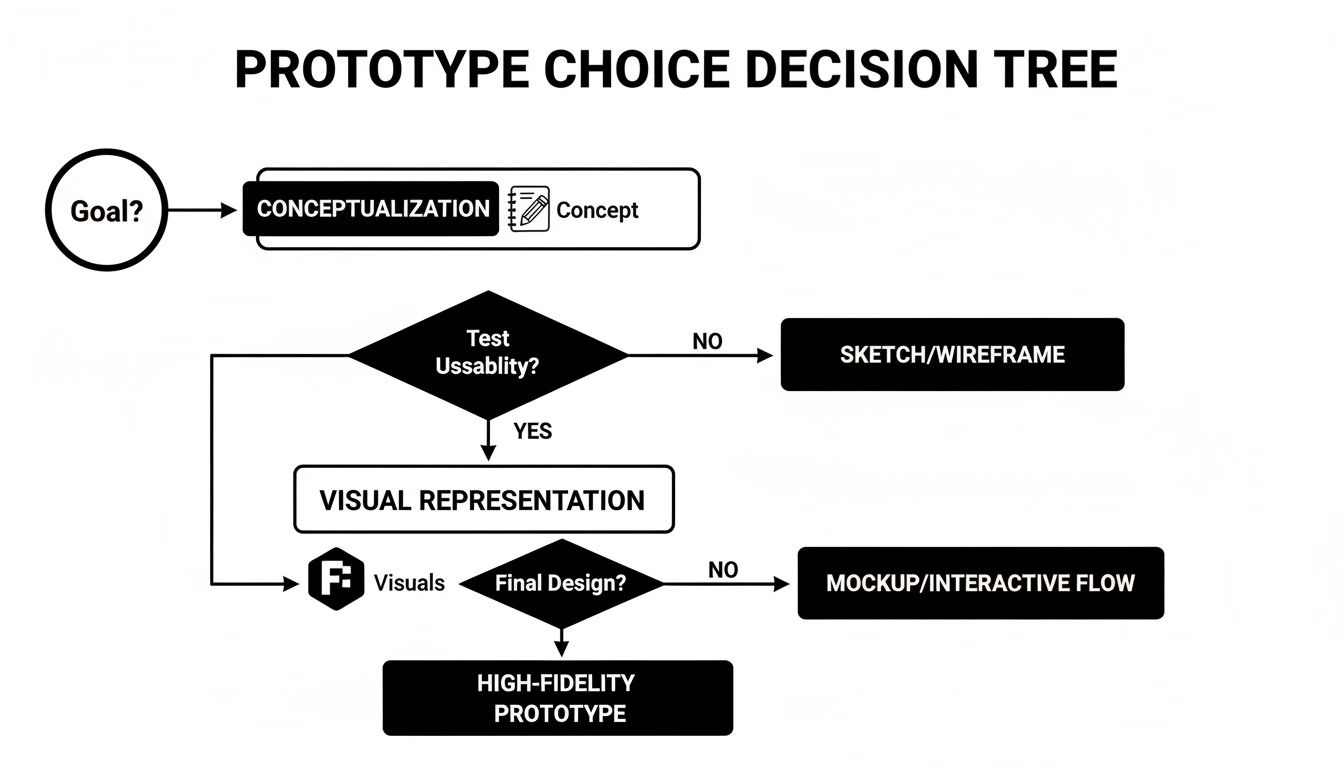
The path you choose—whether you're testing a core concept or fine-tuning visual details—directly dictates the kind of asset you need to build.
Sourcing High-Quality Participants
With your screener ready, it's time to find your people. Use the channels where your target users spend their time.
- Internal Lists: Your existing customer base is a goldmine. They already understand your product. Check with sales or marketing teams for access.
- Recruiting Platforms: Services like User Interviews or Respondent are fantastic for finding specific segments. They handle logistics and incentives, saving you massive time. You can filter by job title, industry, and software they use. A typical 30-minute interview costs between $50-$100 in incentives.
- Social & Community Channels: For a budget-friendly approach, look to niche communities. Find the right LinkedIn groups, Slack channels, or Subreddits. Approach them respectfully and offer a fair incentive.
Recruiting isn't just a numbers game. Five perfect-fit participants who give you deep, thoughtful feedback are infinitely more valuable than fifty random people who rush through the test. Quality over quantity, always.
Crafting Effective Test Scenarios
Your test script is the backbone of the session. A poorly written script introduces bias and results in useless feedback. The goal is to create realistic, open-ended scenarios that encourage natural behavior.
A great test task doesn't tell a user what to click. It gives them a goal and a context. For a deeper dive, review how to conduct effective user interviews to ensure your questions are open-ended and unbiased.
Anatomy of a Google-Style Test Script
Here’s a simple structure many top PMs I've worked with follow:
- The Welcome & Intro (2 mins): Build rapport. "Thanks for joining. Just a reminder, we're testing the prototype, not you. There are no right or wrong answers, and your honest feedback helps us most."
- Warm-Up Questions (3 mins): Ask about their current workflow. "Could you walk me through how you currently handle [the problem your product solves]?"
- The Scenario & Tasks (15 mins): Give them a realistic scenario. "Imagine you just got back from a business trip and need to submit your expenses. Using this prototype, show me how you would do that." Then, observe silently.
- Probing Questions (5 mins): Dig deeper into their behavior. "I noticed you paused there. What were you thinking?" or "What did you expect to happen when you clicked that?"
- Wrap-Up & Debrief (5 mins): Thank them and get final thoughts. "If you could change one thing about what you just saw, what would it be?"
This structured approach ensures you gather consistent data while leaving room to explore unexpected insights. It turns a usability check into a strategic learning opportunity.
Running Effective Test Sessions and Capturing Data
This is where your prep work pays off. A well-run session is the difference between shallow opinions and deep, actionable insights that change a product's trajectory. Your job isn’t to be a presenter. It’s to be an empathetic, neutral observer.
Forget the demo. This is a delicate dance of observation, probing, and active listening. The goal is to make the participant comfortable enough to think out loud, revealing the crucial 'why' behind every click, pause, and moment of frustration or delight.
Setting the Stage for Honesty
The first five minutes are make-or-break. This is your window to build rapport and create the psychological safety needed for unfiltered thoughts.
Kick things off by clearly stating your purpose and setting expectations:
- "We're testing the prototype, not you." This is the magic phrase. It instantly lowers their guard. Remind them there are no right or wrong answers.
- "Your honest feedback is the most valuable thing you can give us." Give them explicit permission to be critical. Tell them that harsh feedback is exactly what helps you make the product better.
- Explain the 'think-aloud' protocol. "As you go, please speak your thoughts. Tell me what you're looking at, what you're trying to do, and what you expect to happen."
This setup flips the dynamic from an evaluation to a collaborative exploration. For a deeper dive, our guide on how to conduct usability testing lays out a fantastic framework.
Mastering the Art of Moderation
During the session, listen more than you talk. You’re there to understand the participant's perspective, not to defend your team's design choices. Resisting the urge to "help" when they get stuck is a vital skill.
When a user pauses, don't lead them. Ask open-ended questions.
- Instead of: "Did you not see the 'Next' button?"
- Try: "What's going through your mind right now?" or "What are you looking for on this screen?"
For the quiet user, use a gentle prompt: "Tell me what you're thinking here." For the chatty one, politely guide them back: "That's a great point. For the sake of time, let's see how you'd tackle this next step."
"Your silence as a moderator is your most powerful tool. The moment a participant gets stuck, count to ten in your head before saying anything. More often than not, they will fill that silence with the exact insight you were looking for."
Systematic Data Capture
While one person moderates, the rest of the team should capture notes systematically. I’m a big fan of using a simple template in Notion or Dovetail. For PMs in the AI space, noting down user reactions to latency, accuracy, and the "explainability" of AI outputs is critical.
Your template should have these key columns:
- Observation: Objective description of what the user did (e.g., "User clicked the company logo trying to get back to the homepage.").
- Direct Quote: The exact words the user said ("I'm lost. I just want to go back to the start.").
- Interpretation/Insight: Your team's hypothesis about why they did that (e.g., "User’s mental model is that the logo is the primary way to navigate home.").
- Sentiment: A quick tag for their emotional state (e.g., Confused, Frustrated, Delighted).
This structured approach keeps brilliant insights from getting lost. For remote tests, always get permission to record the screen and audio. Those recordings are gold—you can turn them into highlight reels to show stakeholders exactly where users are struggling. It transforms feedback from a dry report into a compelling story no one can ignore.
Synthesizing Insights and Driving Product Decisions
Raw data from a prototype test is just noise. Your value as a PM kicks in when you find the signal and turn it into a decisive action plan. This is where you transform scattered user comments into a compelling story that moves the product forward.
Don't mistake synthesis for a mechanical task of tallying comments. It's a strategic exercise in pattern recognition. A single, powerful insight can save months of engineering effort and stop you from shipping a feature that misses the mark.
From Raw Notes to Actionable Themes
The best way to make sense of qualitative data is affinity mapping. It’s a simple technique for organizing observations into thematic clusters.
Get your team in a room (a real one, or a virtual one with Miro):
- Individual Brain-dump: Every team member jots down key observations from the tests onto individual sticky notes. One observation per note.
- Cluster Silently: Without talking, everyone starts grouping similar notes together. Natural themes will emerge as notes about "confusing navigation" or "pricing questions" find each other.
- Name the Groups: Once clusters have settled, discuss and name each theme, like "Users Struggled to Find Search" or "Positive Feedback on Onboarding Flow."
- Vote on Priorities: Give everyone a few dot stickers (or virtual dots) to place on the themes they feel are most critical to address. This quickly surfaces the most impactful issues.
This process democratizes the analysis and stops one person's biases from hijacking the narrative. It takes you from a messy pile of notes to a prioritized list of user-validated problems.
Separating Signal from Noise
Not all feedback is created equal. Your next job is to separate minor usability hiccups from fundamental, strategy-altering revelations. A user not liking a button's color? Noise. Five out of five users failing to grasp your core value proposition? Signal flare.
A critical part of testing prototypes is learning what feedback to ignore. If you chase every small suggestion, you'll end up with a bloated, incoherent product. Focus relentlessly on the themes that map directly back to your core learning goals for the test.
Ask yourself and your team these tough questions:
- Does this issue actually stop the user from completing the main task?
- How many different participants ran into this exact same problem?
- Does this piece of feedback completely blow up a core assumption we had?
Answering these helps you triage the findings. You’re hunting for patterns that represent the biggest risks or opportunities. While you're at it, some customer feedback analysis tools can speed this up, especially if you're dealing with tons of data from unmoderated tests.
Building the Business Case and Driving Action
Your final output isn't a report; it's a proposal for what to do next. Stakeholders don't have time for pages of notes. They need a concise, impactful summary that tells them what you learned and what you recommend.
Your summary should be sharp and to the point:
- Executive Summary: A single paragraph explaining key findings and your primary recommendation. Is it "Iterate on the checkout flow," "Pivot the concept," or "Proceed with development"? Be direct.
- Key Themes: List the top 3-5 themes you identified, backed by undeniable proof.
- Evidence: Bring the data to life. Embed short, powerful video clips of users struggling. Use direct quotes that capture their frustration or delight. Showing is always more powerful than telling.
- Actionable Next Steps: Translate each theme into a specific action. This could mean creating new user stories for the backlog, scheduling a design sprint to tackle a major issue, or green-lighting the current designs for engineering.
This process of early validation is also a massive cost-saver. By spotting potential trainwrecks during design, you cut down on expensive build-and-rebuild cycles. The impact is huge—it leads to better products shipped faster, making your business case even stronger.
Burning Questions on Prototype Testing
Even the most experienced PMs run into the same handful of questions. I see these pop up constantly in coaching sessions, so let's tackle them head-on with straight answers.
How Many Users Should I Actually Test With?
For qualitative usability testing, the magic number is 5 users. This isn’t random. Foundational research from the Nielsen Norman Group showed that testing with just five people uncovers about 85% of the usability problems.
After the fifth user, you start seeing the same issues repeatedly. It’s the point of diminishing returns.
But context is key. For a simple workflow, 3-5 users might be enough. If you're working on a marketplace with buyers and sellers, you need to test 3-5 users for each distinct role to get the full picture.
Remember, this rule is for qualitative insights. For quantitative A/B tests, you need a much larger, statistically significant sample size—hundreds, or even thousands, of users.
Prototype Testing vs. UAT: What's the Real Difference?
This is a critical distinction that trips up newer PMs. Prototype testing and User Acceptance Testing (UAT) sit on opposite ends of the development timeline and have completely different goals.
Prototype Testing (Formative): Happens early in the design process, with mockups or wireframes. The goal is to explore, learn, and validate core concepts before code is written. It answers: "Are we building the right thing?"
User Acceptance Testing (Summative): This is one of the last steps before launch, using a nearly-finished, fully functional product. It confirms that the software meets business requirements and works as expected. UAT answers: "Did we build the thing right?"
Think of it this way: prototype testing is reviewing the architect's blueprints; UAT is the final walkthrough inspection of the newly built house.
How Do I Handle Really Negative Feedback?
Watching someone tear apart a prototype can feel like a personal attack. Learning to reframe that criticism is a skill that separates great PMs from good ones. You have to see negative feedback for what it is: a gift. It’s a direct clue telling you how to make the product better.
First, your mindset is key. Go into every session with relentless curiosity, not a need for validation. Your mission is to find every single flaw.
Second, get good at active listening. When a user is frustrated, don't explain how the feature is supposed to work. Bite your tongue and lean in with a prompt like, "Tell me more about what you're experiencing here." This invites them to vocalize their thought process, which is pure gold.
The feedback is about the prototype, not you. Detach your ego from the design. Thank the user for their honesty—especially when it's tough to hear. They are doing you a massive favor by pointing out a problem now, when it's cheap to fix, rather than after launch.
Treating harsh feedback as a strategic asset is a true PM superpower. It’s the fastest path to iterating your way to a product that people actually want to use.
Ready to accelerate your career and master skills like these? Aakash Gupta provides world-class insights for Product Managers through his leading newsletter and podcast. Join the community and level up your PM game.
