You’re probably in one of two situations right now. Either you’re a PM trying to justify Jira Product Discovery to a finance partner who sees “another Atlassian line item,” or you’re a product leader looking at your existing Jira spend and asking a sharper question: what will this cost once the team starts using it for real?
That second question matters more.
Most jira product discovery pricing pages stop at the sticker price. They tell you Free, Standard, Premium, then move on. That’s useful, but it’s not how budgets get approved. Budgets get approved when you can explain who needs a paid seat, who doesn’t, what workflow grants access to a higher tier, and where hidden ecosystem costs can creep in.
Your Guide to Navigating Jira Product Discovery Pricing in 2026
I’ve seen this go wrong in a very predictable way. A PM says, “The tool is only ten dollars per user.” Then procurement asks whether stakeholders need seats, engineering asks whether roadmap viewers count, and leadership asks whether Jira Software Premium already covers it. Suddenly a cheap pilot becomes a messy budgeting conversation.
The single most important concept in jira product discovery pricing is creators vs. contributors. Atlassian’s early 2023 shift from beta to a freemium model made that distinction central, and Atlassian confirmed that contributors remain free indefinitely in that rollout on the Atlassian Community announcement. If you understand that model, you can usually cut through most of the confusion fast.

Why pricing looks simple and isn’t
On paper, Jira Product Discovery is easy to explain. In practice, teams don’t buy software on paper. They buy workflows.
A solo PM testing idea capture has a completely different cost profile from a multi-team organization trying to centralize prioritization, stakeholder intake, roadmap visibility, and AI-assisted triage. The subscription price is only one part of the decision. The bigger issue is whether your operating model fits the plan you picked.
That’s why it helps to look at adjacent resources on understanding software pricing models before you make the budget case. Pricing mechanics shape behavior. Per-creator billing encourages discipline around who actively manages discovery, while free contributors encourage broad stakeholder participation.
Practical rule: Don’t start by asking which plan is cheapest. Start by asking which people truly need to shape the backlog, fields, views, and prioritization logic.
What ambitious PMs should care about
This isn’t just a tooling decision. It’s a career signal.
If you can explain the trade-offs between seat-based pricing, stakeholder access, automation constraints, and governance needs, you sound like someone who can manage product operations at scale. That’s the same muscle you use when evaluating analytics platforms, experimentation tools, or customer feedback systems.
If you’re comparing your broader stack at the same time, this roundup of product management tools is a useful reference point. Not because Jira Product Discovery always wins, but because pricing only makes sense in context. The right tool is the one whose economics match your team design, not the one with the prettiest feature grid.
Breaking Down the Free, Standard, and Premium Plans
A common budgeting mistake looks like this: a PM leader prices Jira Product Discovery for a few product managers, gets approval, and then finds out six weeks later that published views, automation limits, and cross-team planning needs push the team into a higher tier. The list price was accurate. The budget was not.
That is why I assess jira product discovery pricing through total cost of ownership, not just the monthly seat rate. Atlassian’s plan structure is straightforward on paper, but the key decision is how much coordination work each tier removes, and what extra tooling or manual effort you still need to carry. Plan details and example seat costs cited below are drawn from this Jira Product Discovery pricing breakdown.
Free works for evaluation, not scale
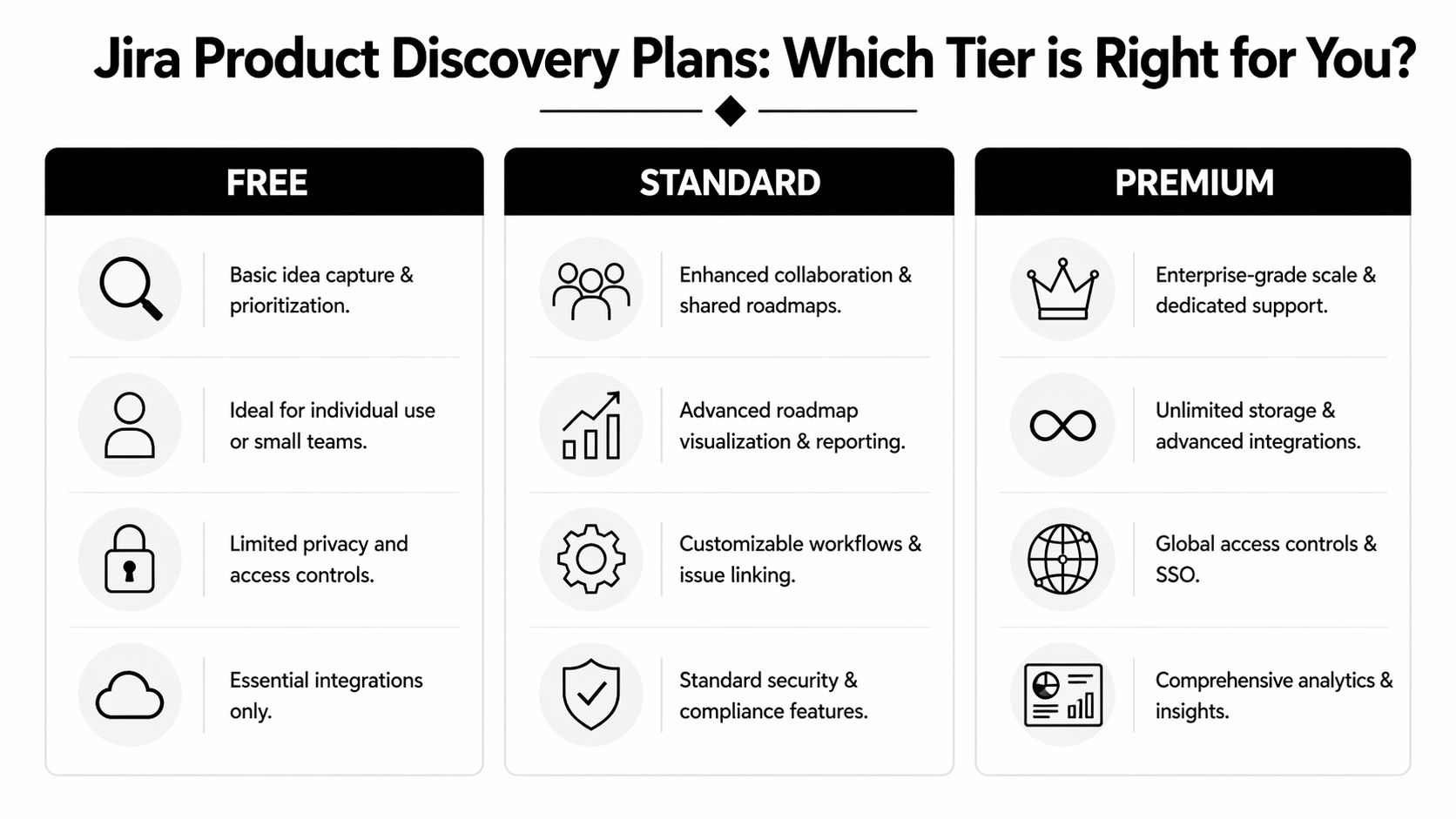
The Free plan includes up to 3 creators, unlimited contributors, 2GB storage, and 200 automation rule runs per month.
That setup works for a very small product group that is still proving its discovery process. Three active builders is usually enough for one PM, one designer, and one founder or product ops partner. In that situation, Free can be a smart way to test whether the team will maintain ideas, fields, and prioritization habits.
The trade-off shows up fast. The cost problem is not the $0 subscription. It is the work that shifts outside the tool once more people need to manage discovery. Teams hit the creator cap, automation runs out, and roadmap sharing starts happening through screenshots, docs, or slide decks again. That manual overhead is part of TCO, even if finance still sees a free plan.
Standard is where the economics start to make sense
Standard costs $10 per creator per month, with lower effective pricing on annual billing. It also adds unlimited creators, 250GB storage, 500 rule runs per month, published views, custom roles, data residency, and business-hours support.
For many single-team product orgs, Standard is the first tier that feels operationally complete. I would focus less on storage and more on the features that remove recurring admin work. Published views matter because they reduce the need to rebuild roadmap updates in separate formats for executives, GTM teams, or customer-facing stakeholders. Custom roles matter because governance gets messy once multiple PMs and adjacent partners work in the same workspace.
Here is the direct seat math for Standard:
| Team setup | Standard monthly cost |
|---|---|
| 5 creators | $50/month |
| 10 creators | $100/month |
| 25 creators | $250/month |
Those numbers are simple. The more useful question is whether Standard lets you retire other costs. If published views replace hours of monthly reporting, or if custom roles prevent permission sprawl, the plan often pays for itself before the seat count gets large. If your team still needs separate tools or manual workarounds for stakeholder visibility, your real cost is higher than the invoice suggests.
If you want context for why software vendors price this jump around collaboration and governance, this overview of common SaaS pricing model structures is a useful reference.
A short product walkthrough can also help if you’re trying to evaluate whether the paid workflow matches your team’s habits.
Premium is priced for portfolio-level coordination
Premium costs $25 per creator per month and adds unlimited storage, Atlassian AI, admin insights, release tracks, IP allowlisting, cross-team roadmaps, and custom domains.
This tier is aimed at organizations where discovery is no longer owned by one product squad. It is for companies trying to standardize how several teams collect opportunities, compare priorities, and present planning to leadership. In that environment, cross-team roadmaps and administrative controls are not cosmetic upgrades. They reduce fragmentation, duplicate setup, and governance friction.
The monthly cost rises quickly:
- 5 creators: $125/month
- 25 creators: $625/month
I would not recommend Premium for a single squad unless there is a specific governance or security requirement behind it. But once multiple product groups are operating with different views, fields, and planning cadences, the cost of inconsistency can exceed the subscription delta. That is the core Premium decision. You are paying for fewer planning collisions, fewer reporting workarounds, and less product ops cleanup across teams.
How Atlassian Defines and Bills for Creators
Most overspending on Jira Product Discovery doesn’t come from the list price. It comes from sloppy seat assignment.
Atlassian’s billing model is built around creators as the licensed role and contributors as the free role. If you assign creator access too broadly, your monthly bill grows faster than the actual value you’re getting from the tool. If you assign it carefully, Jira Product Discovery can be cost-efficient for teams with lots of stakeholders and a relatively small set of active discovery owners.
Who should be a creator
A creator should be someone who actively shapes the discovery system, not just someone who consumes its output.
Use this audit checklist:
- Owns idea management: People who create, edit, or maintain ideas as part of their regular job usually need creator access.
- Controls prioritization inputs: If someone changes fields, scoring logic, or views, they belong in the paid group.
- Runs the roadmap operating cadence: PMs, product ops, or portfolio leads who maintain discovery artifacts often need the ability to configure and update the workspace.
- Builds workflow structure: Anyone managing roles, permissions, or advanced project setup is usually a creator.
Who should stay a contributor
A contributor is someone who needs visibility or lightweight participation without owning the system itself.
Typical contributor candidates include:
- Engineering stakeholders: They often need context, not authorship.
- Go-to-market partners: Sales, support, customer success, and marketing can view, comment, and vote without requiring paid creator seats.
- Executives: Leaders usually benefit more from published visibility than from edit rights.
- External or occasional collaborators: If they aren’t regularly managing discovery work, don’t default them into a paid role.
The cheapest seat is the one you never assign by habit.
If your team is still aligning on what “product discovery” really means in your org, this primer on product discovery is useful because it helps separate true discovery ownership from general stakeholder involvement.
A practical budgeting table
These examples help when you’re building a budget request or cleaning up an existing subscription. I’m using only verified pricing figures and staying qualitative where the source material doesn’t provide exact plan recommendations for each scenario.
| Team scenario | Suggested creator logic | Standard cost | Premium cost |
|---|---|---|---|
| Startup with 3 active PM/founder users | Likely fits Free if only 3 people actively create | $0/month on Free | Not typically necessary early |
| Single team with 10 active creators | Good fit if one team manages discovery centrally | $100/month | $250/month |
| Larger product org with 25 active creators | Consider whether multiple teams need shared planning and governance | $250/month | $625/month |
These example costs align with the verified pricing details in the Atlassian community and pricing summaries already cited earlier.
A seat audit that saves money
Run this audit before you buy, and then repeat it whenever the team changes.
List every person currently touching idea intake.
Don’t start in Jira. Start in your org chart and your recurring meetings.Mark who edits versus who comments.
This is the key cost split.Separate workflow owners from visibility consumers.
Product ops and PM leads often need creators. Most others don’t.Build the minimum paid-seat version first.
Then add creators only when someone has a concrete operational reason.
That approach gives you a defensible budget and keeps the tool from turning into an access-management mess six months later.
Uncovering Hidden Costs and Integration Gaps
The advertised price is the easy part. The total cost of ownership is where PM leaders get surprised.
One of the biggest unresolved questions around jira product discovery pricing is whether your existing Atlassian spend changes anything. Teams with Jira Premium or broader Atlassian contracts often assume Jira Product Discovery will be bundled, discounted, or included in some way. The problem is that this assumption doesn’t appear to be clearly resolved in public community answers.
A verified community pricing discussion captures the issue directly. Questions like whether you have to pay extra to use Jira Product Discovery alongside Jira Premium often don’t get a definitive answer, which creates real ambiguity for teams evaluating TCO in the Atlassian Community thread on paying extra for Jira Product Discovery.
Where budget surprises show up
The seat price may be stable. The surrounding decisions often aren’t.
Here’s where I’ve seen leaders get tripped up:
- Assumed bundling: Teams think their existing Atlassian contract already covers discovery tooling.
- Parallel-tool drift: If JPD doesn’t replace stakeholder intake, customer feedback collection, or roadmap publishing in your environment, you may keep paying for adjacent tools.
- Internal process cost: Ambiguous licensing slows procurement, legal review, and renewal planning.
That’s why the right question isn’t “What does Standard cost?” It’s “What else do we still need after buying Standard?”
Use a build-versus-buy lens
This is the same discipline you’d use in any platform decision. Evaluate Jira Product Discovery as part of a system, not as an isolated subscription.
Here's a practical perspective:
| Cost area | What to ask |
|---|---|
| Core license | Who really needs creator access? |
| Existing Atlassian stack | Is there any confirmed bundle benefit, or are you assuming one? |
| Workflow gaps | Will another tool still be needed for adjacent jobs? |
| Admin overhead | Who will manage roles, billing, and governance? |
A strong mental model here is the classic build vs buy framework. The same reasoning applies to software ecosystems. Even when you’re buying, you’re still stitching together a workflow. Every unclear boundary becomes a future cost.
Buying a tool cheaply can still be expensive if it leaves process gaps your team has to fill manually.
For PM leaders, this matters beyond budgeting. It affects credibility. If you can walk into a planning review and explain not just the line-item cost but also the integration ambiguity and ecosystem risk, you sound like an operator, not just a tool shopper.
When to Upgrade From Free to Standard or Premium
Teams usually wait too long to upgrade. They treat the higher tier as a cost increase instead of recognizing when the lower tier is already slowing down work.
The cleanest trigger to watch is automation capacity. Verified pricing data shows that Free includes 200 rule runs per month for the site, Standard includes 500 rule runs per month for the site, and Premium provides 1,000 rule runs per user per month. For a team of 10 creators, Premium gives 10,000 runs versus 500 on Standard, which is a 20x increase, according to this 2026 value analysis of Jira Product Discovery pricing.
Upgrade from Free when discovery becomes shared work
Free is fine while one very small team is learning the tool. It stops being fine when the discovery process itself becomes collaborative.
Upgrade from Free to Standard when you notice patterns like these:
- More than a handful of active discovery owners: Once the creator cap starts forcing awkward access workarounds, the plan is already too small.
- Roadmap communication happening outside the tool: If PMs are recreating views for stakeholders elsewhere, Standard’s published views become operationally important.
- Basic automation pressure: If idea triage, tagging, or workflow movement starts hitting the site-level cap, manual work begins creeping back in.
Upgrade from Standard when scale creates bottlenecks
Standard is usually the best value for a single team. But it has a hard limit in one specific area: automation throughput is shared at the site level.
That matters more than many teams expect. Once multiple PMs, product ops, and adjacent functions depend on automated triage, scoring, or workflow updates, a shared pool becomes restrictive. Premium changes the model from site-level scarcity to user-level capacity.
These are the strongest Premium triggers I’ve seen:
You have multiple product teams that need one planning view.
Cross-team roadmaps and stronger governance matter when leadership wants comparability across teams, not isolated project views.You’re using automation as infrastructure, not decoration.
If rules are central to how ideas move, get tagged, or stay synced, the Premium automation model is materially different.Security and admin controls now affect delivery speed.
Features like IP allowlisting and admin-oriented controls become more valuable when compliance or governance review is no longer lightweight.
Decision shortcut: If your current plan forces manual triage, duplicated reporting, or workaround-heavy coordination, you’re already paying for the cheaper tier in labor instead of license fees.
Treat upgrades like operating expense decisions
Product leaders who get this right don’t frame the upgrade as “better software.” They frame it the way finance teams understand it: an operating expense trade-off.
If you need a simple refresher on categorizing costs in a finance-friendly way, this explainer on expenses in accounting is useful context. The upgrade conversation gets easier when you can separate direct subscription cost from the labor cost of manual workflow management.
The test is simple. If the next tier removes repetitive admin work, improves visibility across teams, or prevents planning breakdowns, it’s not just a software upgrade. It’s a decision about how much operational friction your org is willing to tolerate.
Tactical Tips for Managing Seats and Billing
Most SaaS waste comes from neglect, not bad intent. Jira Product Discovery is no different.
If you’re the PM lead, product ops manager, or Atlassian admin responsible for the subscription, your job is to treat seat management as an active discipline. Good hygiene then pays off. Small role decisions become recurring budget outcomes.
Keep a living creator policy
Don’t let role assignment become tribal knowledge. Write down the rule for who gets creator access.
A practical policy usually includes these principles:
- Creator seats are for active system owners: PMs and admins who create and manage discovery workflows qualify.
- Visibility defaults to contributor: Anyone who mainly views, comments, or votes should stay free unless there’s a strong reason otherwise.
- Temporary work shouldn’t create permanent licenses: Short-term projects often justify temporary creator access, then a downgrade later.
- Managers review seats regularly: Ownership changes fast in product orgs. Your license list should reflect that.
For teams building stronger procurement and renewal discipline, these software license management best practices offer a helpful checklist mindset.
Handle billing like a PM, not just an admin
Verified pricing data shows that Standard is $10 per creator per month with up to 17% annual savings, and Premium is $25 per creator per month, with Atlassian’s newer billing terms rolling out in February 2023 and a minimum one-month term noted in the pricing breakdown already cited earlier in this article.
That leads to a practical billing playbook:
| Billing choice | Best use case |
|---|---|
| Monthly | Team size is still changing or you’re piloting ownership patterns |
| Annual | Seat needs are stable and you want the verified annual discount on Standard |
A team should usually start monthly if creator ownership is still fluid. Once you’ve stabilized who needs paid access, annual billing becomes easier to defend.
A simple operating cadence
Use a recurring review process instead of waiting for renewal season.
Review creators against actual usage.
If someone hasn’t needed edit or management capability recently, ask whether contributor access is enough.Reassign instead of adding by default.
When a new PM joins, check whether an old seat can be reclaimed first.Match subscription ownership to budget ownership.
If product leadership owns the line item, make sure the same team sees monthly changes.Track tool spend like part of product P&L.
Teams that understand P&L responsibility tend to manage SaaS seats more intentionally because they connect access choices to operating discipline.
A clean seat model does more than save money. It also prevents the common enterprise problem where nobody is sure who owns the workflow, but everyone still has paid permissions.
Frequently Asked Pricing Questions
A few questions tend to come up late in the buying process, usually after a pilot starts or procurement gets involved. These are the ones worth answering directly.
What happens if you add a fourth creator on Free
The verified pricing data says the Free plan supports up to 3 creators and auto-upgrades to a 14-day Standard trial if limits are exceeded, with that billing behavior tied to Atlassian’s newer billing setup noted in the early 2023 rollout details already referenced earlier in this article.
The practical takeaway is simple. Don’t treat Free as a long-term workaround if you know a fourth active user is coming. Plan the transition deliberately so finance and admin owners aren’t surprised by the trial conversion.
Do contributors cost anything
No. The creator and contributor model is what makes Jira Product Discovery attractive for PM-led teams with lots of stakeholders. Contributors remain free indefinitely, as confirmed in the earlier Atlassian pricing announcement already discussed above.
That means you can involve engineering, support, sales, and leadership broadly without turning every viewer into a budget event.
Is Jira Product Discovery sold standalone
Yes. Verified data confirms it can be purchased standalone. The catch is that bundling with existing Jira Software or broader Atlassian plans remains unclear in public discussions, which is why many teams still need to validate total cost before they commit.
PM leaders need to be disciplined. “Standalone” doesn’t always mean “simple to budget.”
Which plan is best for a single product team
For many single-team setups, Standard is the most sensible commercial tier because it enables broader collaboration, published views, and unlimited creators without forcing you into enterprise-style controls.
Premium is usually easier to justify when organizational complexity is the problem, not just feature curiosity.
If one team runs a clean discovery process, Standard is often enough. If several teams need one coordinated planning layer, evaluate Premium seriously.
Is annual billing worth it
If your creator list is stable, probably yes. Verified pricing data notes up to 17% savings on Standard with annual billing in the pricing material cited earlier.
If your team is still changing shape, monthly billing gives you more flexibility while you sort out who needs a paid role. That flexibility can be more valuable than the discount during the first phase of adoption.
What’s the most common buying mistake
Treating jira product discovery pricing like a headcount exercise instead of an operating-model decision.
If you buy seats for everyone who wants visibility, you’ll overspend. If you stay on a lower tier after your workflows have clearly outgrown it, you’ll pay in manual work instead. The best teams manage both sides: tight creator discipline and timely upgrades when collaboration or automation becomes a bottleneck.
If you want sharper guidance on product strategy, budgeting, hiring, and the practical realities of scaling as a PM leader, Aakash Gupta is one of the best resources available. His work is especially useful if you’re trying to level up from tool user to operator, the kind of PM who can evaluate systems, manage trade-offs, and make decisions that hold up in front of executives.
