As a [user], I want [goal], so that [reason] is the standard user story definition, and it became the common format as Agile spread after the 2001 Agile Manifesto and early Extreme Programming practices. But the sentence is only the start. It's the card, not the whole requirement.
If you're reading this, you've probably been in the same meeting most PMs hit sooner or later. A stakeholder says, “We need better reporting.” Engineering asks what that means. Design asks for the workflow. Data asks which users matter. Suddenly a simple request turns into a week of churn.
That's where user stories earn their keep.
A strong user story doesn't just document work. It forces a product team to answer three questions before anyone starts building. Who is this for. What are they trying to do. Why does it matter. That sounds basic, but it's one of the fastest ways to expose fuzzy thinking in a roadmap.
I've seen junior PMs treat stories like paperwork. Senior PMs use them to create alignment, surface trade-offs, and keep teams out of solution theater. That difference matters more than generally recognized. If you can write stories that drive the right conversation, you'll ship cleaner iterations and build trust with engineering faster.
Stop Writing Specs Start Telling Stories
A bad requirement usually sounds polished. It has a title, a paragraph of context, and a list of UI details. It also leaves the team guessing what problem needs solving.
A good user story does the opposite. It strips the request down to the value someone needs, then gives the team room to work through implementation together. That's why stories work so well in fast-moving product organizations. They preserve intent without pretending the PM already knows every edge case, dependency, and technical constraint.
What breaks teams is usually not effort but ambiguity
Take a common example. A stakeholder asks for “an export feature.” That can mean CSV export for admins, PDF summaries for sales teams, scheduled email reports for executives, or raw API access for analysts. Those are completely different products hiding behind the same noun.
When a PM writes, “Build export feature,” engineering has to reverse-engineer the value. That's when teams start making local decisions with incomplete context. Developers fill in the gaps. Design invents assumptions. QA tests against moving targets.
Practical rule: If your story can't tell an engineer who benefits and why they care, it's not ready.
A useful user story forces sharper language. Instead of “build export,” you get something like: as a sales manager, I want to export account activity so that I can review pipeline changes outside the product. Now the team can ask the right follow-ups. Which data matters. What format is usable. Is this a one-off action or a recurring workflow.
Stories create alignment faster than oversized specs
This is also why teams that obsess over long specs often move slower than they expect. Heavy documentation feels safe, but it can hide weak reasoning. A short story with a hard conversation is often more effective than a polished document nobody really interrogates.
If your team still leans too far toward verbose requirements, Aakash Gupta's piece on writing better specs as a PM is a useful complement. The key is balance. Stories aren't an excuse for vagueness, and specs aren't an excuse for avoiding conversation.
Here's the practical test I use with PMs I coach:
- If the work is framed as a solution first, you'll get debate about features.
- If the work is framed as a user need first, you'll get debate about outcomes.
- If the team can't explain the value in one sentence, the backlog item probably isn't mature.
- If acceptance is impossible to describe, the item is still in discovery, not delivery.
That's the significant shift in user story definition. It's not about filling in a template. It's about turning messy product requests into shared understanding.
The User Story Definition That Actually Works
A PM writes, “Add candidate notes,” drops it in the backlog, and moves on. Engineering hears shared comments. Design imagines a lightweight annotation pattern. Recruiting expects private feedback tied to interview stages. Same ticket, three different products.
That is why a user story needs a tighter definition than “a sentence in a template.”
As a [type of user], I want [goal] so that [reason].

The format lasts because it forces three useful choices. Name the user. State the goal. Explain the value. If any one of those is fuzzy, the team usually pays for it later in rework, missed edge cases, or debates during sprint planning that should have happened earlier.
Still, the template is only the wrapper. The story itself is a lightweight requirements container. It captures intent clearly enough to start the right conversation, without pretending every decision has already been made. That is the practical meaning of the 3C model: Card, Conversation, Confirmation, as described in this user story definition breakdown.
The written story is a reminder. The requirement emerges when product, design, and engineering talk through constraints and define what done means.
This distinction matters more than many PMs realize. Writing the artifact is clerical work. Using that artifact to drive alignment, expose disagreement, and negotiate scope is product craft. That is also why strong story writing has career impact. PMs who can turn vague requests into buildable, testable, outcome-focused stories become easier to trust.
The sentence starts the work
I coach teams to treat the story as a prompt, not a contract. A good story gives engineering enough context to estimate and challenge. It gives design enough clarity to test interaction choices. It gives stakeholders a clear statement of user value, so trade-offs happen in the open.
That changes how refinement works. The discussion is not “did we fill in the format correctly?” It is “did we frame the problem well enough that the team can make good decisions?”
If you want a second reference point, this practical user story guide is useful to compare against your own backlog quality.
What the 3Cs look like in real work
Here's how I'd break it down in a real sprint cycle.
| Part | What it means in practice |
|---|---|
| Card | A short user-centered statement of need |
| Conversation | The refinement discussion where scope, edge cases, and trade-offs get worked out |
| Confirmation | Acceptance criteria that prove the team built the right thing |
The failure mode is easy to spot. A team treats the card as if it fully defines the work. Then hidden assumptions slip through.
Take this story: “As a recruiter, I want candidate notes so that I can coordinate with hiring managers.” That is a decent start. It is not ready on its own. The team still needs to answer whether notes are private or shared, whether edit history matters, whether notifications fire, whether mobile support is in scope, and what counts as complete for the first release.
That is the craft. A story should be short on purpose, but not shallow. The written line creates focus. The conversation adds precision. The confirmation protects quality. Aakash Gupta's guide to user story format in Scrum is a useful baseline if you're coaching newer PMs and want a consistent starting point.
The INVEST Checklist Your Engineering Team Will Love
A story can sound user-centered and still be terrible to build. That's where INVEST helps. It's the most cited checklist for story quality: Independent, Negotiable, Valuable, Estimable, Small, Testable. It became widely used as a readiness check for planning, and “small” is commonly interpreted as work that fits within a sprint, as explained in this INVEST overview.
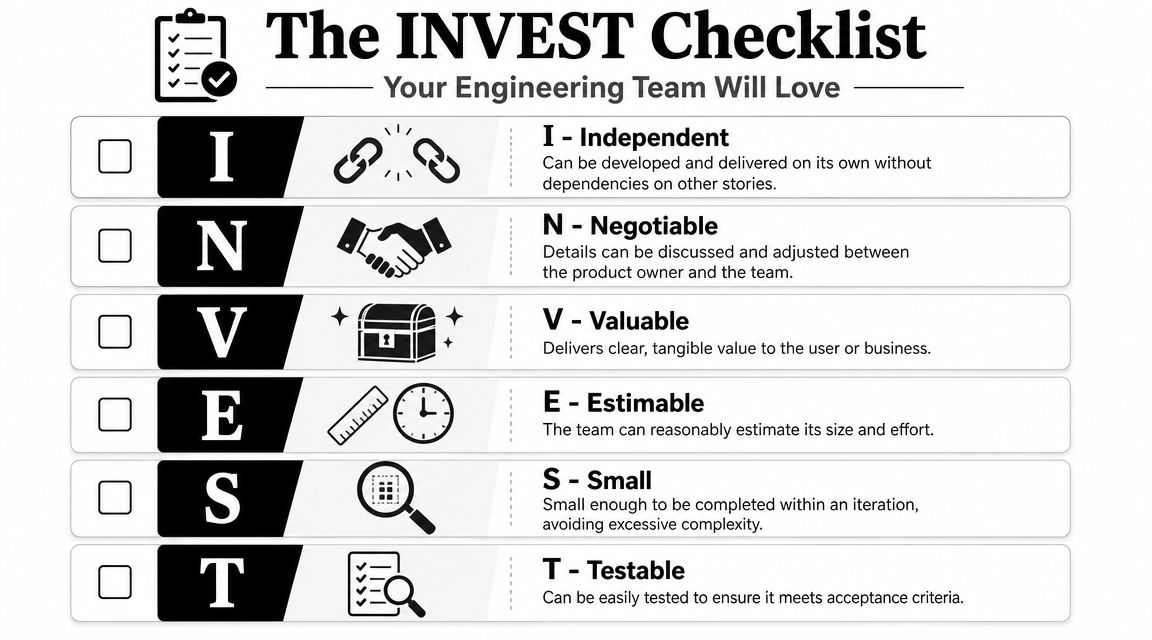
A fast quality gate for backlog refinement
Use this checklist before a story enters sprint planning.
- Independent means the team can build it without waiting on a stack of sibling stories. If the item depends on three other tickets, it isn't really one story.
- Negotiable means the wording isn't a frozen implementation brief. The team should still be able to improve the solution during refinement.
- Valuable means someone benefits in a way the team can explain clearly. “Refactor billing screen” isn't enough unless the value is explicit.
- Estimable means engineering can size it with reasonable confidence. If estimates swing wildly, the story probably needs more clarification or a split.
- Small means the scope is narrow. If two engineers look at it and say, “This feels like a mini-project,” it's too big.
- Testable means QA, PM, and engineering can tell when it's done without a debate.
What this means in practice
Here's a simple do-this-not-that comparison.
| INVEST check | Weak version | Better version |
|---|---|---|
| Independent | “Build full onboarding revamp” | “As a new user, I want to verify my email so that I can activate my account” |
| Negotiable | “Add left-nav panel with five fixed filters” | “As a shopper, I want to narrow products by my preferences so that I can find relevant options faster” |
| Valuable | “Migrate search service” | “As a support agent, I want faster account lookup so that I can resolve tickets without switching tools” |
| Estimable | “Improve analytics experience” | “As a team lead, I want to filter dashboard data by date range so that I can review recent performance” |
| Small | “Redesign reporting” | “As an admin, I want to download the current report as CSV so that I can analyze it offline” |
| Testable | “Make login smoother” | “As a returning user, I want to stay signed in on my trusted device so that I don't log in every visit” |
A lot of PMs get stuck on Small. The easiest fix is to ask, “Can the team deliver and validate one slice of user value, not the whole initiative?” If the answer is no, split it.
This short walkthrough can help your team calibrate on the concept before refinement:
For another hands-on reference, Aakash Gupta's article on agile story writing is worth bookmarking for backlog reviews.
User Story Examples From B2C to AI
Most PMs don't need another definition. They need examples that sound like work they manage.
B2C mobile app example
Bad version:
As a user, I want a carousel and quick-add button on the home screen so that engagement improves.
This is weak for two reasons. It prescribes the UI, and the benefit is written from the company's perspective instead of the user's.
Better version:
As a listener, I want to resume recently played content from the home screen so that I can get back to what I was hearing without searching again.
That story gives design and engineering room to choose the right interaction. It also points directly to the user need.
Good stories describe the problem worth solving. The team can still debate the best interface.
B2B SaaS example
For a Slack or Salesforce-style workflow, I'd write something like this:
As a sales manager, I want to see which deals changed stage since my last review so that I can coach reps on pipeline movement without digging through every record.
That's specific enough to discuss filters, permissions, and default views. It also gives the engineering team a clear mental model of usage. The story isn't “build pipeline dashboard widget.” It's “help a manager review change efficiently.”
A strong next step is to attach acceptance criteria that cover what counts as a stage change, what time window applies, and where the data appears. If you want more examples of that pattern, Aakash Gupta's guide with examples of user stories with acceptance criteria is practical and easy to adapt.
AI product example
AI products make weak story writing even more dangerous, because teams can hide ambiguity behind model language.
A useful AI story sounds like this:
As a support lead, I want AI-generated summaries of long customer conversations so that I can review handoffs quickly and catch unresolved issues.
Notice what's missing. No prescribed model. No mention of prompt architecture. No assumption about where the summary appears. Those are implementation choices the team should explore later.
If your product work overlaps with AI-assisted content workflows, LocalChat's AI content guide is a handy reference for how teams think about content generation use cases in practice. It can help PMs write clearer stories around content review, editing, and workflow support rather than vague “add AI” tickets.
The pattern across all three examples is consistent. Good stories anchor on a user, an action, and a reason. Great stories also leave room for the team to discover the best solution.
How Stories Fit Into Your Product Backlog
A single story rarely stands alone. Product teams need a shared hierarchy so they don't confuse strategic goals with build-ready work.
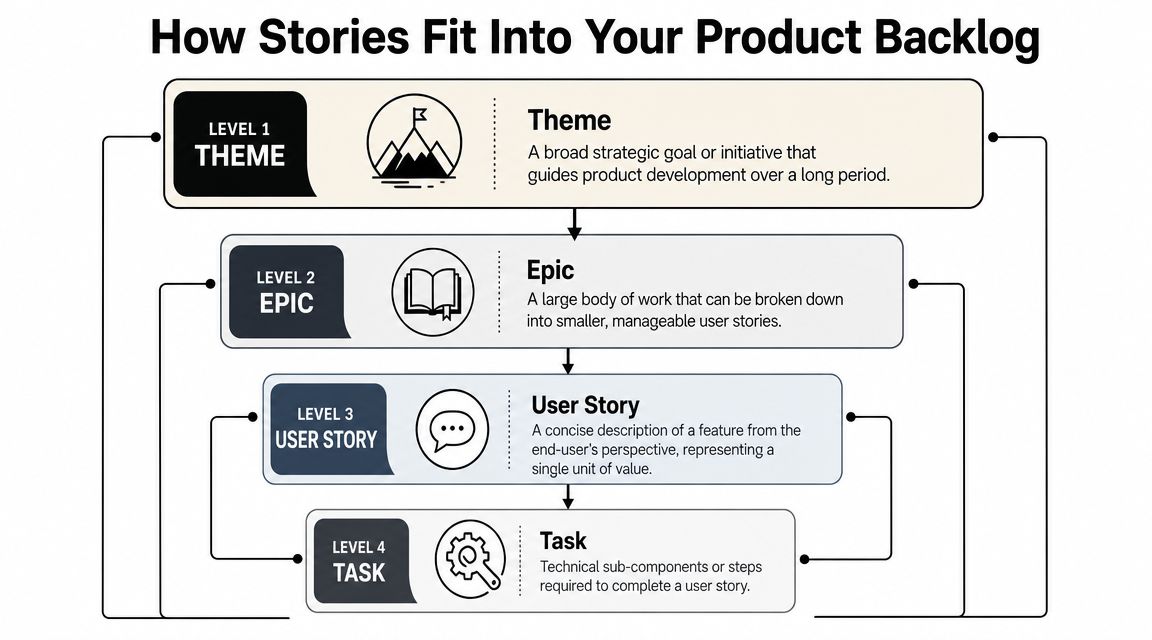
The simplest hierarchy that works
I recommend this four-level model:
| Level | Meaning |
|---|---|
| Theme | A broad product goal |
| Epic | A large body of work inside that goal |
| User story | A specific slice of user value |
| Task | The implementation steps required to deliver the story |
Think of planning a company conference.
- Theme might be improve customer community engagement.
- Epic might be launch attendee networking.
- User story might be “As an attendee, I want to see who else is joining my session so that I can plan who to meet.”
- Task might be create attendee query, add privacy setting, build session participant UI, write QA tests.
PMs often stuff all four layers into one ticket. This practice results in a backlog full of giant items that look actionable but aren't.
When to split and when to reclassify
A quick decision rule helps:
- If the item spans multiple user workflows, it's probably an epic.
- If the item has no user-facing value but supports delivery, it's probably a task.
- If the item describes a defect in existing behavior, it may belong as a bug rather than a new story.
- If the item can be explained as one clear user outcome, it's a good candidate for a story.
Teams move faster when they stop pretending every backlog item is a user story.
That nuance is especially important for PM interviews and onboarding. Hiring managers often ask candidates to break a vague feature request into a hierarchy. They're checking whether you can decompose work without losing user value.
A well-run backlog should let an engineer trace a task back to a story, a story back to an epic, and the epic back to a strategic theme. If you can't do that, prioritization turns political fast.
Common Pitfalls That Derail Product Teams
The most expensive user story mistakes don't look dramatic. They look normal. That's why they survive.
The biggest one is treating the story as the requirement itself. The Agile Alliance makes an important distinction here: a user story is a lightweight placeholder for conversation, refined through discussion and acceptance criteria rather than used as a complete spec, as described in its user stories glossary.
Pitfall one is writing tasks disguised as stories
You'll see tickets like this all the time:
As a developer, I want to upgrade the notification service so that we can support future scaling.
That may be important work. It just isn't a user story. It's a technical task or an enabler. Calling it a user story blurs who the customer is and makes prioritization harder.
The fix is simple. Put technical work in the backlog under the right artifact type, then link it to the user-facing outcome it supports.
Pitfall two is dropping the reason
PMs often write:
As an admin, I want advanced filters.
That's incomplete. Filters for what. To make which workflow easier. To solve which pain point.
When the so that clause disappears, the team loses the value signal. Then every follow-up question becomes harder to answer, from priority to design trade-offs.
Pitfall three is writing epics in disguise
If a story includes multiple personas, workflows, or modes, it's too large.
Here are the warning signs:
- Multiple verbs like create, edit, share, export, and analyze in one story
- Multiple audiences such as admin, manager, and end user together
- Platform spread across web, mobile, and API in a single item
- Open-ended language like complete dashboard overhaul or redesign reporting experience
The fix isn't to add more detail. The fix is to split the work into smaller slices of value.
Pitfall four is over-documenting to avoid conversation
Some PMs react to ambiguity by packing everything into the ticket. Screenshots. edge cases. SQL-style logic. exact interactions. fallback states. implementation preferences.
That can help in the right context, but it often becomes a substitute for alignment. The team reads the ticket asynchronously, everyone interprets it differently, and nobody challenges the core assumption.
If a story gets longer every time the team is confused, you may have a collaboration problem, not a writing problem.
Good PMs know when to stop writing and start facilitating.
Your Actionable User Story Toolkit
A toolkit matters when the team is under pressure. Sprint planning starts in ten minutes, engineering is asking what is in scope, and design is still unsure which edge case matters. In that moment, nobody wants a theory of user stories. They need a working draft, a few checks, and a way to surface the trade-offs fast.
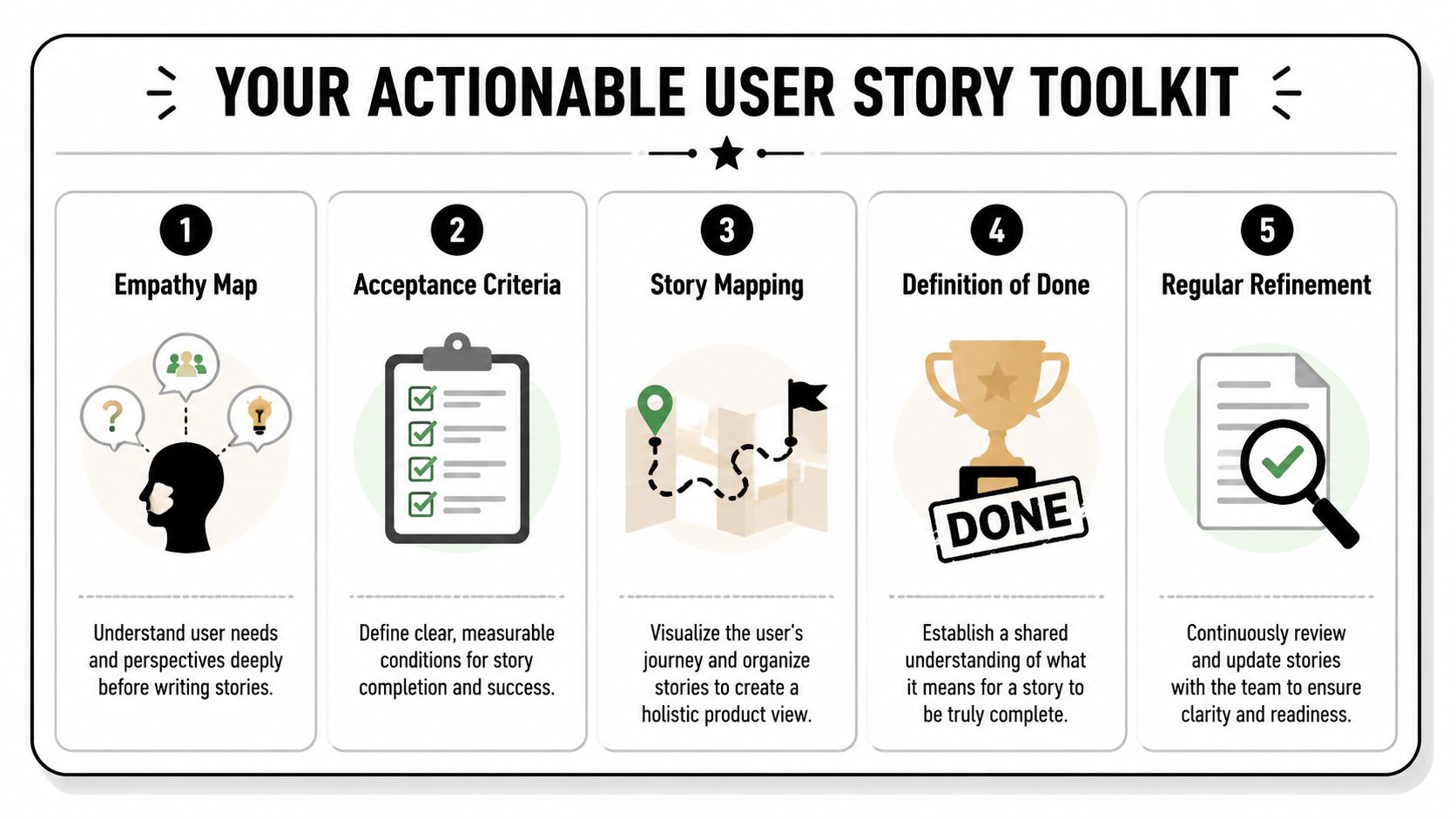
Keep the toolkit small enough that people will use it. The point is not to create more process. The point is to turn a vague request into a conversation the team can execute against.
Start with a draft that creates alignment
Use the standard format as a trigger for discussion, not as the finished work product:
As a [specific user or persona], I want [goal or action], so that [benefit or outcome].
Then add acceptance criteria that make the story testable.
A simple starting pattern:
- Given the user is in the relevant context
- When they take the intended action
- Then the system shows the expected outcome
That structure does two jobs well. It gives engineering something concrete to build against, and it gives product a clean way to spot missing assumptions before they turn into sprint churn.
Use a definition of ready that respects real trade-offs
Teams get into trouble when a story is "ready" because someone copied the template correctly. A story is ready when the team can discuss it without guessing at the user, the value, or the likely scope.
Before bringing a story into sprint planning, check:
- User is specific enough to matter if behavior changes by persona
- Outcome is clear so the team understands why the work deserves priority
- Scope fits one discussion and one meaningful slice of value
- Open questions are visible and assigned to an owner
- Acceptance criteria can be tested without interpretation battles
- Key trade-offs have surfaced across product, design, and engineering
If the story fails one of those checks, keep refining. Pushing half-formed work into planning rarely saves time. It usually shifts the cost into rework, debate, and confused delivery.
For teams that need stronger context before they write stories, Otter A/B's customer journey map examples can help connect a backlog item to an actual user moment instead of a generic feature request.
Use AI for first drafts, not final judgment
AI can speed up story writing. It can also produce polished nonsense.
The right use case is draft generation. Give it enough context to expose gaps in your thinking, then review the output like a PM, not a stenographer.
Try a prompt like this:
You are a product manager helping draft backlog-ready user stories. Based on this feature idea, generate 5 user stories using the format As a [user], I want [goal], so that [reason]. For each story, include likely acceptance criteria, key open questions, and whether the story may be too large and should be split.
Then include:
- product context
- target users
- current workflow
- known constraints
- what success should look like
That gets you to a usable first draft faster. It does not tell you which story matters, which edge case is noise, or whether the team should ship a thinner version first. That judgment still belongs to the PM and the delivery team.
Keep a few reference examples nearby
Strong PMs do not reinvent story structure every sprint. They keep a few examples that show what good looks like across different product types and levels of complexity. A practical reference like sample user stories and acceptance criteria is useful for calibrating your own writing, especially when coaching newer PMs or working with a cross-functional team that uses stories inconsistently.
The bigger point is this. Good user stories are not about filling in a template. They sharpen decisions, expose ambiguity early, and make trade-offs discussable while changes are still cheap. PMs who do that well earn trust because they help teams move with less confusion and better judgment.
If you want more product management frameworks, practical career advice, and hands-on PM writing resources, explore Aakash Gupta. His site includes guides, templates, and training content for PMs who want to sharpen execution and grow into larger product roles.
