If you're a PM building anything with an API, you've probably sat in a meeting where the conversation suddenly turns into alphabet soup. Someone says "bearer token." Another person asks about scopes. A staff engineer mentions JWT expiry and refresh flow. You nod, write it down, and wonder whether this is just implementation detail or something you need to own.
You do need to own it.
When a team asks what is an API token, they're not asking a purely technical question. They're asking how your product will authenticate users, how safely partners can integrate, how much friction customers hit during setup, and how much damage a leaked credential can do. That's product strategy, not just backend plumbing.
For mid-career PMs, this is one of those concepts that separates feature managers from product leaders. The PM who understands token design can challenge bad defaults, spot risk in enterprise deals, and make sharper trade-offs between UX, security, and platform growth.
The Meeting Where "API Token" Stopped Being Jargon
The moment usually arrives in an architecture review.
Engineering is talking through a partner integration. Solutions engineers are worried about customer setup complexity. Security wants tighter access controls. Sales wants the integration live before the quarter closes. Then someone asks whether the partner should use API keys, session tokens, or OAuth tokens with scoped access.
At that point, "API token" stops being jargon.
I learned this the hard way on a B2B SaaS product where we were trying to close a strategic integration. Our team initially treated token handling like an engineering detail. The partner team didn't. They wanted to know what a customer admin could revoke, whether access was tied to a user session, and what happened when an employee left the company. Those weren't edge cases. They were buying criteria.
A PM who can't engage on those questions usually ends up making one of two mistakes:
- Over-delegating security choices so the product inherits whatever the backend team finds fastest
- Over-simplifying the UX and accidentally creating enterprise risk, support burden, or both
That matters more as your career moves upmarket. If you're shipping products with ecosystem integrations, admin controls, AI workflows, or partner platforms, token decisions shape trust. They also shape adoption. Customers will forgive a clunky settings page sooner than they'll forgive ambiguous access control.
I often think of this as a platform fluency issue, similar to understanding billing architecture or event instrumentation. You don't need to implement the auth flow yourself. But you do need enough command of the concept to ask the right questions, especially if you're trying to build products that look more like Stripe, Slack, Atlassian, or OpenAI than a closed internal tool.
If you want one useful PM lens for this kind of product thinking, this breakdown of Stripe's modern product strategy is a strong companion read. The best platform PMs rarely separate technical primitives from business advantage.
API Tokens vs API Keys The PM's Mental Model
Use this model in your next product review.
An API key is like a master key held by the building manager. It usually grants broad access to an application or account, and it often stays valid until someone manually rotates or revokes it.
An API token is closer to a hotel keycard. It's usually issued after authentication, tied to a specific session or user context, limited in scope, and expected to expire.

Why this distinction changes product decisions
This isn't a naming debate. It's a risk model.
A major reason tokens became widely adopted is that they're typically short-lived and scope-limited, while API keys are often long-lived and tied to an application. That means a compromised token usually exposes only the permissions of one session or user and expires automatically, while a compromised API key may grant broader access until someone revokes it manually, as explained in Tyk's guide to API keys vs tokens.
For a PM, the practical difference shows up in very familiar places:
| Product situation | Better fit | Why |
|---|---|---|
| Server-to-server integration owned by a developer | API key or other app credential | Stable application identity matters more than end-user session context |
| User login and session management | API token | You need user-specific authorization and temporary access |
| Enterprise admin controls | Token with scopes | You need permission granularity and revocation paths |
| Browser or mobile experiences | Token | Modern user auth flows rely on temporary credentials |
What works and what fails
What works is using keys for application identity and tokens for user-bound access.
What fails is trying to use an API key as a substitute for user authentication. I've seen teams do this to move faster in early MVPs. It almost always creates rework later. You lose permission granularity, make revocation harder, and create avoidable security concerns when you eventually add enterprise controls.
Practical rule: If the access should change based on who the user is, what role they have, or what they just approved, you probably want a token, not a static key.
This also gives you a cleaner way to reason about platform products. If your roadmap includes partner apps, AI agents acting on behalf of users, or customer-controlled integrations, a visual tech stack diagram for PMs can help you map where tokens belong versus where app-level credentials belong.
Decoding Token Formats Bearer JWT and Opaque
Token format decisions look technical until they start shaping latency, permission design, support load, and enterprise trust. This is one of those areas where a PM who understands the trade-offs can make better roadmap calls and ask sharper questions in architecture reviews.
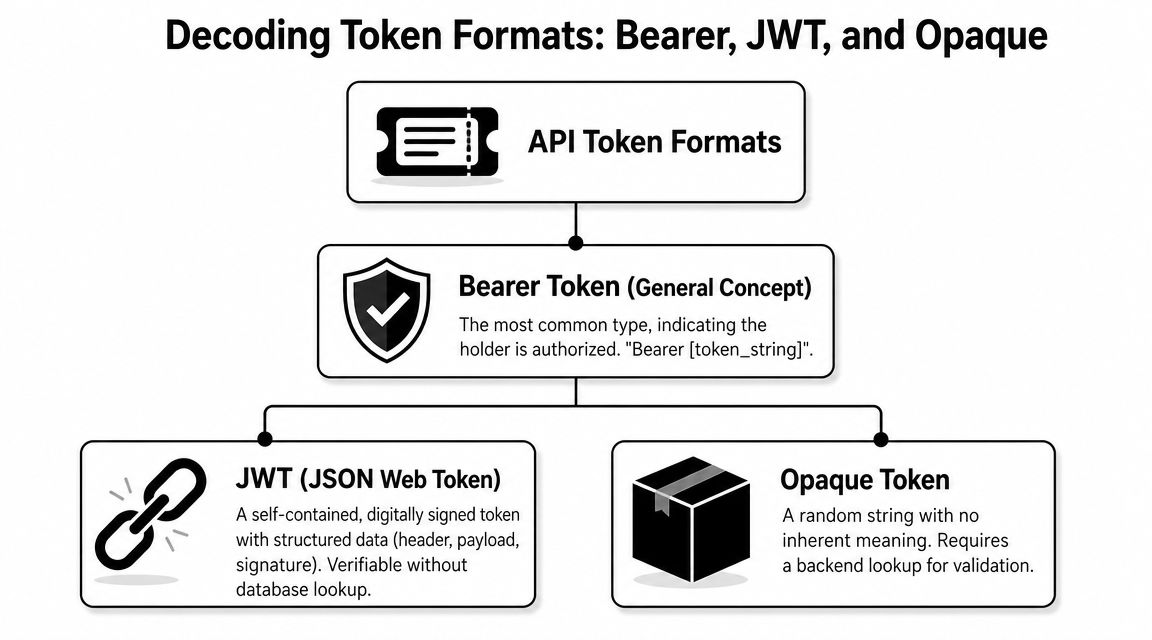
Teams often use bearer token, JWT, and opaque token interchangeably. That creates confusion because they describe different things.
Bearer token describes how the token is used
A bearer token is a credential that grants access to whoever presents it. The product implication is straightforward. If the token leaks through logs, browser storage, screenshots, or a compromised client, another party can use it.
PMs should hear "bearer" and think about exposure risk, session length, and recovery paths. Short lifetimes, secure storage, and revocation options matter because possession is enough.
JWT describes a token with readable structure
A JSON Web Token, or JWT, is one of the formats teams use for bearer tokens. The JWT specification was standardized in RFC 7519 in May 2015 and defined a token with three parts: header, payload, and signature, according to GetStream's explanation of API tokens and JWT structure.
Those parts matter to product teams because they often map directly to product rules:
- Header identifies metadata about the token
- Payload can carry claims such as user ID, role, permissions, and expiration
- Signature helps detect tampering
The payload is where strategy meets implementation. Teams can encode workspace membership, subscription tier, region, feature flags, or admin status into claims. That gives the API enough context to make some authorization decisions quickly.
I pay attention to this in products with tiered packaging or role-based access. If your roadmap includes enterprise admin controls, usage-based plans, or AI agents acting on behalf of users, token claims often become part of the monetization and UX design, not just the auth layer.
A useful PM question is: "Which decisions can we safely make from token claims, and which still need a backend check?"
That question usually surfaces the trade-off between speed and control.
Opaque tokens hide the details from the client
An opaque token is an unreadable identifier from the client's point of view. The application cannot inspect it to learn the user's role or permissions. The server has to resolve it.
That adds dependency on server-side lookups, but it also gives teams tighter control over what changes immediately. If a customer's permissions change, the authorization server can reflect that without waiting for a self-contained token to expire. This is one reason products with strict enterprise controls or sensitive healthcare and fintech workflows often prefer more server-managed approaches.
The PM trade-off is speed versus control
With JWT-style implementations, an API can often verify the signature and read claims locally instead of checking a central store on every request. That reduces lookup overhead and supports stateless verification. Opaque tokens push more of that decision-making back to the server.
Neither choice is universally better.
JWTs can help with high-volume products where response time and horizontal scaling matter. Opaque tokens can be a better fit when immediate revocation, centralized policy changes, or reduced client-side visibility matter more. Companies like Auth0, Okta, and Stripe make different design choices across products because the right answer depends on the workflow, risk model, and customer expectations.
For PMs, this shows up in familiar product outcomes:
- Lower latency for frequent in-app actions when claims can be checked locally
- Stronger centralized control when permissions change often or customers demand rapid revocation
- Clearer packaging enforcement when token claims map cleanly to plans, roles, or tenant boundaries
If you work on infrastructure-heavy products, Datadog's product strategy and market context for PMs is a useful reference point for how architecture choices turn into customer-facing performance and reliability expectations.
How Tokens Power Modern Product Workflows
API tokens stop feeling abstract the first time a launch depends on them.
A PM approves "Log in with Google" because it looks like a faster signup path and a lower-friction onboarding flow. A week later, support asks why some users can sign in but not sync data, sales asks whether enterprise admins can limit permissions, and engineering asks which scopes should be requested now versus later. At that point, tokens are no longer security jargon. They are part of activation, retention, and enterprise readiness.
Take Log in with Google. It is a familiar user experience, but underneath it is a product workflow built on delegated trust, explicit permissions, and controlled access.
A simple visual helps.

The workflow a PM should know cold
- The user clicks the login button. Your product starts an identity flow instead of asking the user to create and manage another password.
- The user is redirected to Google. Google verifies identity and applies its own account protections.
- The user grants permission. The scopes requested at this moment shape user trust and future product flexibility.
- Your backend exchanges the authorization result for tokens. Here, your system gets credentials it can use safely on the server side.
- The application uses the token to make authorized requests. That might mean fetching profile data, calendar access, files, or other approved resources.
- The API validates the token and decides what is allowed. Every downstream action depends on that decision.
Here's a quick explainer that pairs well with product discussions around OAuth and delegated access.
Scopes shape trust, adoption, and expansion
PMs often hear scopes described as a permissioning detail. In practice, scopes affect conversion and account growth.
If your app asks for broad access on day one, users hesitate. Admins hesitate even more. If your app asks for narrow, clearly justified permissions, approvals tend to go more smoothly, and expansion conversations get easier because customers can see that access is constrained by design.
That is why platforms like Slack, Google Workspace, GitHub, and Notion request specific permissions for specific jobs. Their ecosystems work because partners are not handed blanket access. They get enough access to deliver a use case, and no more.
For a PM, that shows up in concrete product decisions:
- Onboarding design: Ask only for the permissions needed to reach first value
- Enterprise sales: Give security reviewers a cleaner story about least-privilege access
- Ecosystem health: Reduce partner risk by limiting what third-party apps can do
- Plan design: Reserve advanced admin controls or higher-trust workflows for premium tiers
Tokens reduce friction in high-frequency workflows
Once a token is issued, the product can keep working without asking the user to re-authenticate on every step. That changes the feel of the product.
A calendar assistant can keep pulling events. A CRM integration can keep syncing contacts. An AI agent can take a bounded action on a user's behalf. The user experiences continuity, while the platform still enforces time limits, scopes, and revocation rules in the background.
PM judgment is critical. Longer-lived access improves convenience and automation, but it also raises the cost of mistakes. Short-lived access lowers exposure, but if refresh and renewal flows are poorly designed, users get random disconnects and support volume goes up.
Token design affects scale and operating cost
Teams also feel token choices in infrastructure and reliability metrics.
When an API can validate a token efficiently, frequent requests become easier to support across mobile apps, integrations, partner workflows, and global traffic patterns. That is partly an engineering concern, but it turns into product outcomes quickly: faster in-app actions, fewer auth-related failures, and more confidence when opening the platform to outside developers.
I have seen PMs gain credibility fast when they can connect these dots. They stop treating auth as a black box and start asking better roadmap questions about latency, revocation, packaging, and support burden. If you want to build that muscle, this cloud code tutorial for PMs is a practical way to get more fluent in the implementation side without drifting into full-time engineering.
Using API Tokens in Your Product Strategy
The most useful PM question isn't "what is an API token?" It's "what business model, customer experience, and risk posture does our token strategy create?"
That's where the concept becomes strategic.
Start with the actor, not the credential
When teams choose auth patterns too early, they usually optimize for engineering familiarity. Strong PMs start with the actor:
- Developer integrating your platform
- End user logging into your app
- Admin granting company-wide access
- Third-party service acting on a user's behalf
- AI agent performing a task with limited permission
Each actor needs a different trust model. That's why mature platforms often use more than one credential pattern at the same time.
Stripe is a good example conceptually. A platform like Stripe needs one model for developers integrating server-side payment flows and another for user-facing, sensitive actions happening in browser contexts. The product isn't choosing "the best auth method." It's matching credentials to risk and user intent.
A PM decision framework
Use this in roadmap and architecture reviews.
Ask what should be revocable
If a customer admin needs to cut access quickly when an employee leaves, user-scoped tokens are usually more product-friendly than broad static credentials. Revocation isn't a security footnote. It's an enterprise buying requirement.
Ask what should expire
Temporary credentials are better when the cost of interception is high. This is one reason token-based access became central to modern user authentication and session management. Short-lived access supports a least-privilege model and narrows the blast radius if something goes wrong.
Ask where the business model lives
OpenAI, Stripe, GitHub, Twilio, and similar platform businesses all depend on identity, authorization, and usage control lining up cleanly. In practice, your credential model often influences:
- Who can access premium capabilities
- How partner apps are approved
- How customers delegate actions
- How support teams investigate misuse
- How finance and ops reason about account-level versus user-level activity
You don't need to claim that "tokens power billing" in a universal sense. But you should recognize that authentication choices affect how cleanly usage can be associated with users, applications, or workspaces.
The PM mistake is treating authorization as a backend concern. The better move is to treat it like packaging, onboarding, and governance all meeting in one place.
What works in real products
A few patterns tend to hold up well:
- Use static app credentials sparingly: They fit server-to-server contexts better than user sessions.
- Use short-lived tokens for delegated access: Especially when actions happen in browsers, mobile apps, or partner flows.
- Design scopes as product surfaces: Scopes should map cleanly to what users understand and what admins can approve.
- Make revocation visible: Customers trust systems they can control from the admin UI.
- Treat AI agents like privileged integrations: If your product lets an AI assistant take actions, token scope design becomes central.
What usually creates rework
Three anti-patterns show up repeatedly:
| Anti-pattern | Why PMs regret it later |
|---|---|
| One broad credential for every use case | Enterprise controls become painful |
| Permission names only engineers understand | Approval UX gets confusing |
| No revocation or expiry story in v1 | Sales and security both escalate it later |
This is one of those domains where PMs gain an advantage by being bilingual. You need to speak enough engineering to understand the trade-offs, and enough business to explain why those trade-offs matter.
A PM's Checklist for API Token Security
If a token is mishandled, users won't care whether the root cause sat in frontend code, a misconfigured backend flow, or a rushed launch decision. They'll blame the product.
That's why token security belongs in PM review, not just security review.
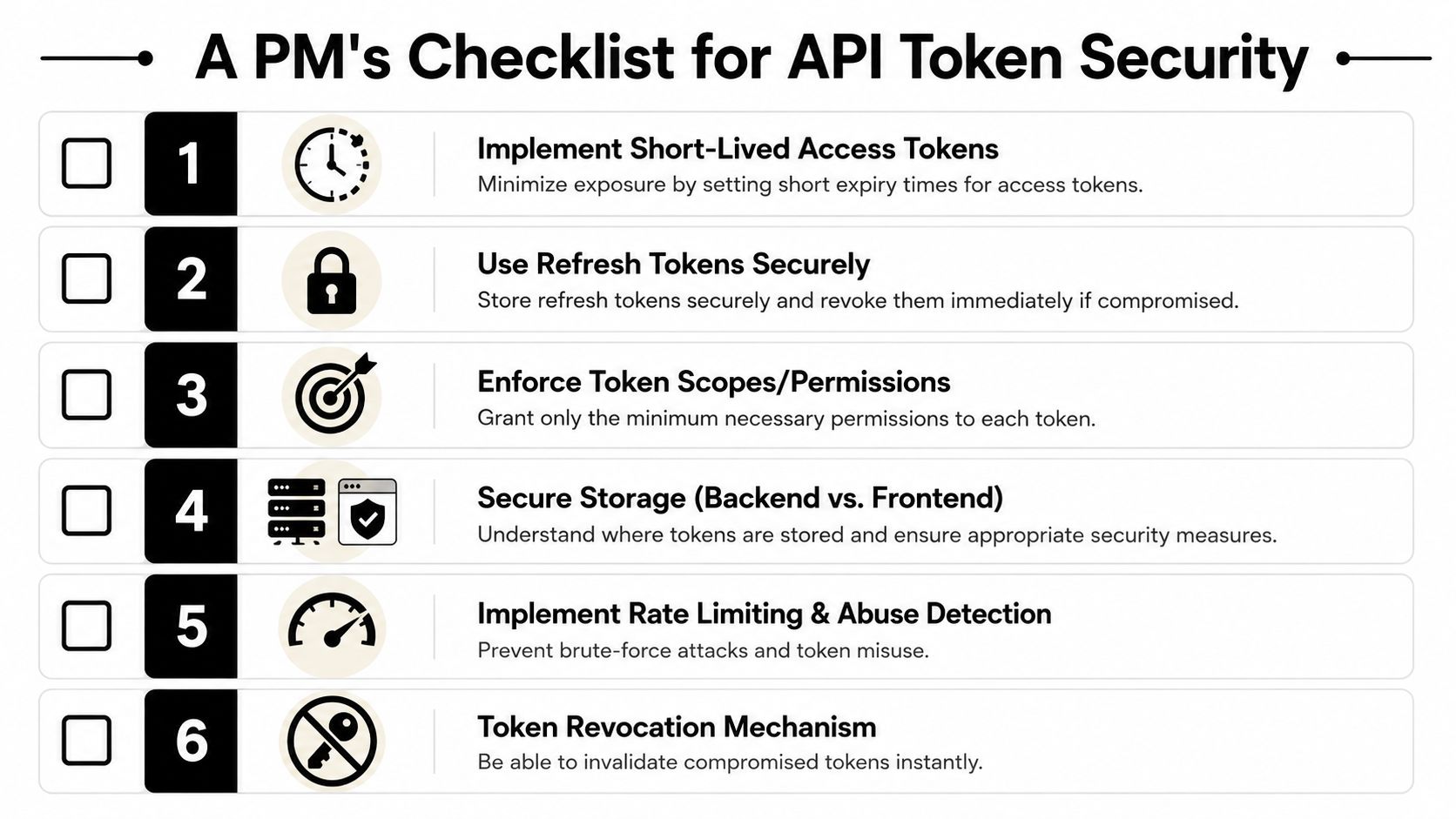
The checklist to bring into feature reviews
- Short-lived access tokens: Ask whether user-facing tokens expire quickly enough to limit exposure if intercepted.
- Refresh token design: Make sure the team has a safe way to maintain sessions without stretching access-token lifetime too far.
- Scope discipline: Push for least-privilege permissions. A token should only do what the user or integration needs.
- Secure storage: Confirm that secrets aren't exposed in frontend code or other retrievable client-side locations.
- Revocation path: Ask what happens if a customer admin needs to disable access immediately.
- Abuse controls: Rate limiting, anomaly detection, and monitoring matter when bearer credentials can be replayed.
The questions strong PMs ask
You don't need to prescribe implementation. You do need to ask sharp questions.
Try these in your next review:
- Where is the token stored, and who can access it?
- How does the system limit damage if a token is leaked?
- Can an admin revoke access without filing a support ticket?
- Do scopes map to product roles customers understand?
- What happens when a user changes jobs, loses permissions, or leaves the workspace?
Security is part of the product experience. Customers feel it in setup, admin control, incident response, and procurement.
For a broader operating model, this guide for API development best practices is worth reviewing with engineering leads because it frames API decisions in terms PMs can operationalize.
If you work on AI products, this gets more important. AI assistants, copilots, and workflow agents often need delegated access to user data and actions. That creates a larger surface area for permission mistakes. PMs who understand AI cybersecurity threats in product contexts are much better positioned to design safe agent experiences instead of bolting on security after launch.
Frequently Asked Questions for PMs
What's the difference between an API token and a cookie
A cookie usually helps a browser maintain session state with a web app. An API token is a credential the client presents to an API for authentication and authorization. In many modern products, they work together. The browser may hold session information while the app uses tokens for API access behind the scenes.
Does my mobile app need API tokens
Usually, yes. Mobile apps commonly need a way to authenticate users and call backend APIs securely. The exact flow varies, but the product question is the same: how does the app prove identity, preserve session continuity, and limit the risk of stolen credentials? For teams thinking through device-side persistence, this practical note on secure storage for offline tokens is useful background.
Are API tokens only for login
No. Login is one common use case, but tokens also support delegated access, third-party integrations, user session management, and fine-grained authorization. If your product lets a partner app access a workspace or allows an AI agent to act for a user, tokens are often part of that trust model.
Who owns token rotation and credential hygiene
Engineering usually implements it. Product should still own the user impact, admin experience, and policy decisions. If rotation breaks partner setups or creates hidden onboarding friction, that's a product problem too.
How do tokens relate to analytics or usage-based billing
Indirectly, tokens can help associate actions with a user, session, app, or workspace. That doesn't mean the token is your billing system. It means your auth model influences how cleanly your product can attribute usage, enforce entitlements, and investigate abuse.
What's the simplest PM takeaway
Know the difference between broad static access and temporary scoped access. That one distinction improves your judgment in architecture reviews, enterprise deals, and platform roadmap decisions.
If you want more practical PM breakdowns like this, explore Aakash Gupta for operator-level insights on product strategy, growth, AI, and the technical concepts that increasingly separate solid PMs from standout ones.
