A product team once showed me a board with hundreds of tickets, seven issue types, and three different definitions of “done.” Nobody trusted the status, so they added more meetings. The meetings became the system.
The End of Process for Process' Sake
A lot of teams don’t have a prioritization problem. They have a friction problem.
You see it when engineers stop opening the project tool unless someone pings them. You see it when PMs maintain the official roadmap in slides because the tracker is too messy to present. You see it when status meetings exist mainly to reconcile conflicting versions of reality. That’s not project management. That’s operational tax.
Legacy setups often create this outcome. Jira, Asana, and similar tools can support serious organizations. But many teams configure them into a maze of custom fields, workflow states, and admin-heavy rituals. The tool becomes a place where work is documented after the fact instead of where work moves.
Why this matters more now
Product teams are operating in a market that expects speed, but speed without clarity is just churn. The broader project management environment reflects that tension. 54% of project managers use AI for risk management, yet the more durable signal of success is still basic execution discipline. Projects with a clear vision achieve a +41 Net Project Success Score according to project management statistics compiled by Plaky.
That’s why linear project management, in the modern product sense, matters. It isn’t about worshipping one tool. It’s about choosing a system that forces clarity, shortens feedback loops, and reduces the drag between decision and execution.
Tools should compress ambiguity, not preserve it.
The best PMs I’ve worked with understand that workflow design is part of product leadership. If your system encourages endless coordination, you’ll spend your time herding updates. If your system makes the current state obvious, you can spend your time making better trade-offs.
Tool choice is also a management choice
Linear stands out because it represents a philosophy. It assumes teams want fewer knobs, faster interaction, and tighter alignment between roadmap, sprint execution, and issue tracking. That’s a different worldview from “let’s create a process flexible enough for every possible department.”
For PMs, that difference has career implications. Leaders notice the person who can create focus without creating bureaucracy. They promote the PM who can keep product, engineering, and design moving in one direction without needing a weekly rescue meeting.
If you care about building that kind of operating model, this perspective on product, process, and people is worth reading alongside your tooling choices.
Understanding The Linear Way
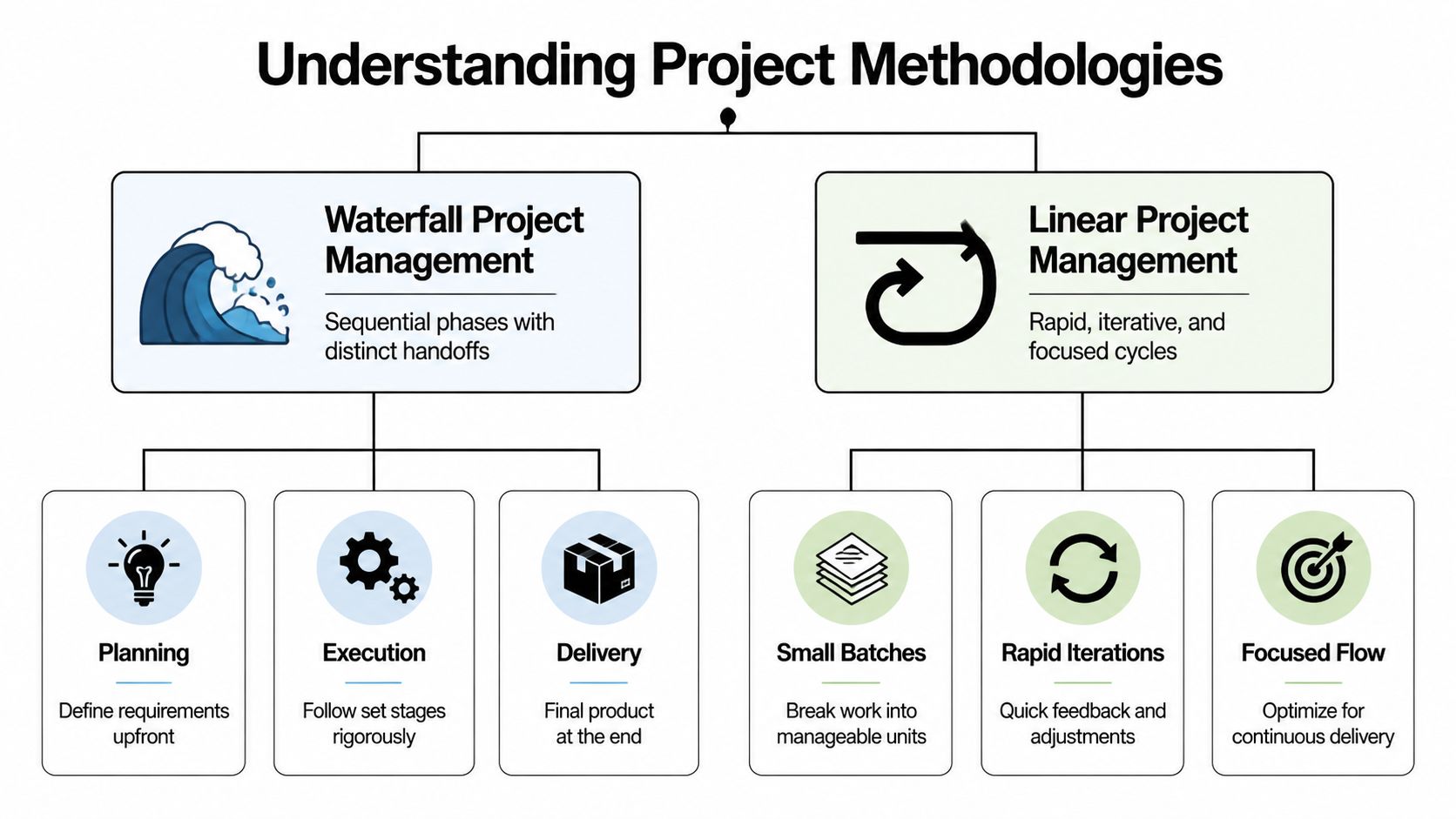
Traditional linear project management usually refers to a sequential model. Work moves through defined stages, one after another, with limited backtracking. That approach fits environments where requirements are stable and handoffs need to be formal.
That is not what most product people mean when they talk about Linear.
Linear the product is better understood as an opinionated operating system for modern software teams. It supports iteration, but it does so with structure. It doesn’t try to be infinitely adaptable. It tries to make high-velocity execution feel natural.
The core model
The important mental model is simple. Linear is built around issues, cycles, and projects.
According to this breakdown of Linear’s architecture, an issue belongs to an assignee, status, cycle, and project simultaneously. That unified data model matters because it removes the fragmentation many teams accept as normal. In other tools, sprint work, roadmap work, and execution details often live in separate layers that need constant manual syncing.
In practice, that means one piece of work can carry multiple meanings at once:
- As an issue: it’s the unit of execution
- As part of a cycle: it contributes to short-term delivery
- As part of a project: it ladders up to a broader initiative
- As a status artifact: it tells the team what is happening right now
That sounds small until you’ve lived the alternative. In fragmented systems, PMs end up translating work across boards, docs, and decks. In Linear, the same object can support planning, delivery, and communication.
Why PMs should care
This architecture supports what good product teams already do. Start with a bigger business outcome, break it into a scoped initiative, then decompose it into executable work without losing the relationship between the layers.
I think of it as progressive elaboration with continuity. You don’t abandon the roadmap when sprint execution begins. You don’t create a separate artifact for “real work” after planning. You refine the same system from abstract to concrete.
Here’s the practical version:
- Create a project for the customer or business outcome.
- Break the project into issues that can move independently.
- Pull those issues into cycles based on team capacity and sequencing.
- Let status and delivery signals update the shared truth instead of rebuilding status manually.
For PMs coming from more traditional agile setups, this often feels cleaner because the tool has an opinion about what matters. It favors shorter issue lifecycles, focused scopes, and visible momentum.
Practical rule: If a roadmap item can’t be decomposed into issues that a team can finish inside normal execution rhythms, it’s not ready for a cycle.
Where teams get confused
The biggest confusion I see is trying to recreate a legacy system inside Linear. Teams import all their old statuses, keep bloated label taxonomies, and preserve every exception path. That defeats the point.
Linear works best when you accept its opinionation:
- Keep statuses tight. If a status exists only for reporting nuance, it probably belongs in a comment or project update.
- Use projects for real initiatives. Don’t turn every loose collection of tickets into a “project.”
- Treat cycles as commitments, not wish lists.
- Write issues small enough to move. Velocity improves when work is sized for flow, not theater.
If you want a strong companion view on how iterative execution actually works in product development, this guide to agile product development process pairs well with the Linear mindset.
Linear vs Jira vs Asana A PM's Decision Framework
The wrong way to choose a tool is by comparing feature lists. All three products can manage tasks. All three can support planning. All three can become painful if the organization’s habits are bad.
The right question is this: What behavior do you want the tool to enforce?
Linear is the best fit when you want sharp defaults, speed, and a workflow centered on product and engineering execution. Jira is stronger when you need deep customization, cross-team process control, or enterprise compliance structures. Asana works well when work spans broad business functions and non-technical teams need an approachable planning layer.
Tooling decision framework
| Criterion | Linear | Jira | Asana |
|---|---|---|---|
| Core philosophy | Opinionated, high-velocity product execution | Highly configurable process engine | Broad cross-functional work management |
| Best fit | Product, engineering, and design teams | Large organizations with complex workflows | Marketing, ops, business, and mixed teams |
| Strength | Fast interaction and clean workflow discipline | Custom fields, permissions, and workflow flexibility | Ease of adoption across non-technical users |
| Risk | Can feel restrictive to teams wanting heavy customization | Can accumulate process overhead quickly | Can become too lightweight for engineering-heavy execution |
| PM use case | Sprint flow, product delivery, issue tracking, roadmap linkage | Enterprise planning, dependency control, compliance workflows | Company-wide coordination and business project visibility |
What the benchmark tells you
If your team complains that the tool itself slows them down, performance isn’t cosmetic. It changes behavior.
A 2024 benchmark found that Linear was 3.7x faster than JIRA and 2.3x faster than Asana for common operations, and teams using Linear reported 34% fewer status meetings in the same case study at Eleken’s analysis of Linear. Those are not vanity wins. Faster issue creation, filtering, and navigation reduce the activation energy required to keep the system current.
When the tool responds instantly, engineers update issues more often. PMs check live status instead of waiting for standup. Designers can track progress without asking for a custom report. That’s how a faster interface becomes an operating advantage.
Use company stage as your filter
Early-stage and growth-stage product teams usually benefit most from Linear because they need consistency without admin burden. They don’t need endless configuration. They need a system that nudges people toward small batches, visible progress, and frequent shipping.
Jira often wins in organizations that have already accumulated process complexity and need to encode it. That can be legitimate. Regulated environments, large platform teams, and companies with many exceptions may need that flexibility.
Asana tends to win when engineering is only one part of the portfolio. If your PM role sits at the center of launches, operations, content, and GTM work, Asana may create less friction for non-technical partners.
The hybrid reality most PMs actually live in
Most scaling companies don’t run one pure methodology. They mix linear planning at the roadmap level with agile execution at the team level. They also mix tools.
That means a PM might run engineering execution in Linear while leadership reviews initiative progress through a broader planning layer elsewhere. Or the company may keep Jira in a platform org while product squads move faster in Linear. The key is not forcing one tool to satisfy every constituency equally.
A few practical patterns work:
- Engineering in Linear, company planning elsewhere: useful when product and engineering need speed, but finance, ops, or marketing already live in another tool.
- Jira for infrastructure, Linear for product squads: common when platform teams require more custom workflow controls than feature teams do.
- Asana for launches, Linear for build: strong when cross-functional execution needs a broad audience-friendly view, while the product team needs a fast issue tracker.
If you’re evaluating adjacent tools beyond the big three, curated directories can speed up your research. I like browsing lists that organize categories well, such as Discover productivity apps, because they help PMs compare workflow options without starting from scratch.
Pick the system that matches how your best people already want to work, not the one that can theoretically support every edge case.
For a useful lens on making this kind of high-stakes call, this framework for decision-making is a strong complement to a tooling evaluation.
Related: six tactics for reclaiming time from admin work.
Your First 90 Days Migrating and Onboarding to Linear
Most migrations fail before import day. They fail when the team thinks the tool switch is cosmetic.
If you’re leading a move to Linear, sell the operational change first. Tell engineering they’ll spend less time updating stale fields. Tell design they’ll finally see project state without chasing Slack threads. Tell leadership they’ll get cleaner visibility because the workflow is simpler, not because the PM is doing more manual reporting.

Days 1 to 30
Start with one team, not the whole company. A single product squad gives you enough complexity to learn without turning the migration into a political event.
Focus on five setup decisions early:
Define team boundaries
Create teams around stable execution groups. Don’t create a new team for every initiative.Set cycle expectations
Decide how your team will use cycles before the first one starts. Teams fail when cycles become optional or overloaded immediately.Simplify statuses
Keep the workflow minimal. If people need a legend to understand status, you already have too many states.Import only what still matters
Old tickets feel important because they exist. Most aren’t worth carrying into a new system.Create templates before launch
A blank issue field invites inconsistency.
A strong first read for leaders thinking about operating cadence is this guide to a PM’s first 90 days. The same discipline applies to system migration.
Days 31 to 60
Once the team is active, standardize issue creation. Don’t aim for perfect taxonomy. Aim for repeatable inputs.
I recommend three starter templates:
Bug report
Problem summary, expected behavior, actual behavior, reproduction notes, customer impact, ownerFeature issue
User problem, success condition, scope boundaries, dependencies, release notes implicationProduct task
Outcome, decision needed, stakeholder, due context, linked project
This is also the phase to train the team on habits, not just clicks. Show them how issues should move. Explain when work belongs in a project versus a cycle. Make “small enough to finish” part of the culture.
Migration succeeds when the team learns new defaults, not when old data appears in a new interface.
A walkthrough can help people see the mechanics before they touch the tool. This demo is a useful companion during rollout:
Days 61 to 90
By now, resist the urge to reintroduce complexity because a few edge cases surfaced. Every migration has detractors who interpret “not built for my exception” as “not mature enough for us.”
Instead, run a short operating review:
| Question | Healthy signal | Warning sign |
|---|---|---|
| Are issues being updated in real time? | Team trusts the tool during execution | Status is still reconstructed in meetings |
| Are cycles finishing cleanly? | Scope is realistic and visible | Work rolls endlessly without discussion |
| Are projects useful to stakeholders? | PMs can share progress from the system | PMs still rebuild updates in slides |
If the warning signs show up, don’t add process first. Tighten scope, templates, and ownership first.
Three Core Product Management Workflows in Linear
Linear becomes valuable when it supports your recurring PM motions without extra ceremony. Three workflows matter most in practice: bug triage, feature delivery, and roadmap communication.
Each one uses the same underlying system. That’s the advantage.
Bug triage that doesn’t become backlog theater
Bug backlogs usually rot because nobody agrees on what deserves immediate attention. PMs can fix that by making triage lightweight and frequent.
A practical flow looks like this:
- Capture quickly with a consistent bug template
- Review on a fixed cadence so bugs don’t linger in limbo
- Route by severity and ownership instead of debating every edge case live
- Close aggressively when issues can’t be reproduced or no longer matter
The important behavior is throughput. You want engineers and PMs making crisp decisions, not building a museum of unresolved defects.
Feature development from project to shipped work
Linear’s model is strongest when a feature starts as a project tied to a business outcome. The PM and design lead define the user problem and scope boundary. Engineering breaks that into issues that can move inside a cycle.
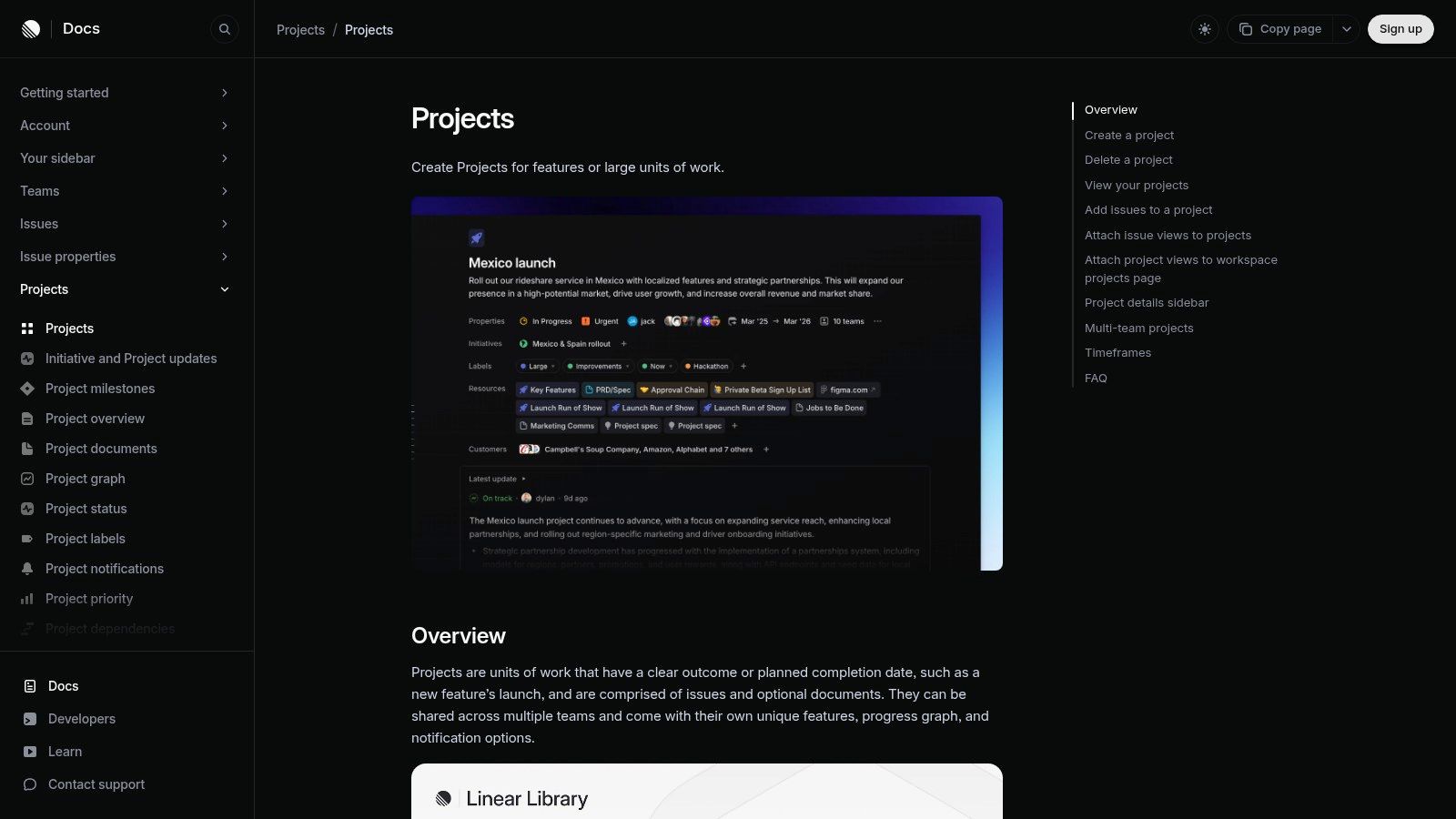
What matters is continuity:
- Project defines the initiative
- Issues define executable work
- Cycle defines near-term commitment
- Status changes reflect the actual state of delivery
PMs often overcomplicate this by writing giant specs for work that should be explored in smaller chunks. I prefer a short project brief plus well-formed issues. If the issue quality is high, the team can move faster with less ceremony.
A roadmap item isn’t “in progress” because somebody talked about it. It’s in progress when a team is moving scoped issues through a real cycle.
Estimation that improves forecasting
Estimates are often misused by turning them into individual performance proxies. That’s a mistake.
Linear’s estimation system is more useful as a forecasting input. According to Linear’s estimates documentation, the project graph uses aggregate estimates to forecast completion. That means inconsistent estimation practices create forecasting errors that stakeholders can see. If one squad uses estimates as rough complexity and another uses them as time, the project graph becomes misleading.
Use estimates for calibration, not control.
A good operating pattern:
- Agree on what points mean before enabling them broadly
- Estimate comparatively so the team aligns on complexity
- Review estimate drift after a few cycles
- Adjust team norms when actual completion patterns diverge repeatedly
The point isn’t precision theater. The point is building a system where project confidence improves over time.
Roadmap communication without rebuilding status by hand
The last workflow is stakeholder visibility. PMs waste huge amounts of time translating execution into executive updates because their tool doesn’t naturally surface initiative health.
Linear can reduce that burden if you keep projects clean and issue linkage disciplined. Leadership doesn’t need every implementation detail. They need a current read on scope, momentum, and blockers. If your projects contain that information natively, your weekly status update becomes interpretation, not reconstruction.
That’s a career advantage. Leaders trust PMs who can tell the truth about progress quickly.
Managing and Hiring for a High-Velocity Linear Team
A PM who knows Linear well is not just “good at a tool.” They usually signal something more valuable. They know how to run a team with tighter feedback loops, smaller work batches, and fewer process excuses.
That matters in hiring.
Current writing on linear project management often misses the hybrid reality used by scaling teams, and this analysis of the gap gets at why that matters. The differentiator isn’t whether a PM can recite agile vocabulary. It’s whether they can manage linear roadmaps with agile execution without losing coherence.
What I look for in PM interviews
I want evidence that a candidate can operate in a fast, structured environment. Resume bullets like “used Linear” don’t tell me much. The interview should surface judgment.
Good prompts include:
- How would you keep a bug backlog healthy without turning triage into a weekly time sink?
- When a cycle starts slipping, what signals do you examine first?
- How do you break a roadmap initiative into issues that engineering can finish?
- How would you report progress to leadership if the team changed scope mid-cycle?
Strong candidates answer with trade-offs. Weak candidates answer with rituals.

What managers should coach for
If you’re leading PMs on a Linear-based team, coach them on operational judgment:
- Scope discipline: Can they shrink work before delivery risk becomes visible?
- Status integrity: Do they maintain clean issue hygiene so the system reflects reality?
- Forecast literacy: Can they explain why a project is moving the way it is?
- Cross-functional translation: Can they convert live execution data into stakeholder language?
These are promotion skills because they create organizational trust.
How PMs should talk about impact
When PMs advocate for more scope or a larger role, they need a narrative that goes beyond “I shipped features.” Linear can help if you use it to show operating improvement.
Talk about outcomes in terms like these:
| Skill signal | What to demonstrate |
|---|---|
| Execution clarity | You created a system where roadmap items decomposed cleanly into cycle-ready work |
| Risk management | You identified slippage early and changed scope before commitment broke |
| Team velocity | You removed blockers and made progress visible without adding meetings |
| Leadership communication | You gave stakeholders a reliable read on delivery confidence |
If a PM can connect their workflow choices to predictability and decision quality, they’re no longer seen as a coordinator. They’re seen as a product operator.
The Future of Product Development AI and The Linear Way
AI will reward teams that already have clean systems. Messy workflows don’t become intelligent just because a model sits on top of them.
That’s one reason the Linear approach matters. Structured issues, explicit ownership, cycle boundaries, and connected project data create the conditions where AI can be useful instead of noisy. If your execution data is fragmented, AI summaries will summarize confusion.
Where AI fits in practice
The broad market is already moving this way. PMs are adopting AI heavily in operational work, as noted earlier. The next step is making AI act on top of high-quality workflow data.
For product teams, the most practical AI use cases look like this:
Issue drafting from conversations
Turn Slack threads or customer feedback into structured issue drafts that a PM can refine.Sub-task generation
Help engineering teams break larger issues into likely implementation steps without pretending the machine owns prioritization.Risk flagging at the cycle level
Surface likely slippage based on issue age, status stagnation, and scope growth.Natural language status retrieval
Let leaders ask for project state in plain English and get an answer grounded in live execution data.
Why this has career implications
PMs who understand both workflow design and AI integration will have a real edge. Not because “AI PM” is a trendy label, but because companies need people who can make AI useful inside operational systems.
That requires judgment. You need to know which decisions can be accelerated by AI and which still require human trade-offs. You also need a tool stack where the underlying data model is coherent enough for AI to reason over.
If that intersection is where you want to grow, this resource on PM and AI is a useful next step.
The teams that win won’t be the ones with the most dashboards or the most prompts. They’ll be the ones with the clearest operating model.
If you want more product leadership frameworks, hiring insights, and practical playbooks for becoming a stronger PM, explore Aakash Gupta. His work is especially useful if you’re trying to level up from shipping features to leading product organizations.
