You're probably here because someone senior asked for a business canvas and made it sound trivial.
A feature pitch is gaining momentum. An AI idea is floating around your roadmap. Finance wants to understand monetization. Design wants clarity on the user. Engineering wants to know what's core. Then a VP says, “Can you put together a quick business canvas?”
Most PMs treat that as admin work. Strong PMs know it's a strategy test.
If you've ever asked “what is a business canvas” and gotten a vague answer about nine boxes on a template, that's the wrong framing. A business canvas is useful because it forces a product team to make its assumptions visible. It exposes where the story is weak, where the economics are fuzzy, and where stakeholders are talking past each other. Used well, it helps you decide what to build. Used badly, it becomes polished nonsense.
The Moment a VP Asks for a Quick Business Canvas
The request usually sounds harmless. It rarely is.
A VP doesn't ask for a canvas because they want a prettier document. They ask because they want a compressed view of strategic logic. Who is this for? Why will they care? How will it reach them? What has to be true operationally? Where does revenue come from? What does it cost us to support?
That's why a “quick canvas” is often a career moment disguised as a worksheet. If you answer it like a project coordinator, you'll fill boxes. If you answer it like a product leader, you'll surface trade-offs, name the assumptions, and show where decisions are blocked.
What the best PMs do differently
At strong product companies, the canvas is less about documentation and more about reasoning. A good PM uses it to align sales, engineering, design, data, and leadership around one shared model. That's why reviewing a solid Business Model Canvas framework before a planning discussion can be useful. Not because you need theory, but because you need a common vocabulary.
The practical shift is simple. Don't present the canvas as a finished artifact. Present it as a working view of the business hypothesis.
Practical rule: If a stakeholder can't challenge a box, the canvas isn't helping you think.
That matters even more when you're presenting upward. Executives don't want a long product sermon. They want signal. They want to know whether the team understands customer value, operational feasibility, and business consequences. If you struggle with that kind of communication, sharpen your approach to executive presentations before you ever step into the review.
Why this matters for your career
Junior PMs often inherit roadmaps. Senior PMs shape them.
A business canvas helps you demonstrate that you can reason across functions, not just manage backlog flow. It shows whether you can connect a product idea to customer demand, delivery mechanics, and monetization. That's the difference between someone who ships features and someone leadership trusts with ambiguous bets.
For AI product work, this becomes even more important. A lot of weak AI pitches sound impressive until someone asks basic questions about who benefits, what data is required, and how the product earns trust. The canvas forces those questions early, before the team burns cycles on a fancy demo.
The 9 Building Blocks of a Business Model
The Business Model Canvas was introduced by Alex Osterwalder and Yves Pigneur and is now widely used as a one-page strategic framework for mapping a business model on a single sheet of paper. It organizes a company into nine building blocks: customer segments, value propositions, channels, customer relationships, revenue streams, key resources, key activities, key partners, and cost structure, as described by Canva's overview of the Business Model Canvas.
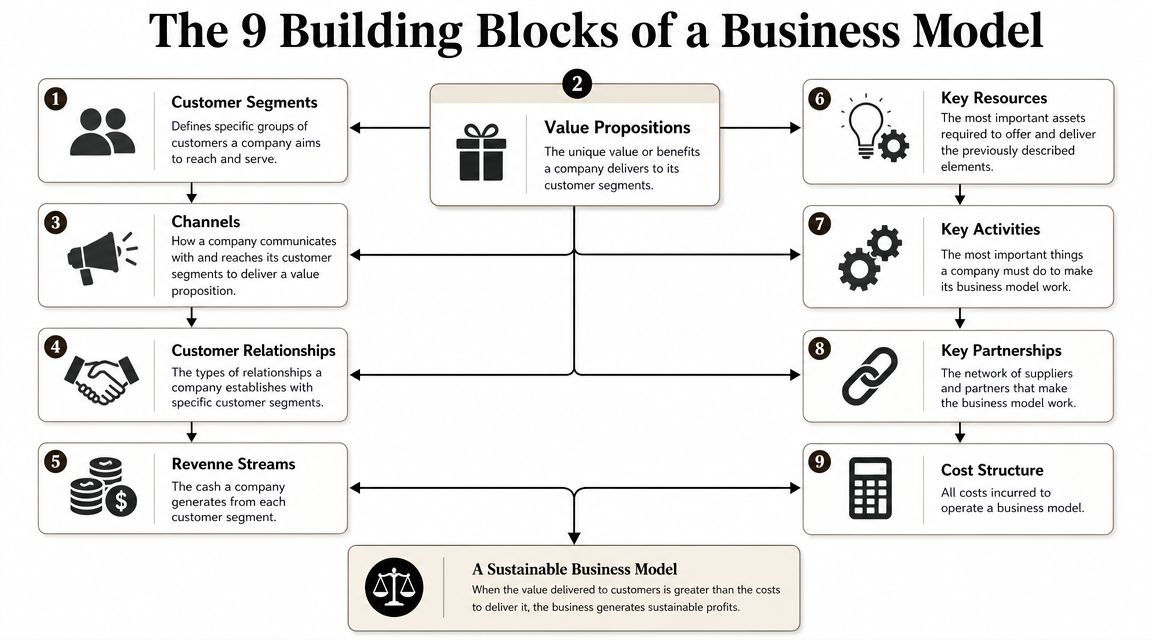
Don't memorize the boxes as labels. Read them as a chain of strategic questions.
Start with the market side
These blocks define who you serve and why they'll care.
Customer Segments
Which specific groups are you serving? “Everyone” is not a segment. In product reviews, I look for segmentation that changes decisions. Enterprise admins, end users, and procurement teams often behave differently. If your product touches all of them, your canvas should show that.Value Propositions
What problem gets solved, or what outcome gets improved? This is where weak PMs write slogans. Strong PMs describe concrete value. “AI-powered insights” is vague. “Reduces manual triage for support leads” is useful because teams can test it.Channels
How do customers discover, evaluate, buy, and use the product? A direct sales motion creates different product requirements than a self-serve motion. Channels affect onboarding, pricing, packaging, and support.Customer Relationships
What kind of relationship does each segment expect? Some products need high-touch onboarding and account management. Others win by being intuitive enough that users never need to speak to a human.
If you're weak on segmentation, spend time learning how strong PMs think about customer profiles. Most broken canvases fail here first.
Then map the business engine
These blocks show how the product works as a business.
| Block | Strategic question |
|---|---|
| Revenue Streams | How does money come in? |
| Key Resources | What assets must exist? |
| Key Activities | What must the team do well? |
| Key Partnerships | Who helps make this work? |
| Cost Structure | What are the major costs? |
A few practical notes:
- Revenue Streams should match the value story. If your pricing model fights your product behavior, that friction shows up quickly.
- Key Resources often include people, technology, data, brand, and access. For AI products, proprietary data or trusted workflows can matter more than the model itself.
- Key Activities are the repeatable things the company must do well. Not aspirations. Actual operational motions.
- Key Partnerships matter when your product depends on vendors, platforms, marketplaces, distributors, or implementation partners.
- Cost Structure forces realism. If support, compliance, infrastructure, or service delivery are expensive, your canvas should show it.
How the blocks work together
The biggest mistake is treating each box as independent.
A business model is coherent only when the boxes reinforce each other. If you target a complex enterprise segment, your channels and relationships usually become more consultative. If your value proposition depends on trust, your key activities may include quality assurance, review processes, or customer enablement. If your costs rise with each user, your revenue logic has to account for that.
The canvas is a one-page argument about how value is created, delivered, and captured. If one box changes, several others usually need to change with it.
That's the answer to what is a business canvas. It's not a form. It's a compact model of strategic interdependence.
Business Model Canvas vs Lean Canvas Which to Use When
Teams often don't need more templates. They need to choose the right one for the kind of uncertainty they face.
The original Business Model Canvas is broad. It helps you understand how a business operates end to end. The Lean Canvas is more pointed. It's better when you're dealing with an unproven idea and the biggest risk is whether the problem is real and the solution deserves to exist.
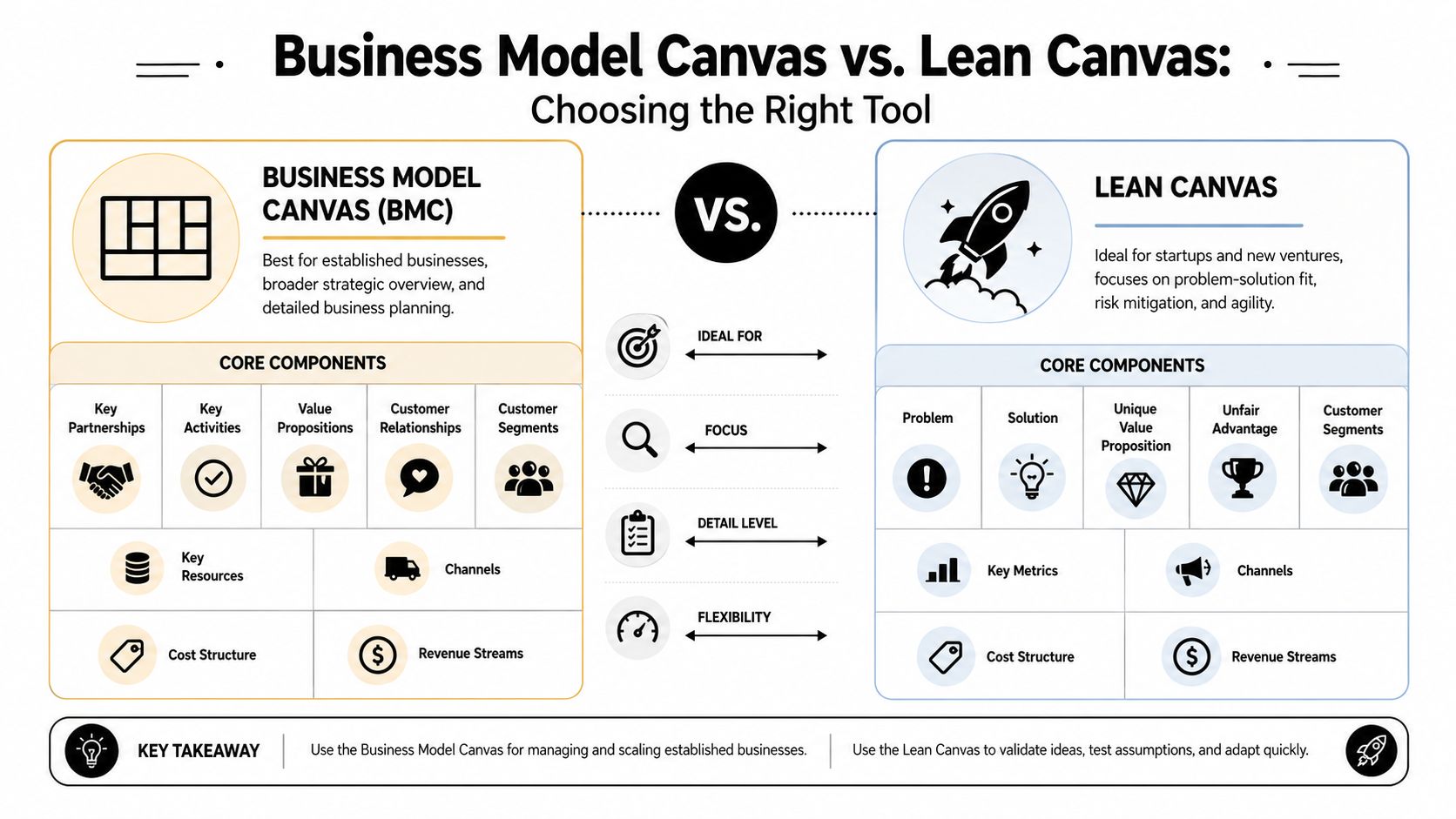
Business Model Canvas vs. Lean Canvas at a glance
| Block | Business Model Canvas (Existing Businesses) | Lean Canvas (Startups/New Products) |
|---|---|---|
| Core focus | Business design and operating model | Problem, solution, and early risk |
| Best use | Existing product lines, platform extensions, portfolio strategy | New bets, zero-to-one ideas, uncertain demand |
| Market lens | Customer segments and value delivery | Problem-solution fit |
| Operational lens | Key resources, activities, partnerships | Fast learning and risk reduction |
| Financial lens | Revenue streams and cost structure | Early viability thinking |
| Team question it answers | “How does this business work?” | “Should this idea exist?” |
For PMs, the distinction is practical. If you're working on a mature SaaS product, a marketplace expansion, or a platform capability that plugs into an existing go-to-market system, the Business Model Canvas is usually the better fit. If you're testing a new AI assistant, a fresh workflow product, or a speculative internal venture, the Lean Canvas may get you to key questions faster.
For a closer breakdown of the startup-oriented variant, this guide on Lean Canvas is useful.
Use the Business Model Canvas when the operating model matters
The Business Model Canvas is stronger when you already know the general customer and you need to reason through delivery, relationships, monetization, and dependencies.
That makes it useful for:
- Product line extensions where sales, support, and packaging already exist
- Internal stakeholder alignment when finance, GTM, and operations all need a shared picture
- AI features inside existing products where the debate is less “is there a problem?” and more “can this fit our current business model?”
If you're building AI into an established workflow product, this framework helps you pressure-test key resources, especially data quality, trust, review workflows, and model operations.
Use the Lean Canvas when the main risk is basic validity
Lean thinking is better when you don't yet know if the problem is painful enough or if the proposed solution is differentiated enough.
That's common in:
- Early-stage AI concepts that look impressive in demos but haven't earned repeat usage
- Consumer experiments where acquisition and retention behavior are still unknown
- Innovation teams trying to avoid overbuilding before evidence exists
If your biggest unknown is operational complexity, use the Business Model Canvas. If your biggest unknown is whether anyone really cares, use the Lean Canvas.
The contrarian view
A lot of PMs pick the Lean Canvas because it feels modern and fast. That can be a mistake.
Sometimes teams reach for the Lean Canvas to avoid facing messy business questions. They'll obsess over problem statements while skipping service costs, partnership constraints, procurement friction, or support burden. In larger companies, that avoidance hurts. A new feature can have real demand and still be a bad business move.
My default advice is simple. Use the Business Model Canvas when the organization already has enough structure that internal dependencies shape success. Use the Lean Canvas when you need permission to learn fast before those dependencies matter.
How Elite PMs Use the Canvas for Discovery and Strategy
Most product teams can complete a canvas in a workshop. That's not the hard part.
The hard part is turning the canvas into a decision system. That's where experienced PMs separate themselves. They don't ask, “How do I fill the boxes?” They ask, “Which of these boxes contains the riskiest assumption, and how do I test it before we commit?”
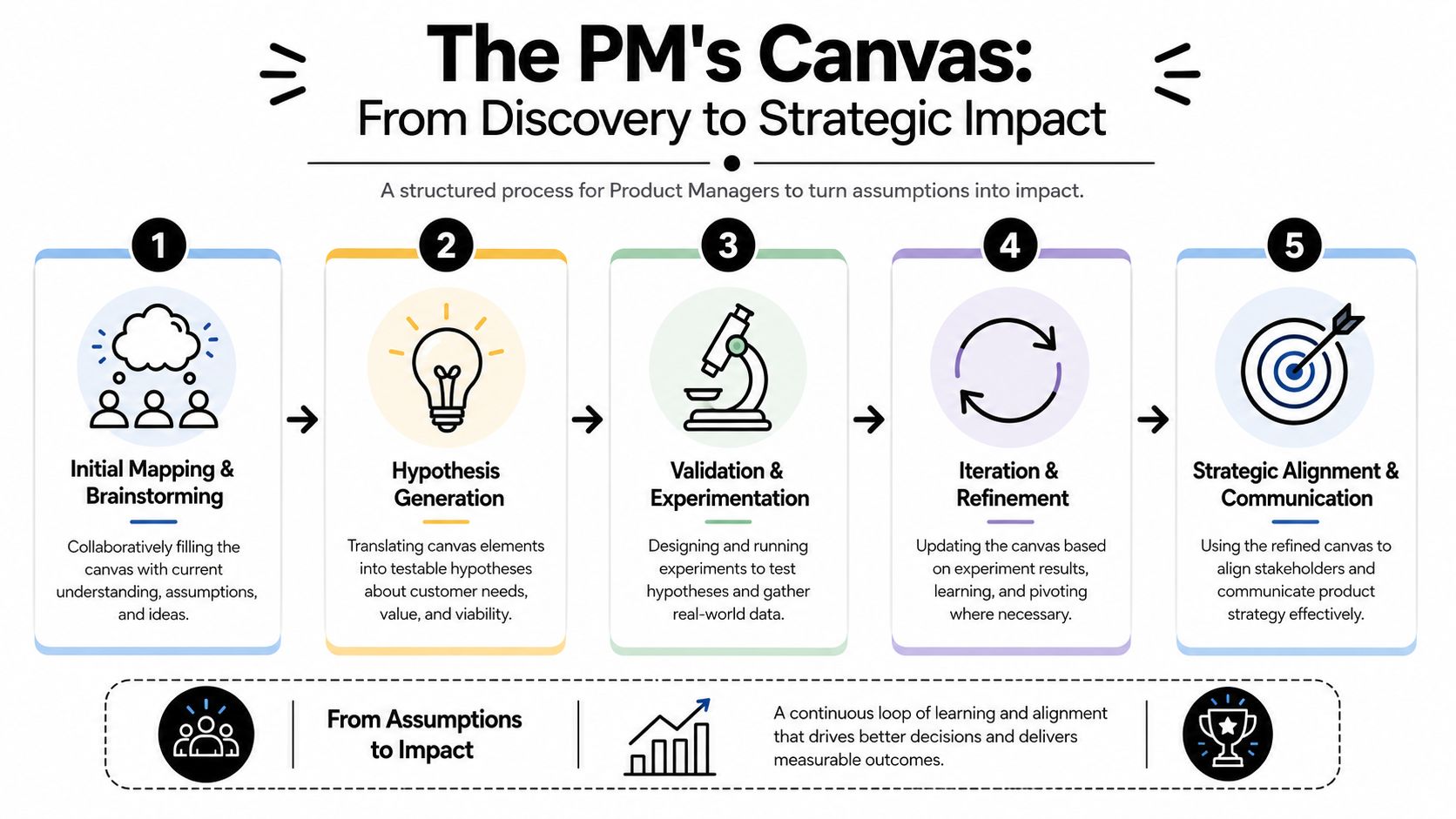
A key milestone in the history of the canvas is that it reframed business design as a testable hypothesis rather than a static document. Atlassian explicitly describes a first canvas as a hypothesis and recommends updating it as new data arrives in its guide to the Business Model Canvas.
Turn each box into a hypothesis
Here's the move that matters. Rewrite each box as a sentence that could be false.
Instead of writing “Customer segment: support managers,” write: “Support managers will switch behavior if we reduce repetitive ticket classification work.” Instead of “Channel: self-serve onboarding,” write: “Users can understand setup without live implementation support.”
Once you phrase the canvas that way, discovery becomes clearer.
- Customer segments become assumptions about who has the pain.
- Value propositions become assumptions about what outcome is compelling.
- Channels become assumptions about how buying and adoption happen.
- Revenue streams become assumptions about willingness to pay or budget fit.
- Key resources and activities become assumptions about what capability the company can reliably sustain.
That's why good PMs connect the canvas directly to product discovery techniques, not just planning rituals.
A first draft should make you slightly uncomfortable. If every box feels obvious, you're probably writing aspirations instead of assumptions.
Use it to manage stakeholder conflict
The canvas also works because it de-personalizes disagreement.
A sales leader might push for enterprise features. Engineering might worry about complexity. Finance might question margins. Design might challenge whether the user problem is strong enough. Without a shared artifact, these debates drift into opinion.
With a canvas, you can locate the disagreement.
- Is the conflict about customer segments?
- Is it about the value proposition?
- Is the issue cost structure disguised as roadmap feedback?
- Are people arguing about channels when they think they're arguing about the product?
Once the disagreement is visible, the meeting gets better. You stop debating vibes and start debating assumptions.
Later in the process, a visual explainer can help the team socialize the workflow:
How AI PMs should adapt the canvas
AI product ideas break weak canvases quickly.
A shallow AI canvas says the value proposition is “faster insights” or “automation.” A strong AI canvas gets specific about the workflow, trust boundary, and human handoff. It also treats data and evaluation as first-class concerns.
For AI products, I pressure-test these areas:
Key resources for AI products
- Data access matters. If you don't have reliable input data, your product idea is fragile.
- Evaluation capability matters. Teams need a way to judge output quality, not just generate outputs.
- Trust and permission matter. Users may resist automation in sensitive workflows.
Key activities for AI products
Some AI teams write “model integration” and move on. That's incomplete. Real activities often include prompt iteration, evaluation design, feedback loops, quality review, abuse prevention, and fallback handling when the model gets things wrong.
Value proposition for AI products
Don't write “AI-powered.” Users don't buy adjectives. They buy outcomes.
A strong AI value proposition sounds more like this:
- For analysts who spend hours summarizing recurring themes, the product drafts a usable first pass they can review.
- For support teams handling large ticket queues, the product helps route and prioritize issues with human oversight.
- For sales reps working in CRM all day, the product reduces manual prep before meetings.
That level of specificity improves discovery and gives stakeholders something real to evaluate.
A Step-by-Step Guide to Creating and Validating Your Canvas
A canvas should take you from ambiguity to sharper questions. If it doesn't change what you investigate next, it's just wall art.
Step 1 starts with a rough draft, not a polished one
Get the core team in a room. Product, design, engineering, and someone close to customers. If the product has commercial implications, include GTM or finance early.
Use prompts that force specificity:
- Customer segments
Who feels the pain directly? Who signs off? Who blocks adoption? - Value proposition
What job gets easier, faster, safer, or more reliable? - Channels
How will the user first encounter this product, and what has to happen before regular use? - Revenue and costs
What monetization path seems plausible, and what operating burden comes with it?
Write assumptions in plain language. Skip jargon. If a sentence sounds too polished, simplify it until someone can argue with it.
Step 2 identify the riskiest boxes
Not every box deserves equal attention.
For a new AI feature, the riskiest assumption may be whether users trust the output. For a new B2B workflow tool, it may be whether one team can buy without security or procurement slowing adoption. For an internal platform idea, it may be whether the company has the resources to support it over time.
I usually ask the team three questions:
- What must be true for this to work at all?
- What do we believe with the least evidence?
- What failure would be most expensive if we discover it late?
Those answers tell you where to validate first.
Step 3 validate with direct evidence
A canvas improves only when reality pushes back.
Use a mix of lightweight methods:
- Customer interviews to test whether the problem is real and frequent
- Prototype walkthroughs to see if the proposed value is understandable
- Smoke tests to gauge whether people take the next step
- Internal operational reviews to challenge cost, support, and delivery assumptions
Good questions beat clever scripts. Ask users:
- Problem test
“Walk me through how you handle this today.” - Pain test
“What's frustrating or slow in that process?” - Behavior test
“What have you already tried?” - Value test
“If this worked well, what would improve for you?” - Adoption test
“What would stop your team from using something like this?”
If you also need a more formal founding or venture setup lens, a practical UAE startup charter guide can help frame the broader business intent around the product concept.
Step 4 update the canvas, then decide
Teams often stop after collecting input. That's lazy.
Update the canvas after every meaningful learning cycle. Cross out weak assumptions. Split broad customer segments. Rewrite generic value propositions. Add operational constraints that the first draft ignored. If the idea no longer makes sense, say so.
If you need a broader workflow for stress-testing early concepts, this guide to testing business ideas is a strong companion.
The goal isn't to defend the first canvas. The goal is to earn a better second one.
Common Pitfalls That Turn Canvases into Corporate Theater
The worst canvas is the one that creates false confidence.
Teams gather in a workshop, fill out the boxes, admire the clarity, and walk away feeling strategic. Meanwhile, nobody has talked to customers, checked delivery constraints, or challenged the economics. The artifact looks rigorous. The thinking isn't.
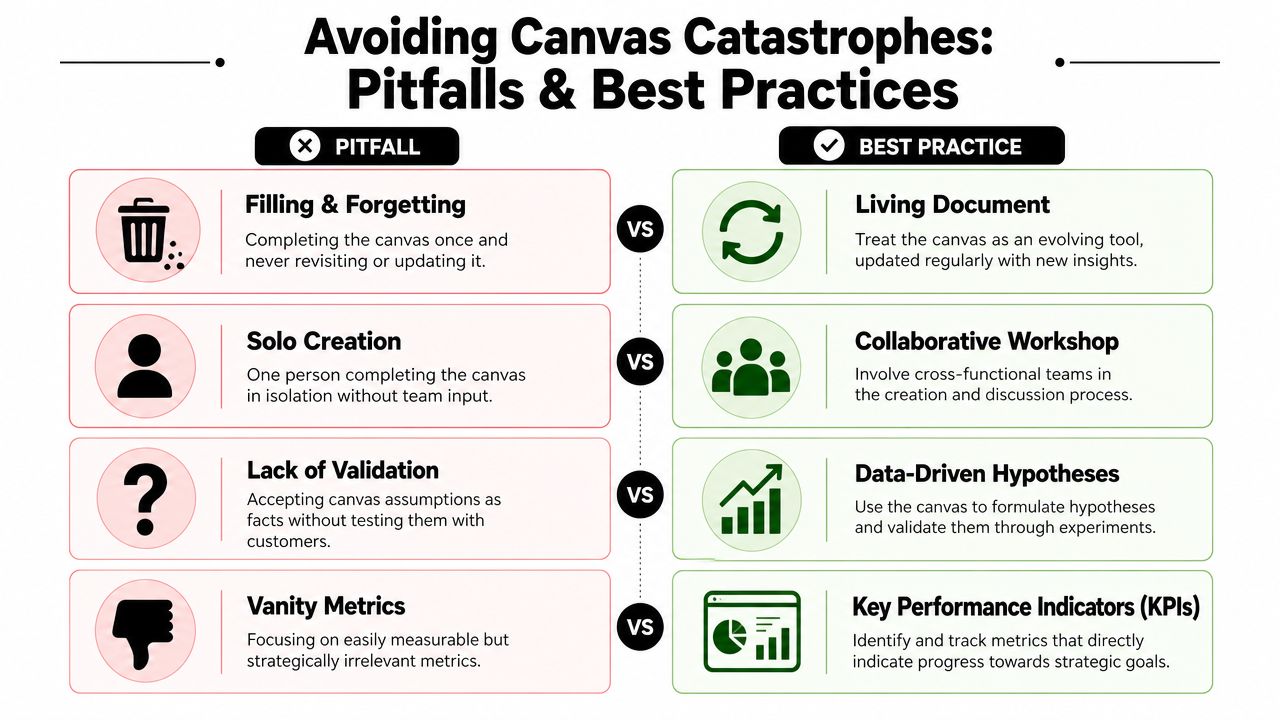
The common failure modes
Here are the patterns I see most often:
- Teams treat the first draft as truth
A canvas should start arguments, not end them. - One PM writes it alone
Solo canvases usually miss sales friction, support burden, technical realities, or financial constraints. - The language stays generic
Words like “intelligent” and “personalized” hide weak reasoning. - Validation never happens
Assumptions sit in boxes and harden unchecked into roadmap commitments.
When the canvas stops being enough
This is the nuance many introductions skip. The canvas is powerful because it's concise. It's also limited for the same reason.
Strategyzer's explanation of the tool notes an important boundary: the canvas is for describing and designing a business model, but it's still a concise, one-page exercise rather than a full business plan, as discussed in Strategyzer's library on the Business Model Canvas.
You should graduate beyond the canvas when you need deeper work on:
- Financial modeling for pricing, cost sensitivity, or investment decisions
- Competitive analysis when the market context changes strategic viability
- Technical architecture when delivery complexity drives product risk
- Operational design for compliance, support, service levels, or rollout planning
A canvas is a map. It helps you see the terrain. It doesn't replace walking it.
For PMs, that's the most useful answer to what is a business canvas. It's a strategic reasoning tool. It helps you expose assumptions, align stakeholders, and decide what to validate next. It does not remove the need for customer evidence, economic judgment, or execution detail.
If you want sharper product thinking like this in your inbox, explore Aakash Gupta. His work is especially useful for PMs who want to move from shipping features to driving strategy, communicating with executives, and building career advantage in a market that increasingly rewards judgment over process.
